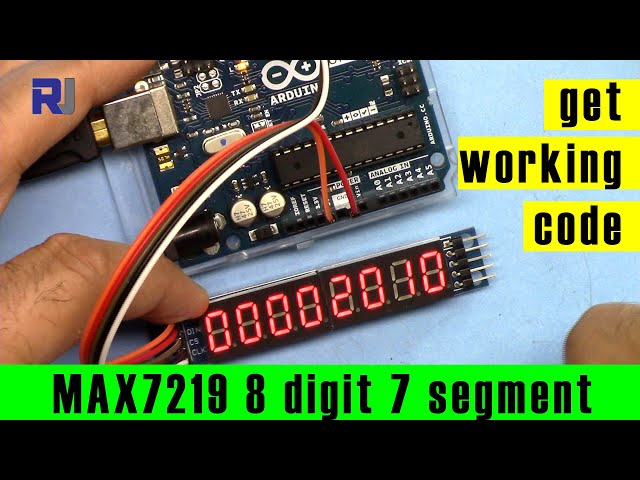
8-Digit LED Seven-Segment Display with MAX7219 and Arduino
This video shows how to use an 8-digit LED seven-segment display based on the MAX7219 using the Arduino IDE.
图像

8 Digit LED Display setup
246-ESP32 Camera Arduino code to view video over Wi-Fi
语言: C++
/*
 *  8-Digit LED Seven-Segment Display Module based on MAX7219 using Arduino IDE
 *
 *  Updated by Ahmad Shamshiri for Robojax
 *  On Monday, September 16, 2019 in Ajax, Ontario, Canada
 *  You can get this code from Robojax.com
 *
 *  Original Library source: https://github.com/ozhantr/DigitLedDisplay
 *
 *  Watch video instructions for this video: https://youtu.be/R5ste5UHmQk
 *  At the moment, it doesn't display decimal points. It needs a little work to make it work.
 *  You can get the wiring diagram from my Arduino Course at Udemy.com.
 *  Learn Arduino step by step with all libraries, codes, and wiring diagrams all in one place.
 *  Visit my course now: http://robojax.com/L/?id=62
 *
 *  If you found this tutorial helpful, please support me so I can continue creating
 *  content like this. You can support me on Patreon: http://robojax.com/L/?id=63
 *  or make a donation using PayPal: http://robojax.com/L/?id=64
 *
 *  Code is available at: http://robojax.com/learn/arduino
 *
 *  This code is "AS IS" without warranty or liability. Free to be used as long as you keep this note intact.
 *  This code has been downloaded from Robojax.com
    This program is free software: you can redistribute it and/or modify
    it under the terms of the GNU General Public License as published by
    the Free Software Foundation, either version 3 of the License, or
    (at your option) any later version.

    This program is distributed in the hope that it will be useful,
    but WITHOUT ANY WARRANTY; without even the implied warranty of
    MERCHANTABILITY or FITNESS FOR A PARTICULAR PURPOSE.  See the
    GNU General Public License for more details.

    You should have received a copy of the GNU General Public License
    along with this program.  If not, see <https://www.gnu.org/licenses/>.


 */
#include "DigitLedDisplay.h"

/* Arduino Pin to Display Pin
   7 to DIN,
   6 to CS,
   5 to CLK */
#define DIN 5
#define CS 6
#define CLK 7
DigitLedDisplay ld = DigitLedDisplay(DIN, CS, CLK);


void setup() {

  /* Set the brightness (min: 1, max: 15) */
  ld.setBright(6);

  /* Set the digit count */
  ld.setDigitLimit(8);

}

void loop() {


  /* Prints data to the display */
  ld.printDigit(12345678);
  delay(3000);
  ld.clear();

  ld.printDigit(22222222);
  delay(500);
  ld.clear();

  ld.printDigit(44444444);
  delay(500);
  ld.clear();

  for (int i = 0; i < 100; i++) {
    ld.printDigit(i);

    /* Start from Digit 4 */
    ld.printDigit(i, 4);
    delay(50);


  }

  for (int i = 0; i <= 10; i++) {
    /* Display off */
    ld.off();
    delay(150);

    /* Display on */
    ld.on();
    delay(150);
  }

  /* Clear all display values */
  ld.clear();
  delay(500);

  for (long i = 0; i < 100; i++) {
    ld.printDigit(i);
    delay(25);
  }

  for (int i = 0; i <= 20; i++) {
    /* Select Digit 5 and write B01100011 */
    ld.write(5, B01100011);
    delay(200);

    /* Select Digit 5 and write B00011101 */
    ld.write(5, B00011101);
    delay(200);
  }

  /* Clear all display values */
  ld.clear();
  delay(500);

  ld.printDigit(2019, 3);
  delay(4000);

}// loop ends
资源与参考
-
外部MAX7219 数据表 (PDF)datasheets.maximintegrated.com
-
外部原始来源页面(GitHub)github.com
文件📁
没有可用的文件。