Review of a 20A DC PWM Motor Speed Controller (10-60V)
Welcome to this tutorial where we will explore how to use a 20A DC PWM Motor Speed Controller. This device is particularly useful for controlling the speed of DC motors in various applications, from robotics to DIY projects. By the end of this guide, you will have a clear understanding of how to set up and utilize this motor controller effectively.
In this tutorial, we will walk through the necessary hardware components, wiring instructions, and provide code examples to help you get started. We will also discuss common pitfalls to avoid and showcase expected behavior when using the motor speed controller. For a more visual explanation, be sure to check out the accompanying video (in video at 00:00).
Hacking the module to work with Arduino
we have separate video and tutorial to show you how to contorl this module using Arduino code. View it here

Hardware Explained
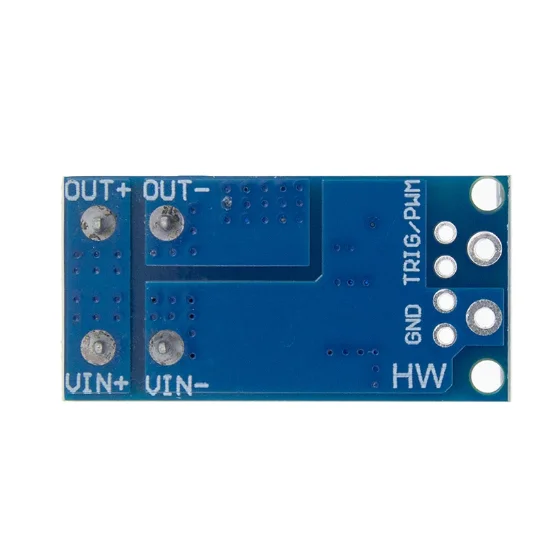
The main component of our project is the 20A DC PWM Motor Speed Controller. This controller can manage a wide input voltage range from 10V to 60V, making it suitable for various power supply scenarios. It uses Pulse Width Modulation (PWM) to adjust the speed of the connected motor by changing the width of the voltage pulses sent to it.
Additionally, we will be using a microcontroller like an Arduino to send PWM signals to the motor controller. The controller interprets these signals to modulate the motor speed, providing smooth and efficient control. Understanding how these components work together is crucial for successful implementation.

Datasheet Details
| Manufacturer | Generic |
|---|---|
| Part number | 20A PWM Controller |
| Logic/IO voltage | 5 V |
| Supply voltage | 10–60 V |
| Output current (per channel) | 20 A |
| Peak current (per channel) | 25 A |
| PWM frequency guidance | 1 kHz to 20 kHz |
| Input logic thresholds | 0.5 V low, 2.5 V high |
| Voltage drop / RDS(on) / saturation | 0.1 V |
| Thermal limits | 85 °C max |
| Package | Standard PCB |
| Notes / variants | Various current ratings available |
- Ensure proper heat sinking for high current applications.
- Be mindful of the input voltage range to avoid damage.
- Use decoupling capacitors for stable operation.
- Verify PWM signal frequency matches the controller specifications.
- Check wiring connections carefully to prevent shorts.
-

20A DC PWM Motor Speed Controller: Potentiometer (variable resistor)
Wiring Instructions
To wire the 20A DC PWM Motor Speed Controller, start by connecting the power supply. Connect the positive terminal of your power supply to the +V terminal on the controller and the negative terminal to the GND terminal. Next, wire the motor to the output terminals labeled as M+ and M-. Make sure the motor is rated for the voltage you are supplying.
For the control signal, connect a PWM-capable pin from the Arduino (e.g., pin 9) to the control input on the motor controller. This pin will send the PWM signal to adjust the motor speed. Finally, connect the GND pin of the Arduino to the GND of the motor controller to ensure a common ground. Double-check all connections before powering up to avoid any potential damage.
Demonstration / What to Expect
When powered up, the motor should respond to the PWM signals sent from the Arduino, adjusting its speed accordingly. If the connections are correct and the code is properly uploaded, you will see the motor speed change as per the defined PWM values. Common pitfalls include incorrect wiring, which can lead to no motor response or even damage to the components.
Video Timestamps
- 00:00 Start
- 00:30 Introduction
- 05:53 Testing with motor
- i>
- 07:29 Higher Current Tests 13:17 Conclusion remarks
Изображения


Вещи, которые могут вам понадобиться
-
Амазонка
-
АлиЭкспрессDC 10-60V 20A импульсный широтно-импульсный модулятор PWM на AliExpresss.click.aliexpress.com
-
АлиЭкспрессКупите 20A DC 10-60V PWM контроллер скорости мотора на AliExpresss.click.aliexpress.com
-
Банггуд
-
Банггуд
Ресурсы и ссылки
-
Внешний
-
Внешний
-
ВнешнийDC 10-60V 20A импульсный широтно-импульсный модулятор PWM на AliExpresss.click.aliexpress.com
-
Внешний
-
Внешний
-
Внутренний
Файлы📁
Нет доступных файлов.