This tutorial is part of: Digital Relative Humidity & Temperature Sensor HTU21D
Videos related to Digital Relative Humidity & Temperature Sensor HTU21D. Links to other videos are below this article.
Using Two More HTU21DF Humidity and Temperature Sensors with Arduino
In this tutorial, we will learn how to connect and use two HTU21DF temperature and humidity sensors with an Arduino. The HTU21DF sensor is known for its accuracy and low power consumption, making it ideal for various applications. By the end of this tutorial, you will be able to read the temperature and humidity values from both sensors and display them on the serial monitor.

To start, we will briefly go over the hardware components involved in this project. The HTU21DF sensors communicate over I2C, which requires only two data lines in addition to power and ground connections. The Arduino will read the sensor data and print the results to the serial monitor, allowing you to observe changes in temperature and humidity in real-time.
For a clearer understanding of the wiring and coding process, consider watching the associated video (in video at 01:30). Let's dive into the details!
Hardware Explained
The main component of this project is the HTU21DF sensor, which measures temperature and relative humidity. This sensor operates using I2C communication, which simplifies the wiring by needing only two data lines. It is capable of measuring temperatures from -40°C to 125°C and humidity levels from 0% to 100% with a resolution of 0.04%.
When the sensor is not actively measuring, it consumes only 0.04 µA, making it suitable for battery-powered applications. When measuring, the current consumption is around 400 µA, which is still relatively low for most projects.
Datasheet Details
| Manufacturer | TE Connectivity |
|---|---|
| Part number | HTU21DF |
| Logic/IO voltage | 1.5 – 3.6 V |
| Supply voltage | 3.3 V |
| Output current (per channel) | 0.4 mA (measuring) |
| Peak current (per channel) | 450 µA (max) |
| PWM frequency guidance | Not applicable |
| Input logic thresholds | 0.3 x VDD to 0.7 x VDD |
| Voltage drop / RDS(on) / saturation | N/A |
| Thermal limits | -40°C to +125°C |
| Package | 6-pin DFN |
| Notes / variants | Available in different package sizes |
- Power supply: 3.3 V recommended for optimal performance.
- Connect SCL to the I2C clock pin (A5 on Arduino UNO).
- Connect SDA to the I2C data pin (A4 on Arduino UNO).
- Ensure proper wiring to avoid floating inputs.
- Monitor current consumption during measurement to manage battery life.
- Consider using pull-up resistors if necessary for I2C lines.
Wiring Instructions
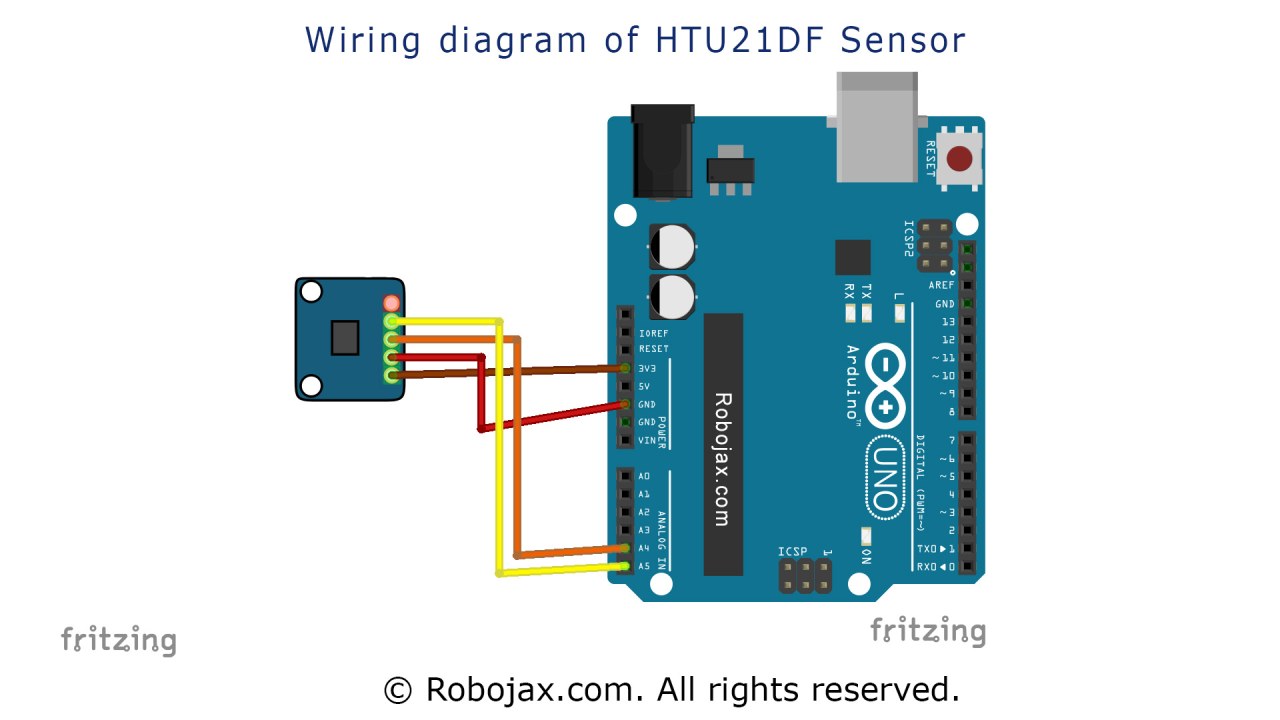
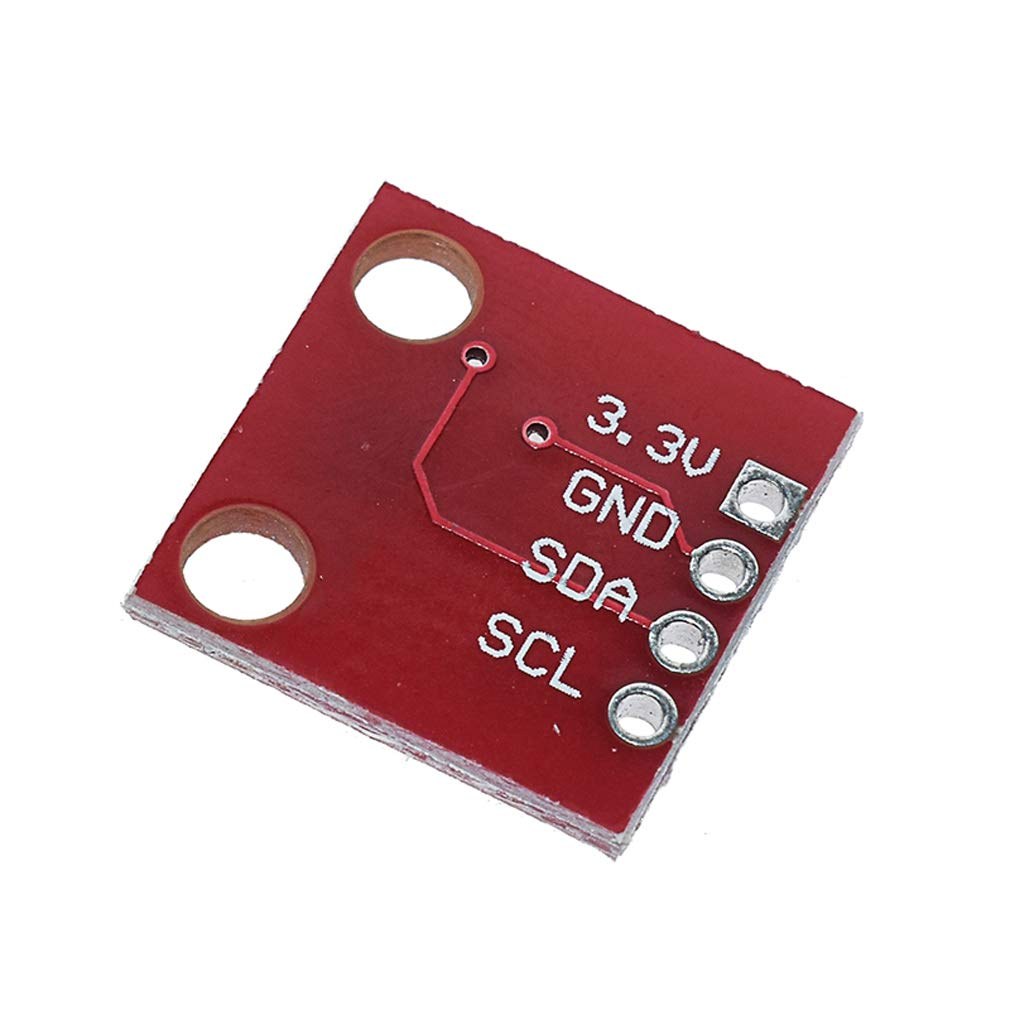
To wire the HTU21DF sensors, start by connecting the VCC pin of each sensor to the 3.3 V pin on the Arduino. Next, connect the GND pin of each sensor to a common ground. For I2C communication, connect the SDA pin of both sensors to the A4 pin on the Arduino, and the SCL pin to the A5 pin. Ensure that the sensors are properly powered and that the data connections are secure to facilitate communication.
If you are using additional sensors or components, ensure that their wiring does not interfere with the I2C bus. The HTU21DF sensors can be connected in parallel to the same I2C bus, allowing the Arduino to read data from both sensors without confusion.
Code Examples & Walkthrough
The following code initializes the HTU21DF sensors and reads their temperature and humidity values. First, we include the necessary libraries and create instances for both sensors:
#include
#include "Adafruit_HTU21DF.h"

Adafruit_HTU21DF htu1 = Adafruit_HTU21DF(); // create object for first sensor
Adafruit_HTU21DF htu2 = Adafruit_HTU21DF(); // create object for second sensor
The above code sets up the required libraries and creates two sensor objects, htu1 and htu2, which will be used to read data from each sensor independently.
Next, in the setup() function, we initialize the serial monitor and check if the sensors are connected:
void setup() {
  Serial.begin(9600);
  if (!htu1.begin() || !htu2.begin()) {
    Serial.println("Couldn't find sensor!");
    while (1);
  }
}
This section of the code initializes the serial communication at 9600 baud and checks if both sensors are functioning. If a sensor is not detected, it will print an error message and halt the program.
In the main loop, we read the temperature and humidity values from both sensors and display them:
void loop() {
    float temp1 = htu1.readTemperature();
    float rel_hum1 = htu1.readHumidity();
    float temp2 = htu2.readTemperature();
    float rel_hum2 = htu2.readHumidity();

    Serial.print("Sensor 1 Temp: "); Serial.print(temp1); Serial.print(" C");
    Serial.print("\tSensor 1 Humidity: "); Serial.print(rel_hum1); Serial.println(" %");
    Serial.print("Sensor 2 Temp: "); Serial.print(temp2); Serial.print(" C");
    Serial.print("\tSensor 2 Humidity: "); Serial.print(rel_hum2); Serial.println(" %");
    delay(500);
}
This loop continuously reads and prints the temperature and humidity from both sensors every 500 milliseconds. You can observe how the values change in response to environmental conditions.
Demonstration / What to Expect
When you run the code, the serial monitor will display the temperature and humidity values for both sensors. You can apply heat, such as from a heat gun, to observe how the temperature readings increase while humidity levels may decrease (in video at 12:30). If the temperature exceeds the maximum measurable limit of 125°C, the sensor may return zero or an error, indicating it cannot read the value.
Be mindful of wiring errors, such as reversed connections or floating inputs, which can lead to incorrect readings. By following the steps outlined in this tutorial, you should be able to successfully implement the HTU21DF sensors and monitor their readings effectively.
Video Timestamps
- 00:00 - Introduction
- 01:30 - Wiring Explanation
- 02:45 - Code Explanation
- 12:30 - Demonstration with Heat Gun
- 14:00 - Conclusion
Images

This tutorial is part of: Digital Relative Humidity & Temperature Sensor HTU21D
- Lesson 35-1: Using the HTU21D Temperature Sensor
- Lesson 35-2: Using the HTU21D Temperature Sensor Custom Code
- Lesson 35: Using HTU21D Temperature Sensor with Arduino
- Lesson 36: Using the HTU21D Temperature Sensor with an LCD Arduino Step-by-Step Course
- Displaying Temperature from an HTU21D on an LCD
- Displaying Temperature from an HTU21D as a Bar Graph on an LCD
- How to Use the HTU21DF Humidity and Temperature Sensor with Arduino (Basic Code)
- How to Use the HTU21DF Humidity and Temperature Sensor with Arduino (Custom Code)
++
/***************************************************
  This is an example for the HTU21D-F Humidity & Temperature Sensor

  Designed specifically to work with the HTU21D-F sensor from Adafruit
  ----> https://www.adafruit.com/products/1899

  These module use I2C to communicate; 2 pins are required to
  interface
 ****************************************************/

#include <Wire.h>
#include "Adafruit_HTU21DF.h"

// Connect Vin to 3-5VDC
// Connect GND to ground
// Connect SCL to I2C clock pin (A5 on UNO)
// Connect SDA to I2C data pin (A4 on UNO)

Adafruit_HTU21DF htu1 = Adafruit_HTU21DF();//create object for first HTU21DF sensor
Adafruit_HTU21DF htu2 = Adafruit_HTU21DF();//create object for second HTU21DF sensor
//Adafruit_HTU21DF htu3 = Adafruit_HTU21DF();//create object for third HTU21DF sensor (disabled, remove // from begging of code)

void setup() {
  Serial.begin(9600);
  Serial.println("HTU21D-F test for two modules");

  if (!htu.begin()) {
    Serial.println("Couldn't find sensor!");
    while (1);
  }
}

void loop() {
	//get value for sensor 1
    float temp1 = htu1.readTemperature();
    float rel_hum1 = htu1.readHumidity();

	//get value for sensor 2
    float temp2 = htu2.readTemperature();
    float rel_hum2 = htu2.readHumidity();

	//get value for sensor 3
    float temp3 = htu3.readTemperature();
    float rel_hum3 = htu3.readHumidity();

	//print values for sensor 1
    Serial.print("Sensor 1 Temp : "); Serial.print(temp1); Serial.print(" C");
    Serial.print("\t\t");
    Serial.print("Sensor 1 Humidity: "); Serial.print(rel_hum1); Serial.println(" %");

	//print values for sensor 2
    Serial.print("Sensor 2 Temp : "); Serial.print(temp2); Serial.print(" C");
    Serial.print("\t\t");
    Serial.print("Sensor 2 Humidity: "); Serial.print(rel_hum2); Serial.println(" %");

	//print values for sensor 3
    //Serial.print("Sensor 3 Temp : "); Serial.print(temp3); Serial.print(" C");
    //Serial.print("\t\t");
    //Serial.print("Sensor 3 Humidity: "); Serial.print(rel_hum3); Serial.println(" %");

    delay(500);
}
Things you might need
-
Amazon
-
eBayPurchase HTU21D from eBayebay.us
-
AliExpressPurchase HTU21D or SHT21 from AliExpresss.click.aliexpress.com
Resources & references
-
ExternalAdafruit HTU21D Library (GitHub)github.com
Files📁
Datasheet (pdf)
-
HTU21D_temerature_humidity_datasheet
HTU21D_temerature_humidity_datasheet.pdf0.96 MB