Este tutorial es parte de: Sensor digital de humedad relativa y temperatura HTU21D
Vídeos relacionados con el sensor digital de humedad relativa y temperatura HTU21D. Encontrará enlaces a otros vídeos debajo de este artículo.
Cómo utilizar el sensor de humedad y temperatura HTU21DF con Arduino (código personalizado)
Este código es para medir la temperatura y la humedad utilizando el sensor HTU21DF. Se muestra el hardware completo, dos tipos de código y una demostración. Este código muestra la temperatura en Celsius, Fahrenheit o Kelvin, y la humedad en el monitor serial que se muestra en el video. Para otros códigos relacionados, por favor desplácese hacia abajo en esta pantalla.
[ad]medir la temperatura y la humedad
Imágenes

thumb_robojax_HTU21DF_types-1756423961-8524
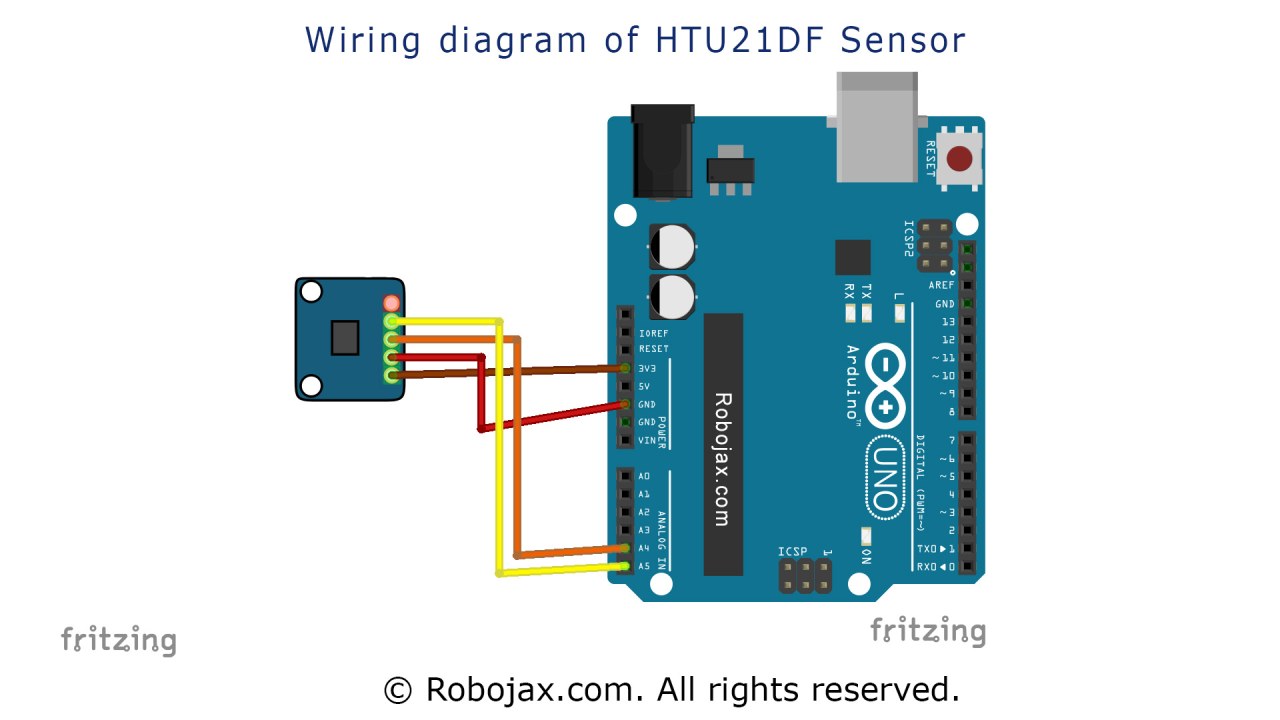
Arduino wiring for HTU21DF light intesity sensor

HTU21D module
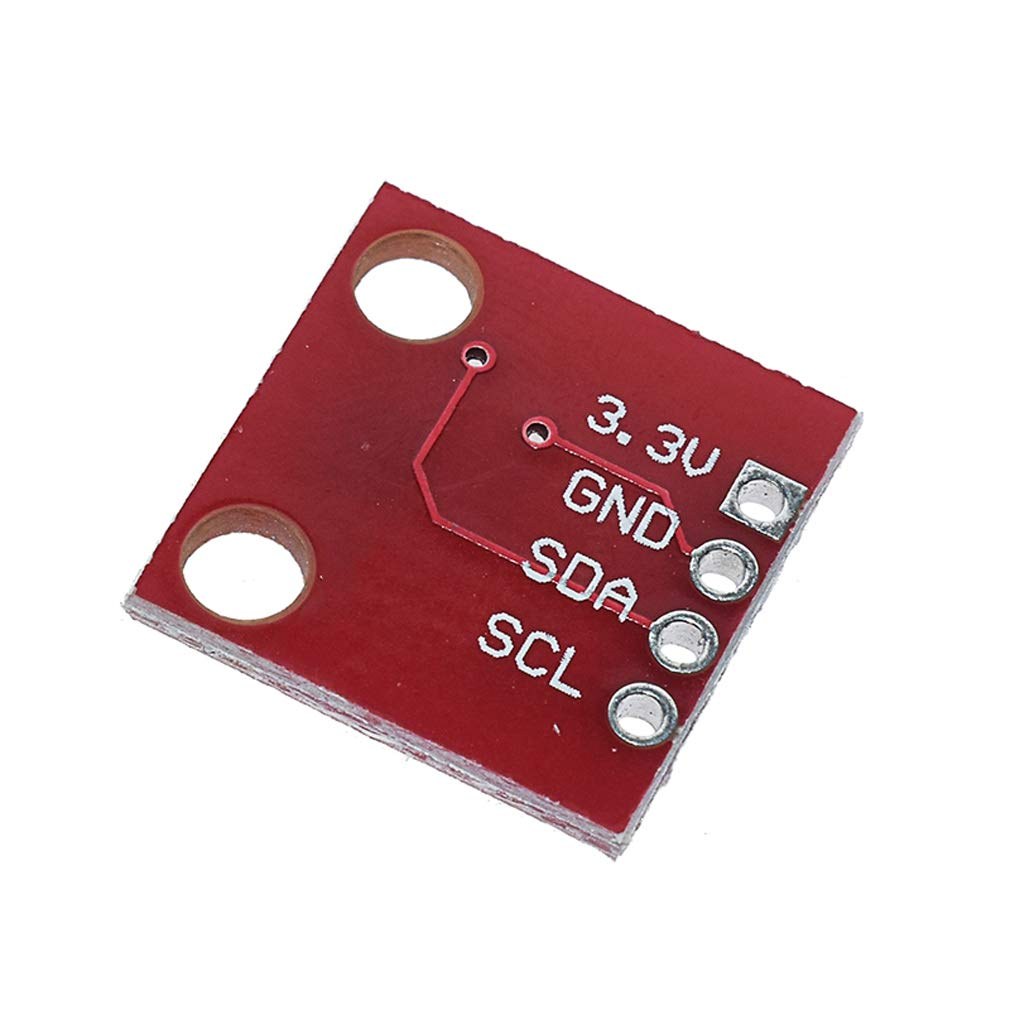
HTU21D module-back
Este tutorial es parte de: Sensor digital de humedad relativa y temperatura HTU21D
- Lección 35-1: Uso del sensor de temperatura HTU21D
- Lección 35-2: Uso del sensor de temperatura HTU21D - Código personalizado
- Lección 35: Uso del sensor de temperatura HTU21D con Arduino
- Lección 36: Uso del sensor de temperatura HTU21D con un LCD Curso paso a paso de Arduino
- Uso de dos sensores de humedad y temperatura HTU21DF más con Arduino
- Mostrando la temperatura de un HTU21D en un LCD
- Mostrando la temperatura de un HTU21D como un gráfico de barras en un LCD
- Cómo usar el sensor de humedad y temperatura HTU21DF con Arduino (Código básico)
211-Arduino code using HTU21D-F Humidity & Temperature Sensor (Advanced)
Idioma: C++
/*
 * Written/Updated by Ahmad Shamshiri on July 13, 2019
 * in Ajax, Ontario, Canada
 * Watch video instructions for this sketch: https://youtu.be/Q5y18rgTAhA

**************************************************
*
  This is an example for the HTU21D-F Humidity & Temperature Sensor

  Designed specifically to work with the HTU21D-F sensor from Adafruit
  ----> https://www.adafruit.com/products/1899

  These displays use I2C to communicate; 2 pins are required to
  interface
 ***************************************************
*/

#include <Wire.h>
#include "Adafruit_HTU21DF.h"

// Connect Vin to 3-5VDC
// Connect GND to ground
// Connect SCL to I2C clock pin (A5 on UNO)
// Connect SDA to I2C data pin (A4 on UNO)

Adafruit_HTU21DF htu = Adafruit_HTU21DF();

void setup() {
  Serial.begin(9600);
  Serial.println("Robojax.com");
  Serial.println("HTU21D-F test");

  if (!htu.begin()) {
    Serial.println("Couldn't find sensor!");
    while (1);
  }
}

void loop() {
	// Robojax HTU21DF Code
    Serial.print(getHTU('C'));
    printDegree();
    Serial.println("C");

    Serial.print(getHTU('F'));
    printDegree();
    Serial.println("F");

    Serial.print(getHTU('K'));
    Serial.println("K");
    Serial.println(" ");

    Serial.print("Humidity:");
    Serial.print(getHTU('H'));
    Serial.println("%");

    if(getHTU('C') <81)
    {
      //digitalWrite(5, LOW);

    }
    delay(1000);
}


/*
 * @brief returns temperature or relative humidity
 * @param "type" is a character
 *     C = Celsius
 *     K = Kelvin
 *     F = Fahrenheit
 *     H = Humidity
 * @return returns one of the values above
 * Usage: to get Fahrenheit type: getHTU('F')
 * to print it on the serial monitor: Serial.println(getHTU('F'));
 * Written by Ahmad Shamshiri on July 13, 2019
 * in Ajax, Ontario, Canada
 * www.Robojax.com
 */
float getHTU(char type)
{
  float value;
    float temp = htu.readTemperature();
    float rel_hum = htu.readHumidity();
   if(type =='F')
   {
    value = temp *9/5 + 32;//convert to Fahrenheit
   }else if(type =='K')
   {
    value = temp + 273.15;//convert to Kelvin
   }else if(type =='H')
   {
    value = rel_hum;//return relative humidity
   }else{
    value = temp;// return Celsius
   }
   return value;
}//


/*
 * @brief prints degree symbol on serial monitor
 * @param none
 * @return returns nothing
 * Written by Ahmad Shamshiri on July 13, 2019
 * for Robojax Tutorial Robojax.com
 */
 void printDegree()
{
    Serial.print("\\xC2");
    Serial.print("\\xB0");
}
Cosas que podrías necesitar
-
Amazonas
-
eBayCompra HTU21D en eBayebay.us
-
AliExpressCompra HTU21D o SHT21 en AliExpresss.click.aliexpress.com
Recursos y referencias
-
ExternoBiblioteca Adafruit HTU21D (GitHub)github.com
Archivos📁
Hoja de datos (pdf)
-
HTU21D_ficha_técnica_de_temperatura_y_humedad
HTU21D_temerature_humidity_datasheet.pdf0.96 MB