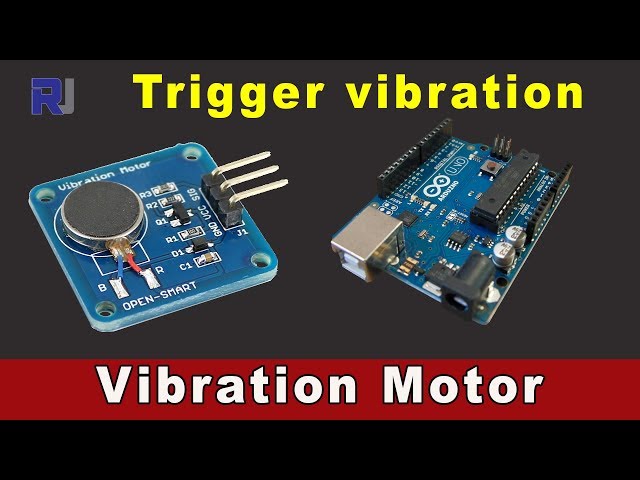
Controlling a Vibration Motor with Arduino
This is the Arduino code to control a vibration motor with Arduino My Arduino Course on Udemy Support me via Patreon206-Control a vibration motor module with an Arduino
语言: C++
/*
 * Control vibration motor module using Arduino
 *
 * Written by Ahmad Shamshiri on June 26th, 2019 at 22:07
 * in Ajax, Ontario, Canada
 * Visit www.Robojax.com for codes
 * Watch video instruction and demonstration:
 * https://youtu.be/5wUxBjpXzL8

You can get the wiring diagram from my Arduino Course at Udemy.com
Learn Arduino step by step with all libraries, codes, and wiring diagrams all in one place
visit my course now http://robojax.com/L/?id=62

If you found this tutorial helpful, please support me so I can continue creating
content like this.
or make a donation using PayPal http://robojax.com/L/?id=64
*
 * Code is available at http://robojax.com/learn/arduino

 * This code is "AS IS" without warranty or liability. Free to be used as long as you keep this note intact.
 * This code has been downloaded from Robojax.com
    This program is free software: you can redistribute it and/or modify
    it under the terms of the GNU General Public License as published by
    the Free Software Foundation, either version 3 of the License, or
    (at your option) any later version.

    This program is distributed in the hope that it will be useful,
    but WITHOUT ANY WARRANTY; without even the implied warranty of
    MERCHANTABILITY or FITNESS FOR A PARTICULAR PURPOSE.  See the
    GNU General Public License for more details.

    You should have received a copy of the GNU General Public License
    along with this program.  If not, see <https://www.gnu.org/licenses/>.

*/
#define vibOutPin 2

void setup() {
  pinMode(vibOutPin,OUTPUT);// define a pin as output

}

void loop() {

    digitalWrite(vibOutPin,HIGH);
    delay(2000);
    digitalWrite(vibOutPin, LOW);
    delay(600);
    digitalWrite(vibOutPin,HIGH);
    delay(2000);
    digitalWrite(vibOutPin, LOW);
    delay(600);
    digitalWrite(vibOutPin,HIGH);
    delay(2000);
    digitalWrite(vibOutPin, LOW);
    delay(600);


    delay(5000);
}// loop207-Trigger the vibration motor module with an Arduino and voltage from a potentiometer.
语言: C++
/*
 * Trigger vibration motor with voltage from potentiometer
 * using Arduino
 *
 * Written by Ahmad Shamshiri on June 26th, 2019 at 22:07
 * in Ajax, Ontario, Canada
 * Visit www.Robojax.com for codes
 * Watch video instruction and demonstration:
 * https://youtu.be/5wUxBjpXzL8
*
You can get the wiring diagram from my Arduino Course at Udemy.com.
Learn Arduino step by step with all libraries, codes, and wiring diagrams all in one place.
Visit my course now: http://robojax.com/L/?id=62

If you found this tutorial helpful, please support me so I can continue creating
content like this. You can support me on Patreon: http://robojax.com/L/?id=63
or make a donation using PayPal: http://robojax.com/L/?id=64

 * Code is available at http://robojax.com/learn/arduino

 * This code is "AS IS" without warranty or liability. Free to be used as long as you keep this note intact.
 * This code has been downloaded from Robojax.com
    This program is free software: you can redistribute it and/or modify
    it under the terms of the GNU General Public License as published by
    the Free Software Foundation, either version 3 of the License, or
    (at your option) any later version.

    This program is distributed in the hope that it will be useful,
    but WITHOUT ANY WARRANTY; without even the implied warranty of
    MERCHANTABILITY or FITNESS FOR A PARTICULAR PURPOSE.  See the
    GNU General Public License for more details.

    You should have received a copy of the GNU General Public License
    along with this program.  If not, see <https://www.gnu.org/licenses/>.

*/
#define vibOutPin 2
#define voltagePin A0
#define VCC2 8


void setup() {
  pinMode(vibOutPin,OUTPUT);
  pinMode(VCC2,OUTPUT);
  digitalWrite(VCC2, HIGH);//5V for potentiometer
  Serial.begin(9600);
  Serial.println("Robojax.com");
  Serial.println("Vibration motor test");
}

void loop() {


    int potValue =analogRead(voltagePin);
    float voltage =potValue*(5.0 / 1023.0);
    Serial.print("Voltage: ");
    Serial.print(voltage,2);
    Serial.println("V");
    if(voltage > 3.8){
      vibrate();
    }else{
      stop();
    }

    delay(200);
}// loop

/*
 * @brief sends signal to vibration motor
 * @param none
 * @return does not return anything
 *
 * www.Robojax.com code July 2019
 */
void vibrate(){
 digitalWrite(vibOutPin,HIGH);
    delay(2000);
    digitalWrite(vibOutPin, LOW);
    delay(600);
    digitalWrite(vibOutPin,HIGH);
    delay(2000);
    digitalWrite(vibOutPin, LOW);
    delay(600);
    digitalWrite(vibOutPin,HIGH);
    delay(2000);
    digitalWrite(vibOutPin, LOW);
    delay(600);
}//vibrate end

/*
 * @brief stops the vibration motor
 * @param none
 * @return does not return anything
 *
 * www.Robojax.com code July 2019
 */
void stop(){
  digitalWrite(vibOutPin, LOW);
}
资源与参考
尚无可用资源。
文件📁
没有可用的文件。