Arduinoで二つ以上のLCD1602-I2Cモジュールを使用する方法
このプロジェクトでは、I2Cモジュールを使用して2つ以上のLCD1602ディスプレイを単一のArduinoに接続し、制御する方法を示します。この設定は非常に多才であり、複数の画面にデータを表示するためのさまざまな可能性を開きます。
こちらは複数のLCDを使用したいくつかのプロジェクトアイデアです:
- 異なる場所からのセンサー読み取り値を別々の画面に表示しています。
- プロジェクトのためにマルチスクリーン情報表示を作成しています。
- 画面の一方にナビゲーションオプションを、もう一方にコンテンツを表示するメニュー駆動型インターフェースを構築する。
- 16x2文字以上を必要とするプロジェクトのために表示エリアを拡張します。
ハードウェア/コンポーネント
- Arduino Uno(または他の互換ボード)
- I2Cバックパック付きのLCD1602ディスプレイが2つ以上
- ジャンパーワイヤー
- ポテンショメーター(LCDのコントラスト調整用 - 通常I2Cバックパックに含まれる)
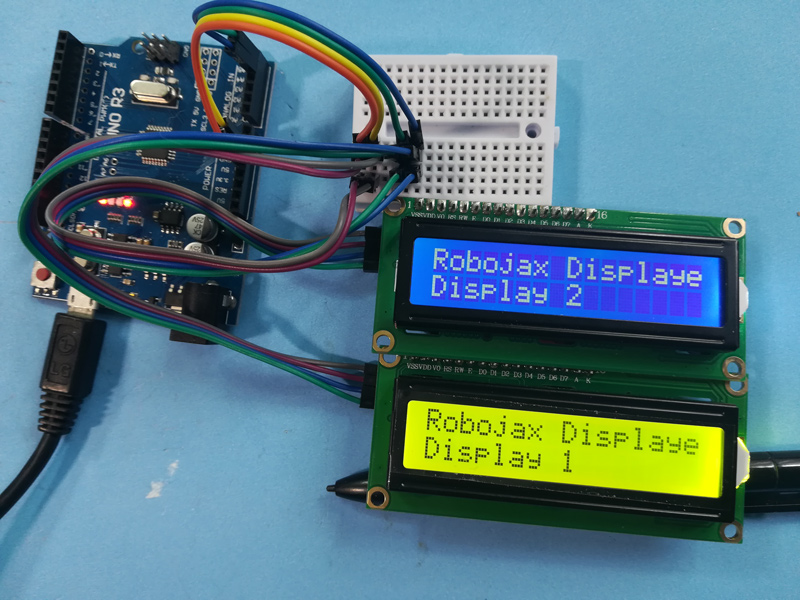
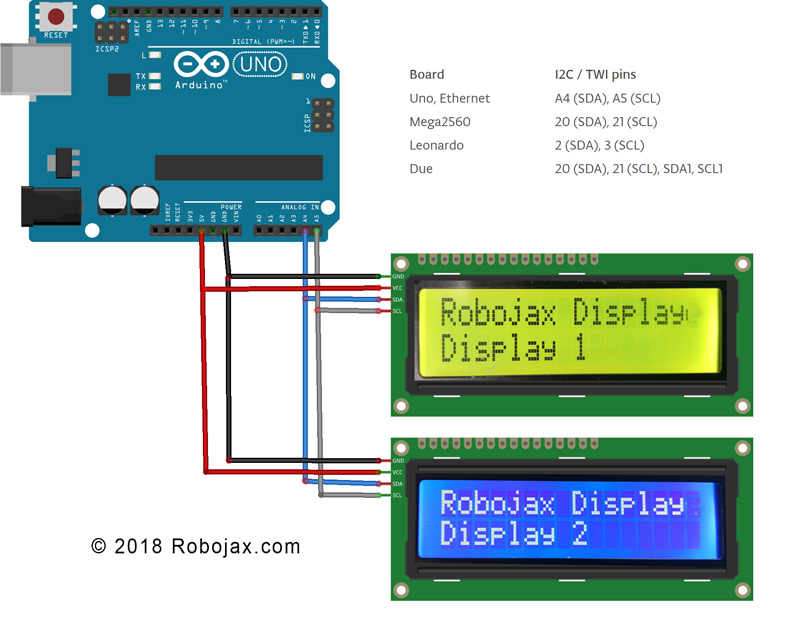
配線ガイド
(in video at 01:16)
- 各I2C LCDのVCCピンをArduinoの5Vピンに接続します。
- 各I2C LCDのGNDピンをArduinoのGNDピンに接続してください。
- 各I2C LCDのSDAピンをArduinoのSDAピン(UnoのA4)に接続します。
- 各I2C LCDのSCLピンをArduinoのSCLピン(UnoのA5)に接続します。
他のArduinoボードについては、SDAおよびSCLピンのピン配置図を参照してください(動画の02:20にあります)。
宛先:各LCDにはユニークなI2Cアドレスが必要です。これは通常、I2Cバックパックのソルダーパッドを使用して設定されます(動画の02:41で)。提供されたI2Cスキャナーコードを使用して(動画の06:16で)各LCDのアドレスを特定してください。
コードの説明
コードは、異なるデータ型(整数、浮動小数点数、文字列)を複数のLCDに簡単に表示できるように設計されています。コア機能はカスタム関数を中心に展開されています。
LiquidCrystal_I2C lcd1(0x3F, 16, 2); // Display 1 (in video at 05:24)
LiquidCrystal_I2C lcd2(0x26, 16, 2); // Display 2
// ... add more LCD objects as needed
置き換える0x3Fと0x26あなたのLCDのI2Cアドレスと一緒に。
lcdDisplay(1, 0, "Age: ", intToStr(age), " years"); // (in video at 09:23)
この関数は、特定のLCD(第一引数)、行(第二引数)、タイトル(第三引数)、値(第四引数)、および単位(第五引数)でデータを表示することを簡素化します。intToStr()とfloatToStr()関数は数値データを表示用の文字列に変換します。
ライブプロジェクト/デモンストレーション
デモンストレーションでは、年齢、日数、体重、電圧を2つの異なるLCDに表示する方法を示しています。値はループ内で動的に更新されます。
章節
- [00:00] はじめにとプロジェクトの概要
- [01:16] 配線の説明
- [02:20] Arduinoボードピン配置
- [02:41] I2Cアドレッシング
- [04:40] コードの概要
- [06:16] I2Cスキャナー
- [07:21] 小数点以下の桁数と数値フォーマット
- [08:00] 設定機能
- ループ機能とデータ表示
- [12:01] カスタムディスプレイ機能
- [13:10] 文字列変換関数
画像
Arduinoで2つ以上のLCD1602-I2Cモジュールを使用する方法
Arduinoで2つ以上のLCD1602-I2Cモジュールを使用する方法
170-How to use two or more LCD1602 I2C modules with Arduino
言語: C++
/*
 * Arduino code for use with two or more LCD1602 I2C displays with Arduino
 *  Custom function to display floats (like 2.45), integers (like 2 or 8), and strings
 *  very easily

 * This Arduino sketch makes it possible to use two displays at the same time.
 *
* Watch video instructions for this code: https://youtu.be/L6ekl2ABcuY
* *
 * Written by Ahmad Shamshiri for Robojax.com on Saturday, November 17, 2018
 * at 20:45 in Ajax, Ontario, Canada
 *

 * This code is "AS IS" without warranty or liability. Free to be used as long as you keep this note intact.
 * This code has been downloaded from Robojax.com
    This program is free software: you can redistribute it and/or modify
    it under the terms of the GNU General Public License as published by
    the Free Software Foundation, either version 3 of the License, or
    (at your option) any later version.

    This program is distributed in the hope that it will be useful,
    but WITHOUT ANY WARRANTY; without even the implied warranty of
    MERCHANTABILITY or FITNESS FOR A PARTICULAR PURPOSE.  See the
    GNU General Public License for more details.

    You should have received a copy of the GNU General Public License
    along with this program.  If not, see <https://www.gnu.org/licenses/>.
 */


#include <Wire.h> // this is part of arduino
#include <LiquidCrystal_I2C.h>

LiquidCrystal_I2C lcd1(0x3F, 16, 2);// display 1
LiquidCrystal_I2C lcd2(0x26, 16, 2);// display 2


// number settings
const int decimals = 2;// number of decimal places needed to be displayed
const int positions = 5;// total position of numbers including the decimal places

void setup() {
  // initialize the LCD
  lcd1.begin();//initialize LCD1
  lcd2.begin();//initialize LCD2
  lcd1.backlight();// turn the backlight ON for the LCD1
  lcd2.backlight();// turn the backlight ON for the LCD2


  Serial.begin(9600);// initialize serial monitor with 9600 baud

      lcd1.print("Robojax Display");
      lcd1.setCursor(0,1);
      lcd1.print("Display 1");

      lcd2.print("Robojax Display");
      lcd2.setCursor(0,1);
      lcd2.print("Display 2");

      Serial.println("Robojax Displays");
      Serial.println("2 or More");

  delay(3000);// change this line if you want not to wait
  lcd1.clear();// clear screen 1
  lcd2.clear();// clear screen 2
}

void loop() {
  // Robojax.com multiple LCD1602 I2C display

  int age = 31;
  int days= age * 365;
  float weight = 4.84;
  float voltage = 22.1;


      lcdDisplay(1, 0, "Age: ", intToStr(age), " years"); // print "Age: 31 years" to line 1 of display 1
      lcdDisplay(1, 1, "Days: ", intToStr(days), " days");// print "Days: 11351 days" to line 2 of display 1

      lcdDisplay(2, 0, "Weight: ", floatToStr(weight), " kg");//print "Weight: 2.84 kg" to line 1 of display 2
      lcdDisplay(2, 1, "Voltage: ", floatToStr(voltage), "V");// print "Voltage 22.10V" to line 2 of display 2

      Serial.println("Age: ");Serial.print(age); Serial.print(" years");
      Serial.println("Days: ");Serial.print(days); Serial.print(" days");
    Serial.println("====");

 delay(50); // wait for 200 milliseconds
}// loop end


/*
 * Written by Ahmad Shamshiri on November 17, 2018 for Robojax.com
 * lcdDisplay(int dis, int rowNum, String titleText, String valueText, String value2Text)
  for example to display:
 * dis is the display number
 * rowNum  is the row number  (0 or 1)
 * titleText is the text (e.g., "Voltage:")
 * valueText is the value
 *  value2Text is the text appended to the valueText (e.g., "A", "V", etc.)
 *
 * @brief Prints text on the screen on a specific row and character.
 * @param tc=text character number, trc=text row number,
 * @return the remaining time as an integer (seconds)

 *
 */
void lcdDisplay(int dis, int rowNum, String titleText, String valueText, String value2Text)
{
    clearRow(dis,rowNum);
    String myStr;
    myStr = String(valueText);

    int titleTextLength = titleText.length();
   // Robojax.com multiple LCD1602 I2C display
   if(dis ==1)
   {
     lcd1.setCursor (0,rowNum); //
     lcd1.print(titleText);

     lcd1.setCursor (titleTextLength,rowNum); //
     lcd1.print(myStr);

     lcd1.setCursor (myStr.length()+titleTextLength,rowNum); //
     lcd1.print(value2Text);
   }
   if(dis ==2)
   {
     lcd2.setCursor (0,rowNum); //
     lcd2.print(titleText);

     lcd2.setCursor (titleTextLength,rowNum); //
     lcd2.print(myStr);

     lcd2.setCursor (myStr.length()+titleTextLength,rowNum); //
     lcd2.print(value2Text);
   }

}

/*
 * Written by Ahmad Shamshiri on November 17, 2018 for Robojax.com
 * @brief Clears only one row of a specific display.
 * @param d, the display number (integer)
 * @param r, the row number (integer)
 * @return no return value
 */
void clearRow(int d,int r)
{
  //
  for(int i=0; i<16; i++)
  {
    if(d ==1)
    {
      lcd1.setCursor (i,r); //
      lcd1.print(" ");
    }
    if(d ==2)
    {
      lcd2.setCursor (i,r); //
      lcd2.print(" ");
    }

  }
}//clearRow end


/*
 * Written by Ahmad Shamshiri on November 18, 2018 for Robojax.com
 * @brief Converts an integer to a string.
 * @param a, the integer to convert.
 * @return the converted value as a string.
 */
String intToStr(int a)
{

  return String(a);
}//intToStr end


/*
 * Written by Ahmad Shamshiri on November 18, 2018 for Robojax.com
 * @brief Converts a float to a string.
 * @param a, the float to convert.
 * @return the converted value as a string.
 */
String floatToStr(float a)
{
  char buff[6]; // create a buffer of 6 characters
  dtostrf(a, positions, decimals, buff );// 5 positions and 2 decimal places
  return buff;// return the buffer
}//floatToStr end
必要かもしれないもの
-
アマゾンAmazonでLCD1602-I2Cを購入するamzn.to
-
イーベイeBayでLCD1602-I2Cを購入するebay.us
-
アリエクスプレスAliExpressから10個のLCD1602-I2Cを購入するs.click.aliexpress.com
-
アリエクスプレスAliExpressからLCD1602-I2Cを購入するs.click.aliexpress.com
リソースと参考文献
-
外部Arduino Wire ドキュメントページarduino.cc
ファイル📁
フリッツィングファイル
-
4本のワイヤーを持つLCD LCD1602-I2Cモジュール
LCD1602-I2C.fzpz0.01 MB
他のファイル
-
LCD1602 リキッドクリスタルライブラリ
robojax-LCD1602_LiquidCrystal.zip




![Sangoma Technologies PHON-D10M D10m Dect Extra Handset [universal Handset]](https://i.ebayimg.com/images/g/pUQAAeSwmeRpwv7E/s-l225.jpg)