Comment utiliser deux modules LCD1602-I2C ou plus avec Arduino
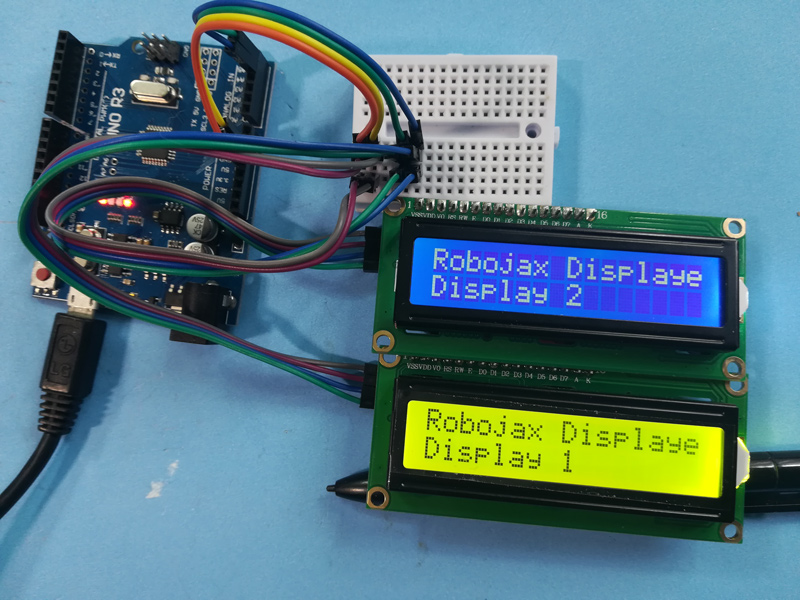
Ce projet démontre comment connecter et contrôler deux écrans LCD1602 ou plus avec des modules I2C à un seul Arduino. Ce système est très polyvalent et ouvre une gamme de possibilités pour afficher des données sur plusieurs écrans.
Voici quelques idées de projets utilisant plusieurs écrans LCD :
- Affichage des relevés de capteurs provenant de différents emplacements sur des écrans séparés.
- Création d'un affichage d'informations multi-écrans pour un projet.
- Créer une interface pilotée par un menu avec des options de navigation sur un écran et du contenu sur un autre.
- Étendre la zone d'affichage pour les projets nécessitant plus de 16x2 caractères.
Matériel/Composants
- Arduino Uno (ou autre carte compatible)
- Deux écrans LCD1602 ou plus avec des modules I2C.
- Fils de connexion
- Potentiomètre (pour le réglage du contraste sur les LCD - généralement inclus avec le module I2C)
Guide de câblage
(in video à 01:16)
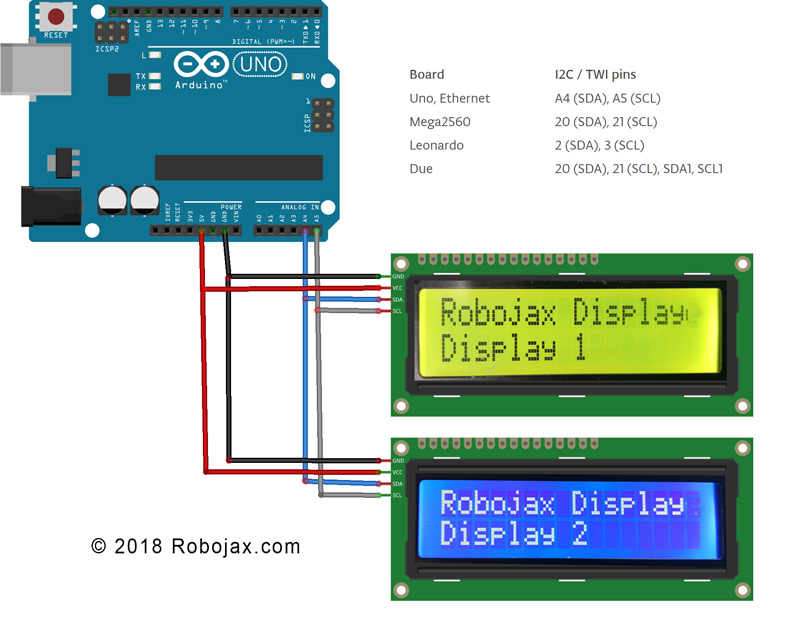
- Connectez la broche VCC de chaque écran LCD I2C à la broche 5V de l'Arduino.
- Connectez la broche GND de chaque écran LCD I2C à la broche GND de l'Arduino.
- Connectez la broche SDA de chaque LCD I2C à la broche SDA de l'Arduino (A4 sur Uno).
- Connectez la broche SCL de chaque LCD I2C à la broche SCL de l'Arduino (A5 sur Uno).
Pour les autres cartes Arduino, consultez le diagramme de brochage pour les broches SDA et SCL (dans la vidéo à 02:20).
Adresse :Chaque écran LCD nécessite une adresse I2C unique. Cela est généralement configuré à l'aide de pistes de soudure sur le backpack I2C (dans la vidéo à 02:41). Utilisez le code de scanner I2C fourni (dans la vidéo à 06:16) pour déterminer l'adresse de chaque écran LCD.
Explication du code
Le code est conçu pour faciliter l'affichage de divers types de données (entiers, flottants, chaînes) sur plusieurs LCD. La fonctionnalité principale tourne autour de fonctions personnalisées :
LiquidCrystal_I2C lcd1(0x3F, 16, 2); // Display 1 (in video at 05:24)
LiquidCrystal_I2C lcd2(0x26, 16, 2); // Display 2
// ... add more LCD objects as needed
Remplacer0x3Fet0x26avec les adresses I2C de vos écrans LCD.
lcdDisplay(1, 0, "Age: ", intToStr(age), " years"); // (in video at 09:23)
Cette fonction simplifie l'affichage des données sur un LCD spécifique (premier argument), une ligne (deuxième argument), avec un titre (troisième argument), une valeur (quatrième argument) et des unités (cinquième argument). LeintToStr()etfloatToStr()les fonctions convertissent des données numériques en chaînes pour l'affichage.
Projet en direct/Démonstration
La démonstration montre comment afficher l'âge, les jours, le poids et la tension sur deux LCD différents. Les valeurs sont mises à jour dynamiquement dans la boucle.
Chapitres
- [00:00] Introduction et présentation du projet
- [01:16] Explication du câblage
- [02:20] Brochage des broches de la carte Arduino
- [02:41] Addressage I2C
- [04:40] Aperçu du Code
- [06:16] Scanner I2C
- [07:21] Décimales et formatage des nombres
- [08:00] Configuration de la fonction
- Fonction de boucle et affichage des données
- [12:01] Fonction d'affichage personnalisée
- [13:10] Fonctions de conversion de chaînes
Images
/*
 * Arduino code for use with two or more LCD1602 I2C displays with Arduino
 *  Custom function to display floats (like 2.45), integers (like 2 or 8), and strings
 *  very easily

 * This Arduino sketch makes it possible to use two displays at the same time.
 *
* Watch video instructions for this code: https://youtu.be/L6ekl2ABcuY
* *
 * Written by Ahmad Shamshiri for Robojax.com on Saturday, November 17, 2018
 * at 20:45 in Ajax, Ontario, Canada
 *

 * This code is "AS IS" without warranty or liability. Free to be used as long as you keep this note intact.
 * This code has been downloaded from Robojax.com
    This program is free software: you can redistribute it and/or modify
    it under the terms of the GNU General Public License as published by
    the Free Software Foundation, either version 3 of the License, or
    (at your option) any later version.

    This program is distributed in the hope that it will be useful,
    but WITHOUT ANY WARRANTY; without even the implied warranty of
    MERCHANTABILITY or FITNESS FOR A PARTICULAR PURPOSE.  See the
    GNU General Public License for more details.

    You should have received a copy of the GNU General Public License
    along with this program.  If not, see <https://www.gnu.org/licenses/>.
 */


#include <Wire.h> // this is part of arduino
#include <LiquidCrystal_I2C.h>

LiquidCrystal_I2C lcd1(0x3F, 16, 2);// display 1
LiquidCrystal_I2C lcd2(0x26, 16, 2);// display 2


// number settings
const int decimals = 2;// number of decimal places needed to be displayed
const int positions = 5;// total position of numbers including the decimal places

void setup() {
  // initialize the LCD
  lcd1.begin();//initialize LCD1
  lcd2.begin();//initialize LCD2
  lcd1.backlight();// turn the backlight ON for the LCD1
  lcd2.backlight();// turn the backlight ON for the LCD2


  Serial.begin(9600);// initialize serial monitor with 9600 baud

      lcd1.print("Robojax Display");
      lcd1.setCursor(0,1);
      lcd1.print("Display 1");

      lcd2.print("Robojax Display");
      lcd2.setCursor(0,1);
      lcd2.print("Display 2");

      Serial.println("Robojax Displays");
      Serial.println("2 or More");

  delay(3000);// change this line if you want not to wait
  lcd1.clear();// clear screen 1
  lcd2.clear();// clear screen 2
}

void loop() {
  // Robojax.com multiple LCD1602 I2C display

  int age = 31;
  int days= age * 365;
  float weight = 4.84;
  float voltage = 22.1;


      lcdDisplay(1, 0, "Age: ", intToStr(age), " years"); // print "Age: 31 years" to line 1 of display 1
      lcdDisplay(1, 1, "Days: ", intToStr(days), " days");// print "Days: 11351 days" to line 2 of display 1

      lcdDisplay(2, 0, "Weight: ", floatToStr(weight), " kg");//print "Weight: 2.84 kg" to line 1 of display 2
      lcdDisplay(2, 1, "Voltage: ", floatToStr(voltage), "V");// print "Voltage 22.10V" to line 2 of display 2

      Serial.println("Age: ");Serial.print(age); Serial.print(" years");
      Serial.println("Days: ");Serial.print(days); Serial.print(" days");
    Serial.println("====");

 delay(50); // wait for 200 milliseconds
}// loop end


/*
 * Written by Ahmad Shamshiri on November 17, 2018 for Robojax.com
 * lcdDisplay(int dis, int rowNum, String titleText, String valueText, String value2Text)
  for example to display:
 * dis is the display number
 * rowNum  is the row number  (0 or 1)
 * titleText is the text (e.g., "Voltage:")
 * valueText is the value
 *  value2Text is the text appended to the valueText (e.g., "A", "V", etc.)
 *
 * @brief Prints text on the screen on a specific row and character.
 * @param tc=text character number, trc=text row number,
 * @return the remaining time as an integer (seconds)

 *
 */
void lcdDisplay(int dis, int rowNum, String titleText, String valueText, String value2Text)
{
    clearRow(dis,rowNum);
    String myStr;
    myStr = String(valueText);

    int titleTextLength = titleText.length();
   // Robojax.com multiple LCD1602 I2C display
   if(dis ==1)
   {
     lcd1.setCursor (0,rowNum); //
     lcd1.print(titleText);

     lcd1.setCursor (titleTextLength,rowNum); //
     lcd1.print(myStr);

     lcd1.setCursor (myStr.length()+titleTextLength,rowNum); //
     lcd1.print(value2Text);
   }
   if(dis ==2)
   {
     lcd2.setCursor (0,rowNum); //
     lcd2.print(titleText);

     lcd2.setCursor (titleTextLength,rowNum); //
     lcd2.print(myStr);

     lcd2.setCursor (myStr.length()+titleTextLength,rowNum); //
     lcd2.print(value2Text);
   }

}

/*
 * Written by Ahmad Shamshiri on November 17, 2018 for Robojax.com
 * @brief Clears only one row of a specific display.
 * @param d, the display number (integer)
 * @param r, the row number (integer)
 * @return no return value
 */
void clearRow(int d,int r)
{
  //
  for(int i=0; i<16; i++)
  {
    if(d ==1)
    {
      lcd1.setCursor (i,r); //
      lcd1.print(" ");
    }
    if(d ==2)
    {
      lcd2.setCursor (i,r); //
      lcd2.print(" ");
    }

  }
}//clearRow end


/*
 * Written by Ahmad Shamshiri on November 18, 2018 for Robojax.com
 * @brief Converts an integer to a string.
 * @param a, the integer to convert.
 * @return the converted value as a string.
 */
String intToStr(int a)
{

  return String(a);
}//intToStr end


/*
 * Written by Ahmad Shamshiri on November 18, 2018 for Robojax.com
 * @brief Converts a float to a string.
 * @param a, the float to convert.
 * @return the converted value as a string.
 */
String floatToStr(float a)
{
  char buff[6]; // create a buffer of 6 characters
  dtostrf(a, positions, decimals, buff );// 5 positions and 2 decimal places
  return buff;// return the buffer
}//floatToStr end
Ce dont vous pourriez avoir besoin
-
Amazon
-
eBayAcheter un LCD1602-I2C sur eBayebay.us
-
AliExpressAcheter LCD1602-I2C sur AliExpresss.click.aliexpress.com
-
AliExpressAchetez 10 pièces de LCD1602-I2C sur AliExpresss.click.aliexpress.com
Ressources et références
-
ExternePage de documentation de l'Arduino Wirearduino.cc
Fichiers📁
Fichier Fritzing
-
Module LCD LCD1602-I2C avec 4 fils
LCD1602-I2C.fzpz0.01 MB
Autres fichiers
-
Bibliothèque LiquidCrystal LCD1602
robojax-LCD1602_LiquidCrystal.zip