چگونه از دو یا چند ماجیول LCD1602-I2C با آردوینو استفاده کنیم
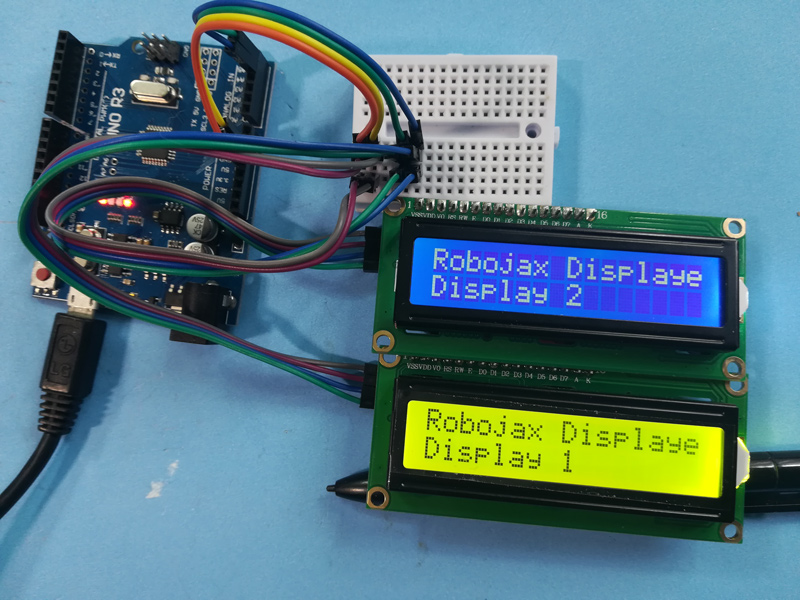
این پروژه نشان میدهد که چگونه میتوان دو یا چند نمایشگر LCD1602 را با ماجیولهای I2C به یک آردوینو متصل و کنترل کرد. این تنظیمات بسیار انعطافپذیر است و دامنهای از امکانات را برای نمایش دادهها در چندین صفحه باز میکند.
در اینجا چند ایده پروژه با استفاده از چندین ال سی دی آورده شده است:
- نمایش خواندن حسگرها از مکانهای مختلف بر روی صفحات جداگانه.
- ایجاد یک نمایش اطلاعات چند صفحهای برای یک پروژه.
- ساخت یک رابط کاربری مبتنی بر منو با گزینههای ناوبری در یک صفحه و محتوا در صفحه دیگر.
- گسترش ناحیه نمایش برای پروژههایی که به بیش از 16x2 خصیصه نیاز دارند.
سختافزار/قطعات
- آردوینو اونو (یا سایر بردهای سازگار)
- دو یا چند نمایشگر LCD1602 با کولهپشتیهای I2C
- پایهسیمها
- پتانسیومتر (برای تنظیم کنتراست بر روی LCD ها - معمولاً همراه با ماجیول I2C ارائه میشود)
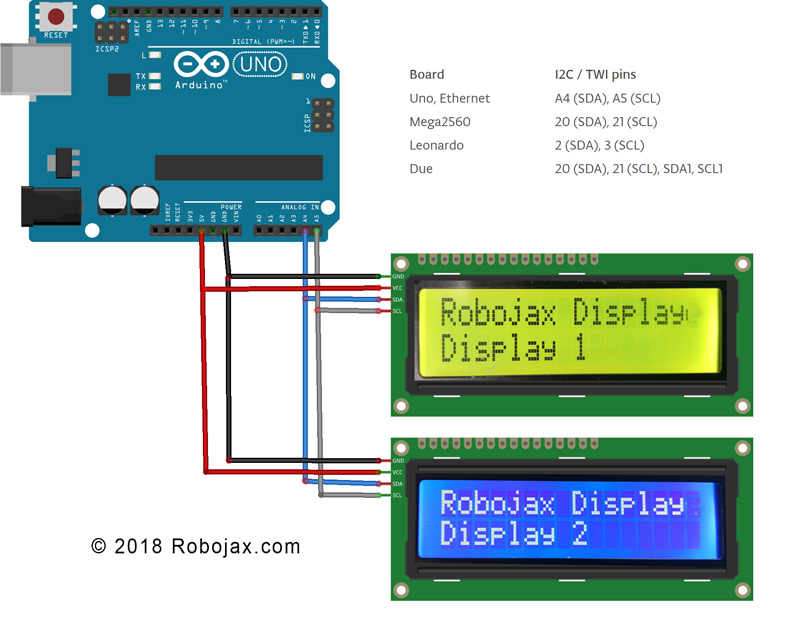
راهنمای سیمکشی
(in video at 01:16)
- پایه VCC هر LCD I2C را به پایه 5V آردوینو متصل کنید.
- پایه GND هر LCD I2C را به پایه GND آردوینو وصل کنید.
- سوزن SDA هر LCD I2C را به سوزن SDA آردوینو (A4 روی Uno) متصل کنید.
- پایه SCL هر LCD I2C را به پایه SCL آردوینو (A5 در Uno) متصل کنید.
برای سایر بردهای آردوینو، دیاگرام پایهها را برای پایههای SDA و SCL مشاوره کنید (در ویدئو در ۰۲:۲۰).
آدرس:هر LCD به یک آدرس I2C منحصر به فرد نیاز دارد. این معمولاً با استفاده از پدهای لحیم روی کولهپشتی I2C تنظیم میشود (در ویدیو در ساعت :41). از شِفر (کود) اسکنر I2C ارائه شده (در ویدیو در ساعت :16) برای تعیین آدرس هر LCD استفاده کنید.
توضیح شِفر (کود)
شِفر (کود) به گونهای طراحی شده است که نمایش انواع مختلف دادهها (اعداد صحیح، اعشار، رشتهها) را بر روی چندین LCD آسان کند. عملکرد اصلی بر اساس توابع سفارشی میچرخد:
LiquidCrystal_I2C lcd1(0x3F, 16, 2); // Display 1 (in video at 05:24)
LiquidCrystal_I2C lcd2(0x26, 16, 2); // Display 2
// ... add more LCD objects as needed
تعویض0x3Fو0x26با آدرسهای I2C LCDهای خودتان.
lcdDisplay(1, 0, "Age: ", intToStr(age), " years"); // (in video at 09:23)
این تابع نمایش دادهها را بر روی یک LCD خاص (آرگومان اول)، ردیف (آرگومان دوم)، با عنوان (آرگومان سوم)، مقدار (آرگومان چهارم) و واحدها (آرگومان پنجم) ساده میکند.intToStr()وfloatToStr()توابع دادههای عددی را به رشتهها برای نمایش تبدیل میکنند.
پروژه زنده/نمایش
این نمایش نشان میدهد که چگونه سن، روزها، وزن و ولتاژ را روی دو السیدی مختلف نمایش دهیم. مقادیر بهطور پویا در حلقه بهروزرسانی میشوند.
فصلها
- مقدمه و مرور کلی پروژه
- [01:16] توضیحات سیمکشی
- :20 برد پایه آردوینو
- آدرسدهی I2C:41
- [04:40] مرور شِفر (کود)
- [06:16] اسکنر I2C
- [07:21] مکانهای اعشاری و فرمتبندی عددی
- [08:00] راهاندازی تابع
- [08:58] تابع حلقه و نمایش دادهها
- [12:01] تابع نمایش سفارشی
- [13:10] توابع تبدیل رشته
تصاویر
/*
 * Arduino code for use with two or more LCD1602 I2C displays with Arduino
 *  Custom function to display floats (like 2.45), integers (like 2 or 8), and strings
 *  very easily

 * This Arduino sketch makes it possible to use two displays at the same time.
 *
* Watch video instructions for this code: https://youtu.be/L6ekl2ABcuY
* *
 * Written by Ahmad Shamshiri for Robojax.com on Saturday, November 17, 2018
 * at 20:45 in Ajax, Ontario, Canada
 *

 * This code is "AS IS" without warranty or liability. Free to be used as long as you keep this note intact.
 * This code has been downloaded from Robojax.com
    This program is free software: you can redistribute it and/or modify
    it under the terms of the GNU General Public License as published by
    the Free Software Foundation, either version 3 of the License, or
    (at your option) any later version.

    This program is distributed in the hope that it will be useful,
    but WITHOUT ANY WARRANTY; without even the implied warranty of
    MERCHANTABILITY or FITNESS FOR A PARTICULAR PURPOSE.  See the
    GNU General Public License for more details.

    You should have received a copy of the GNU General Public License
    along with this program.  If not, see <https://www.gnu.org/licenses/>.
 */


#include <Wire.h> // this is part of arduino
#include <LiquidCrystal_I2C.h>

LiquidCrystal_I2C lcd1(0x3F, 16, 2);// display 1
LiquidCrystal_I2C lcd2(0x26, 16, 2);// display 2


// number settings
const int decimals = 2;// number of decimal places needed to be displayed
const int positions = 5;// total position of numbers including the decimal places

void setup() {
  // initialize the LCD
  lcd1.begin();//initialize LCD1
  lcd2.begin();//initialize LCD2
  lcd1.backlight();// turn the backlight ON for the LCD1
  lcd2.backlight();// turn the backlight ON for the LCD2


  Serial.begin(9600);// initialize serial monitor with 9600 baud

      lcd1.print("Robojax Display");
      lcd1.setCursor(0,1);
      lcd1.print("Display 1");

      lcd2.print("Robojax Display");
      lcd2.setCursor(0,1);
      lcd2.print("Display 2");

      Serial.println("Robojax Displays");
      Serial.println("2 or More");

  delay(3000);// change this line if you want not to wait
  lcd1.clear();// clear screen 1
  lcd2.clear();// clear screen 2
}

void loop() {
  // Robojax.com multiple LCD1602 I2C display

  int age = 31;
  int days= age * 365;
  float weight = 4.84;
  float voltage = 22.1;


      lcdDisplay(1, 0, "Age: ", intToStr(age), " years"); // print "Age: 31 years" to line 1 of display 1
      lcdDisplay(1, 1, "Days: ", intToStr(days), " days");// print "Days: 11351 days" to line 2 of display 1

      lcdDisplay(2, 0, "Weight: ", floatToStr(weight), " kg");//print "Weight: 2.84 kg" to line 1 of display 2
      lcdDisplay(2, 1, "Voltage: ", floatToStr(voltage), "V");// print "Voltage 22.10V" to line 2 of display 2

      Serial.println("Age: ");Serial.print(age); Serial.print(" years");
      Serial.println("Days: ");Serial.print(days); Serial.print(" days");
    Serial.println("====");

 delay(50); // wait for 200 milliseconds
}// loop end


/*
 * Written by Ahmad Shamshiri on November 17, 2018 for Robojax.com
 * lcdDisplay(int dis, int rowNum, String titleText, String valueText, String value2Text)
  for example to display:
 * dis is the display number
 * rowNum  is the row number  (0 or 1)
 * titleText is the text (e.g., "Voltage:")
 * valueText is the value
 *  value2Text is the text appended to the valueText (e.g., "A", "V", etc.)
 *
 * @brief Prints text on the screen on a specific row and character.
 * @param tc=text character number, trc=text row number,
 * @return the remaining time as an integer (seconds)

 *
 */
void lcdDisplay(int dis, int rowNum, String titleText, String valueText, String value2Text)
{
    clearRow(dis,rowNum);
    String myStr;
    myStr = String(valueText);

    int titleTextLength = titleText.length();
   // Robojax.com multiple LCD1602 I2C display
   if(dis ==1)
   {
     lcd1.setCursor (0,rowNum); //
     lcd1.print(titleText);

     lcd1.setCursor (titleTextLength,rowNum); //
     lcd1.print(myStr);

     lcd1.setCursor (myStr.length()+titleTextLength,rowNum); //
     lcd1.print(value2Text);
   }
   if(dis ==2)
   {
     lcd2.setCursor (0,rowNum); //
     lcd2.print(titleText);

     lcd2.setCursor (titleTextLength,rowNum); //
     lcd2.print(myStr);

     lcd2.setCursor (myStr.length()+titleTextLength,rowNum); //
     lcd2.print(value2Text);
   }

}

/*
 * Written by Ahmad Shamshiri on November 17, 2018 for Robojax.com
 * @brief Clears only one row of a specific display.
 * @param d, the display number (integer)
 * @param r, the row number (integer)
 * @return no return value
 */
void clearRow(int d,int r)
{
  //
  for(int i=0; i<16; i++)
  {
    if(d ==1)
    {
      lcd1.setCursor (i,r); //
      lcd1.print(" ");
    }
    if(d ==2)
    {
      lcd2.setCursor (i,r); //
      lcd2.print(" ");
    }

  }
}//clearRow end


/*
 * Written by Ahmad Shamshiri on November 18, 2018 for Robojax.com
 * @brief Converts an integer to a string.
 * @param a, the integer to convert.
 * @return the converted value as a string.
 */
String intToStr(int a)
{

  return String(a);
}//intToStr end


/*
 * Written by Ahmad Shamshiri on November 18, 2018 for Robojax.com
 * @brief Converts a float to a string.
 * @param a, the float to convert.
 * @return the converted value as a string.
 */
String floatToStr(float a)
{
  char buff[6]; // create a buffer of 6 characters
  dtostrf(a, positions, decimals, buff );// 5 positions and 2 decimal places
  return buff;// return the buffer
}//floatToStr end
مواردی که ممکن است به آنها نیاز داشته باشید
-
آمازونخرید LCD1602-I2C از اَمه زونamzn.to
-
ایبیخرید LCD1602-I2C از eBayebay.us
-
علیاکسپرسخرید LCD1602-I2C از علیاکسپرسs.click.aliexpress.com
-
علیاکسپرسخرید ۱۰ عدد LCD1602-I2C از علیاکسپرسs.click.aliexpress.com
منابع و مراجع
-
خارجیصفحه مستندات وایر آردوینوarduino.cc
فایلها📁
فایل فریزینگ
-
ماجیول LCD LCD1602-I2C با ۴ سیم
LCD1602-I2C.fzpz0.01 MB
سایر فایلها
-
کتابخانه LiquidCrystal LCD1602
robojax-LCD1602_LiquidCrystal.zip