આર્ડુઇનો સાથે યુ-બ્લોક્સ નિયો-6 અને નિયો-7 જીપીએસ મોડ્યુલોમાંથી જીપીએસ લોકેશન મેળવો
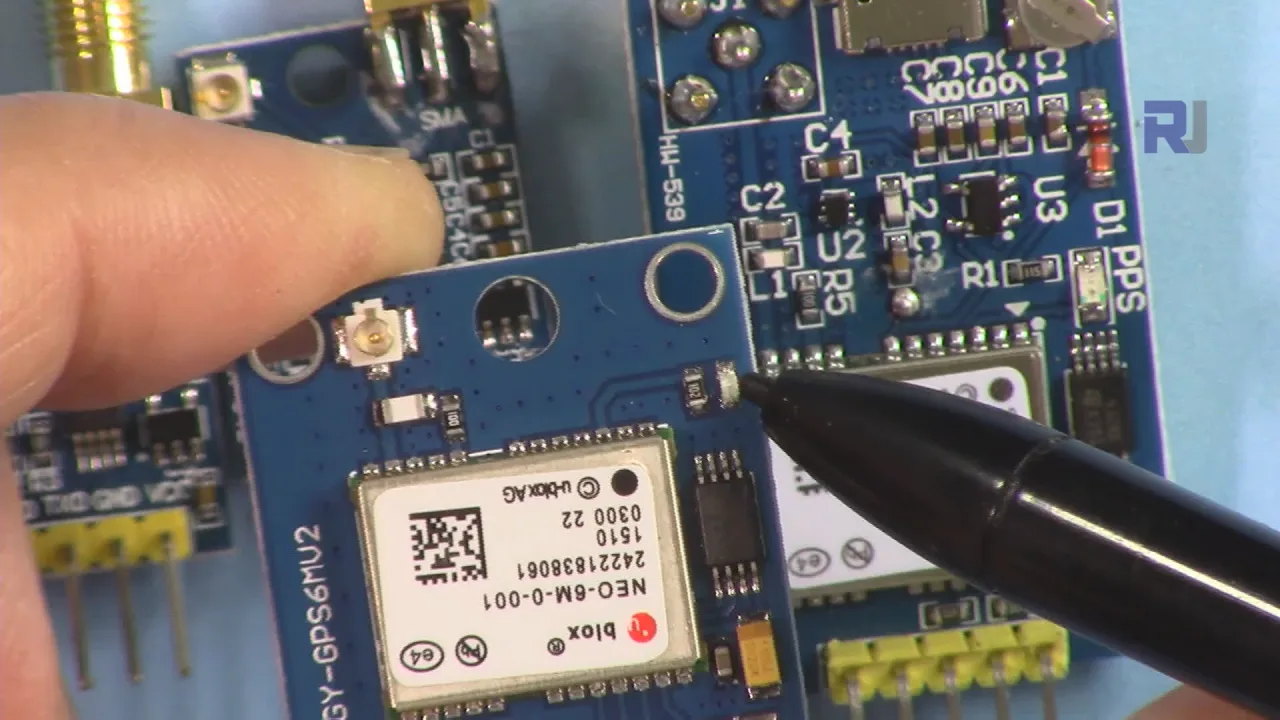
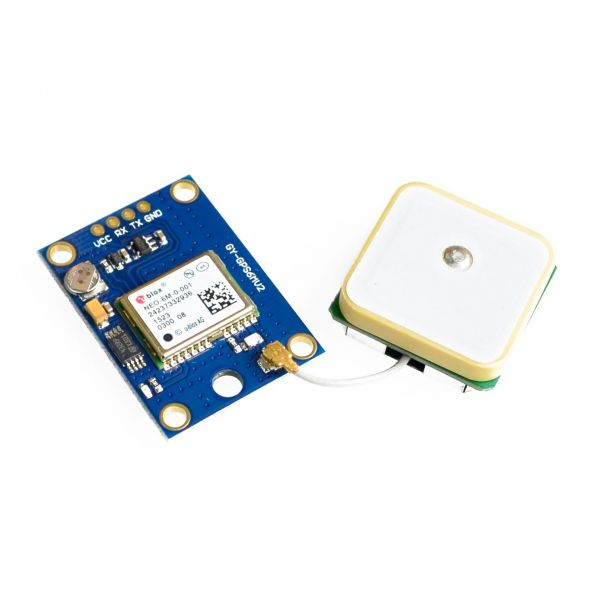
આ પ્રોજેક્ટ દર્શાવે છે કે કેવી રીતે U-blox Neo-6M અથવા Neo-7M GPS મોડ્યુલને Arduino સાથે જોડીને સ્થાન ડેટા (અક્ષાંશ અને રેખાંશ) મેળવવો. આ સસ્તા મોડ્યુલો, જે ઓનલાઈન સરળતાથી ઉપલબ્ધ છે, તમારા પ્રોજેક્ટ્સમાં GPS કાર્યક્ષમતા ઉમેરવાનો સરળ માર્ગ પૂરો પાડે છે. Neo-7M પરની અલગ દેખાતી વાદળી LED (વિડિયોમાં 02:53 પર) GPS ફિક્સ સૂચવે છે, જે સિગ્નલ મેળવવાની પુષ્ટિ કરવા માટે ઉપયોગી સુવિધા છે.
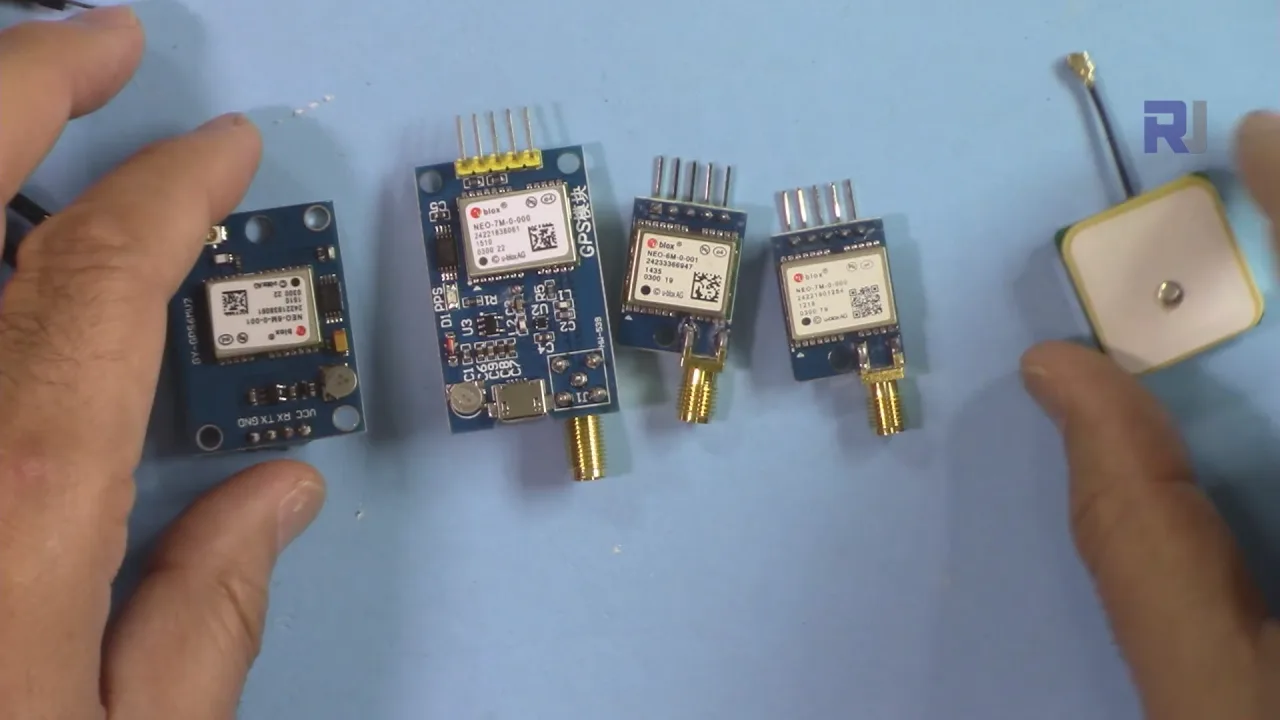
GPS મોડ્યુલ અને Arduino નો ઉપયોગ કરીને કેટલાક પ્રોજેક્ટ વિચારો અહીં છે:
- GPS ટ્રેકર: સ્થાન ડેટા લોગ કરો અને તેને નકશા પર દર્શાવો.
- જીઓકેશિંગ ટૂલ: ચોક્કસ કોઓર્ડિનેટ્સ પર નેવિગેટ કરો.
- સ્વચાલિત વાહન નેવિગેશન: રોબોટ અથવા ડ્રોનને માર્ગદર્શન આપો.
- હવામાન સ્ટેશન: હવામાન રીડિંગ્સમાં સ્થાન ડેટા ઉમેરો.
- વન્યજીવ ટ્રેકિંગ: પ્રાણીઓની હિલચાલ પર દેખરેખ રાખો.
હાર્ડવેર/ઘટકો
- Arduino Uno (અથવા સુસંગત બોર્ડ)
- U-blox Neo-6M અથવા Neo-7M GPS મોડ્યુલ
- જમ્પર વાયર
- USB કેબલ
- (વૈકલ્પિક) બાહ્ય એન્ટેના અને SMA કનેક્ટર
વાયરિંગ માર્ગદર્શિકા
વાયરિંગ સરળ છે (વિડિયોમાં 10:39 પર):
%%WIRING%%
- GPS VCC ને Arduino 3.3V સાથે
- GPS GND ને Arduino GND સાથે
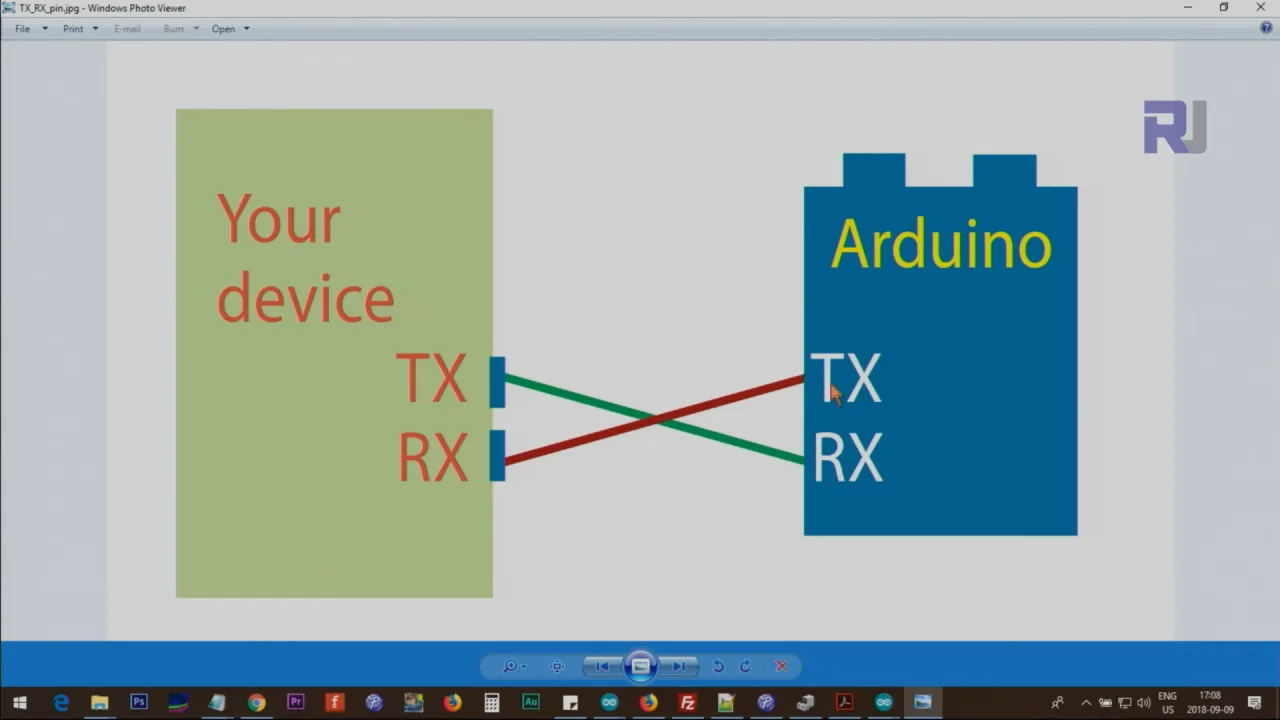
- GPS TX ને Arduino પિન 3 સાથે (કોડમાં RX તરીકે વ્યાખ્યાયિત)
- GPS RX ને Arduino પિન 4 સાથે (કોડમાં TX તરીકે વ્યાખ્યાયિત)
યાદ રાખો, TX RX સાથે જોડાય છે અને તેનાથી વિપરીત (વિડિયોમાં 11:10 પર). વિડિયો એ પણ બતાવે છે કે કનેક્શન માટે સરળ જમ્પર વાયરનો ઉપયોગ કેવી રીતે કરવો (વિડિયોમાં 10:24 પર).
કોડ સમજૂતી
આ પ્રોજેક્ટ TinyGPS++ લાઇબ્રેરી નો ઉપયોગ કરે છે. તેને Arduino IDE ના લાઇબ્રેરી મેનેજર દ્વારા ડાઉનલોડ કરીને ઇન્સ્ટોલ કરો. આવશ્યક કોડ ગોઠવણો સોફ્ટવેર સીરિયલ પિન વ્યાખ્યાઓ અને બૉડ રેટ છે (વિડિયોમાં 07:00 પર):
#include <TinyGPS++.h>
#include <SoftwareSerial.h>

static const int RXPin = 3, TXPin = 4;
static const uint32_t GPSBaud = 9600; // U-blox મોડ્યુલો માટે ડિફોલ્ટ
RXPin અને TXPin ચલો GPS મોડ્યુલ સાથે જોડાયેલા Arduino પિનને વ્યાખ્યાયિત કરે છે. U-blox મોડ્યુલો માટે ડિફોલ્ટ બૉડ રેટ 9600 છે. કોડનો મુખ્ય ભાગ GPS માંથી સીરિયલ ડેટા વાંચવા અને TinyGPS++ લાઇબ્રેરીનો ઉપયોગ કરીને તેને પાર્સ કરવામાં છે (વિડિયોમાં 08:03 પર):
// TinyGPS++ ઑબ્જેક્ટ
TinyGPSPlus gps;

// GPS ઉપકરણ સાથે સીરિયલ કનેક્શન
SoftwareSerial ss(RXPin, TXPin);

// ... (લૂપ ફંક્શનની અંદર) ...
while (ss.available() > 0)
  if (gps.encode(ss.read()))
    displayInfo();
displayInfo() ફંક્શન પછી જ્યારે પણ માન્ય GPS ફિક્સ મેળવાય છે ત્યારે અક્ષાંશ અને રેખાંશ કાઢીને છાપે છે (વિડિયોમાં 09:07 પર):
void displayInfo()
{
  // ... અન્ય કોડ ...

  if (gps.location.isValid())
  {
    Serial.print(gps.location.lat(), 6); // 6 દશાંશ સ્થાનો સાથે અક્ષાંશ
    Serial.print(F(","));
    Serial.print(gps.location.lng(), 6); // 6 દશાંશ સ્થાનો સાથે રેખાંશ
  }
  // ... અન્ય કોડ ...
}
લાઇવ પ્રોજેક્ટ/પ્રદર્શન
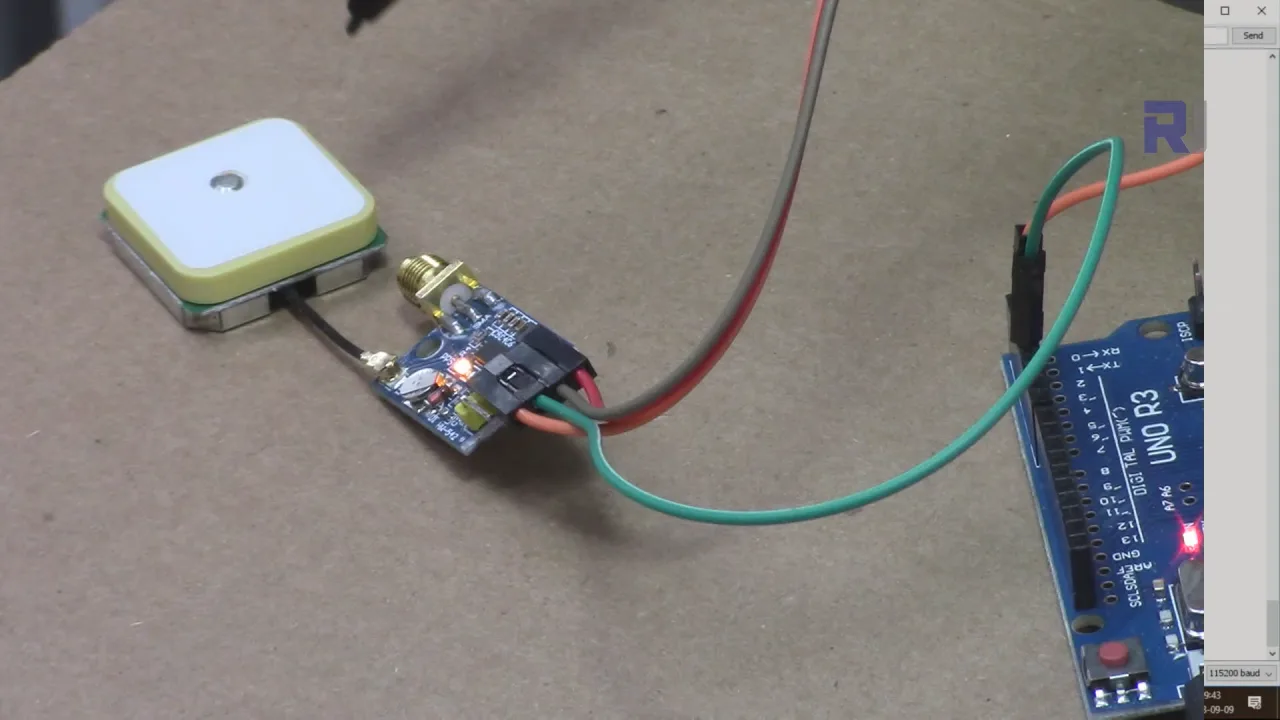
વિડિયો (વિડિયોમાં 12:29 પર) પ્રોજેક્ટને કાર્યરત દર્શાવે છે, જેમાં કોઈ GPS સિગ્નલ ન હોય ત્યારે પ્રારંભિક "INVALID" આઉટપુટ અને ફિક્સ મેળવ્યા પછી માન્ય કોઓર્ડિનેટ્સ દર્શાવે છે. Neo-7M પર ઝબકતી વાદળી LED GPS સિગ્નલની દ્રશ્ય પુષ્ટિ પૂરી પાડે છે (વિડિયોમાં 13:49 પર).
પ્રકરણો
- [00:00] પરિચય અને પ્રોજેક્ટ ઝાંખી
- [00:32] GPS મોડ્યુલ વેરિએશન્સ (Neo-6M અને Neo-7M)
- [04:30] GPS મોડ્યુલને Arduino સાથે વાયરિંગ
- [06:12] કોડ સમજૂતી અને TinyGPS++ લાઇબ્રેરી
- [10:07] વિગતવાર વાયરિંગ સમજૂતી અને TX/RX સિદ્ધાંતો
- [12:29] લાઇવ પ્રદર્શન અને સિગ્નલ મેળવવું
છબીઓ
#include <TinyGPS++.h>
#include <SoftwareSerial.h>
/*
 * Original library source: https://github.com/mikalhart/TinyGPSPlus
   This sample sketch demonstrates the normal use of a TinyGPSPlus object.
   It requires the use of SoftwareSerial, and assumes that you have a
   4800-baud serial GPS device hooked up on pins 3(rx) and 4(tx).

   Modified by Ahmad Shamshiri for Robojax.com
   on September 09, 2018 at 20:20 in Ajax, Ontario, Canada
   Watch video instructions for this code:https://youtu.be/hbRpr1HbDf8
*/
static const int RXPin = 3, TXPin = 4;
static const uint32_t GPSBaud = 9600;

// The TinyGPS++ object
TinyGPSPlus gps;

// The serial connection to the GPS device
SoftwareSerial ss(RXPin, TXPin);

void setup()
{
  Serial.begin(115200);
  ss.begin(GPSBaud);

  Serial.println(F("Robojax GPS Demo"));
  Serial.println(F("A simple demonstration of TinyGPS++ with an attached GPS module"));
  Serial.print(F("Testing TinyGPS++ library v. ")); Serial.println(TinyGPSPlus::libraryVersion());
  Serial.println(F("by Mikal Hart"));
  Serial.println();
}

void loop()
{

  // This sketch displays information every time a new sentence is correctly encoded.
  while (ss.available() > 0)
    if (gps.encode(ss.read()))
      displayInfo();

  if (millis() > 5000 && gps.charsProcessed() < 10)
  {
    Serial.println(F("No GPS detected: check wiring."));
    while(true);
  }
 delay(100);
}

void displayInfo()
{
  Serial.print(F("Location: "));
  if (gps.location.isValid())
  {
    Serial.print(gps.location.lat(), 6);
    Serial.print(F(","));
    Serial.print(gps.location.lng(), 6);
  }
  else
  {
    Serial.print(F("INVALID"));
  }

  Serial.print(F("  Date/Time: "));
  if (gps.date.isValid())
  {
    Serial.print(gps.date.month());
    Serial.print(F("/"));
    Serial.print(gps.date.day());
    Serial.print(F("/"));
    Serial.print(gps.date.year());
  }
  else
  {
    Serial.print(F("INVALID"));
  }

  Serial.print(F(" "));
  if (gps.time.isValid())
  {
    if (gps.time.hour() < 10) Serial.print(F("0"));
    Serial.print(gps.time.hour());
    Serial.print(F(":"));
    if (gps.time.minute() < 10) Serial.print(F("0"));
    Serial.print(gps.time.minute());
    Serial.print(F(":"));
    if (gps.time.second() < 10) Serial.print(F("0"));
    Serial.print(gps.time.second());
    Serial.print(F("."));
    if (gps.time.centisecond() < 10) Serial.print(F("0"));
    Serial.print(gps.time.centisecond());
  }
  else
  {
    Serial.print(F("INVALID"));
  }

  Serial.println();
}
સંસાધનો અને સંદર્ભો
-
બાહ્યGet TinyGPSPlus (from GitHub)github.com
-
બાહ્યOfficial TinyGPSPlus Websitearduiniana.org
-
બાહ્યUblox websiteu-blox.com
ફાઇલો📁
અન્ય ફાઇલો
-
GPS TinyGPSPlus NEO-7 DataSheetDatasheet for the u-blox NEO-7 GPS module, a compact GNSS receiver with high sensitivity and low power consumption. It provides positioning data via UART and is commonly used with Arduino and the TinyGPSPlus library.
robojax_GPS_TinyGPSPlus_NEO-7_DataSheet.pdf1.73 MB