Kokamba motɛ́ ya DC na remote controller ya IR na Arduino mpe L293D
Libosoli
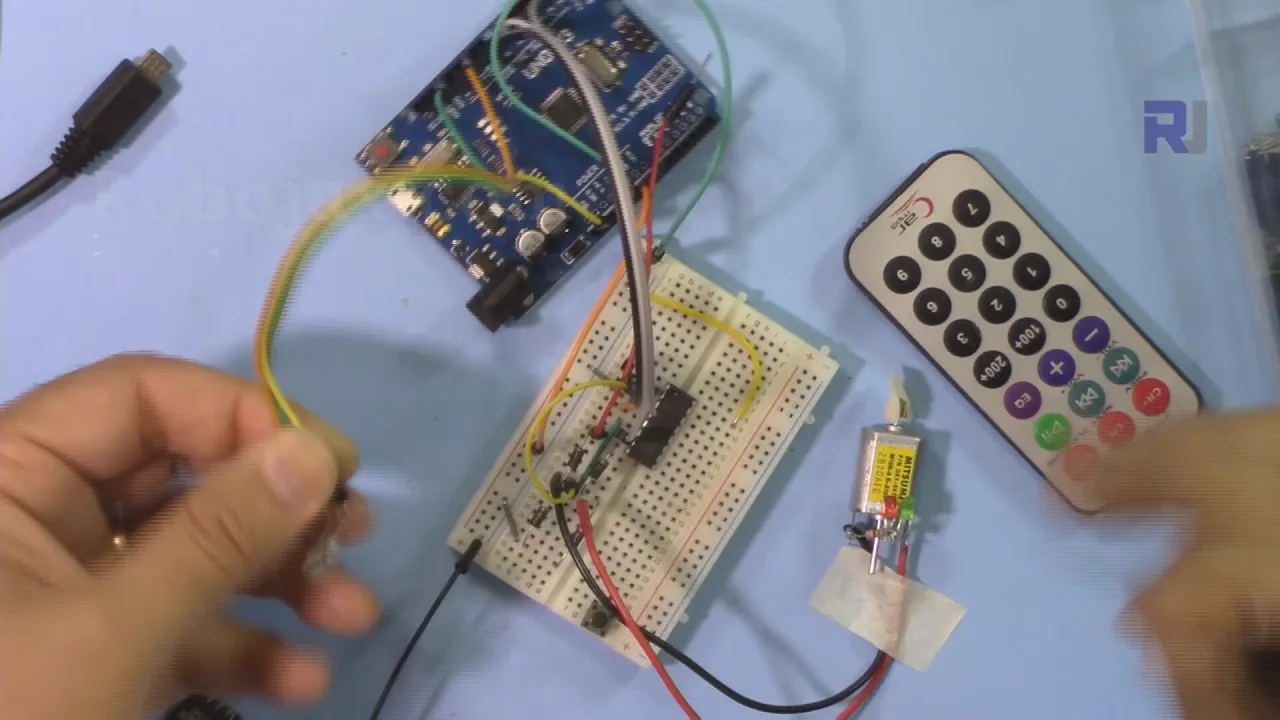
Liteya oyo elimbisi ndenge ya ko kontrolé direction ya moteur DC mpe fonction ya kozala na stop na kosalela remote controller ya IR, récepteur ya infrarouge, mpe carte Arduino. Chip ya moteur driver L293D ezali intermédiaire, oyo epesaka makoki na ba-signaux ya courant faible ya Arduino mpo na ko conduire moteur na sécurité. Projet oyo ezali introduction pratique na ko combiner contrôle ya télécommande na contrôle ya moteur, oyo efungolaka possibilités mingi mpo na ba-projets ya robotique mpe automatisation.
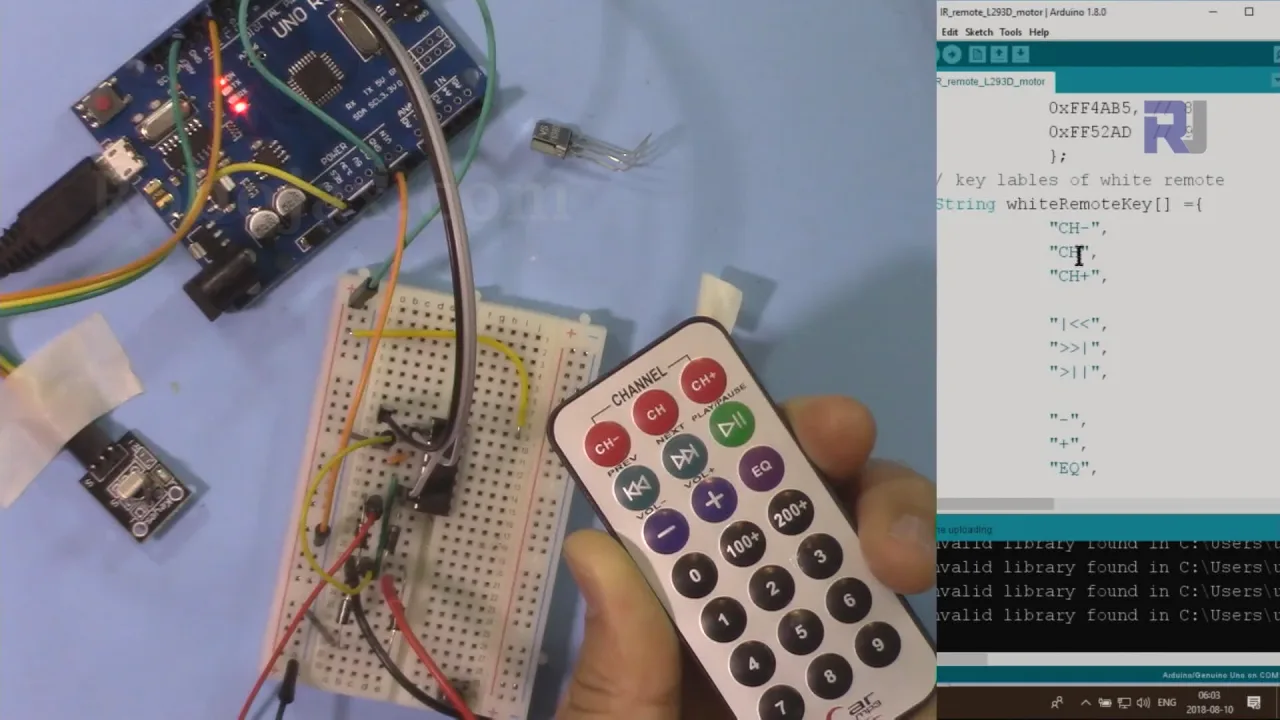
Tala ba-idées ya pratique oyo okoki kosala na mise en place oyo:
- Ko contrôle mouvement ya mwa voiture ya robotique to rover.
- Ko construire système ya camera slider to pan-tilt oyo eko contrôlée na télécommande.
- Ko créer commutateur ya on/off na sans fil mpo na fan ya DIY to eloko mosusu ya mike.
- Ko développer mécanisme ya porte to ya lock na télécommande mpo na modèle to projet ya mike.


Matériel oyo esengeli
- Carte Arduino (ex., Uno)
- IC ya moteur driver L293D
- Moteur DC (moke, 3-9V)
- Remote controller ya IR (noir to argenté/blanc)
- Module ya récepteur IR (na to na ngambo ya PCB)
- Source ya courant ya libanda mpo na moteur (ex., batterie ya 9V)
- Ba-fils ya jumper mpe breadboard
Guide ya câblage
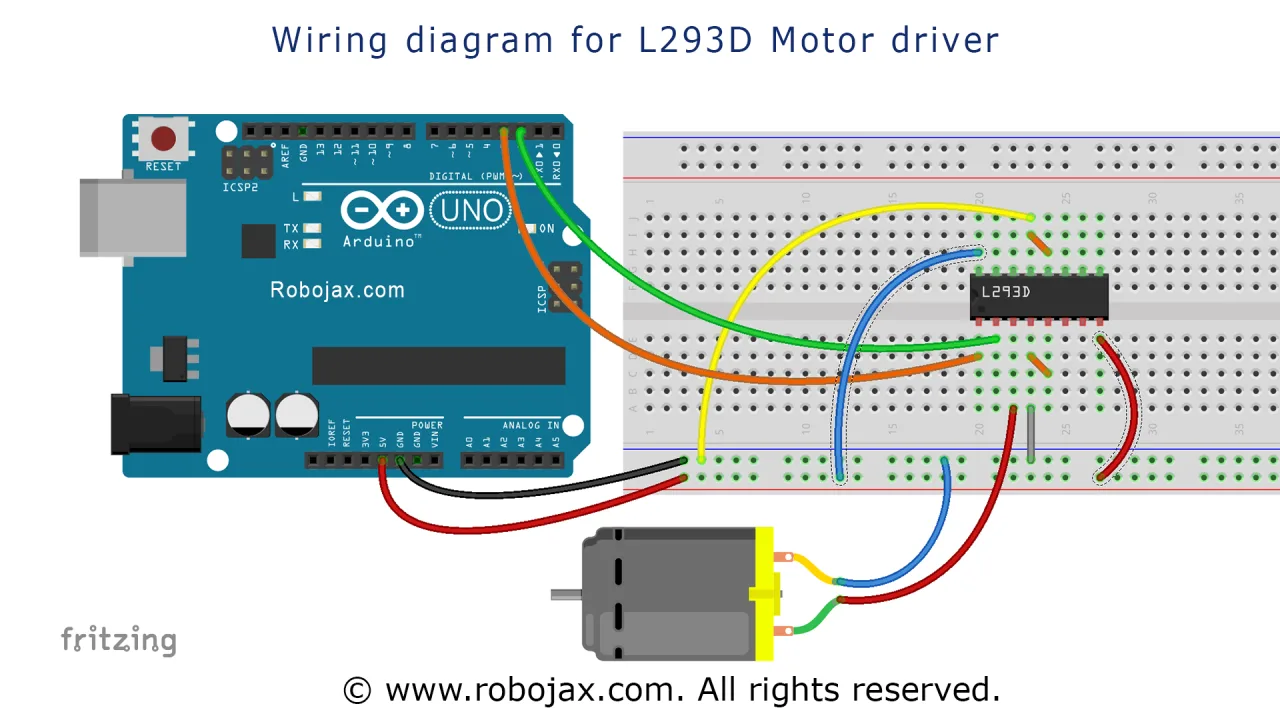
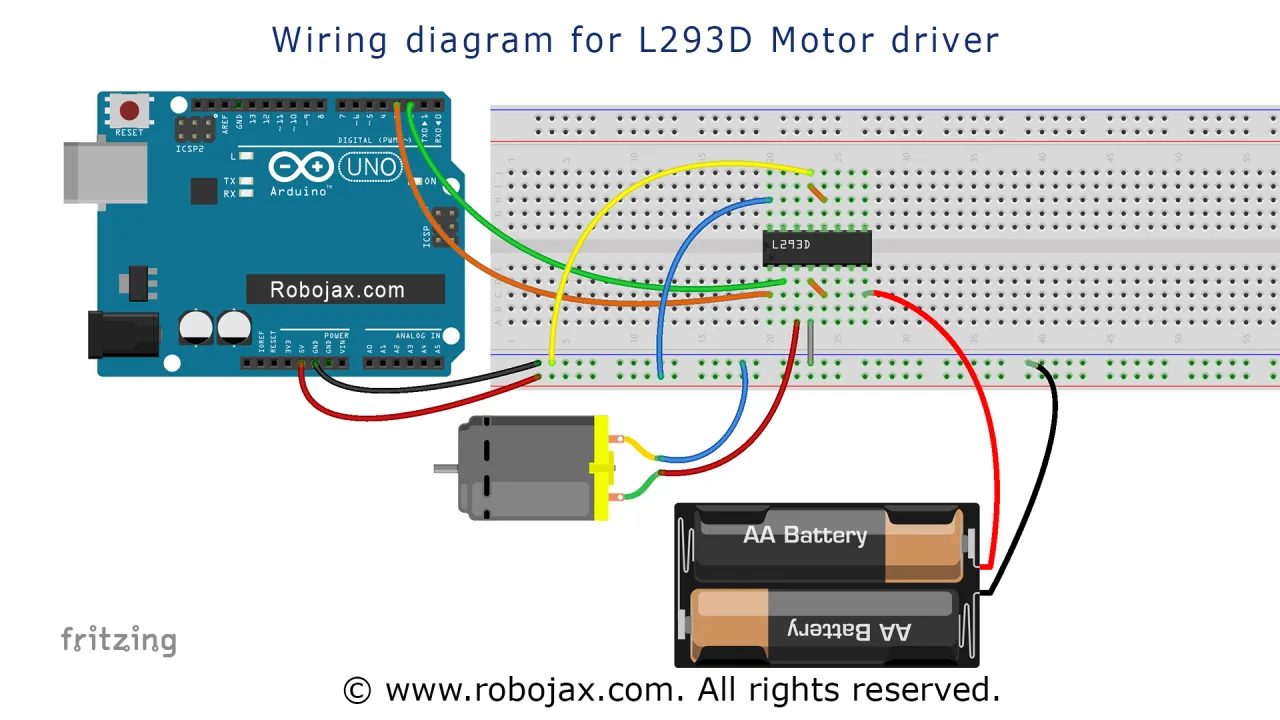
Mpo na projet oyo, chip L293D esalelami mpo na ko contrôle moteur kolanda ba-signaux oyo ewuti na Arduino. Ba-connexions ezali boye:
- Puissance mpe Terre: Pin 16 ya L293D ekangami na 5V ya Arduino. Ba-pins 4, 5, 12, mpe 13 ekangami esika moko mpe na terre commune. Source ya courant ya libanda mpo na moteur (ex., 9V) ekangami na pin 8 (VCC2).
- Ba-connexions ya moteur: Ba-fils mibale ya moteur DC ekangami na ba-pins 3 mpe 6 ya L293D. Direction ya rotation ekoki ko changer na ko inverser ba-connexions oyo soki esengeli. Ba-diodes ya flyback na chip ebatelaka yango na ba-spikes ya voltage oyo moteur eproduisaka.
- Ba-pins ya contrôle: Pin 1 (Enable 1,2) ekangami na pin 8 ya Arduino. Pin 2 (Input 1A) ekangami na pin 2 ya Arduino, mpe Pin 7 (Input 2A) ekangami na pin 7 ya Arduino. Ba-pins oyo ya Arduino eko contrôler direction mpe vitesse ya moteur.
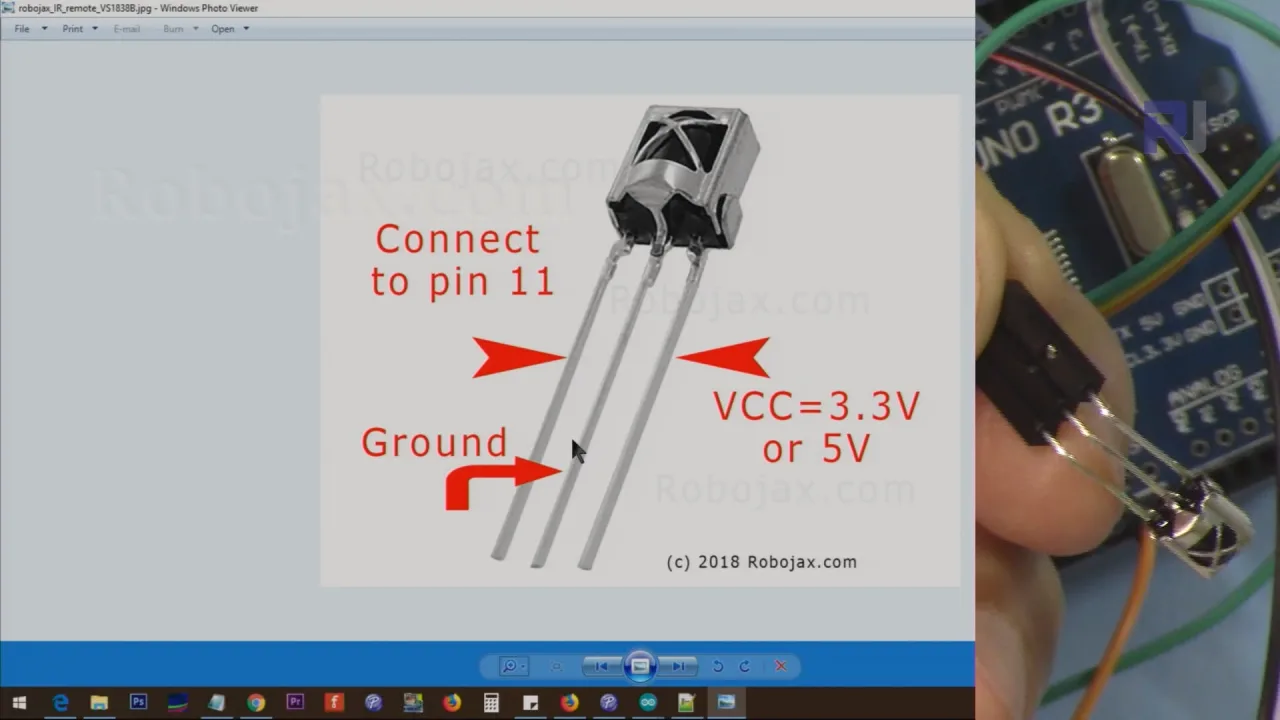
- Récepteur IR: Pin ya signal ya récepteur IR ekangami na pin 11 ya Arduino. Ba-pins VCC mpe GND ekangami na 5V mpe GND ya Arduino, na ndenge oyo esengeli. Soki ozali kosalela module ya récepteur oyo ezali na ngambo ya PCB, pinout ezali VCC, GND, mpe sortie ya signal.
Diagramme ya détaillée ya câblage ekomami na nse.

Source ya courant ya moteur esanganisi te na source ya logique ya Arduino, oyo ezali important mpo na kopesa courant ya kokoka na moteur na ko charger te régulateur ya voltage ya Arduino.
Explication ya Code
Liteya oyo ezali na ba-programmes mibale ya séparé. Ya liboso ezali code principal ya projet oyo esangisi contrôle ya télécommande IR na driver L293D. Ya mibale ezali programme ya plus simple mpo na ko tester driver ya moteur L293D na ndenge ya indépendant.
Source mpo na ko contrôle moteur servo na remote controller ya IR na kosalela Arduino
Oyo ezali programme ya mobimba mpo na projet. Esangisi bibliothèque ya récepteur IR mpe logique ya contrôle ya moteur L293D. Code esalami na ndenge oyo okoki ko configurer yango na pete mpo na remote mpe récepteur na yo ya spécifique.
Section oyo utilisateur akoki ko changer ezali na likolo ya code. Tala oyo esengeli okanga:
Liboso, esengeli okanga ndenge ya remote IR na yo mpe module ya récepteur. Variable type esengeli ekomama 'B' mpo na remote ya noir to 'W' mpo na remote ya blanc/argenté. Variable ya booléen PCB esengeli ekomama 1 soki ozali kosalela module ya récepteur na PCB, to 0 soki ozali kosalela récepteur oyo ezali na ngambo ya PCB te.
const char type ='B';// W mpo na blanc, B mpo na noir. Esengeli kobomba ba-quotes singulier lokola 'B' to 'W'
const boolean PCB = 0;// soki récepteur ezali na PCB, tia 1, soki te tia 0. Tala vidéo mpo na ba-détails
Na sima, okoki ko définir ba-touches nini na remote na yo eko contrôler moteur. Ba-strings RIGHT, LEFT, mpe STOP ekomami na ba-étiquettes ya ba-touches oyo olingi kosalela. Na ndakisa, na remote ya noir, défaut ezali flèche ya droite (>), flèche ya gauche (<), mpe bouton OK. Esengeli ekomama na ba-étiquettes ya ba-touches oyo e définis na ba-arrays lokola blackRemoteKey[].
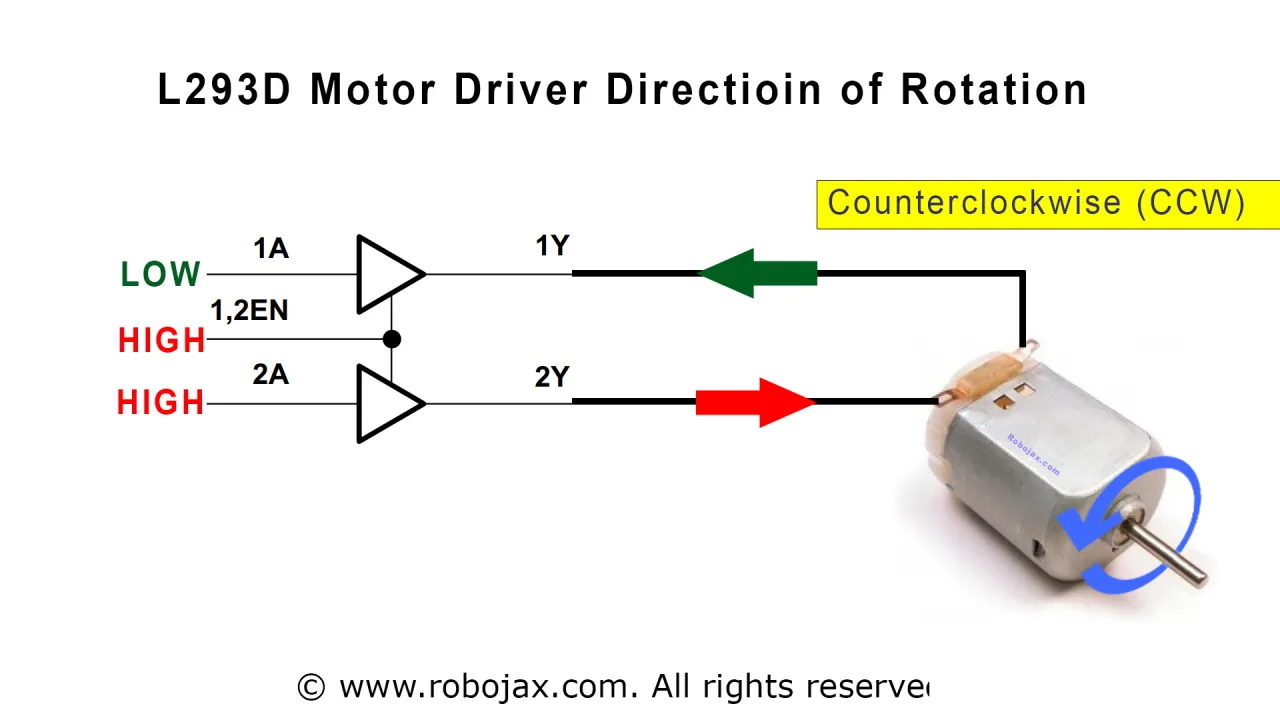
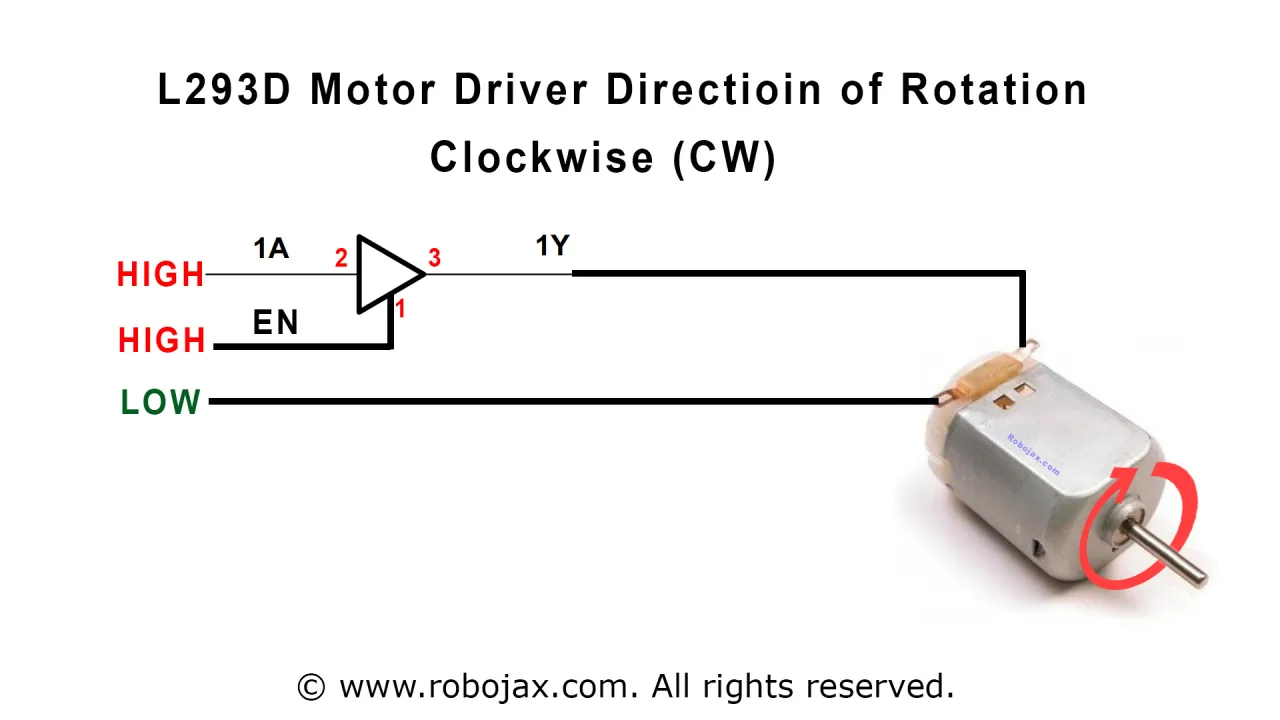
const String RIGHT=">";// kendeza moteur na loboko ya mobali (CW) na nkasa oyo na remote
const String LEFT ="<";// kendeza moteur na loboko ya mwasi (CCW) na nkasa oyo na remote
const String STOP ="OK";// kotelema moteur na nkasa oyo na remote
Okoki mpe kobongola ba pins ya Arduino oyo esalelami mpo na moteur mpe récepteur. Code efinir P1A, P2A, mpe EN12 mpo na L293D, mpe RECV_PIN mpo na récepteur IR. Soki olingi kosalela ba pins mosusu, okoki kobongola ba définitions oyo.
#define P1A 2 // définir pin 2 lokola mpo na P1A
#define P2A 7 // définir pin 7 lokola mpo na P2A
#define EN12 8 // définir pin 8 lokola mpo na 1,2EN enable
Logique ya liboso esalemi na fonction motorAction(). Ntango nkasa epresé, fonction robojaxValidateCode() e décode yango mpe e béla motorAction() na kombo ya nkasa. Fonction oyo e compa kombo na ba variables na yo RIGHT, LEFT, mpe STOP mpe e béla fonction L293D() na ndenge esengeli mpo na kopérusa moteur na direction ya malamu to kotelema yango.
Source mpo na contrôleur moteur L293 ya pete na Arduino
Oyo ezali programme ya test ya liboso mpo na chip L293D. Esengaka te récepteur IR. Na esika yango, e kendeza moteur automatiquement na séquence ya ba actions mpo na ko vérifier que câblage na yo ezali malamu.
Seul partie oyo utilisateur akoki kobongola na sketch oyo ezali définition ya pin, oyo esengeli kokokana na câblage na yo:
#define P1A 2 // définir pin 2 lokola mpo na P1A
#define P2A 7 // définir pin 7 lokola mpo na P2A
#define EN12 8 // définir pin 8 lokola mpo na 1,2EN enable
Na loop(), code e béla fonction L293D_con() na ba paramètres ndenge na ndenge. Paramètre ya liboso ezali caractère: 'L' mpo na direction moko mpe 'R' mpo na mosusu. Paramètre ya mibale ezali entier: 1 mpo na kopérusa moteur mpe 0 mpo na kotelema yango. Fonction oyo ezali ndenge ya pete ya ko tester moteur driver liboso ya ko intégrer yango na logique ya contrôle IR.
Démonstration ya Projet na Biso
Na vidéo, projet emonamaki na ba remotes mibale: ya mwindo mpe ya argent. Liboso, présentateur asalelaki remote ya mwindo na module récepteur PCB. Na nsima ya ko uploader code na ba réglages ya malamu (type='B', PCB=1), kopressa flèche ya loboko ya mobali e kendeza moteur na direction moko, flèche ya loboko ya mwasi e kendeza yango na direction oyo ekeseni, mpe bouton OK e telema yango.
Démonstration na nsima e bongwana na remote ya argent. Code ebongolami mpo na kosalela ba labels ya ba nkasa ya remote ya argent, lokola CH+ mpe CH-, mpo na contrôle. Présentateur amonisi ete moteur e répondre malamu na ba boutons mosusu oyo.
Na suka, présentateur alongoli module PCB mpe asalelaki récepteur IR ya bolumbu. Changement seul oyo esengeli na code ezali ko mettre PCB=0. Démonstration e condirme ete moteur etikali ko contrôler na ndenge ya malamu, oyo e prouve ete code esalelaka malamu ba types mibale ya récepteurs.
Ba Chapitres
- [00:00] Introduction mpe démonstration ya projet
- [00:53] Ba prérequis mpe ba vidéos oyo tosengeli
- [02:14] Explication ya câblage ya chip L293D
- [07:30] Explication ya code mpe configuration
- [14:15] Démonstration na remote ya mwindo mpe PCB
- [16:04] Démonstration na remote ya argent mpe PCB
- [17:42] Démonstration na remote ya argent sans PCB
- [18:23] Démonstration na remote ya mwindo sans PCB
Images
/*
 * Original Infrared library from - http://arcfn.com
 *
 * This is Arduino code for the L293D DC motor driver.
 * It uses an IR remote control to rotate the DC motor clockwise (CW), counter-clockwise (CCW), and stop it.
 * Watch instructions for this video: https://youtu.be/e0pvfJbdw_o
 * To get the library and files related to this code, visit http://robojax.com/learn/arduino
 // Written for Robojax.com video

 * Code is available at http://robojax.com/learn/arduino

 *
 // Written by Ahmad S. for Robojax.com on
// August 10, 2018 at 22:03 in Ajax, Ontario, Canada
    This program is free software: you can redistribute it and/or modify
    it under the terms of the GNU General Public License as published by
    the Free Software Foundation, either version 3 of the License, or
    (at your option) any later version.

    This program is distributed in the hope that it will be useful,
    but WITHOUT ANY WARRANTY; without even the implied warranty of
    MERCHANTABILITY or FITNESS FOR A PARTICULAR PURPOSE.  See the
    GNU General Public License for more details.

    You should have received a copy of the GNU General Public License
    along with this program.  If not, see <https://www.gnu.org/licenses/>.
*/
// DC motor control
#define P1A 2 // define pin 2 as for P1A
#define P2A 7 // define pin 7 as for P2A
#define EN12 8 // define pin 8 as for 1,2EN enable

// remote settings start
#include <IRremote.h>

int RECV_PIN = 11;
const char type ='B';// W for white, B for black. Must keep single quotes like 'B' or 'W'
const boolean PCB = 0;// if receiver is PCB set to 1, if not set to 0. See video for details
boolean displayCode = false;// to display remote code. if not, set to false

// IR remote settings
const String RIGHT=">";// move motor to the right (CW) with this key on remote
const String LEFT ="<";// move motor to the left (CCW) with this key on remote
const String STOP ="OK";// stop motor with this key on remote
// remote settings end

IRrecv irrecv(RECV_PIN);

// this is array holding codes for White Remote when used with PCB version of receiver
unsigned int whiteRemotePCB[] ={
            0xE318261B, // CH-
            0x511DBB,   // CH
            0xEE886D7F,  // CH+

            0x52A3D41F, // |<<
            0xD7E84B1B, // >>|
            0x20FE4DBB, // >||

            0xF076C13B, // -
            0xA3C8EDDB, // +
            0x12CEA6E6, // EQ

            0xC101E57B, // 0
            0x97483BFB, // 100+
            0xF0C41643, // 200+

            0x9716BE3F, // 1
            0x3D9AE3F7, // 2
            0x6182021B, // 3

            0x8C22657B, // 4
            0x488F3CBB, // 5
            0x449E79F,  // 6

            0x32C6FDF7, // 7
            0x1BC0157B, // 8
            0x3EC3FC1B  // 9
            };

// this is array holding codes for White Remote when used with non-PCB version of receiver
unsigned int whiteRemote[] ={
            0xFFA25D, // CH-
            0xFF629D,   // CH
            0xFFE21D,  // CH+

            0xFF22DD, // |<<
            0xFF02FD, // >>|
            0xFFC23D, // >||

            0xFFE01F, // -
            0xFFA857, // +
            0xFF906F, // EQ

            0xFF6897, // 0
            0xFF9867, // 100+
            0xFFB04F, // 200+

            0xFF30CF, // 1
            0xFF18E7, // 2
            0xFF7A85, // 3

            0xFF10EF, // 4
            0xFF38C7, // 5
            0xFF5AA5,  // 6

            0xFF42BD, // 7
            0xFF4AB5, // 8
            0xFF52AD  // 9
            };
// key lables of white remote
 String whiteRemoteKey[] ={
            "CH-",
            "CH",
            "CH+",

            "|<<",
            ">>|",
            ">||",

            "-",
            "+",
            "EQ",

            "0",
            "100+",
            "200+",

            "1",
            "2",
            "3",

            "4",
            "5",
            "6",

            "7",
            "8",
            "9"
            };

// this is array holding codes for Black Remote when used with non-PCB version of receiver
 unsigned int blackRemote[] ={
            0xFF629D, // ^
            0xFF22DD,   // <
            0xFF02FD,  // OK
            0xFFC23D, // >
            0xFFA857, // v

            0xFF6897, // 1
            0xFF9867, // 2
            0xF0C41643, // 3

            0xFF30CF, // 4
            0xFF18E7, // 5
            0xFF7A85,  // 6

            0xFF10EF, // 7
            0xFF38C7, // 8
            0xFF5AA5,  // 9

            0xFF42BD, // *
            0xFF4AB5, // 0
            0xFF52AD  // #
            };

// this is array holding codes for Black Remote when used with PCB version of receiver
 unsigned int blackRemotePCB[] ={
            0x511DBB, // ^
            0x52A3D41F,   // <
            0xD7E84B1B,  // OK
            0x20FE4DBB, // >
            0xA3C8EDDB, // v


            0xC101E57B, // 1
            0x97483BFB, // 2
            0xF0C41643, // 3

            0x9716BE3F, // 4
            0x3D9AE3F7, // 5
            0x6182021B,  // 6

            0x8C22657B, // 7
            0x488F3CBB, // 8
            0x449E79F,  // 9

            0x32C6FDF7, // *
            0x1BC0157B, // 0
            0x3EC3FC1B  // #
            };

// Black remote key names
 String blackRemoteKey[] ={
            "^",
            "<",
            "OK",
            ">",
            "v",

            "1",
            "2",
            "3",

            "4",
            "5",
            "6",

            "7",
            "8",
            "9",

            "*",
            "0",
            "#"
            };

decode_results results;


/*
 * Permission granted to share this code given that this
 * note is kept with the code.
 * Disclaimer: this code is "AS IS" and for educational purposes only.
 *
 */

void setup() {
  // L293 Motor Control Code by Robojax.com 2018025
  Serial.begin(9600);// setup Serial Monitor to display information
  pinMode(P1A, OUTPUT);// define pin as OUTPUT for P1A
  pinMode(P2A, OUTPUT);// define pin as OUTPUT for P2A
  pinMode(EN12, OUTPUT);// define pin as OUTPUT for 1,2EN

  Serial.println("Robojax IR Decode");
  Serial.println("Motor Control with Remote");
  irrecv.enableIRIn(); // Start the receiver


  // L293 Motor Control Code by Robojax.com 20180810
}

void loop() {
  // L293d Motor Control Code with IR by Robojax.com 20180810

  if (irrecv.decode(&results)) {
    if(displayCode)Serial.println(results.value, HEX);
    robojaxValidateCode(results.value);// used the "robojaxValidateCode" bellow
    irrecv.resume(); // Receive the next value
  }
  delay(50);// 50 millisecond delay
  // L293d Motor Control Code with IR by Robojax.com 20180810
}//loop end


/*
 * function: robojaxValidateCode
 * validates the remote code and prints the correct key name
 * cd is the code passed from the loop
 * Written by A. S. for Robojax
 */
void robojaxValidateCode(int cd)
{

  // Robojax IR Remote decoder
  int found=0;

 if(type =='W' && !PCB)
 {
    // Robojax IR White Remote decoder
    // if type is set to 'W' (white remote) and PCB=0 then check White remote code
      for(int i=0; i< sizeof(whiteRemote)/sizeof(int); i++)
      {
        if(whiteRemote[i] ==cd)
        {

          Serial.print("Key pressed:");
          Serial.println(whiteRemoteKey[i]);
          motorAction(whiteRemoteKey[i]);// take action
          found=1;
        }// if matched
      }// for
 }else if(type =='W' && PCB){
    // Robojax IR White Remote decoder
    // if type is set to 'W' (white remote) and PCB=1 then check White remote code
      for(int i=0; i< sizeof(whiteRemotePCB)/sizeof(int); i++)
      {
        if(whiteRemotePCB[i] ==cd)
        {

          Serial.print("Key pressed:");
          Serial.println(whiteRemoteKey[i]);
          motorAction(whiteRemoteKey[i]);// take action
          found=1;
        }// if matched
      }// for
 }else if(type =='B' && PCB){
    // Robojax IR Black Remote decoder
       // if type is set to 'B' (black remote) and PCB=1 then check Black remote code
       for(int i=0; i< sizeof(blackRemotePCB)/sizeof(int); i++)
      {
        // Robojax IR black Remote decoder
        if(blackRemotePCB[i] ==cd)
        {

          Serial.print("Key pressed:");
          Serial.println(blackRemoteKey[i]);
         motorAction(blackRemoteKey[i]);// take action
          found=1;
        }// if matched
      }// for
 }else{

      // if type is set to 'B' (black remote) and PCB =0 then check Black remote code
       for(int i=0; i< sizeof(blackRemote)/sizeof(int); i++)
      {
        // Robojax IR black Remote decoder
        if(blackRemote[i] ==cd)
        {

          Serial.print("Key pressed:");
          Serial.println(blackRemoteKey[i]);
          motorAction(blackRemoteKey[i]);// take action

          found=1;
        }// if matched
      }// for
 }// else
  if(!found){
    if(cd !=0xFFFFFFFF)
      {
    Serial.println("Key unknown");
      }
  }// found
}// robojaxValidateCode end

/*
 *
 * motorAction()
 * receives string "value" as input and based on the settings,
 * turns motor CW, CCW or STOP
 */
void motorAction(String value)
{
  // Robojax IR motor control
   if(value == RIGHT)
   {
    L293D('R',1);// rotate motor to the right (CCW)
   }

   if(value == LEFT)
   {
    L293D('L',1);// rotate motor to the left (CW)
   }

   if(value == STOP)
   {
    L293D('R',0);// stop motor
   }
}//motorAction end


/*
 * L293D(char dir, int en)
 * dir is character either L for CW direction
 *  or R for CCW direction
 *  en is integer 1 to rotate, 0 for stop
 */
void L293D(char dir, int en)
{
  if(dir =='L')
  {
    if(en ==0){
       Serial.println("CW Motor Stopped");
    }else{
       Serial.println("Rotating CW");
    }
    digitalWrite(EN12 ,en);// Enable 1A and 2A
    digitalWrite(P1A,HIGH);// send + or HIGH signal to P1A
    digitalWrite(P2A,LOW);// send - or LOW signal to P2A

  }else{
    if(en ==0){
       Serial.println("CCW Motor Stopped");
    }else{
       Serial.println("Rotating CCW");
    }
    digitalWrite(EN12 ,en);// Disable 1A and 2A
    digitalWrite(P1A,LOW);// send + or HIGH signal to P1A
    digitalWrite(P2A,HIGH);// send - or LOW signal to P2A
  }
}//L293D end++
/*
* This is the Arduino code for L293d DC motor Driver
* watch LE18-D80NK video for details https://youtu.be/MrYsmAwzfrM
* Code is available at http://robojax.com/learn/arduino
*
* Written by Ahmad S. for Robojax.com on
* August 9, 2018 at 22:03 in Ajax, Ontario, Canada
*/
// DC motor 1 control
#define P1A 2 // define pin 2 as for P1A
#define P2A 7 // define pin 7 as for P2A
#define EN12 8 // define pin 8 as for 1,2EN enable
/*
* Permission granted to share this code given that this
* note is kept with the code.
* Disclaimer: this code is "AS IS" and for educational purposes only.
*
*/
void setup() {
// L293 Motor Control Code by Robojax.com 2018025
Serial.begin(9600);// setup Serial Monitor to display information
pinMode(P1A, OUTPUT);// define pin as OUTPUT for P1A
pinMode(P2A, OUTPUT);// define pin as OUTPUT for P2A
pinMode(EN12, OUTPUT);// define pin as OUTPUT for 1,2EN
// L293 Motor Control Code by Robojax.com 2018025
}
void loop() {
// L293 Motor Control Code by Robojax.com 2018025
L293D_con('L',1);
delay(4000);
L293D_con('L',0);
delay(2000);
L293D_con('R',1);
delay(4000);
L293D_con('R',0);
delay(2000);
Serial.println("=========== Loop done");
delay(500);
// L293 Motor Control Code by Robojax.com 2018025
}
void L293D_con(char dir, int en)
{
if(dir =='L')
{
if(en ==0){
Serial.println(" CW Motor Stopped");
}else{
Serial.println(" Rotating CW");
}
digitalWrite(EN12 ,en);// Enable 1A and 2A
digitalWrite(P1A,HIGH);// send + or HIGH signal to P1A
digitalWrite(P2A,LOW);// send - or LOW signal to P2A
}else{
if(en ==0){
Serial.println(" CCW Motor Stopped");
}else{
Serial.println(" Rotating CCW");
}
digitalWrite(EN12 ,en);// Disable 1A and 2A
digitalWrite(P1A,LOW);// send + or HIGH signal to P1A
digitalWrite(P2A,HIGH);// send - or LOW signal to P2A
}
}//L293D_con endMokili na bisika
-
L'extérieurDownload Library for Arduino (GitHub)github.com
Fichiers📁
Fiche technique (pdf)
-
robojax_L293D_motor_shield_manual.pdf
robojax_L293D_motor_shield_manual.pdf0.16 MB -
L293d datasheet
L293d_datasheet.pdf0.34 MB