Lo ṣàkóso fìtílà AC kan pẹ̀lú ẹ̀rọ ìsàkóso infrared èyíkéyìí pẹ̀lú Arduino àti relay
Nínú ẹ̀kọ́ yìí, a óò kọ́ bí a ṣe lè lo ẹ̀rọ ìsàkóso ìjìnnà (infrared remote) láti ṣiṣẹ́ pẹ̀lú iná AC nípasẹ̀ Arduino àti module relay. Iṣẹ́ yìí wé mọ́ ṣíṣe ìtumọ̀ àwọn àmì (signals) láti remote náà àti lílo wọn láti ṣàkóso relay, èyí tí yóò mú iná AC wọ̀n-ọn-nì tàbí pa á. Ní ìparí ẹ̀kọ́ yìí, o óò lè lo remote ìjìnnà èyíkéyìí láti ṣàkóso iná ilé rẹ.
A óò lo olùgbà infrared kan láti gba àwọn àmì láti remote náà, Arduino yóò sì túmọ̀ àwọn àmì wọ̀nyí láti ṣe àwọn iṣẹ́ pàtó. Kóòdù tí a pèsè yóò jẹ́ kí o yan irú remote (dúdú tàbí funfun) àti bóyá o ń lo PCB tàbí module tí kò ní PCB fún olùgbà náà. Rí i pé o wo fídíò tó bá a lọ fún àwọn àlàyé àti ìṣàlàyé kún-ún (nínú fídíò ní 0:00).
Àlàyé Ohun Èlò
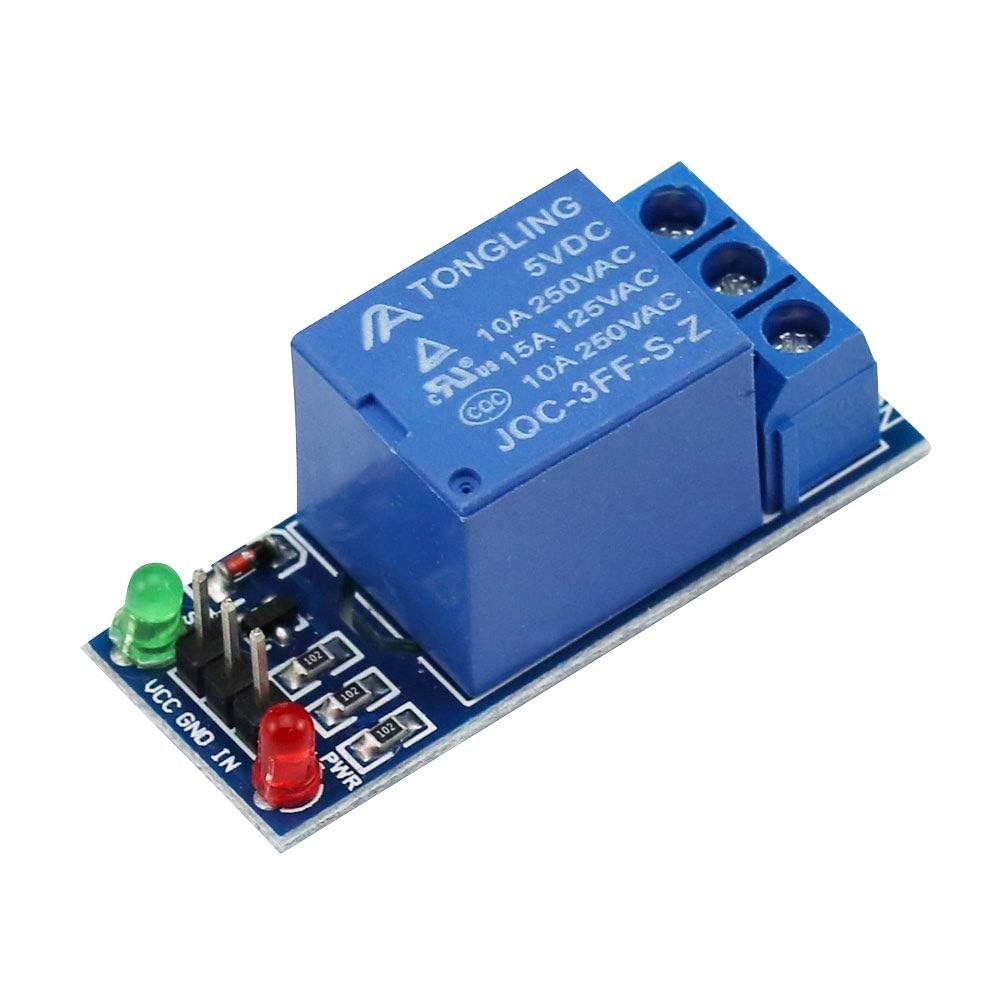
Fún iṣẹ́ yìí, àwọn èròjà pàtàkì ní Arduino board, module olùgbà infrared, àti module relay. Olùgbà infrared ni ó ń gba àwọn àmì láti remote náà tí yóò sì fi wọ́n ránṣẹ́ sí Arduino. Module relay ń ṣiṣẹ́ bí ẹ̀rọ ìmú-ṣiṣẹ́ láti ṣàkóso iná AC, tí yóò jẹ́ kí ó wọ̀n-ọn-nì tàbí pa á dá lórí àwọn àmì tí a gbà.

Olùgbà infrared sábà máa ń ṣiṣẹ́ ní ìgbohùnsáfẹ́fẹ́ 38 kHz, ó sì lè rí àwọn àmì láti ibi tí ó jìn tó 10 sí 15 mítà. Nígbà tí Arduino bá gba àmì náà, ó túmọ̀ rẹ̀, ó sì lo relay láti ṣàkóso agbára iná náà.
Àwọn Ìtọ́ni Ìsopọ̀
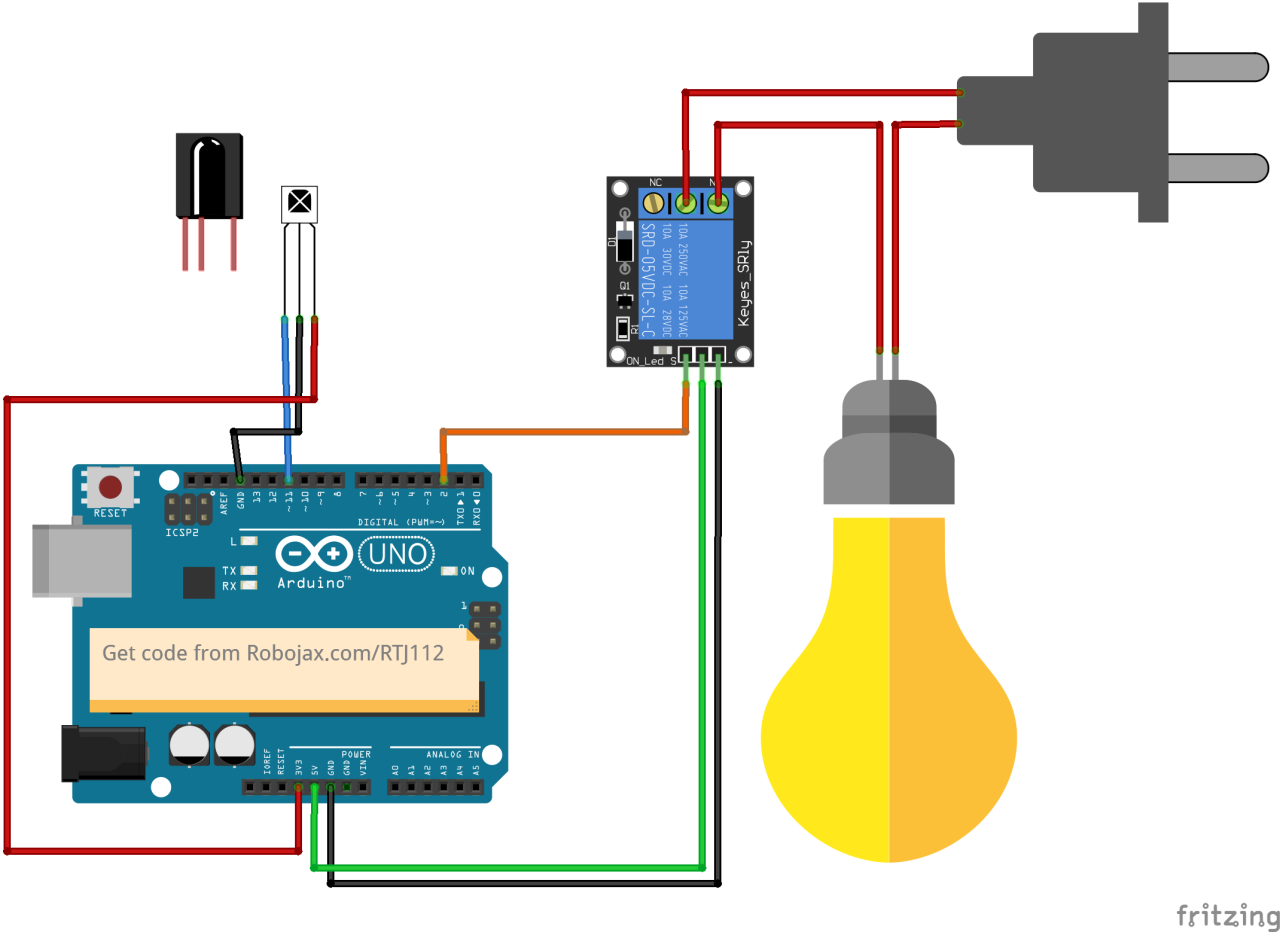
Bẹ̀rẹ̀ ìsopọ̀ nípa ṣíṣopọ̀ module olùgbà infrared sí Arduino. Pin VCC ti olùgbà náà sopọ̀ sí pin 5V lórí Arduino, pin ilẹ̀ (ground) sì sopọ̀ sí pin GND kan. Pin àmì (signal) láti olùgbà infrared yẹ kí ó sopọ̀ sí pin oní nọ́ńbà 11 lórí Arduino.
Lẹ́yìn náà, sopọ̀ module relay. Pin ìṣàkóso relay yẹ kí ó sopọ̀ sí pin oní nọ́ńbà 2 lórí Arduino. Bákan náà, sopọ̀ àwọn pin VCC àti GND ti relay sí 5V àti GND ti Arduino. Ní ìparí, sopọ̀ iná AC sí relay ní ìbámu pẹ̀lú àwọn ìlànà relay náà láti rí i pé ó ṣiṣẹ́ láìséwu.
Àwọn Àpẹẹrẹ Kóòdù & Ìtọ́sọ́nà
Nínú ìpele ìmúrasílẹ̀ ètò náà, a ń bẹ̀rẹ̀ ìbánisọ̀rọ̀ serial, a sì ń ṣètò pin relay. Àmì ìdánimọ̀ RECV_PIN ti ṣètò sí 11, èyí tí ó jẹ́ ibi tí pin àmì olùgbà infrared ti sopọ̀. Èyí jẹ́ kí a gba àwọn àmì láti remote náà.
void setup() {
  Serial.begin(9600);
  irrecv.enableIRIn(); // Bẹ̀rẹ̀ olùgbà náà
  pinMode(RELAY_PIN, OUTPUT); // ṣàlàyé pin fún relay bí OUTPUT
  digitalWrite(RELAY_PIN, HIGH); // ṣètò relay sí OFF ní ìbẹ̀rẹ̀
}
Nínú ìṣiṣẹ́ loop, a ń ṣàyẹ̀wò àwọn àmì tó ń bọ̀ láti remote nígbà gbogbo. Nígbà tí a bá rí àmì kan, a túmọ̀ iye rẹ̀, a sì ṣe ìgbésẹ̀ tó bá bọ́ọ́ mu dá lórí bọ́tìì tí a tẹ̀.
void loop() {
  if (irrecv.decode(&results)) {
    Serial.println(results.value, HEX); // Tẹ̀ iye tí a gbà jáde
    robojaxValidateCode(results.value); // Ṣàyẹ̀wò kóòdù náà
    irrecv.resume(); // Gba iye tí ó tẹ̀lé e
  }
  delay(100);
}
Ìṣiṣẹ́ robojaxValidateCode ń ṣàyẹ̀wò kóòdù tí a gbà lòdì sí àwọn iye tí a mọ̀ fún remote náà. Dá lórí bọ́tìì tí a tẹ̀, yóò ṣe ìgbésẹ̀ tó bá a mu ní lílo relay.
void robojaxValidateCode(int cd) {
  if (type == 'W' && !PCB) {
    // Ṣàyẹ̀wò àwọn kóòdù remote funfun
    for (int i = 0; i < sizeof(whiteRemote) / sizeof(int); i++) {
      if (whiteRemote[i] == cd) {
        Serial.print("Bọ́tìì tí a tẹ̀: ");
        Serial.println(whiteRemoteKey[i]);
        relayAction(whiteRemoteKey[i]); // Ṣe ìgbésẹ̀
      }
    }
  }
}
Nínú ìṣiṣẹ́ yìí, kóòdù náà ń ṣàyẹ̀wò bóyá bọ́tìì tí a tẹ̀ bá àwọn iye inú array tí a ṣàlàyé mu. Bí a bá rí ìbámu kan, ó ń pe ìṣiṣẹ́ relayAction láti mú relay wọ̀n-ọn-nì tàbí pa á, dá lórí bọ́tìì tí a tẹ̀.
Ìṣàfihàn / Ohun Tí O Lè Retí
Lẹ́yìn tí o bá parí ìsopọ̀ àti gbígbé kóòdù náà sí inú Arduino, o lè lo remote ìjìnnà rẹ láti ṣàkóso iná AC. Tẹ àwọn bọ́tìì tí a yàn lórí remote náà, relay yóò sì mú iná náà wọ̀n-ọn-nì tàbí pa á ní ìbámu. Rí i pé o dán àwọn bọ́tìì kọ̀ọ̀kan wò láti rí ìdáhùn wọn (nínú fídíò ní 5:00).
Àwọn Àkókò Nínú Fídíò
- 00:00 Ìbẹ̀rẹ̀
- 00:49 Ìfihàn
- 02:00 Ìsopọ̀ àti àṣopọ̀
- 05:27 Àlàyé kóòdù Arduino
- 09:51 Ìṣàfihàn ṣíṣàkóso iná AC pẹ̀lú remote ọ̀tọ̀ọ̀tọ̀
- 13:13 Lílo remote TV rẹ láti ṣàkóso iná AC
Aworan

/*
 * Original library from - http://arcfn.com
 *
 * This Arduino code decodes any remote code and then you can control an AC load using a relay
 * sold on eBay for Arduino.
 * You have to select the type of your remote as Black or White in the code below
 * and also select your receiver 1838 as either a PCB or bare module. See video for details
 *
 * You have to watch this video: https://youtu.be/muAkBQb24NI
 * before proceeding with this code.
 *
 * Modified/Written by Ahmad Shamshiri
 * on July 31, 2018 at 20:33 in Ajax, Ontario, Canada
 * for Robojax.com
 * Watch video instructions for this code: https://youtu.be/j5kb0WBpD30
 * Get other Arduino codes from Robojax.com
 *
 */

#include <IRremote.h>

int RECV_PIN = 11;
const char type ='W';// W for white, B for black. Must keep single quotes like 'B' or 'W'
const boolean PCB = 1;// if receiver is PCB set to 1, if not set to 0. See video for details
boolean displayCode = true;// to display remote code. if not, set to false

//***** Relay settings begins
const int RELAY_PIN = 2;//
const String ON="3";// turn relay ON with + key on remote
const String OFF="1";// turn relay OFF with - key on remote
//**** Relay settings ends

IRrecv irrecv(RECV_PIN);


// this is array holding codes for White Remote when used with PCB version of receiver
unsigned int whiteRemotePCB[] ={
            0xE318261B, // CH-
            0x511DBB,   // CH
            0xEE886D7F,  // CH+

            0x52A3D41F, // |<<
            0xD7E84B1B, // >>|
            0x20FE4DBB, // >||

            0xF076C13B, // -
            0xA3C8EDDB, // +
            0x12CEA6E6, // EQ

            0xC101E57B, // 0
            0x97483BFB, // 100+
            0xF0C41643, // 200+

            0x9716BE3F, // 1
            0x3D9AE3F7, // 2
            0x6182021B, // 3

            0x8C22657B, // 4
            0x488F3CBB, // 5
            0x449E79F,  // 6

            0x32C6FDF7, // 7
            0x1BC0157B, // 8
            0x3EC3FC1B  // 9
            };

// this is array holding codes for White Remote when used with non-PCB version of receiver
unsigned int whiteRemote[] ={
            0xFFA25D, // CH-
            0xFF629D,   // CH
            0xFFE21D,  // CH+

            0xFF22DD, // |<<
            0xFF02FD, // >>|
            0xFFC23D, // >||

            0xFFE01F, // -
            0xFFA857, // +
            0xFF906F, // EQ

            0xFF6897, // 0
            0xFF9867, // 100+
            0xFFB04F, // 200+

            0xFF30CF, // 1
            0xFF18E7, // 2
            0xFF7A85, // 3

            0xFF10EF, // 4
            0xFF38C7, // 5
            0xFF5AA5,  // 6

            0xFF42BD, // 7
            0xFF4AB5, // 8
            0xFF52AD  // 9
            };
// key lables of white remote
 String whiteRemoteKey[] ={
            "CH-",
            "CH",
            "CH+",

            "|<<",
            ">>|",
            ">||",

            "-",
            "+",
            "EQ",

            "0",
            "100+",
            "200+",

            "1",
            "2",
            "3",

            "4",
            "5",
            "6",

            "7",
            "8",
            "9"
            };

// this is array holding codes for Black Remote when used with non-PCB version of receiver
 unsigned int blackRemote[] ={
            0xFF629D, // ^
            0xFF22DD,   // <
            0xFF02FD,  // OK
            0xFFC23D, // >
            0xFFA857, // v

            0xFF6897, // 1
            0xFF9867, // 2
            0xF0C41643, // 3

            0xFF30CF, // 4
            0xFF18E7, // 5
            0xFF7A85,  // 6

            0xFF10EF, // 7
            0xFF38C7, // 8
            0xFF5AA5,  // 9

            0xFF42BD, // *
            0xFF4AB5, // 0
            0xFF52AD  // #
            };

// this is array holding codes for Black Remote when used with PCB version of receiver
 unsigned int blackRemotePCB[] ={
            0x511DBB, // ^
            0x52A3D41F,   // <
            0xD7E84B1B,  // OK
            0x20FE4DBB, // >
            0xA3C8EDDB, // v


            0xC101E57B, // 1
            0x97483BFB, // 2
            0xF0C41643, // 3

            0x9716BE3F, // 4
            0x3D9AE3F7, // 5
            0x6182021B,  // 6

            0x8C22657B, // 7
            0x488F3CBB, // 8
            0x449E79F,  // 9

            0x32C6FDF7, // *
            0x1BC0157B, // 0
            0x3EC3FC1B  // #
            };

// Black remote key names
 String blackRemoteKey[] ={
            "^",
            "<",
            "OK",
            ">",
            "v",

            "1",
            "2",
            "3",

            "4",
            "5",
            "6",

            "7",
            "8",
            "9",

            "*",
            "0",
            "#"
            };

decode_results results;


void setup()
{
  Serial.begin(9600);
  // In case the interrupt driver crashes on setup, give a clue
  // to the user what's going on.
  Serial.println("Robojax IR Decode");
  Serial.println("Control Relay with Remote");
  irrecv.enableIRIn(); // Start the receiver

  pinMode(RELAY_PIN,OUTPUT);// define a pin for relay as OUTPUT
  digitalWrite(RELAY_PIN, HIGH);// set relay to OFF at the begining
}

void loop() {

  if (irrecv.decode(&results)) {
    if(displayCode)Serial.println(results.value, HEX);
    robojaxValidateCode(results.value);// used the "robojaxValidateCode" bellow
    irrecv.resume(); // Receive the next value
  }
  delay(100);
}

/*
 * function: robojaxValidateCode
 * validates the remote code and prints the correct key name
 * cd is code passed from the loop
 * Written by A. S. for Robojax
 */
void robojaxValidateCode(int cd)
{

  // Robojax IR Remote decoder
  int found=0;

 if(type =='W' && !PCB)
 {
    // Robojax IR White Remote decoder
    // if type is set to 'W' (white remote) and PCB=0 then check White remote code
      for(int i=0; i< sizeof(whiteRemote)/sizeof(int); i++)
      {
        if(whiteRemote[i] ==cd)
        {

          Serial.print("Key pressed:");
          Serial.println(whiteRemoteKey[i]);
          relayAction(whiteRemoteKey[i]);// take action
          found=1;
        }// if matched
      }// for
 }else if(type =='W' && PCB){
    // Robojax IR White Remote decoder
    // if type is set to 'W' (white remote) and PCB=1 then check White remote code
      for(int i=0; i< sizeof(whiteRemotePCB)/sizeof(int); i++)
      {
        if(whiteRemotePCB[i] ==cd)
        {

          Serial.print("Key pressed:");
          Serial.println(whiteRemoteKey[i]);
          relayAction(whiteRemoteKey[i]);// take action
          found=1;
        }// if matched
      }// for
 }else if(type =='B' && PCB){
    // Robojax IR Black Remote decoder
       // if type is set to 'B' (black remote) and PCB=1 then check Black remote code
       for(int i=0; i< sizeof(blackRemotePCB)/sizeof(int); i++)
      {
        // Robojax IR black Remote decoder
        if(blackRemotePCB[i] ==cd)
        {

          Serial.print("Key pressed:");
          Serial.println(blackRemoteKey[i]);
         relayAction(blackRemoteKey[i]);// take action
          found=1;
        }// if matched
      }// for
 }else{

      // if type is set to 'B' (black remote) and PCB =0 then check Black remote code
       for(int i=0; i< sizeof(blackRemote)/sizeof(int); i++)
      {
        // Robojax IR black Remote decoder
        if(blackRemote[i] ==cd)
        {

          Serial.print("Key pressed:");
          Serial.println(blackRemoteKey[i]);
          relayAction(blackRemoteKey[i]);// take action

          found=1;
        }// if matched
      }// for
 }// else
  if(!found){
    if(cd !=0xFFFFFFFF)
      {
    Serial.println("Key unknown");
      }
  }// found
}// robojaxValidateCode end

/*
 *
 * relayAction()
 * receives string "value" as input and based on the settings,
 * turns relay pin HIGH or LOW
 */
void relayAction(String value)
{
  // Robojax IR Relay control
   if(value == ON)
   {
    digitalWrite(RELAY_PIN, LOW);// Turn relay ON
    Serial.println("Relay Turned ON");
   }

   if(value == OFF)
   {
    digitalWrite(RELAY_PIN, HIGH);// Turn relay OFF
    Serial.println("Relay Turned OFF");
   }
}//relayAction end
Ohun ti o le nilo
-
Amazon
-
eBay
Orisun & itọkasi
Ko si awọn orisun sibẹsibẹ.
Fáìlìs📁
Fayile Fritzing
-
VS1838B Infrared receiver
VS1838B_part.fzpz