This tutorial is part of: Ba claviers
Ba vidéos nionso ya clavier ezali na liste awa.
Kosakola na 4x3 Keypad na Arduino
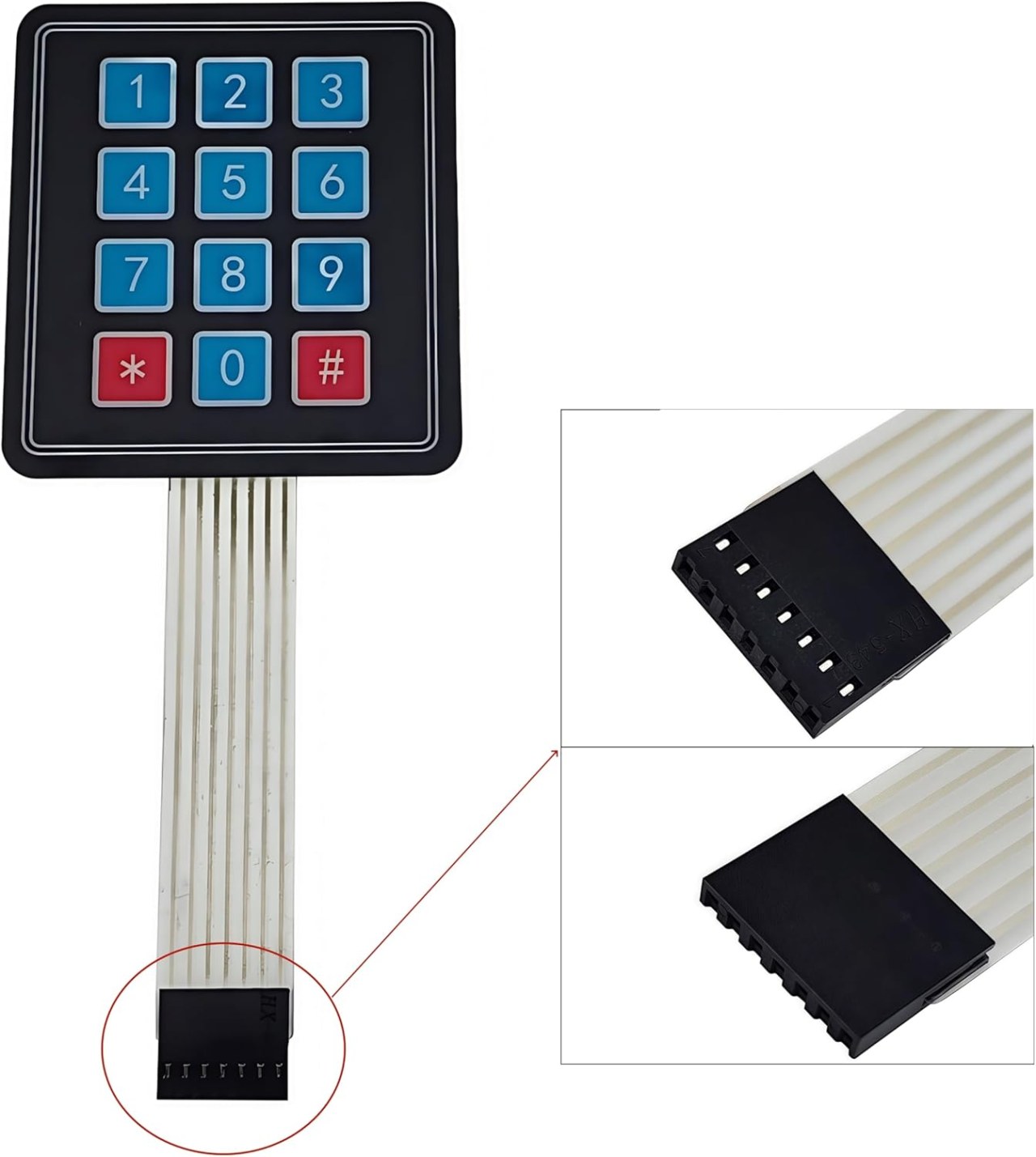
Na boyekoli oyo, tokotalela ndenge ya kosalela keypad ya 4x3 na Arduino mpo na kotanga bobengi ya ba touches. Keypad oyo ekoki kosalelama na ba projets ebele, lokola kosala interface ya pete ya bokotisi mpo na système ya sécurité to application nyonso oyo esengaka bokotisi ya utilisateur. Na suka ya boyekoli oyo, okokoka kotanga bobengi ya ba touches mpe koyanola na ba touches ya sikisiki.

Tála vidéo oyo ezali kolanda mpo na ndimbola ya miso ya câblage mpe mise en œuvre ya code (na vidéo na 00:00).
Matériel oyo esengeli
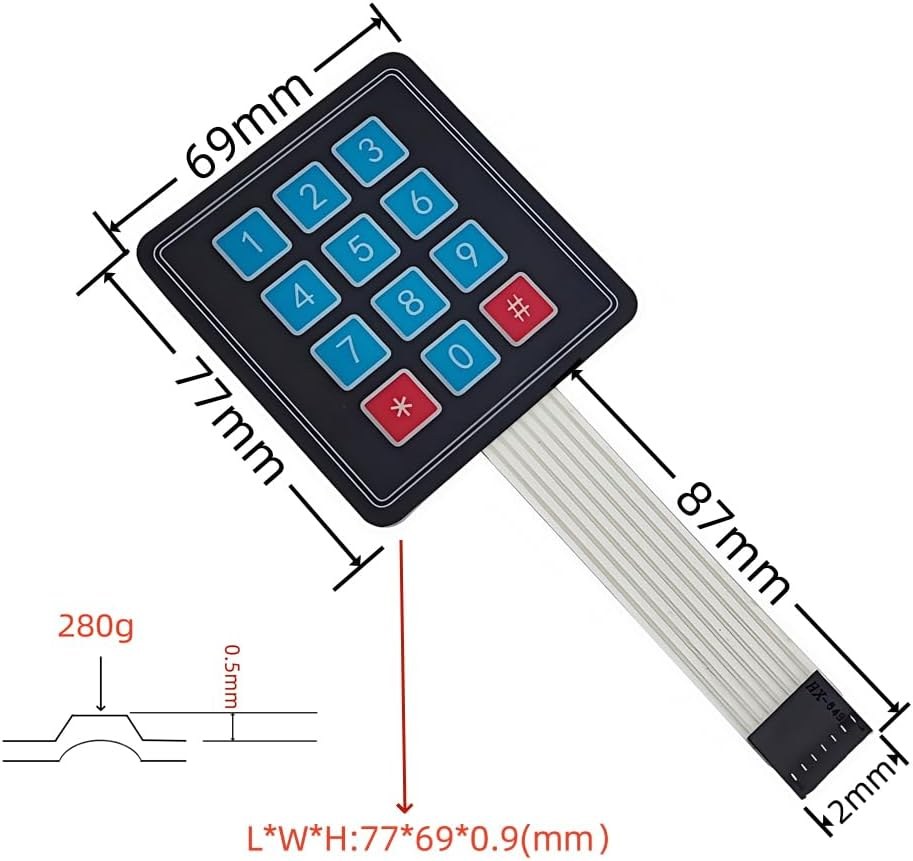
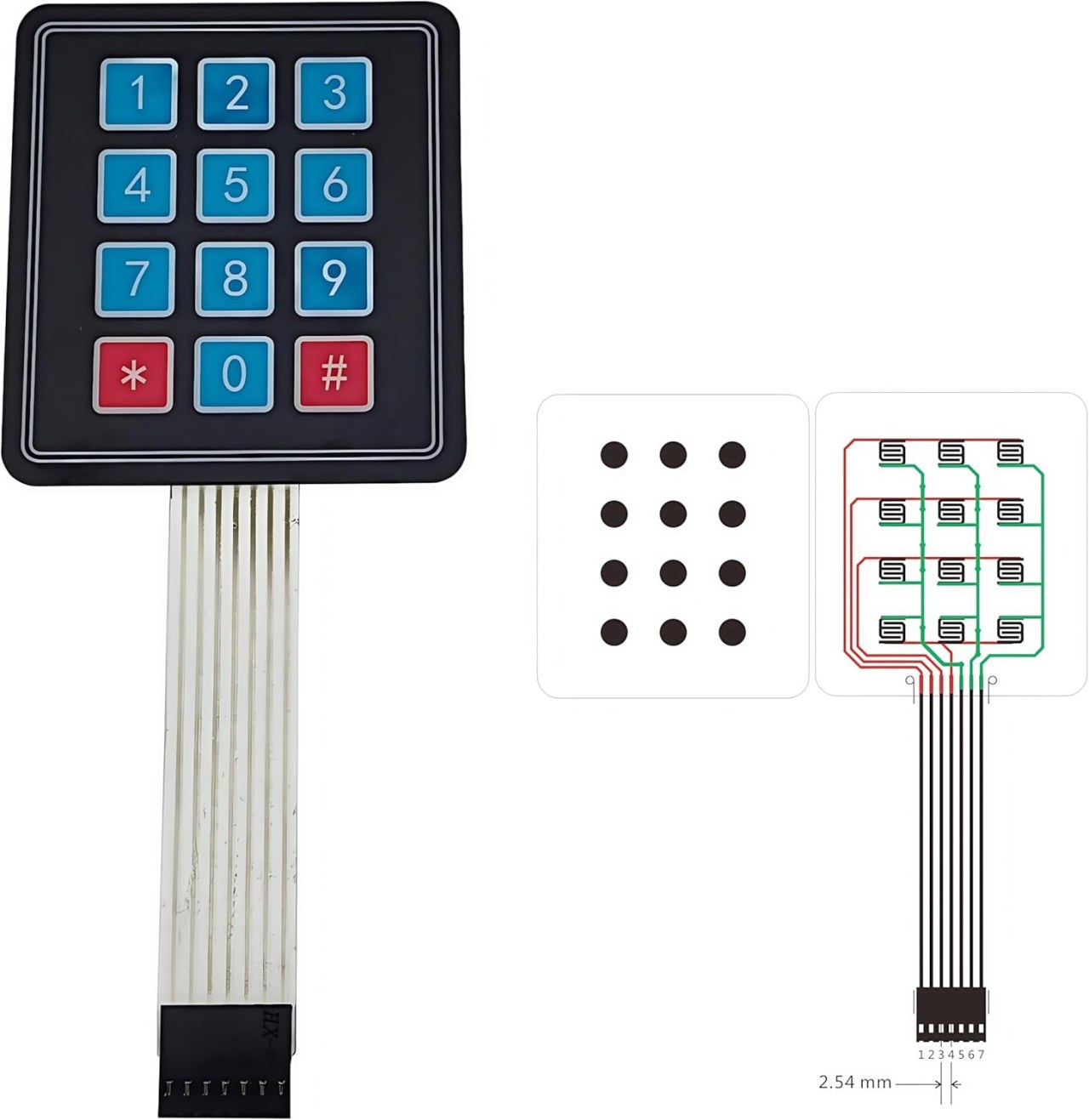
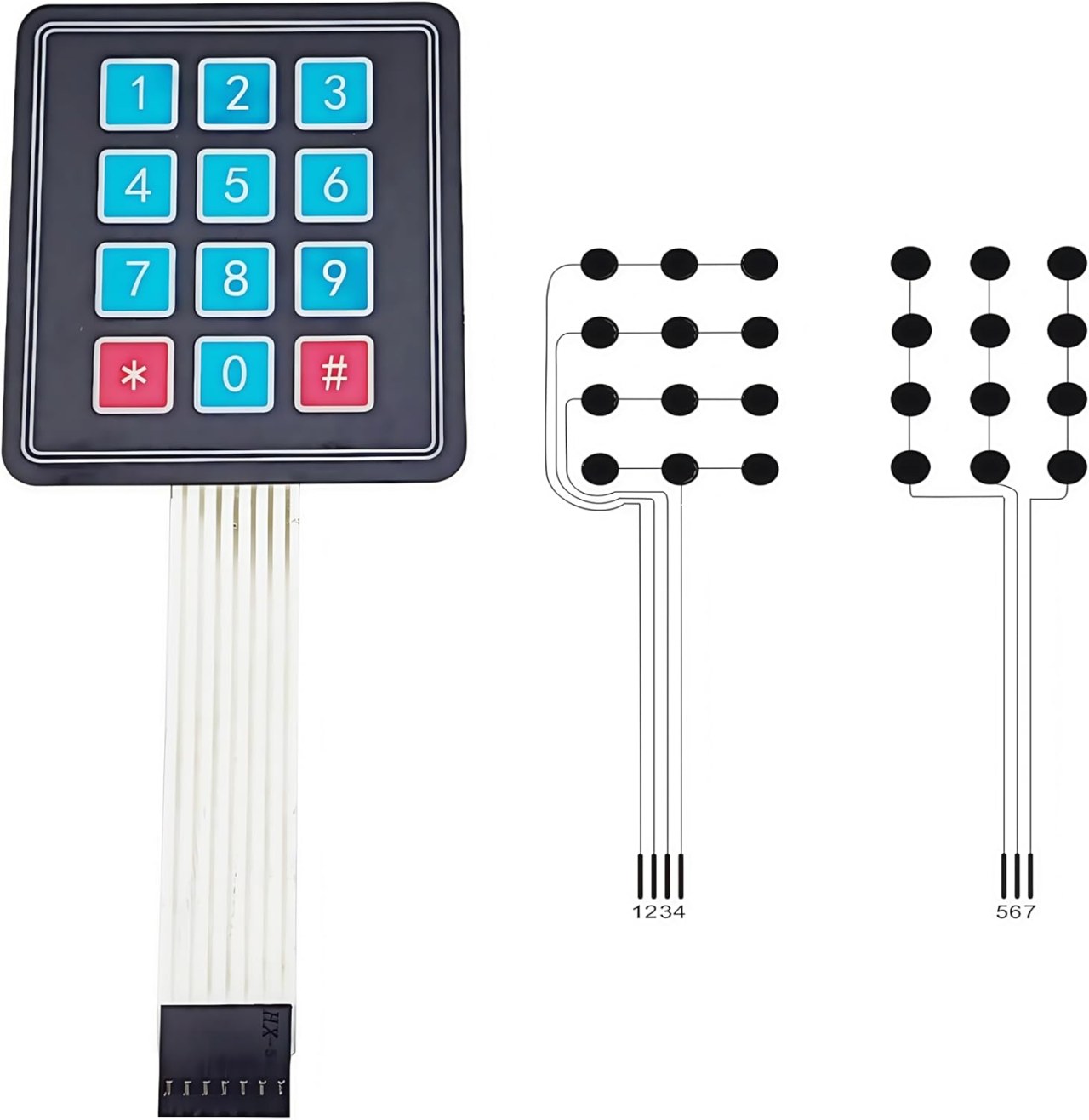
Ba composants ya minene mpo na projet oyo ezali keypad ya 4x3 mpe carte Arduino. Keypad ezali na matrice ya ba boutons oyo ezali na ba rangées 4 mpe ba colonnes 3. Ntango bouton epresaka, esangisaka rangée moko na colonne moko, oyo epesaka Arduino ndenge ya koyeba nini bouton epresamaki.
Carte Arduino ezali lokola contrôleur ya kati oyo etangaka ba entrées ya keypad. Esalelaka bibliothèque Keypad, oyo ekitisaka mosala ya kokamba keypad ya matrice mpe esalaka ete ezala pete mpo na koyeba ba touches oyo epresami.
Détails ya Datasheet
| Fabricant | Ba ndenge na ndenge |
|---|---|
| Numéro ya partie | Keypad ya 4x3 |
| Tension ya logique | 5 V |
| Courant ya fonctionnement | ≤ 20 mA |
| Durée de vie ya ba touches | ≥ 1,000,000 ba pressions |
| Paquet | Keypad ya Matrice |
- Kokangisa ba pins ya keypad na ba pins ya digitale ya Arduino na ndenge ya semba.
- Salela ba résistances ya pull-up to pull-down soki esengeli, kolanda ndenge oyo osali.
- Kokamba ete bibliothèque Keypad ezali na kati ya Arduino IDE na yo.
- Debouncer ba pressions ya ba touches na logiciel mpo na kokima kotanga mbala ebele.
- Meka touch nyonso mpo na kondima câblage mpe fonctionnement ya semba.
Ba Instructions ya Câblage

Mpo na kokangisa keypad ya 4x3 na Arduino, okokangisa ba pins ya rangée mpe ya colonne ya keypad na ba pins ya digitale ya Arduino. Kokangisa ba pins ya rangée (mbala mingi ba pins 4) na ba pins 2, 3, 4, mpe 5 ya Arduino. Ba pins ya colonne (mbala mingi ba pins 3) esengeli kokangisama na ba pins 6, 7, mpe 8.
Kokamba ete okangisi pin ya terre ya keypad na terre ya Arduino mpe pin ya puissance na sortie 5V. Configuration oyo ekolakisa Arduino kotanga état ya touch nyonso ntango epresami, na kosalela bibliothèque Keypad mpo na kokamba balayage ya matrice.
Ba Exemples ya Code & Explication
Code oyo elandaka ebandisaka keypad mpe epesaka touch oyo epresami na moniteur ya série. Ba valeurs ya ba touches ebatelami na tableau ya ba caractères.
const byte ROWS = 4; //ba rangées minei
const byte COLS = 3; //ba colonnes misato
char keys[ROWS][COLS] = {
  {'1','2','3'},
  {'4','5','6'},
  {'7','8','9'},
  {'*','0','#'}
};
Tableau keys elakisi ndenge keypad ezali, oyo ekokani na ndenge ya ba touches ezali na nzoto. Caractère nyonso ezali kopesa bouton moko na keypad.
Na sima, tokomisaka keypad na fonction setup():
void setup(){
  Serial.begin(9600);
  Serial.println("Robojax 4x3 keypad");
}
Segment oyo ebandisaka communication ya série na taux ya baud 9600, oyo epesaka biso ndenge ya komona ba pressions ya ba touches na moniteur ya série.
Na suka, boucle etalaka ba pressions ya ba touches mpe eyanolaka na ndenge oyo:
void loop(){
  char key = keypad.getKey();
  if (key){
    Serial.println(key);
  }
  if (key =='4'){
    Serial.println("Key 4 is pressed");
  }
}
Awa, programme etalaka soki touch moko epresami na kosalela keypad.getKey(). Soki touch epresami, epesaka valeur ya touch. Na libanda, soki touch '4' epresami, message ya sikisiki elakemaka.
Démonstration / Nini Okoki Kozela
Ntango configuration esili, kopressa touch nyonso na keypad esengeli kopesa caractère oyo ekokani na moniteur ya série. Soki touch '4' epresami, message ya sikisiki ekomama oyo elakisi ete touch yango ebandisami. Fonctionnalité oyo epesaka yo ndenge ya kotonga na likolo ya fondation oyo mpo na ba applications ya mingi koleka.
Keba na ba entrées ya flottant oyo ekoki komema na comportement ya mabe. Kamba ete ba connexions nyonso ezali ya semba mpe meka touch nyonso mpo na kondima fonctionnement ya semba (na vidéo na 00:00).
Images
This tutorial is part of: Ba claviers
- Code Arduino mpe Vidéo ya keypad ya ba touches minei
- Code ya Arduino mpe Video: Keypad Moiro ya 4x4
- Build a Simple Electronic Lock with Keypad and LCD Using Arduino
- Controlling an 8-channel relay with a 4x3 keypad
- Lolenge ya kosalela 4x4 Soft Keypad na Arduino
- How to Use a 5x4 20-Key Keypad with Arduino to Detect Strings
- Lesson 67: Controlling an 8-Channel Relay with a Keypad Using Arduino
- Écran LCD 1602 avec clavier : Code de base
/*
 * Library taken from: https://playground.arduino.cc/Code/Keypad
 * This is the Arduino code for a 4x3 keypad.
 * Watch the video for details and demo: http://youtu.be/qIDzzG2LUtg
resources page: www.Robojax.com/RJT104
 *
 * Modified by Ahmad Shamshiri for the Robojax Video channel: www.Robojax.com/RJT104
 * Date: July 11, 2018 at 19:56 in Ajax, Ontario, Canada
 * Permission granted to share this code, given that this
 * note is kept with the code.
 * Disclaimer: This code is "AS IS" and for educational purposes only.
 * This code has been downloaded from https://robojax.com
 * Watch video instructions for this code:
 *
 */
/* @file HelloKeypad.pde
|| @version 1.0
|| @author Alexander Brevig
|| @contact alexanderbrevig@gmail.com
||
|| @description
|| | Demonstrates the simplest use of the matrix Keypad library.
|| #
*/
#include <Keypad.h>

const byte ROWS = 4; //four rows
const byte COLS = 3; //three columns
char keys[ROWS][COLS] = {
  {'1','2','3'},
  {'4','5','6'},
  {'7','8','9'},
  {'*','0','#'}
};

byte rowPins[ROWS] = {2, 3, 4, 5}; //connect to the row pinouts of the keypad
byte colPins[COLS] = {6,7,8}; //connect to the column pinouts of the keypad

Keypad keypad = Keypad( makeKeymap(keys), rowPins, colPins, ROWS, COLS );

void setup(){
  // Robojax 4x3 keypad test
  Serial.begin(9600);
  Serial.println("Robojax 4x3 keypad");
}

void loop(){
  // Robojax 4x3 keypad test
  char key = keypad.getKey();
    // Just print the pressed key
   if (key){
    Serial.println(key);
  }
   // This checks if 4 is pressed, then do something. Here we print the text, but you can control something.
  if (key =='4'){
    // If key matches what you are looking for
    Serial.println("Key 4 is pressed");
  }

}
Nko o na nki.
-
AmazonPurchase 4x3 keypad from Amazonamzn.to
Mokili na bisika
Pas encore de ressources.
Fichiers📁
Fritzing File
-
Membrane Matrix Keypad 4x3
Membrane Matrix Keypad 4x3.fzpz0.01 MB
Mabala a mangwe
-
Librairie de clavier LCD
robojax-1602_LCD_keypad.zip0.01 MB