In this tutorial, we will explore how to use arrays in ESP32 Arduino programming. Arrays allow you to store multiple values in a single variable, making it easier to manage data, especially when dealing with collections of similar items. This tutorial will guide you through defining, accessing, and modifying arrays, as well as utilizing loops to interact with them effectively. Understanding these concepts will greatly enhance your ability to program with the ESP32.
We will specifically cover the use of different types of loops, such as for, while, and do while, to iterate through array elements. This will help you automate tasks and make your programs more efficient. To see these concepts in action, be sure to check the video at 2:30 for a practical demonstration.
Hardware Explained
The primary hardware component we will be using in this tutorial is the ESP32 microcontroller. The ESP32 is a powerful, low-cost microcontroller that features both Wi-Fi and Bluetooth capabilities, making it suitable for a wide range of IoT applications. The board can perform tasks similar to an Arduino Uno while offering additional functionalities, such as cloud connectivity.
In this specific tutorial, we will utilize an array to control outputs through digital pins. Each pin can be set to high or low, allowing us to create various patterns or behaviors based on the data stored in the array. The ESP32's GPIO pins will be configured for output, enabling us to manipulate connected devices or components.
Wiring Instructions
ESP32-07_74HC595_walking_light_wiring
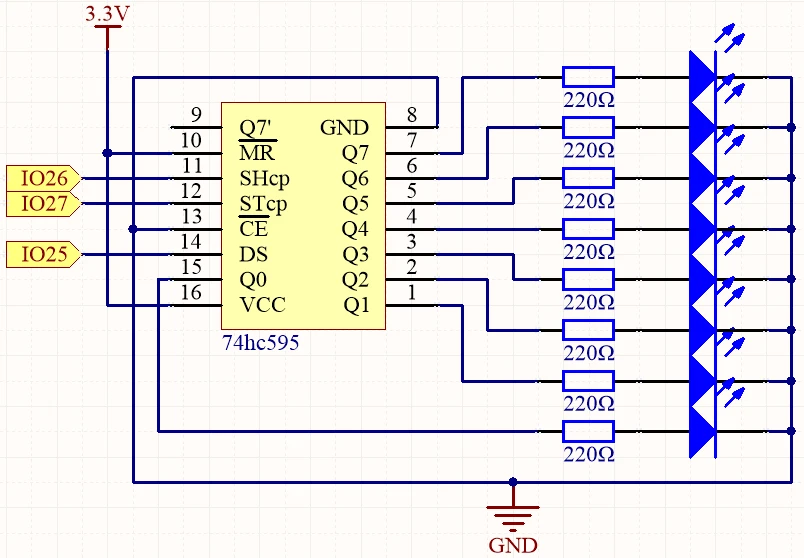
To wire your ESP32 for this tutorial, start by connecting the digital pins. Connect the STcp pin (27) to the ST_CP pin of your shift register. The SHcp pin (26) should be connected to the SH_CP pin of the shift register. Finally, connect the DS pin (25) to the DS pin of the shift register. Ensure that the ground of the ESP32 is connected to the ground of the shift register to provide a common reference.
Make sure to power the ESP32 using a stable 3.3 V supply. If you are using additional components, ensure they are also compatible with the ESP32's voltage levels. It’s important to double-check your connections before powering the system on to avoid any potential damage (in video at 4:10).
Code Examples & Walkthrough
In the provided code snippet, we define an array called datArray that holds binary values. Each value in the array corresponds to a different pattern that can be output through the GPIO pins. The array is defined as follows:
This array contains binary representations, where each bit corresponds to a pin state (on or off). In the loop() function, we iterate through the array to output these patterns using a for loop:
for(int num = 0; num < 10; num++) {
    digitalWrite(STcp, LOW);
    shiftOut(DS, SHcp, MSBFIRST, datArray[num]);
    digitalWrite(STcp, HIGH);
    delay(1000);
}
In this loop, we continuously send data from the datArray to the shift register, creating a walking light effect. The delay(1000) introduces a pause between each pattern, allowing the changes to be visible. For the full code, please refer below as it will load dynamically.
Demonstration / What to Expect
After completing the wiring and uploading the code, you should see a walking light effect on the connected devices. Each bit in the array will light up sequentially, creating a visually engaging pattern. Be cautious of reversed connections as they can lead to unexpected behavior (in video at 8:15).
Video Timestamps
00:00 Start
1:24 Introduction
3:15 74HC595 Shift register chip
5:25 Walking light wiring
18:56 Arduino code for 74HC595 explained
24:24 Demonstration of project
25:49 fixing the code
28:11 Light moves back and forth
30:28 Walking light
Images
ESP32-07_74HC595_walking_light_wiring
ESP32-07_74HC595_walking_light_schematic
ESP32-07_74HC595_walking_light_wiring
ESP32-07_74HC595_walking_light_schematic
807-ESP32 Tutorial 7/55 - Walking Light using 74HC595 and learn array
Language: C++
const int STcp = 27;//ST_CP
const int SHcp = 26;//SH_CP
const int DS = 25; //DS

int datArray[] = {B00000000, B00000001, B00000011, B00000111, B00001111, B00011111, B00111111, B01111111, B11111111};

void setup ()
{
  //set pins to output
  pinMode(STcp,OUTPUT);
  pinMode(SHcp,OUTPUT);
  pinMode(DS,OUTPUT);
}
void loop()
{
  for(int num = 0; num <10; num++)
  {
    digitalWrite(STcp,LOW); //ground ST_CP and hold low for as long as you are transmitting
    shiftOut(DS,SHcp,MSBFIRST,datArray[num]);
    digitalWrite(STcp,HIGH); //pull the ST_CPST_CP to save the data
    delay(1000);
  }
}