ESP32教程15/55 - 使用ESP32 L293D控制直流电机速度 | SunFounder的ESP32物联网学习套件
ESP32 教程 15/55 - 使用 ESP32 和 L293D 控制直流电机速度 | SunFounder 的 ESP32 物联网学习套件
使用 ESP32 控制直流电机看似困难,但只要组件正确、理解到位,其实相当容易。在本教程中,我们将构建一个项目,使用 L293D 电机驱动器来控制直流电机的速度和方向。最终,你将拥有一个可用的设置,能够正转和反转电机,同时调节其速度。如需视觉参考,请务必观看视频(视频中 00:00 处)。
硬件详解
本项目的主要组件包括 ESP32 微控制器和 L293D 电机驱动器。ESP32 是一款功能强大的微控制器,内置 Wi-Fi 和蓝牙功能,非常适合物联网应用。它可以通过其 GPIO 引脚控制各种硬件组件,包括电机。L293D 是一款双 H 桥电机驱动器,允许你控制两个直流电机的方向和速度。每个 H 桥可以通过反转施加到电机端子上的电压极性来驱动电机向任一方向旋转。此外,L293D 每通道可处理高达 600 mA 的电流,适用于小型到中型电机。

数据手册详情
| 制造商 | 德州仪器 |
|---|---|
| 零件编号 | L293D |
| 逻辑/IO 电压 | 2.5 – 7 V |
| 电源电压 | 4.5 – 36 V |
| 输出电流(每通道) | 600 mA(典型值) |
| 峰值电流(每通道) | 1.2 A(最大值) |
| PWM 频率指南 | 20 kHz(典型值) |
| 输入逻辑阈值 | 0.8 V(高电平),2.0 V(低电平) |
| 压降 / RDS(on) / 饱和 | 1.5 V(最大值) |
| 热限制 | 150 °C(最大值) |
| 封装 | 16-DIP |
| 备注 / 变体 | 四重半 H 驱动器 |
- 对于高电流应用,请确保适当的散热。
- 使用电容器对电源进行去耦,以防止电压尖峰。
- 接线时注意防止极性接反。
- 使用 PWM 进行速度控制,以避免过热。
- 检查电机的额定电压,以防止损坏。
接线说明
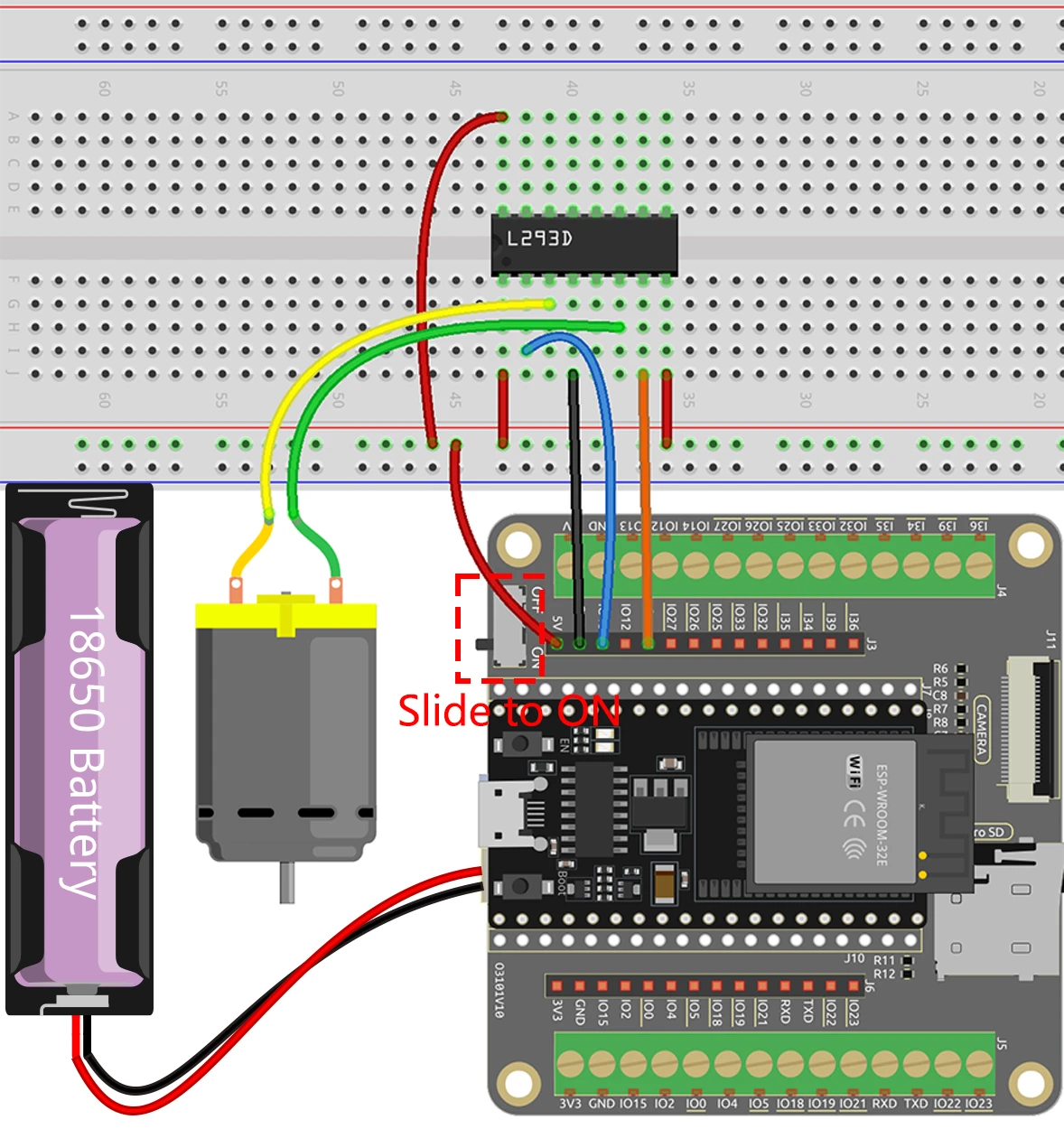
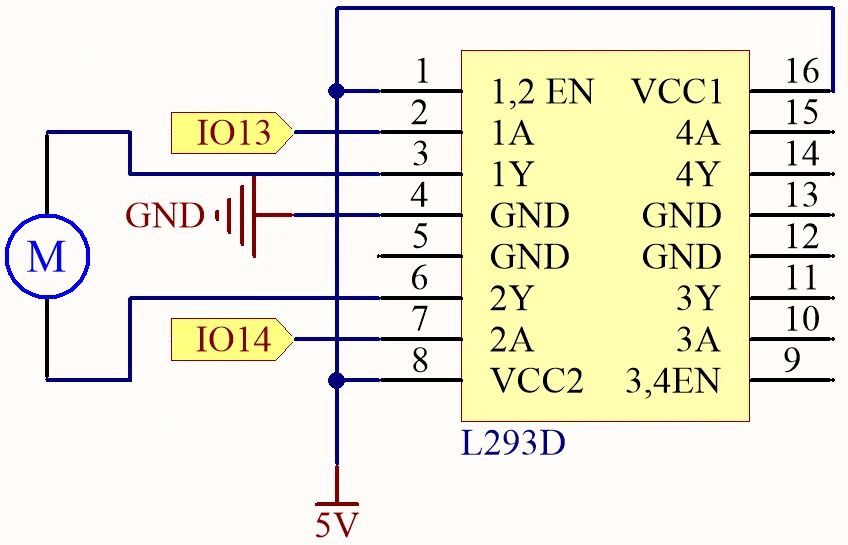
要连接 ESP32 和 L293D 电机驱动器,首先连接电源。将 L293D 的引脚 16 连接到电源的正极端子,引脚 4 连接到地。接下来,连接电机:一个端子连接到 L293D 的引脚 3,另一个端子连接到引脚 6。对于控制信号,将 ESP32 的 GPIO 引脚 13 连接到 L293D 的引脚 2,GPIO 引脚 14 连接到引脚 7。最后,确保将 ESP32 的地连接到 L293D 的地,以确保共地参考。如果视频中提到了替代接线(视频中 05:00 处),请务必遵循所示的具体更改。
代码示例与讲解
控制电机的代码包括定义电机引脚并设置其模式。以下是 setup 函数的摘录:
#define motor1A 13
#define motor2A 14

void setup() {
  pinMode(motor1A, OUTPUT);
  pinMode(motor2A, OUTPUT);
}
在此代码片段中,我们将电机控制引脚定义为常量,并在 setup 函数中将其设置为输出。这至关重要,因为它为控制电机做好了引脚准备。loop 函数是控制电机行为的地方。以下是 loop 的关键部分:
void loop() {
  digitalWrite(motor1A, HIGH);
  digitalWrite(motor2A, LOW);
  delay(2000);

  digitalWrite(motor1A, LOW);
  digitalWrite(motor2A, HIGH);
  delay(2000);

  digitalWrite(motor1A, LOW);
  digitalWrite(motor2A, LOW);
  delay(3000);
}
此代码使电机沿一个方向旋转 2 秒,然后反转方向再旋转 2 秒,最后停止电机 3 秒。此循环将无限重复,从而实现连续控制。如需更详细的见解和完整代码,请参阅文章下方加载的完整程序。
演示 / 预期效果
成功接线并上传代码后,你应该会看到电机沿一个方向旋转 2 秒,然后改变方向再旋转 2 秒,最后停止 3 秒。如果电机没有按预期响应,请检查常见问题,例如极性接反或引脚连接错误(视频中 08:00 处)。此设置提供了一种使用 ESP32 和 L293D 控制直流电机速度和方向的简单方法。
视频时间戳
- 00:00 开始
- 2:01 直流电机介绍
- 6:14 L293D 电机驱动器
- 9:17 项目文档
- 11:04 接线说明
- 14:41 使用ESP32进行Arduino电机控制
- 17:10 为ESP32板选择Arduino端口
- 18:52 项目演示
- 22:08 使用ESP32进行电机速度控制
- 26:22 速度控制演示
- 28:01 速度和方向控制Arduino代码
- 29:05 速度和方向演示
图像
#define motor1A 13
#define motor2A 14

// the setup function runs once when you press reset or power the board
void setup() {
  // initialize digital pin as an output.
  pinMode(motor1A, OUTPUT);
  pinMode(motor2A, OUTPUT);
}

// the loop function runs over and over again forever
void loop() {

  // Rotate
  digitalWrite(motor1A, HIGH);
  digitalWrite(motor2A, LOW);
  delay(2000);

  // Rotate in the opposite direction
  digitalWrite(motor1A, LOW);
  digitalWrite(motor2A, HIGH);
  delay(2000);

  // Stop
  digitalWrite(motor1A, LOW);
  digitalWrite(motor2A, LOW);
  delay(3000);
}
Common Course Links
Common Course Files
|||您可能需要的东西
-
亚马逊购买 L293D 电机驱动 ICamzn.to
-
易趣从eBay购买一枚L293D芯片。ebay.us
-
全球速卖通从AliExpress购买L293D电机驱动ICs.click.aliexpress.com
资源与参考
-
文档ESP32 教程 15/55 - SunFounder 电机控制文档docs.sunfounder.com
文件📁
数据手册 (pdf)
-
L293d_四重半桥数据表
l293d_Quadruple_half_bridge_datasheet.pdf0.34 MB