ESP32 Tutorial 22/55 - Feeling The light using LED Arduino | SunFounder's ESP32 IoT Learning kit

ESP32 Tutorial 22/55 - Feeling The light using LED Arduino | SunFounder's ESP32 IoT Learning kit

In this tutorial, we will explore how to use a Light Dependent Resistor (LDR) with the ESP32 microcontroller to measure light intensity. By reading the resistance of the LDR, we can trigger actions, such as turning on a buzzer when the light level exceeds a certain threshold. This project will demonstrate the interaction between light levels and the ESP32's analog reading capabilities, allowing us to create responsive applications based on ambient light. (in video at 5:30)

Hardware Explained

The main components we will be using in this project include the ESP32 microcontroller, an LDR, and a 10 kΩ resistor. The LDR changes its resistance based on the intensity of light hitting its surface: more light results in lower resistance, while less light results in higher resistance. This property allows us to measure varying light levels by connecting the LDR in a voltage divider configuration with the resistor.

The ESP32 microcontroller features built-in Wi-Fi and Bluetooth, making it ideal for IoT projects. It has several analog pins that can read varying voltage levels, which we will utilize to monitor the voltage across the LDR. This voltage will be converted into an analog value that the ESP32 can process and use to trigger actions like activating a buzzer.

Datasheet Details

ManufacturerEspressif Systems
Part numberESP32
Logic/IO voltage3.3 V
Supply voltage3.0 - 3.6 V
Output current (per GPIO)40 mA max
PWM frequency guidance1 kHz - 40 kHz
Input logic thresholdsHigh: 2.0 V min, Low: 0.8 V max
Voltage drop / RDS(on) / saturation0.3 V max
Thermal limits-40 °C to 125 °C
PackageQFN48
Notes / variantsSupports multiple Wi-Fi and Bluetooth protocols

  • Use a 10 kΩ resistor in series with the LDR for voltage division.
  • Ensure the ESP32 is powered with 3.3 V to avoid damage.
  • Connect the LDR and resistor correctly to measure light intensity.
  • Use a capacitor for decoupling if needed to stabilize power supply.
  • Check analog read values to ensure they fall within expected ranges.

Wiring Instructions

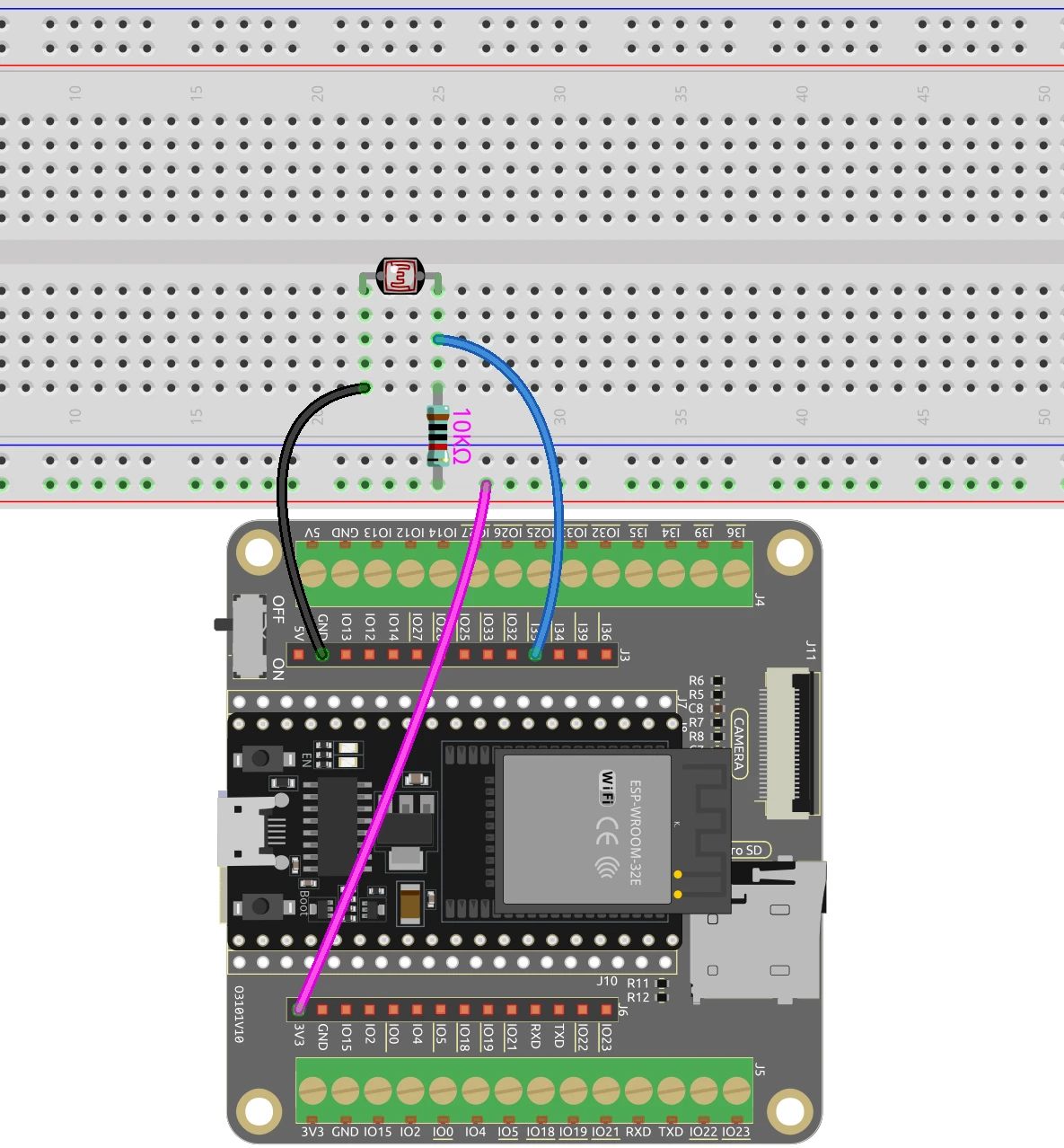
ESP32-22_light_sensor-wiring

To wire the LDR and resistor to the ESP32, start by connecting one terminal of the LDR to the 3.3 V power pin on the ESP32. The other terminal of the LDR should be connected to one terminal of the 10 kΩ resistor. Connect the other terminal of the resistor to the ground.

Next, connect a jumper wire from the junction point between the LDR and the resistor to pin 35 on the ESP32. This setup creates a voltage divider, allowing the ESP32 to read the varying voltage based on the light intensity hitting the LDR. Ensure that all connections are secure and that the LDR is positioned where it can accurately sense light changes.

Code Examples & Walkthrough

In the code, we start by initializing serial communication to monitor the readings from the LDR. The key identifier here is analogValue, which stores the reading from pin 35.

void setup() {
  Serial.begin(115200);
}

void loop() {
  int analogValue = analogRead(35);
  Serial.printf("ADC analog value = %d\n",analogValue);
  delay(100);
}

This code snippet initializes the serial monitor at a baud rate of 115200 and continuously reads the analog value from pin 35. The value is printed to the serial monitor, allowing us to observe how it changes with varying light levels.

When the light intensity changes, the resistance of the LDR varies, and thus the voltage read by the ESP32 will also change, reflecting the light conditions (in video at 12:45).

Demonstration / What to Expect

As you run the program and observe the serial monitor, you should see the ADC analog value fluctuate based on the ambient light conditions. When you cover the LDR, the value should increase, indicating higher resistance, while exposing it to bright light should lower the value significantly. This behavior can be used to trigger a buzzer or any other action based on the predefined thresholds.

If the readings do not change as expected, check for wiring issues, ensure that the LDR is not floating, and confirm that the ESP32 is powered correctly. This will help prevent common pitfalls and ensure smooth operation (in video at 15:30).

Video Timestamps

  • 00:00 Start
  • 1:48 Introduction to LDR
  • 8:33 Wiring explained
  • 11:07 Arduino code explained
  • 13:07 Selecting ESP32 board and COM port in Arduino IDE
  • 14:49 Demonstration of reading value
  • 17:24 Understanding Day and Night value
  • 18:47 DAC value and reading Voltage

图像

ESP32-22_light_sensor
ESP32-22_light_sensor-wiring
821-ESP32 Tutorial 22/55- Arduino code for Light dependant resistor
语言: C++
已复制!

资源与参考

文件📁

没有可用的文件。