ESP32 教程 20/55 - 循迹模块 | SunFounder 的 ESP32 物联网学习套件
在本教程中,我们将学习如何使用ESP32模块配合循迹模块来检测白色表面上的黑色线条。这一功能对于需要沿指定路径行驶的机器人小车等应用至关重要。此外,我们还将集成一个蜂鸣器,当循迹模块检测到黑色线条时蜂鸣器会激活,从而增强我们项目的反馈机制。如需进一步说明,请参考视频(视频中0:00处)。
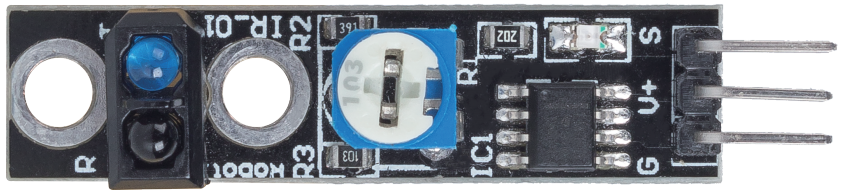 line_track
硬件说明
本项目的主要组件包括ESP32模块、循迹模块和蜂鸣器。ESP32模块是一款功能强大的微控制器,内置Wi-Fi和蓝牙功能,可实现广泛的物联网应用。循迹模块利用红外发射器和光敏电阻,根据反射红外光的强度来检测表面颜色的差异。
循迹模块的工作原理是发射红外光,红外光从其下方的表面反射回来。较暗的表面(如黑色)会吸收更多光线,导致反射强度较低,而较亮的表面(如白色)会反射更多光线,产生较高的强度。这种差异通过运算放大器进行处理,以确定表面的状态(黑色或白色)并输出相应的信号。
数据手册详情
| 制造商 |
SunFounder |
| 零件编号 |
TCRT5000 |
| 逻辑/IO电压 |
3.3 V 至 5 V |
| 输出电流(每通道) |
20 mA |
| 峰值电流(每通道) |
50 mA |
| 响应时间 |
< 10 ms |
| 检测范围 |
1 cm 至 5 cm |
| 封装 |
带排针的模块 |
| 备注/变体 |
常用于循迹机器人 |
- 确保电源供应正确(3.3 V 或 5 V)。
- 保持传感器清洁以获得准确读数。
- 使用板载电位器调节灵敏度。
- 检查连接以避免悬空输入。
- 如有必要,使用上拉电阻以确保读数稳定。
- 尽量减少环境红外光源的干扰。
接线说明
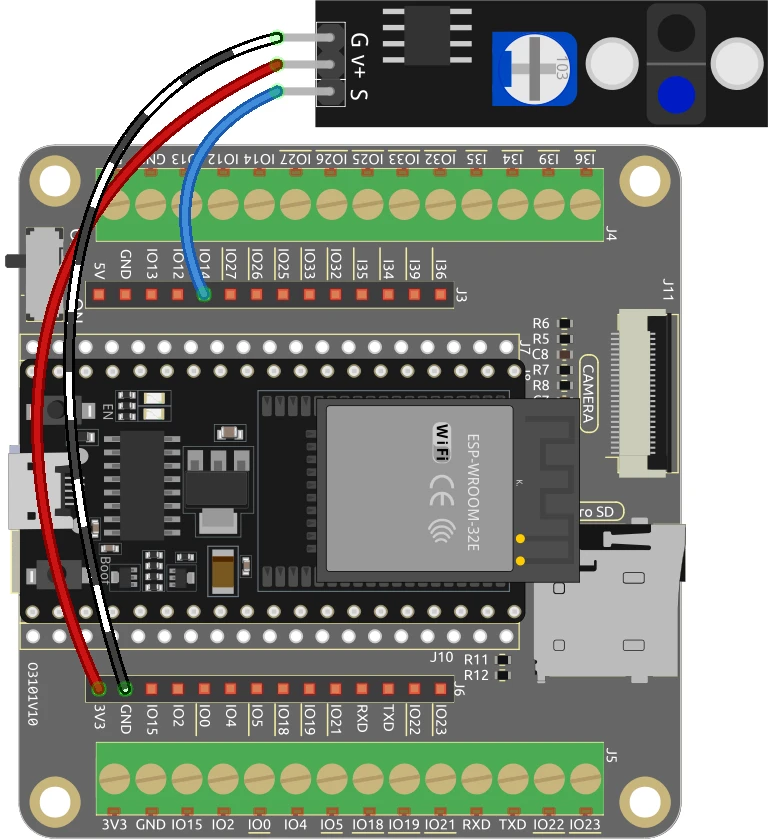 ESP32-20_line-tracking-wiring
要将循迹模块连接到ESP32,首先将模块的接地引脚连接到ESP32上的接地引脚。然后,将循迹模块的V+引脚连接到合适的电源,即ESP32上的3.3 V或5 V。信号引脚(标记为S)应连接到ESP32上的GPIO 14。在继续之前,请确保这些连接牢固。
如果使用蜂鸣器,请将其负极端子连接到地线,正极端子连接到ESP32上的GPIO 27。此设置允许蜂鸣器在循迹模块检测到黑色线条时激活。请务必仔细检查所有连接,确保它们与代码中指定的引脚匹配。
 ESP32-20_line-tracking-schemtaic
代码示例与讲解
以下是设置循迹模块的代码关键摘录。变量linePin被定义用于表示连接到循迹模块的引脚。
const int linePin = 14; // 循迹模块引脚编号
此行将linePin初始化为引脚14,该引脚将用于读取线路状态。lineState变量将保存传感器的结果。
在setup()函数中,我们将linePin的引脚模式配置为输入。
void setup() {
  Serial.begin(115200);
  pinMode(linePin, INPUT);
}
这确保了ESP32能够读取循迹模块的状态。串行通信以115200的波特率启动,用于监控输出。
最后,在loop()函数中,我们持续读取循迹模块的状态并打印检测到的颜色。
void loop() {
  lineState = digitalRead(linePin);
  if (lineState == HIGH) {
    Serial.println("Black");
    delay(100);
  } else {
    Serial.println("White");
    delay(100);
  }
}
此循环检查lineState是否为HIGH(表示黑色)或LOW(表示白色),并将结果打印到串行监视器。完整代码加载在文章下方供您参考。
演示/预期效果
接线完成并上传代码后,您应该会观察到当循迹模块位于黑色表面上时,ESP32打印“Black”,当位于白色表面上时打印“White”。此外,当模块检测到黑色线条时,蜂鸣器会响起,提供声音警报。请注意电位器的设置,因为过于灵敏的设置可能导致行为异常(视频中10:00处)。
视频时间戳
- 00:00 开始
- 2:22 循迹模块介绍
- 5:10 文档页面
- 9:20 接线说明
- 10:49 Arduino代码说明
- 13:36 在Arduino IDE中选择ESP32开发板和COM端口
- 15:18 演示
- 18:15 项目:带蜂鸣器的循迹
- 19:52 循迹和蜂鸣器的Arduino代码
- 20:52 演示
图像
ESP32-20_line-tracking-schemtaic
ESP32-20_line-tracking-wiring
line_track
ESP32-20_line-tracking-schemtaic
ESP32-20_line-tracking-wiring
819-ESP32 Tutorial 20/55- Arduino code line tracking
语言: C++
/*
 * 设置引脚编号
 */
const int linePin = 14; // 线路轨道模块引脚的数量

 // 用于存储线路状态的变量
int lineState = 0;

void setup() {
  Serial.begin(115200);
 // 将线路跟踪模块引脚初始化为输入模式。
  pinMode(linePin, INPUT);
}

void loop() {
 // 读取线路轨道模块的状态
  lineState = digitalRead(linePin);

  if (lineState == HIGH) {
    Serial.println("Black");
    delay(100);
  }
  else {
    Serial.println("White");
    delay(100);
  }
}