ESP32 教程 38/55 - 通过手机控制RGB LED | SunFounder的ESP32物联网学习套件
在本教程中,我们将探索如何使用SunFounder ESP32学习套件中的ESP32模块来控制RGB LED。通过从移动设备发送命令,您可以更改LED颜色或将其完全关闭。本项目充分利用ESP32的功能,利用内置的Wi-Fi和蓝牙特性实现无缝连接和控制。
RGB LED由三个独立的LED组成:红色、绿色和蓝色,它们可以混合产生各种颜色。在本项目中,您将学习如何正确连接RGB LED,并编程ESP32以响应蓝牙命令。本教程还将指导您实现此功能所需的代码组件(视频中02:15处)。
硬件说明
本项目的主要组件包括ESP32微控制器和RGB LED。ESP32是一款功能强大的模块,内置Wi-Fi和蓝牙,非常适合物联网应用。在本项目中,它将作为服务器接收来自移动设备的命令,并相应地控制RGB LED。
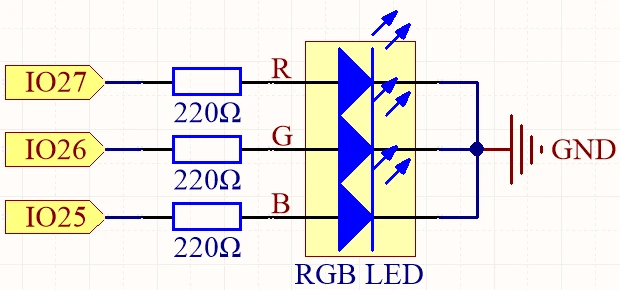
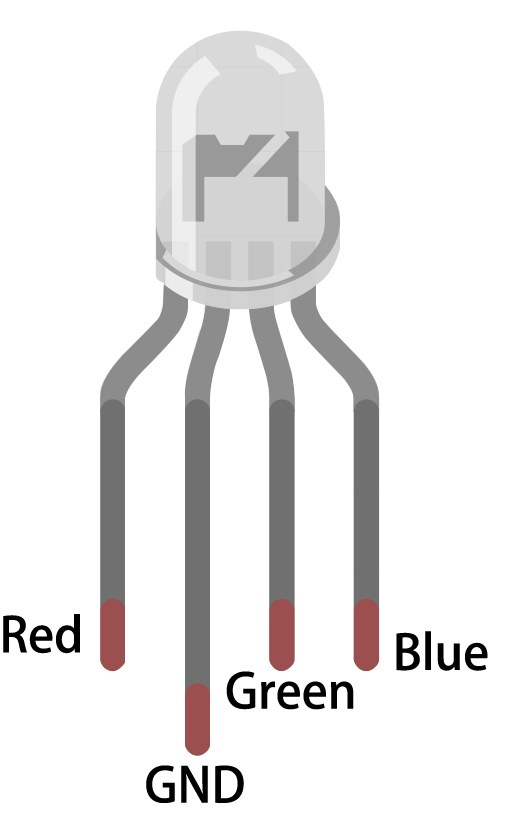
RGB LED有四个引脚:一个公共引脚(阳极或阴极)和三个用于单独颜色的引脚。公共引脚连接到电源或地线,而其他三个引脚通过电阻连接到ESP32的GPIO引脚,以限制电流并保护LED。这种设置允许精确控制每种颜色的亮度,从而产生多种颜色。
数据手册详情
| 制造商 | SunFounder |
|---|---|
| 零件编号 | RGB LED |
| 公共引脚类型 | 共阳极 / 共阴极 |
| 正向电压(V) | 2.0 - 3.2 V |
| 最大正向电流(A) | 20 mA |
| 典型电流(A) | 15 mA |
| 颜色分辨率 | 8位(0-255) |
| 封装 | 直插式 / 贴片式 |
- 确保使用合适的电阻值(通常为220欧姆)以限制每个LED通道的电流。
- 接线前检查公共引脚配置(阳极或阴极)。
- 使用PWM进行调光和颜色混合,通过调整发送到每个LED的信号来实现。
- 接线时注意避免短路;一次连接一个引脚。
- 设置完成后,单独测试每种颜色以确认接线正确。
接线说明

要将RGB LED连接到ESP32,首先将RGB LED放在面包板上。较长的引脚是公共引脚,您需要将其连接到正电压(对于共阳极)或地线(对于共阴极)。如果使用共阳极,请将长引脚连接到ESP32上的3.3V引脚。对于共阴极,请将其连接到GND引脚。
接下来,取三个220欧姆电阻,将每个电阻的一端连接到LED对应的RGB引脚。将电阻的另一端连接到ESP32的GPIO引脚:将LED的红色引脚连接到GPIO 27,绿色引脚连接到GPIO 26,蓝色引脚连接到GPIO 25。最后,确保公共引脚根据您的配置(阳极或阴极)正确连接。
代码示例与讲解
本项目的代码首先定义连接到RGB LED的引脚。以下摘录展示了如何声明引脚:
const int redPin = 27;
const int greenPin = 26;
const int bluePin = 25;在这里,redPin、greenPin和bluePin被分配了ESP32上RGB LED每个颜色通道的特定GPIO编号。
在setup函数中,初始化蓝牙并应用PWM设置。此摘录演示了此初始化过程:
void setup() {
  Serial.begin(115200);      // 初始化串口
  setupBLE();                // 初始化蓝牙BLE

  ledcAttach(redPin, freq, resolution);
  ledcAttach(greenPin, freq, resolution);
  ledcAttach(bluePin, freq, resolution);
}
此代码初始化串行通信并设置蓝牙功能,同时将RGB LED引脚连接到PWM通道以进行控制。
最后,loop函数检查接收到的蓝牙消息并相应地调整LED颜色:
if (value == "red") {
  setColor(255, 0, 0); // 红色
  Serial.println("red");
}在此部分中,如果接收到的值是"red",则使用setColor函数将LED设置为全红色亮度。
为了全面理解代码,建议观看视频教程,其中完整代码加载在文章下方。
演示 / 预期效果
一旦所有接线完成并上传代码,您应该能够通过蓝牙从移动设备控制RGB LED。通过发送诸如"red"、"green"、"blue"等命令,您将看到LED相应地改变颜色。如果发送"LED_off",RGB LED将关闭。请确保检查串行监视器以查看任何调试消息,确认命令是否正确接收(视频中10:45处)。
视频时间戳
- 00:00 开始
- 1:59 什么是RGB LED?
- 6:01 RGB颜色详解
- 10:01 文档页面
- 11:19 接线说明
- 13:34 在Arduino IDE中选择ESP32开发板和COM端口
- 15:15 Arduino代码
- 18:02 使用手机控制RGB LED的演示
图像
#include "BLEDevice.h"
#include "BLEServer.h"
#include "BLEUtils.h"
#include "BLE2902.h"

// Define RGB LED pins
const int redPin = 27;
const int greenPin = 26;
const int bluePin = 25;

// Define PWM frequency and resolution
const int freq = 5000;
const int resolution = 8;

// Define the Bluetooth device name
const char *bleName = "ESP32_Bluetooth";

// Define the received text and the time of the last message
String receivedText = "";
unsigned long lastMessageTime = 0;

// Define the UUIDs of the service and characteristics
#define SERVICE_UUID "8785d8b3-9d23-473b-aee5-3fabe2ba9583"
#define CHARACTERISTIC_UUID_RX "b2bcd13b-aab6-4660-92ae-40abf6941fce"
#define CHARACTERISTIC_UUID_TX "4219d86a-d701-4fd2-bd84-04db50f70fe2"

// Define the Bluetooth characteristic
BLECharacteristic *pCharacteristic;

void setup() {
  Serial.begin(115200);      // Initialize the serial port
  setupBLE();                // Initialize the Bluetooth BLE

  ledcAttach(redPin, freq, resolution);
  ledcAttach(greenPin, freq, resolution);
  ledcAttach(bluePin, freq, resolution);
}

void loop() {
  // When the received text is not empty and the time since the last message is over 1 second
  // Send a notification and print the received text
  if (receivedText.length() > 0 && millis() - lastMessageTime > 1000) {
    Serial.print("Received message: ");
    Serial.println(receivedText);
    pCharacteristic->setValue(receivedText.c_str());
    pCharacteristic->notify();
    receivedText = "";
  }

  // Read data from the serial port and send it to BLE characteristic
  if (Serial.available() > 0) {
    String str = Serial.readStringUntil('\n');
    const char *newValue = str.c_str();
    pCharacteristic->setValue(newValue);
    pCharacteristic->notify();
  }
}

// Define the BLE server callbacks
class MyServerCallbacks : public BLEServerCallbacks {
  // Print the connection message when a client is connected
  void onConnect(BLEServer *pServer) {
    Serial.println("Connected");
  }
  // Print the disconnection message when a client is disconnected
  void onDisconnect(BLEServer *pServer) {
    Serial.println("Disconnected");
  }
};

// Define the BLE characteristic callbacks
class MyCharacteristicCallbacks : public BLECharacteristicCallbacks {
  void onWrite(BLECharacteristic *pCharacteristic) {
    std::string value = std::string(pCharacteristic->getValue().c_str());
    if (value == "led_off") {
      setColor(0, 0, 0); // turn the RGB LED off
      Serial.println("RGB LED turned off");
    } else if (value == "red") {
      setColor(255, 0, 0); // Red
      Serial.println("red");
    }
    else if (value == "green") {
      setColor(0, 255, 0); // green
      Serial.println("green");
    }
    else if (value == "blue") {
      setColor(0, 0, 255); // blue
      Serial.println("blue");
    }
    else if (value == "yellow") {
      setColor(255, 150, 0); // yellow
      Serial.println("yellow");
    }
    else if (value == "purple") {
      setColor(80, 0, 80); // purple
      Serial.println("purple");
    }
  }
};

// Initialize the Bluetooth BLE
void setupBLE() {
  BLEDevice::init(bleName);                        // Initialize the BLE device
  BLEServer *pServer = BLEDevice::createServer();  // Create the BLE server
  // Print the error message if the BLE server creation fails
  if (pServer == nullptr) {
    Serial.println("Error creating BLE server");
    return;
  }
  pServer->setCallbacks(new MyServerCallbacks());  // Set the BLE server callbacks

  // Create the BLE service
  BLEService *pService = pServer->createService(SERVICE_UUID);
  // Print the error message if the BLE service creation fails
  if (pService == nullptr) {
    Serial.println("Error creating BLE service");
    return;
  }
  // Create the BLE characteristic for sending notifications
  pCharacteristic = pService->createCharacteristic(CHARACTERISTIC_UUID_TX, BLECharacteristic::PROPERTY_NOTIFY);
  pCharacteristic->addDescriptor(new BLE2902());  // Add the descriptor
  // Create the BLE characteristic for receiving data
  BLECharacteristic *pCharacteristicRX = pService->createCharacteristic(CHARACTERISTIC_UUID_RX, BLECharacteristic::PROPERTY_WRITE);
  pCharacteristicRX->setCallbacks(new MyCharacteristicCallbacks());  // Set the BLE characteristic callbacks
  pService->start();                                                 // Start the BLE service
  pServer->getAdvertising()->start();                                // Start advertising
  Serial.println("Waiting for a client connection...");              // Wait for a client connection
}

void setColor(int red, int green, int blue) {
  // For common-anode RGB LEDs, use 255 minus the color value
  ledcWrite(redPin, red);
  ledcWrite(greenPin, green);
  ledcWrite(bluePin, blue);
}
Common Course Links
Common Course Files
资源与参考
-
文档ESP32 教程 38/55 - SunFounder 蓝牙 RGB LED 文档页面docs.sunfounder.com
文件📁
没有可用的文件。