Koyarwar ESP32 38/55 - Sarrafa LED RGB daga wayar hannu | Kayan Koyon IoT na SunFounder ESP32
A cikin wannan koyawa, za mu bincika yadda ake sarrafa LED RGB ta amfani da module ESP32 daga kayan koyon SunFounder ESP32. Ta hanyar aika umarni daga na'urar ka ta hannu, za ka iya canza launin LED ko kashe shi gaba ɗaya. Wannan aikin yana amfani da ƙarfin ESP32, yana amfani da Wi-Fi da Bluetooth da ke cikin shi don haɗi da sarrafawa cikin sauƙi.
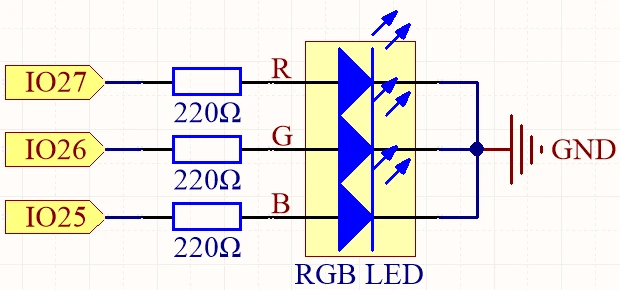
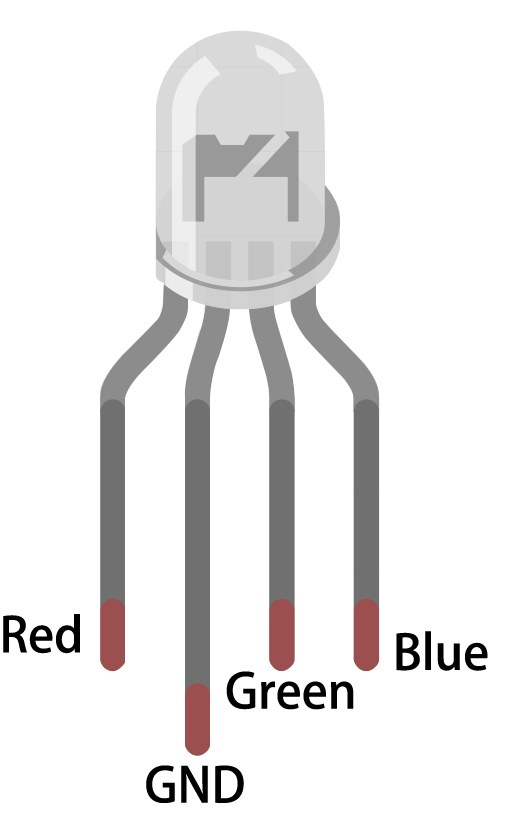
LED RGB ya ƙunshi LEDs guda uku: ja, kore, da shuɗi, waɗanda za a iya haɗa su don ƙirƙirar launuka daban-daban. A cikin wannan aikin, za ka koyi yadda ake haɗa LED RGB daidai da kuma tsara ESP32 don amsa umarnin Bluetooth. Koyawar kuma za ta jagorance ka ta hanyar abubuwan da ake buƙata na code don cimma wannan aiki (a cikin bidiyo a 02:15).
Abubuwan Hardware da Aka Bayyana
Abubuwan farko na wannan aikin sun haɗa da microcontroller ESP32 da LED RGB. ESP32 module ne mai ƙarfi tare da Wi-Fi da Bluetooth da ke ciki, yana da kyau don aikace-aikacen IoT. A cikin wannan aikin, zai yi aiki a matsayin uwar garken don karɓar umarni daga na'urar hannu da sarrafa LED RGB daidai.
LED RGB yana da pins huɗu: pin ɗaya na gama-gari (ko dai anode ko cathode) da pins uku don launuka daban-daban. Pin na gama-gari yana haɗawa da ko dai tushen wutar lantarki ko ƙasa, yayin da sauran pins uku suna haɗawa da GPIO pins na ESP32 ta hanyar resistors don iyakance wutar da kare LEDs. Wannan saitin yana ba da damar sarrafa hasken kowane launi daidai, ƙirƙirar launuka da yawa.
Bayanan Datasheet
| Manufacturer | SunFounder |
|---|---|
| Part number | RGB LED |
| Common pin type | Common anode / Common cathode |
| Forward voltage (V) | 2.0 - 3.2 V |
| Max forward current (A) | 20 mA |
| Typical current (A) | 15 mA |
| Color resolution | 8 bit (0-255) |
| Package | Through-hole / SMD |
- Tabbatar da ƙimar resistor da ta dace (yawanci 220 Ohm) don iyakance wutar ta kowane tashar LED.
- Duba tsarin pin na gama-gari (anode ko cathode) kafin haɗawa.
- Yi amfani da PWM don rage haske da haɗa launuka ta hanyar daidaita siginar da aka aika zuwa kowane LED.
- Yi hankali da haɗawa don guje wa gajerun kewayawa; haɗa pin ɗaya a lokaci ɗaya.
- Gwada kowane launi daban bayan saitin don tabbatar da haɗin da ya dace.
Umarnin Haɗawa

Don haɗa LED RGB zuwa ESP32, fara da sanya LED RGB akan breadboard. Pin mafi tsayi shine pin na gama-gari, wanda za ka haɗa shi da ko dai wutar lantarki mai kyau (don common anode) ko ƙasa (don common cathode). Idan kana amfani da common anode, haɗa dogon pin zuwa pin 3.3V akan ESP32. Don common cathode, haɗa shi zuwa pin GND.
Na gaba, ɗauki resistors 220 Ohm guda uku kuma haɗa ƙarshen kowane resistor zuwa pins RGB da suka dace na LED. Haɗa sauran ƙarshen resistors zuwa GPIO pins na ESP32: haɗa ja pin na LED zuwa GPIO 27, kore pin zuwa GPIO 26, da shuɗi pin zuwa GPIO 25. A ƙarshe, tabbatar da cewa pin na gama-gari an haɗa shi daidai bisa ga tsarin ka (anode ko cathode).
Misalan Code & Bayani
Code na wannan aikin yana farawa da ayyana pins da aka haɗa zuwa LED RGB. Wannan ɓangaren da ke gaba yana nuna yadda ake ayyana pins:
const int redPin = 27;
const int greenPin = 26;
const int bluePin = 25;
Anan, redPin, greenPin, da bluePin an sanya su takamaiman lambobin GPIO akan ESP32 don kowane tashar launi na LED RGB.
A cikin aikin setup, an fara Bluetooth, kuma an yi amfani da saitunan PWM. Wannan ɓangaren yana nuna wannan farawa:
void setup() {
  Serial.begin(115200);      // Initialize the serial port
  setupBLE();                // Initialize the Bluetooth BLE

  ledcAttach(redPin, freq, resolution);
  ledcAttach(greenPin, freq, resolution);
  ledcAttach(bluePin, freq, resolution);
}
Wannan code yana fara sadarwar serial kuma yana saita aikin Bluetooth yayin da yake haɗa pins na LED RGB zuwa tashoshin PWM don sarrafawa.
A ƙarshe, aikin loop yana duba saƙonnin Bluetooth da aka karɓa kuma yana daidaita launin LED daidai:
if (value == "red") {
  setColor(255, 0, 0); // Red
  Serial.println("red");
}
A wannan ɓangaren, idan ƙimar da aka karɓa ita ce "red", za a saita LED zuwa cikakken haske ja ta amfani da aikin setColor.
Don cikakken fahimtar code, ana ba da shawarar kallon bidiyon koyawa inda aka loda cikakken code a ƙasan labarin.
Nuni / Abin da Za Ka Yi Tsammani
Da zarar an haɗa komai kuma an loda code, za ka iya sarrafa LED RGB daga na'urar ka ta hannu ta hanyar Bluetooth. Ta hanyar aika umarni kamar "red", "green", "blue", da sauransu, za ka ga LED yana canza launuka daidai. Idan ka aika "LED_off", LED RGB zai kashe. Tabbatar da duba serial monitor don duk wani saƙon gyara don tabbatar da cewa ana karɓar umarni daidai (a cikin bidiyo a 10:45).
Lokutan Bidiyo
- 00:00 Fara
- 1:59 Menene RGB LED?
- 6:01 Bayanin Launin RGB
- 10:01 Shafin Takardun
- 11:19 Bayanin Haɗin Waya
- 13:34 Zaɓin allo na ESP32 da tashar COM a cikin Arduino IDE
- 15:15 Lambar Arduino
- 18:02 Nunin sarrafa RGB LED ta amfani da wayarka
Hotuna
#include "BLEDevice.h"
#include "BLEServer.h"
#include "BLEUtils.h"
#include "BLE2902.h"

// Define RGB LED pins
const int redPin = 27;
const int greenPin = 26;
const int bluePin = 25;

// Define PWM frequency and resolution
const int freq = 5000;
const int resolution = 8;

// Define the Bluetooth device name
const char *bleName = "ESP32_Bluetooth";

// Define the received text and the time of the last message
String receivedText = "";
unsigned long lastMessageTime = 0;

// Define the UUIDs of the service and characteristics
#define SERVICE_UUID "8785d8b3-9d23-473b-aee5-3fabe2ba9583"
#define CHARACTERISTIC_UUID_RX "b2bcd13b-aab6-4660-92ae-40abf6941fce"
#define CHARACTERISTIC_UUID_TX "4219d86a-d701-4fd2-bd84-04db50f70fe2"

// Define the Bluetooth characteristic
BLECharacteristic *pCharacteristic;

void setup() {
  Serial.begin(115200);      // Initialize the serial port
  setupBLE();                // Initialize the Bluetooth BLE

  ledcAttach(redPin, freq, resolution);
  ledcAttach(greenPin, freq, resolution);
  ledcAttach(bluePin, freq, resolution);
}

void loop() {
  // When the received text is not empty and the time since the last message is over 1 second
  // Send a notification and print the received text
  if (receivedText.length() > 0 && millis() - lastMessageTime > 1000) {
    Serial.print("Received message: ");
    Serial.println(receivedText);
    pCharacteristic->setValue(receivedText.c_str());
    pCharacteristic->notify();
    receivedText = "";
  }

  // Read data from the serial port and send it to BLE characteristic
  if (Serial.available() > 0) {
    String str = Serial.readStringUntil('\n');
    const char *newValue = str.c_str();
    pCharacteristic->setValue(newValue);
    pCharacteristic->notify();
  }
}

// Define the BLE server callbacks
class MyServerCallbacks : public BLEServerCallbacks {
  // Print the connection message when a client is connected
  void onConnect(BLEServer *pServer) {
    Serial.println("Connected");
  }
  // Print the disconnection message when a client is disconnected
  void onDisconnect(BLEServer *pServer) {
    Serial.println("Disconnected");
  }
};

// Define the BLE characteristic callbacks
class MyCharacteristicCallbacks : public BLECharacteristicCallbacks {
  void onWrite(BLECharacteristic *pCharacteristic) {
    std::string value = std::string(pCharacteristic->getValue().c_str());
    if (value == "led_off") {
      setColor(0, 0, 0); // turn the RGB LED off
      Serial.println("RGB LED turned off");
    } else if (value == "red") {
      setColor(255, 0, 0); // Red
      Serial.println("red");
    }
    else if (value == "green") {
      setColor(0, 255, 0); // green
      Serial.println("green");
    }
    else if (value == "blue") {
      setColor(0, 0, 255); // blue
      Serial.println("blue");
    }
    else if (value == "yellow") {
      setColor(255, 150, 0); // yellow
      Serial.println("yellow");
    }
    else if (value == "purple") {
      setColor(80, 0, 80); // purple
      Serial.println("purple");
    }
  }
};

// Initialize the Bluetooth BLE
void setupBLE() {
  BLEDevice::init(bleName);                        // Initialize the BLE device
  BLEServer *pServer = BLEDevice::createServer();  // Create the BLE server
  // Print the error message if the BLE server creation fails
  if (pServer == nullptr) {
    Serial.println("Error creating BLE server");
    return;
  }
  pServer->setCallbacks(new MyServerCallbacks());  // Set the BLE server callbacks

  // Create the BLE service
  BLEService *pService = pServer->createService(SERVICE_UUID);
  // Print the error message if the BLE service creation fails
  if (pService == nullptr) {
    Serial.println("Error creating BLE service");
    return;
  }
  // Create the BLE characteristic for sending notifications
  pCharacteristic = pService->createCharacteristic(CHARACTERISTIC_UUID_TX, BLECharacteristic::PROPERTY_NOTIFY);
  pCharacteristic->addDescriptor(new BLE2902());  // Add the descriptor
  // Create the BLE characteristic for receiving data
  BLECharacteristic *pCharacteristicRX = pService->createCharacteristic(CHARACTERISTIC_UUID_RX, BLECharacteristic::PROPERTY_WRITE);
  pCharacteristicRX->setCallbacks(new MyCharacteristicCallbacks());  // Set the BLE characteristic callbacks
  pService->start();                                                 // Start the BLE service
  pServer->getAdvertising()->start();                                // Start advertising
  Serial.println("Waiting for a client connection...");              // Wait for a client connection
}

void setColor(int red, int green, int blue) {
  // For common-anode RGB LEDs, use 255 minus the color value
  ledcWrite(redPin, red);
  ledcWrite(greenPin, green);
  ledcWrite(bluePin, blue);
}
Common Course Links
Common Course Files
Albarkatun da kuma shafukan da za a duba
-
TakarduESP32 Tutorial 38/55- SunFounder doc page for Bluetooth RGB LEDdocs.sunfounder.com
Fayiloli📁
Babu fayiloli da ake da su.