ESP32 튜토리얼 37/55 - ESP32 BLE와 블루투스 앱 사용하기 | SunFounder의 ESP32 IoT 학습 키트
이 튜토리얼에서는 ESP32를 Bluetooth 서버로 사용하여 모바일 앱과 메시지를 주고받는 방법을 살펴보겠습니다. 이를 통해 ESP32 보드와 모바일 기기 간의 양방향 통신이 가능해져 IoT 프로젝트에 다재다능한 기능을 더할 수 있습니다. 이 강의가 끝나면 모바일 기기에서 ESP32로 텍스트를 보내고 직렬 모니터에 표시되는 것을 확인할 수 있습니다.
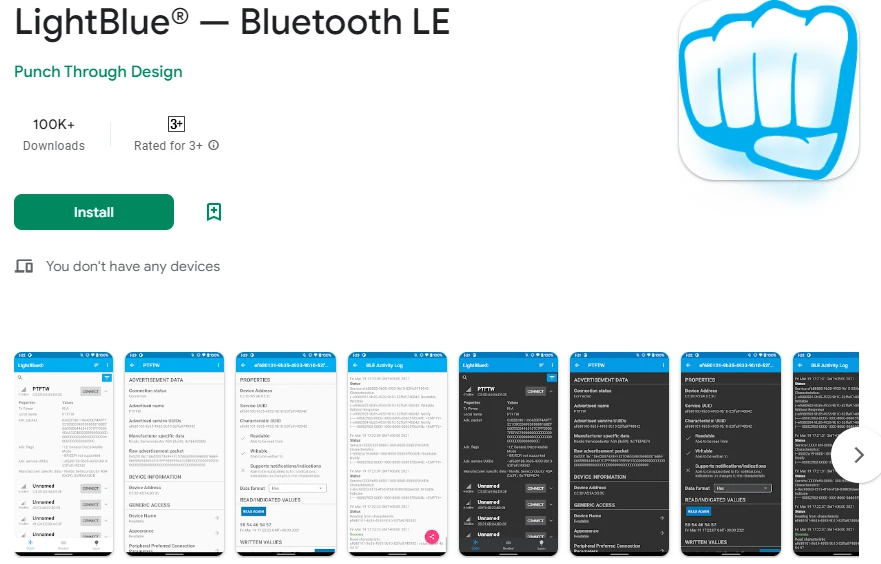
iOS와 Android에서 모두 사용할 수 있는 LightBlue Explorer 앱을 활용하여 ESP32와 통신할 것입니다. 이 튜토리얼은 Bluetooth Low Energy(BLE) 통신을 이해하는 기초가 되며 더 고급 프로젝트를 위한 토대를 마련합니다. 시각적 가이드는 (02:00 부분의) 비디오를 참조하세요.
하드웨어 설명
이 프로젝트의 주요 구성 요소는 Wi-Fi와 Bluetooth 기능을 모두 통합한 ESP32 마이크로컨트롤러입니다. 이를 통해 ESP32는 서버 역할을 하여 데이터를 무선으로 수신하고 전송할 수 있습니다. ESP32의 내장 Bluetooth 기능은 BLE를 지원하므로 저전력 애플리케이션에 효율적입니다.
ESP32 외에도 LightBlue 앱이 설치된 모바일 기기를 사용합니다. 이 앱을 통해 사용자는 ESP32에 연결하고 Bluetooth로 데이터를 보낼 수 있습니다. 이러한 구성 요소의 통합은 ESP32와 모바일 기기 간의 원활한 통신을 가능하게 하여 사용자 상호 작용을 향상시킵니다.
데이터시트 세부 정보
| 제조업체 | Espressif Systems |
|---|---|
| 부품 번호 | ESP32-WROOM-32 |
| 로직/IO 전압 | 3.3 V |
| 공급 전압 | 3.0 – 3.6 V |
| 출력 전류 (채널당) | 40 mA |
| 피크 전류 (채널당) | 160 mA |
| PWM 주파수 가이드 | 1 kHz |
| 입력 로직 임계값 | 0.2 VCC (낮음), 0.8 VCC (높음) |
| 전압 강하 / RDS(on) / 포화 | 0.1 V |
| 열 제한 | 125 °C |
| 패키지 | QFN48 |
| 참고 사항 / 변형 | ESP32-WROOM-32, ESP32-WROVER |
- 브라운아웃을 방지하려면 안정적인 전원 공급(3.3 V)을 보장하세요.
- 전원 핀 근처에 디커플링용 커패시터를 사용하세요.
- 고전류를 사용하는 경우 적절한 방열을 유지하세요.
- GPIO 핀 전압 레벨에 주의하세요. 3.3 V 허용입니다.
- GPIO 구성에 필요한 경우 풀업 또는 풀다운 저항을 사용하세요.
- BLE 연결을 모니터링하고 앱이 올바르게 페어링되었는지 확인하세요.
- 서비스 및 특성의 UUID가 고유한지 확인하세요.
- 디버깅 메시지를 위해 직렬 모니터를 정기적으로 확인하세요.
- 복잡한 신호 문제 해결을 위해 로직 분석기 사용을 고려하세요.
배선 지침
ESP32는 주로 USB를 통해 전원과 프로그래밍을 연결하므로 이 프로젝트의 배선은 간단합니다. 마이크로 USB 케이블을 사용하여 ESP32를 컴퓨터에 연결하세요. USB 포트가 충분한 전원(일반적으로 5 V)을 공급하는지 확인하세요. 디버깅에는 직렬 모니터가 사용되므로 이 애플리케이션에는 추가 하드웨어 연결이 필요하지 않습니다.
향후 프로젝트에서 ESP32를 외부 구성 요소와 함께 사용할 때는 접지 핀을 공통 접지에 연결하는 것을 기억하세요. 이렇게 하면 ESP32와 연결된 센서 또는 모듈이 동일한 기준점을 공유하게 됩니다. 또한 배터리를 사용하는 경우 양극 단자를 3.3 V 핀에 연결하고 음극 단자를 ESP32의 접지 핀에 연결하세요.
코드 예제 및 설명
제공된 코드는 Bluetooth 서버를 초기화하고 필요한 서비스와 특성을 설정하며 수신 메시지를 처리합니다. 주요 식별자에는 Bluetooth 장치의 이름을 정의하는 bleName과 모바일 앱에서 수신한 메시지를 저장하는 receivedText가 포함됩니다.
const char *bleName = "ESP32_Bluetooth";
String receivedText = "";
setup() 함수는 직렬 통신과 BLE 설정을 초기화합니다. 이는 LightBlue 앱과의 연결을 설정하는 데 중요합니다.
void setup() {
  Serial.begin(115200);  // 직렬 포트 초기화
  setupBLE();            // Bluetooth BLE 초기화
}
loop() 함수 내에서 코드는 수신 메시지를 확인합니다. 새 메시지가 수신되면 직렬 모니터에 출력되고 연결된 BLE 장치에 알림이 전송됩니다.
if (receivedText.length() > 0 && millis() - lastMessageTime > 1000) {
    Serial.print("수신 메시지: ");
    Serial.println(receivedText);
    pCharacteristic->setValue(receivedText.c_str());
    pCharacteristic->notify();
    receivedText = "";
}
전체적인 이해를 위해 기사 아래에 로드되는 전체 코드를 참조하세요. 프로젝트를 성공적으로 구현하는 데 필요한 모든 세부 정보를 제공할 것입니다.
데모 / 기대 효과
구현이 성공하면 LightBlue 앱에서 ESP32로 메시지를 보낼 수 있습니다. "Hello"와 같은 메시지를 입력하면 직렬 모니터에 표시됩니다. 또한 앱으로 메시지를 다시 보내 양방향 통신을 확인할 수 있습니다. 메시지가 표시되지 않는 등의 문제가 발생하면 ESP32가 앱과 올바르게 페어링되었는지, UUID가 일치하는지 확인하세요.
비디오 타임스탬프
- 00:00 시작
- 2:10 프로젝트 소개
- 2:45 문서 페이지
- 4:04 아두이노 코드
- 6:31 블루투스 앱 설치
- 7:12 ESP32 보드 및 COM 포트 선택
- 8:54 프로젝트 시연
이미지
#include "BLEDevice.h"
#include "BLEServer.h"
#include "BLEUtils.h"
#include "BLE2902.h"

// Define the Bluetooth device name
const char *bleName = "ESP32_Bluetooth";

// Define the received text and the time of the last message
String receivedText = "";
unsigned long lastMessageTime = 0;

// Define the UUIDs of the service and characteristics
#define SERVICE_UUID           "your_service_uuid_here"
#define CHARACTERISTIC_UUID_RX "your_rx_characteristic_uuid_here"
#define CHARACTERISTIC_UUID_TX "your_tx_characteristic_uuid_here"

// Define the Bluetooth characteristic
BLECharacteristic *pCharacteristic;

void setup() {
  Serial.begin(115200);  // Initialize the serial port
  setupBLE();            // Initialize the Bluetooth BLE
}

void loop() {
  // When the received text is not empty and the time since the last message is over 1 second
  // Send a notification and print the received text
  if (receivedText.length() > 0 && millis() - lastMessageTime > 1000) {
    Serial.print("Received message: ");
    Serial.println(receivedText);
    pCharacteristic->setValue(receivedText.c_str());
    pCharacteristic->notify();
    receivedText = "";
  }

  // Read data from the serial port and send it to BLE characteristic
  if (Serial.available() > 0) {
    String str = Serial.readStringUntil('\n');
    const char *newValue = str.c_str();
    pCharacteristic->setValue(newValue);
    pCharacteristic->notify();
  }
}

// Define the BLE server callbacks
class MyServerCallbacks : public BLEServerCallbacks {
  // Print the connection message when a client is connected
  void onConnect(BLEServer *pServer) {
    Serial.println("Connected");
  }
  // Print the disconnection message when a client is disconnected
  void onDisconnect(BLEServer *pServer) {
    Serial.println("Disconnected");
  }
};

// Define the BLE characteristic callbacks
class MyCharacteristicCallbacks : public BLECharacteristicCallbacks {
  void onWrite(BLECharacteristic *pCharacteristic) {
    // When data is received, get the data and save it to receivedText, and record the time
    std::string value = std::string(pCharacteristic->getValue().c_str());
    receivedText = String(value.c_str());
    lastMessageTime = millis();
    Serial.print("Received: ");
    Serial.println(receivedText);
  }
};

// Initialize the Bluetooth BLE
void setupBLE() {
  BLEDevice::init(bleName);                        // Initialize the BLE device
  BLEServer *pServer = BLEDevice::createServer();  // Create the BLE server
  // Print the error message if the BLE server creation fails
  if (pServer == nullptr) {
    Serial.println("Error creating BLE server");
    return;
  }
  pServer->setCallbacks(new MyServerCallbacks());  // Set the BLE server callbacks

  // Create the BLE service
  BLEService *pService = pServer->createService(SERVICE_UUID);
  // Print the error message if the BLE service creation fails
  if (pService == nullptr) {
    Serial.println("Error creating BLE service");
    return;
  }
  // Create the BLE characteristic for sending notifications
  pCharacteristic = pService->createCharacteristic(CHARACTERISTIC_UUID_TX, BLECharacteristic::PROPERTY_NOTIFY);
  pCharacteristic->addDescriptor(new BLE2902());  // Add the descriptor
  // Create the BLE characteristic for receiving data
  BLECharacteristic *pCharacteristicRX = pService->createCharacteristic(CHARACTERISTIC_UUID_RX, BLECharacteristic::PROPERTY_WRITE);
  pCharacteristicRX->setCallbacks(new MyCharacteristicCallbacks());  // Set the BLE characteristic callbacks
  pService->start();                                                 // Start the BLE service
  pServer->getAdvertising()->start();                                // Start advertising
  Serial.println("Waiting for a client connection...");              // Wait for a client connection
}
Common Course Links
Common Course Files
자원 및 참고자료
-
문서화ESP32 Tutorial 37/55 - SunFounder doc page for Bluetooth appdocs.sunfounder.com
파일📁
파일이 없습니다.