ESP32 チュートリアル 37/55 - ESP32 BLE を使用した Bluetooth アプリ | SunFounder の ESP32 IoT 学習キット
このチュートリアルでは、ESP32をBluetoothサーバーとして使用し、モバイルアプリからメッセージを送受信する方法を探ります。これにより、ESP32ボードとモバイルデバイス間でインタラクティブな通信が可能になり、IoTプロジェクトに便利な追加要素となります。このレッスンの終わりまでには、モバイルデバイスからESP32にテキストを送信し、シリアルモニターに表示させることができるようになります。
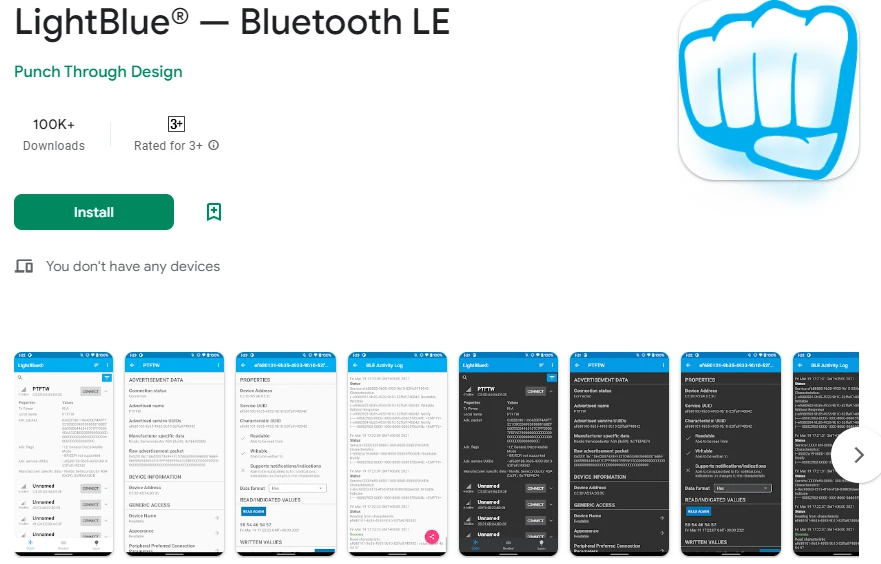
私たちは、iOSとAndroidの両方で利用可能なLightBlue Explorerアプリを使用してESP32と通信します。このチュートリアルは、Bluetooth Low Energy(BLE)通信を理解するための基礎となり、より高度なプロジェクトのための土台を築きます。視覚的なガイドについては、(動画の02:00で)をご参照ください。
ハードウェアの解説
このプロジェクトの主要なコンポーネントはESP32マイクロコントローラーで、Wi-FiとBluetoothの機能を統合しています。これにより、ESP32はサーバーとして機能し、データをワイヤレスで受信および送信することができます。ESP32の内蔵Bluetooth機能はBLEをサポートしており、低電力アプリケーションに適しています。
ESP32に加えて、LightBlueアプリがインストールされたモバイルデバイスを使用します。このアプリを使用すると、ユーザーはESP32に接続し、Bluetoothを通じてデータを送信できます。これらのコンポーネントの統合により、ESP32とモバイルデバイス間でシームレスな通信が可能になり、ユーザーのインタラクションが向上します。
データシートの詳細
| メーカー | エスプレスシステムズ |
|---|---|
| 部品番号 | ESP32-WROOM-32 |
| ロジック/入出力電圧 | 3.3 V |
| 供給電圧 | 3.0 - 3.6 V |
| 出力電流(チャネルごと) | 40 mA |
| ピーク電流(チャネルごと) | 160 mA |
| PWM周波数ガイダンス | 1 kHz |
| 入力ロジック閾値 | 0.2 VCC (低), 0.8 VCC (高) |
| 電圧降下 / RDS(on)/飽和 | 0.1 V |
| 熱的限界 | 125 °C |
| パッケージ | QFN48 |
| メモ / バリアント | ESP32-WROOM-32、ESP32-WROVER |
- 安定した電源供給(3.3 V)を確保して、ブラウンアウトを防ぎます。
- 電源ピンの近くでデカップリング用のコンデンサーを使用してください。
- 高電流を使用する場合は、適切な熱放散を維持してください。
- GPIOピンの電圧レベルには注意してください; それらは3.3Vに耐性があります。
- GPIO設定に必要に応じてプルアップまたはプルダウン抵抗を利用してください。
- BLE接続を監視し、アプリが正しくペアリングされていることを確認してください。
- サービスおよび特徴のUUIDが一意であることを確認してください。
- デバッグメッセージを確認するために、定期的にシリアルモニターをチェックしてください。
- 複雑な信号のトラブルシューティングにはロジックアナライザーの利用を検討してください。
配線指示
このプロジェクトの配線は簡単です。ESP32は主にUSB経由で電源とプログラミングに接続されます。ESP32をマイクロUSBケーブルを使ってコンピュータに接続してください。USBポートが十分な電力(通常は5 V)を供給していることを確認してください。デバッグにはシリアルモニターが使用されるため、このアプリケーションには追加のハードウェア接続は必要ありません。
将来のプロジェクトで外部コンポーネントとともにESP32を使用する際は、グラウンドピンを共通のグラウンドに接続することを忘れないでください。これにより、ESP32と接続されたセンサーやモジュールが同じ基準点を共有することが保証されます。また、バッテリーを使用する場合は、正端子を3.3 Vピンに接続し、負端子をESP32のグラウンドピンに接続してください。
コード例とウォークスルー
提供されたコードは、Bluetoothサーバーを初期化し、必要なサービスと特性を設定し、受信メッセージを処理します。主要な識別子には含まれますbleNameBluetoothデバイスの名前を定義するもので、receivedTextモバイルアプリからの受信メッセージを保存します。
const char *bleName = "ESP32_Bluetooth";
String receivedText = "";
そのsetup()この関数はシリアル通信とBLEセットアップを初期化します。これはLightBlueアプリとの接続を確立するために重要です。
void setup() {
  Serial.begin(115200);  // Initialize the serial port
  setupBLE();            // Initialize the Bluetooth BLE
}
中のloop()関数は、受信メッセージをチェックします。新しいメッセージが受信されると、それがシリアルモニタに印刷され、接続されたBLEデバイスに通知が送信されます。
if (receivedText.length() > 0 && millis() - lastMessageTime > 1000) {
    Serial.print("Received message: ");
    Serial.println(receivedText);
    pCharacteristic->setValue(receivedText.c_str());
    pCharacteristic->notify();
    receivedText = "";
}
完全な理解のために、記事の下にある完全なコードを参照してください。これにより、プロジェクトを成功裏に実装するために必要なすべての詳細が得られます。
デモンストレーション / 期待すること
成功裏に実装されると、LightBlueアプリからESP32にメッセージを送信できるようになります。「こんにちは」といったメッセージを入力すると、それがシリアルモニターに表示されます。さらに、アプリにメッセージを送り返すことで双方向の通信が確認できます。メッセージが表示されないといった問題が発生した場合は、ESP32がアプリに正しくペアリングされていることと、UUIDが一致していることを確認してください。
ビデオのタイムスタンプ
- 00:00 開始
- 2:10 プロジェクトの紹介
- 2:45 ドキュメンテーションページ
- 4:04 Arduinoコード
- 6:31 Bluetoothアプリをインストール中
- 7:12 ESP32ボードとCOMポートを選択中
- 8:54 プロジェクトのデモンストレーション
画像
#include "BLEDevice.h"
#include "BLEServer.h"
#include "BLEUtils.h"
#include "BLE2902.h"

// Define the Bluetooth device name
const char *bleName = "ESP32_Bluetooth";

// Define the received text and the time of the last message
String receivedText = "";
unsigned long lastMessageTime = 0;

// Define the UUIDs of the service and characteristics
#define SERVICE_UUID           "your_service_uuid_here"
#define CHARACTERISTIC_UUID_RX "your_rx_characteristic_uuid_here"
#define CHARACTERISTIC_UUID_TX "your_tx_characteristic_uuid_here"

// Define the Bluetooth characteristic
BLECharacteristic *pCharacteristic;

void setup() {
  Serial.begin(115200);  // Initialize the serial port
  setupBLE();            // Initialize the Bluetooth BLE
}

void loop() {
  // When the received text is not empty and the time since the last message is over 1 second
  // Send a notification and print the received text
  if (receivedText.length() > 0 && millis() - lastMessageTime > 1000) {
    Serial.print("Received message: ");
    Serial.println(receivedText);
    pCharacteristic->setValue(receivedText.c_str());
    pCharacteristic->notify();
    receivedText = "";
  }

  // Read data from the serial port and send it to BLE characteristic
  if (Serial.available() > 0) {
    String str = Serial.readStringUntil('\n');
    const char *newValue = str.c_str();
    pCharacteristic->setValue(newValue);
    pCharacteristic->notify();
  }
}

// Define the BLE server callbacks
class MyServerCallbacks : public BLEServerCallbacks {
  // Print the connection message when a client is connected
  void onConnect(BLEServer *pServer) {
    Serial.println("Connected");
  }
  // Print the disconnection message when a client is disconnected
  void onDisconnect(BLEServer *pServer) {
    Serial.println("Disconnected");
  }
};

// Define the BLE characteristic callbacks
class MyCharacteristicCallbacks : public BLECharacteristicCallbacks {
  void onWrite(BLECharacteristic *pCharacteristic) {
    // When data is received, get the data and save it to receivedText, and record the time
    std::string value = std::string(pCharacteristic->getValue().c_str());
    receivedText = String(value.c_str());
    lastMessageTime = millis();
    Serial.print("Received: ");
    Serial.println(receivedText);
  }
};

// Initialize the Bluetooth BLE
void setupBLE() {
  BLEDevice::init(bleName);                        // Initialize the BLE device
  BLEServer *pServer = BLEDevice::createServer();  // Create the BLE server
  // Print the error message if the BLE server creation fails
  if (pServer == nullptr) {
    Serial.println("Error creating BLE server");
    return;
  }
  pServer->setCallbacks(new MyServerCallbacks());  // Set the BLE server callbacks

  // Create the BLE service
  BLEService *pService = pServer->createService(SERVICE_UUID);
  // Print the error message if the BLE service creation fails
  if (pService == nullptr) {
    Serial.println("Error creating BLE service");
    return;
  }
  // Create the BLE characteristic for sending notifications
  pCharacteristic = pService->createCharacteristic(CHARACTERISTIC_UUID_TX, BLECharacteristic::PROPERTY_NOTIFY);
  pCharacteristic->addDescriptor(new BLE2902());  // Add the descriptor
  // Create the BLE characteristic for receiving data
  BLECharacteristic *pCharacteristicRX = pService->createCharacteristic(CHARACTERISTIC_UUID_RX, BLECharacteristic::PROPERTY_WRITE);
  pCharacteristicRX->setCallbacks(new MyCharacteristicCallbacks());  // Set the BLE characteristic callbacks
  pService->start();                                                 // Start the BLE service
  pServer->getAdvertising()->start();                                // Start advertising
  Serial.println("Waiting for a client connection...");              // Wait for a client connection
}
Common Course Links
Common Course Files
リソースと参考文献
-
ドキュメンテーションESP32 チュートリアル 37/55 - SunFounder Bluetooth アプリのドキュメントページdocs.sunfounder.com
ファイル📁
ファイルは利用できません。