ESP32 ትምህርት 37/55 - የብሉቱዝ መተግበሪያን ከESP32 BLE ጋር መጠቀም | SunFounder የESP32 IoT መማሪያ ኪት
በዚህ ትምህርት ውስጥ፣ ESP32ን እንደ ብሉቱዝ አገልጋይ በመጠቀም ከሞባይል መተግበሪያ መልዕክቶችን እንዴት መላክ እና መቀበል እንደሚቻል እንመረምራለን። ይህ በESP32 ቦርድዎ እና በሞባይል መሣሪያዎ መካከል መስተጋብራዊ ግንኙነት እንዲኖር ያስችላል፣ ይህም ለIoT ፕሮጀክቶችዎ ሁለገብ ጭማሪ ያደርገዋል። በዚህ ትምህርት መጨረሻ፣ ከሞባይል መሣሪያዎ ጽሑፍ ወደ ESP32 መላክ እና በተከታታይ መቆጣጠሪያ (serial monitor) ላይ ሲታይ ማየት ይችላሉ።
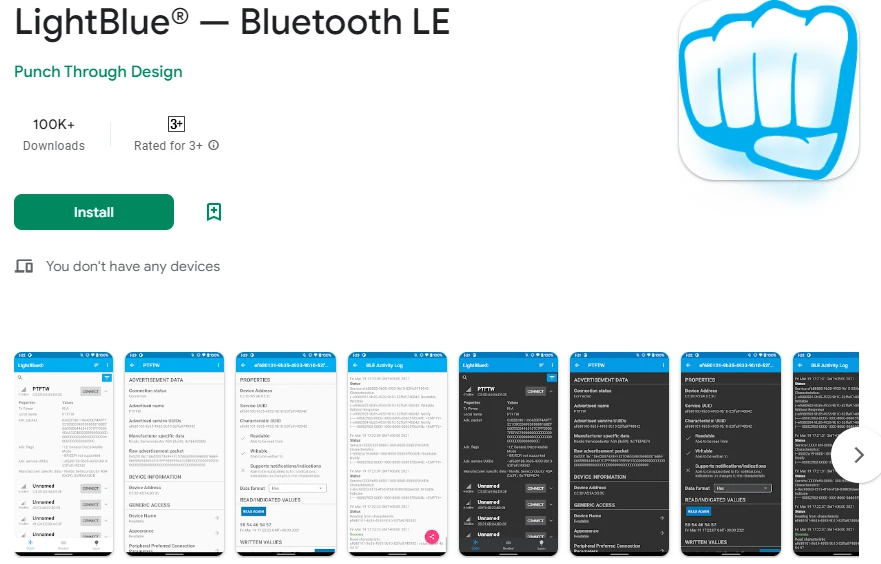
ከESP32 ጋር ለመግባባት በiOS እና Android ላይ የሚገኘውን LightBlue Explorer መተግበሪያን እንጠቀማለን። ይህ ትምህርት የብሉቱዝ ዝቅተኛ ኃይል (BLE) ግንኙነትን ለመረዳት መሠረታዊ ነው እና ለበለጠ የላቁ ፕሮጀክቶች መድረክ ይሆናል። ለእይታ መመሪያ፣ እባክዎ ቪዲዮውን ይመልከቱ (በቪዲዮው 02:00 ላይ)።
ሃርድዌር ተብራርቷል
በዚህ ፕሮጀክት ውስጥ ዋናው አካል ESP32 ማይክሮኮንትሮለር ነው፣ እሱም ሁለቱንም ዋይ-ፋይ እና ብሉቱዝ አቅሞችን ያጣምራል። ይህ ESP32 እንደ አገልጋይ ሆኖ እንዲሠራ እና መረጃን በገመድ አልባ እንዲቀበል እና እንዲልክ ያስችለዋል። የESP32 አብሮ የተሠራ የብሉቱዝ ተግባር BLEን ይደግፋል፣ ይህም ለዝቅተኛ ኃይል መተግበሪያዎች ቀልጣፋ ያደርገዋል።
ከESP32 በተጨማሪ፣ LightBlue መተግበሪያ የተጫነበት ሞባይል መሣሪያ እንጠቀማለን። ይህ መተግበሪያ ተጠቃሚዎች ከESP32 ጋር እንዲገናኙ እና በብሉቱዝ መረጃ እንዲልኩ ያስችላቸዋል። የእነዚህ አካላት ውህደት በESP32 እና በሞባይል መሣሪያዎች መካከል እንከን የለሽ ግንኙነት እንዲኖር ያስችላል፣ ይህም የተጠቃሚ መስተጋብርን ያሻሽላል።
የዳታሼት ዝርዝሮች
| አምራች | ኤስፕረሲፍ ሲስተምስ |
|---|---|
| የክፍል ቁጥር | ESP32-WROOM-32 |
| የሎጂክ/IO ቮልቴጅ | 3.3 ቪ |
| የአቅርቦት ቮልቴጅ | 3.0 – 3.6 ቪ |
| የውጤት ጅረት (በአንድ ቻናል) | 40 ሚኤ |
| ከፍተኛ ጅረት (በአንድ ቻናል) | 160 ሚኤ |
| የPWM ድግግሞሽ መመሪያ | 1 ኪሎሄርትዝ |
| የግቤት ሎጂክ ገደቦች | 0.2 ቪሲሲ (ዝቅተኛ)፣ 0.8 ቪሲሲ (ከፍተኛ) |
| የቮልቴጅ ጠብታ / RDS(on) / ሳቹሬሽን | 0.1 ቪ |
| የሙቀት ገደቦች | 125 °ሴ |
| ፓኬጅ | QFN48 |
| ማስታወሻዎች / ልዩነቶች | ESP32-WROOM-32፣ ESP32-WROVER |
- የቮልቴጅ መቀነስን ለመከላከል የተረጋጋ የኃይል አቅርቦት (3.3 ቪ) ያረጋግጡ።
- በኃይል ፒኖች አጠገብ ለዲኮፕሊንግ ካፓሲተሮችን ይጠቀሙ።
- ከፍተኛ ጅረት የሚጠቀሙ ከሆነ ትክክለኛ የሙቀት መበታተንን ይጠብቁ።
- ለGPIO ፒን የቮልቴጅ ደረጃዎች ይጠንቀቁ፤ እነሱ 3.3 ቪ ታጋሽ ናቸው።
- ለGPIO ውቅሮች እንደ አስፈላጊነቱ ፑል-አፕ ወይም ፑል-ዳውን ተቃዋሚዎችን ይጠቀሙ።
- የBLE ግንኙነቶችን ይቆጣጠሩ፤ መተግበሪያው በትክክል መጣመሩን ያረጋግጡ።
- ለአገልግሎቶች እና ባህሪያት UUIDዎች ልዩ መሆናቸውን ያረጋግጡ።
- ለማረም መልዕክቶች የተከታታይ መቆጣጠሪያውን በመደበኛነት ይፈትሹ።
- ለውስብስብ የምልክት ችግር መፈተሻ የሎጂክ ተንታኝ መጠቀምን ያስቡ።
የወልና መመሪያዎች
ለዚህ ፕሮጀክት የወልና ሥራ ቀላል ነው ምክንያቱም ESP32 በዋናነት ለኃይል እና ለፕሮግራም በUSB ይገናኛል። ESP32ን ማይክሮ ዩኤስቢ ገመድ በመጠቀም ከኮምፒውተርዎ ጋር ያገናኙ። የዩኤስቢ ወደብ በቂ ኃይል (በተለምዶ 5 ቪ) እየሰጠ መሆኑን ያረጋግጡ። የተከታታይ መቆጣጠሪያው ለማረም ይጠቅማል፣ ስለዚህ ለዚህ መተግበሪያ ተጨማሪ የሃርድዌር ግንኙነቶች አያስፈልጉም።
ወደፊት በሚሠሩ ፕሮጀክቶች ውስጥ ESP32ን ከውጭ አካላት ጋር ሲጠቀሙ፣ የመሬት (ground) ፒኖችን ከጋራ መሬት ጋር ማገናኘት ያስታውሱ። ይህ ESP32 እና ማንኛውም የተገናኙ ዳሳሾች ወይም ሞጁሎች ተመሳሳይ የማጣቀሻ ነጥብ እንዲጋሩ ያረጋግጣል። በተጨማሪም፣ ባትሪ የሚጠቀሙ ከሆነ፣ አወንታዊውን ተርሚናል ከ3.3 ቪ ፒን እና አሉታዊውን ተርሚናል በESP32 ላይ ካለው የመሬት ፒን ጋር ያገናኙ።
የኮድ ምሳሌዎች እና ማብራሪያ
የቀረበው ኮድ የብሉቱዝ አገልጋዩን ያስጀምራል፣ አስፈላጊ አገልግሎቶችን እና ባህሪያትን ያዘጋጃል፣ እና የገቡ መልዕክቶችን ይይዛል። ቁልፍ መለያዎች bleNameን ያካትታሉ፣ እሱም የብሉቱዝ መሣሪያውን ስም ይገልጻል፣ እና receivedTextን፣ እሱም ከሞባይል መተግበሪያው የገባውን መልዕክት ያከማቻል።
const char *bleName = "ESP32_Bluetooth";
String receivedText = "";
የsetup() ተግባር የተከታታይ ግንኙነትን እና የBLE ውቅርን ያስጀምራል። ይህ ከLightBlue መተግበሪያ ጋር ግንኙነት ለመመሥረት ወሳኝ ነው።
void setup() {
  Serial.begin(115200);  // የተከታታይ ወደቡን ያስጀምሩ
  setupBLE();            // የብሉቱዝ BLEን ያስጀምሩ
}
በloop() ተግባር ውስጥ፣ ኮዱ የገቡ መልዕክቶችን ይፈትሻል። አዲስ መልዕክት ከተቀበለ፣ በተከታታይ መቆጣጠሪያው ላይ ይታተማል፣ እና ማሳወቂያ ለተገናኘው BLE መሣሪያ ይላካል።
if (receivedText.length() > 0 && millis() - lastMessageTime > 1000) {
    Serial.print("የተቀበለው መልዕክት፡ ");
    Serial.println(receivedText);
    pCharacteristic->setValue(receivedText.c_str());
    pCharacteristic->notify();
    receivedText = "";
}
ለተሟላ ግንዛቤ፣ ከጽሑፉ በታች የሚጫነውን ሙሉ ኮድ ይመልከቱ። ይህ ፕሮጀክቱን በተሳካ ሁኔታ ለመተግበር የሚያስፈልጉዎትን ሁሉንም ዝርዝሮች ይሰጥዎታል።
ማሳያ / ምን እንደሚጠበቅ
በተሳካ ሁኔታ ከተተገበረ በኋላ፣ ከLightBlue መተግበሪያ ወደ ESP32 መልዕክቶችን መላክ መቻል ይኖርብዎታል። እንደ "ሄሎ" ያለ መልዕክት ሲተይቡ፣ በተከታታይ መቆጣጠሪያው ላይ ይታያል። በተጨማሪም፣ መልዕክቶችን ወደ መተግበሪያው መልሰው መላክ ይችላሉ፣ ይህም የሁለት መንገድ ግንኙነትን ያረጋግጣል። እንደ መልዕክቶች አለመታየት ያሉ ችግሮች ካጋጠሙዎት፣ ESP32 ከመተግበሪያው ጋር በትክክል መጣመሩን እና UUIDዎቹ መመሳሰላቸውን ያረጋግጡ።
የቪዲዮ የጊዜ ምልክቶች
- 00:00 መጀመሪያ
- 2:10 የፕሮጀክቱ መግቢያ
- 2:45 የሰነድ ገጽ
- 4:04 የአርዱኖ ኮድ
- 6:31 የብሉቱዝ መተግበሪያን መጫን
- 7:12 የESP32 ቦርድ እና የCOM ወደብ መምረጥ
- 8:54 የፕሮጀክቱ ማሳያ
ምስሎች
#include "BLEDevice.h"
#include "BLEServer.h"
#include "BLEUtils.h"
#include "BLE2902.h"

// Define the Bluetooth device name
const char *bleName = "ESP32_Bluetooth";

// Define the received text and the time of the last message
String receivedText = "";
unsigned long lastMessageTime = 0;

// Define the UUIDs of the service and characteristics
#define SERVICE_UUID           "your_service_uuid_here"
#define CHARACTERISTIC_UUID_RX "your_rx_characteristic_uuid_here"
#define CHARACTERISTIC_UUID_TX "your_tx_characteristic_uuid_here"

// Define the Bluetooth characteristic
BLECharacteristic *pCharacteristic;

void setup() {
  Serial.begin(115200);  // Initialize the serial port
  setupBLE();            // Initialize the Bluetooth BLE
}

void loop() {
  // When the received text is not empty and the time since the last message is over 1 second
  // Send a notification and print the received text
  if (receivedText.length() > 0 && millis() - lastMessageTime > 1000) {
    Serial.print("Received message: ");
    Serial.println(receivedText);
    pCharacteristic->setValue(receivedText.c_str());
    pCharacteristic->notify();
    receivedText = "";
  }

  // Read data from the serial port and send it to BLE characteristic
  if (Serial.available() > 0) {
    String str = Serial.readStringUntil('\n');
    const char *newValue = str.c_str();
    pCharacteristic->setValue(newValue);
    pCharacteristic->notify();
  }
}

// Define the BLE server callbacks
class MyServerCallbacks : public BLEServerCallbacks {
  // Print the connection message when a client is connected
  void onConnect(BLEServer *pServer) {
    Serial.println("Connected");
  }
  // Print the disconnection message when a client is disconnected
  void onDisconnect(BLEServer *pServer) {
    Serial.println("Disconnected");
  }
};

// Define the BLE characteristic callbacks
class MyCharacteristicCallbacks : public BLECharacteristicCallbacks {
  void onWrite(BLECharacteristic *pCharacteristic) {
    // When data is received, get the data and save it to receivedText, and record the time
    std::string value = std::string(pCharacteristic->getValue().c_str());
    receivedText = String(value.c_str());
    lastMessageTime = millis();
    Serial.print("Received: ");
    Serial.println(receivedText);
  }
};

// Initialize the Bluetooth BLE
void setupBLE() {
  BLEDevice::init(bleName);                        // Initialize the BLE device
  BLEServer *pServer = BLEDevice::createServer();  // Create the BLE server
  // Print the error message if the BLE server creation fails
  if (pServer == nullptr) {
    Serial.println("Error creating BLE server");
    return;
  }
  pServer->setCallbacks(new MyServerCallbacks());  // Set the BLE server callbacks

  // Create the BLE service
  BLEService *pService = pServer->createService(SERVICE_UUID);
  // Print the error message if the BLE service creation fails
  if (pService == nullptr) {
    Serial.println("Error creating BLE service");
    return;
  }
  // Create the BLE characteristic for sending notifications
  pCharacteristic = pService->createCharacteristic(CHARACTERISTIC_UUID_TX, BLECharacteristic::PROPERTY_NOTIFY);
  pCharacteristic->addDescriptor(new BLE2902());  // Add the descriptor
  // Create the BLE characteristic for receiving data
  BLECharacteristic *pCharacteristicRX = pService->createCharacteristic(CHARACTERISTIC_UUID_RX, BLECharacteristic::PROPERTY_WRITE);
  pCharacteristicRX->setCallbacks(new MyCharacteristicCallbacks());  // Set the BLE characteristic callbacks
  pService->start();                                                 // Start the BLE service
  pServer->getAdvertising()->start();                                // Start advertising
  Serial.println("Waiting for a client connection...");              // Wait for a client connection
}
Common Course Links
Common Course Files
ምንጮች እና ምንጮች
-
ሰነዶችESP32 Tutorial 37/55- SunFounder doc page for Bluetooth appdocs.sunfounder.com
ፋይሎች📁
አንድ ፋይል የለም።