ESP32教程36/55 - 猜数字游戏 | SunFounder的ESP32物联网学习套件
在本教程中,我们将使用ESP32微控制器以及红外遥控器和LCD显示屏创建一个有趣的猜数字游戏。玩家将尝试猜测一个介于0到99之间的随机生成数字,游戏会提示猜测是过高还是过低。通过这个项目,您将学习如何使用红外接收器、在LCD上显示数值以及管理来自遥控器的用户输入。您可以参考视频以获得更多清晰度(视频中00:00处)。


硬件说明
本项目中使用的主要组件包括ESP32微控制器、红外遥控器、红外接收器和LCD显示屏。ESP32作为主处理单元,能够处理无线通信,使其成为物联网项目的多功能选择。红外遥控器允许用户无需与板子进行物理交互即可输入猜测,而LCD则显示游戏状态和提示。
红外接收器检测来自遥控器的信号并将其解码以供游戏使用。遥控器上的每次按键都对应一个ESP32可以解释的特定值。LCD显示屏为用户提供视觉界面,显示当前猜测范围以及猜测是否正确。
数据手册详情
| 制造商 | SunFounder |
|---|---|
| 零件编号 | ESP32 |
| 逻辑/IO电压 | 3.3 V |
| 电源电压 | 5 V(通过USB) |
| 输出电流(每通道) | 12 mA(最大) |
| PWM频率指南 | 1 kHz |
| 输入逻辑阈值 | 0.3 * Vcc 至 0.7 * Vcc |
| 压降 / RDS(on) / 饱和 | 0.2 V |
| 热限制 | 工作温度:-40 至 85 °C |
| 封装 | WROOM-32模块 |
| 备注 / 变体 | 支持Wi-Fi和蓝牙 |
- 确保所有组件在适用情况下额定为3.3 V和5 V。
- 为IR接收器使用适当的上拉电阻,以避免浮动输入。
- 如果在最大输出电流下长时间运行,请考虑使用散热器。
- 使用PWM时,保持约1 kHz的频率以获得最佳性能。
- 注意接线;确保连接牢固以避免间歇性故障。
接线说明
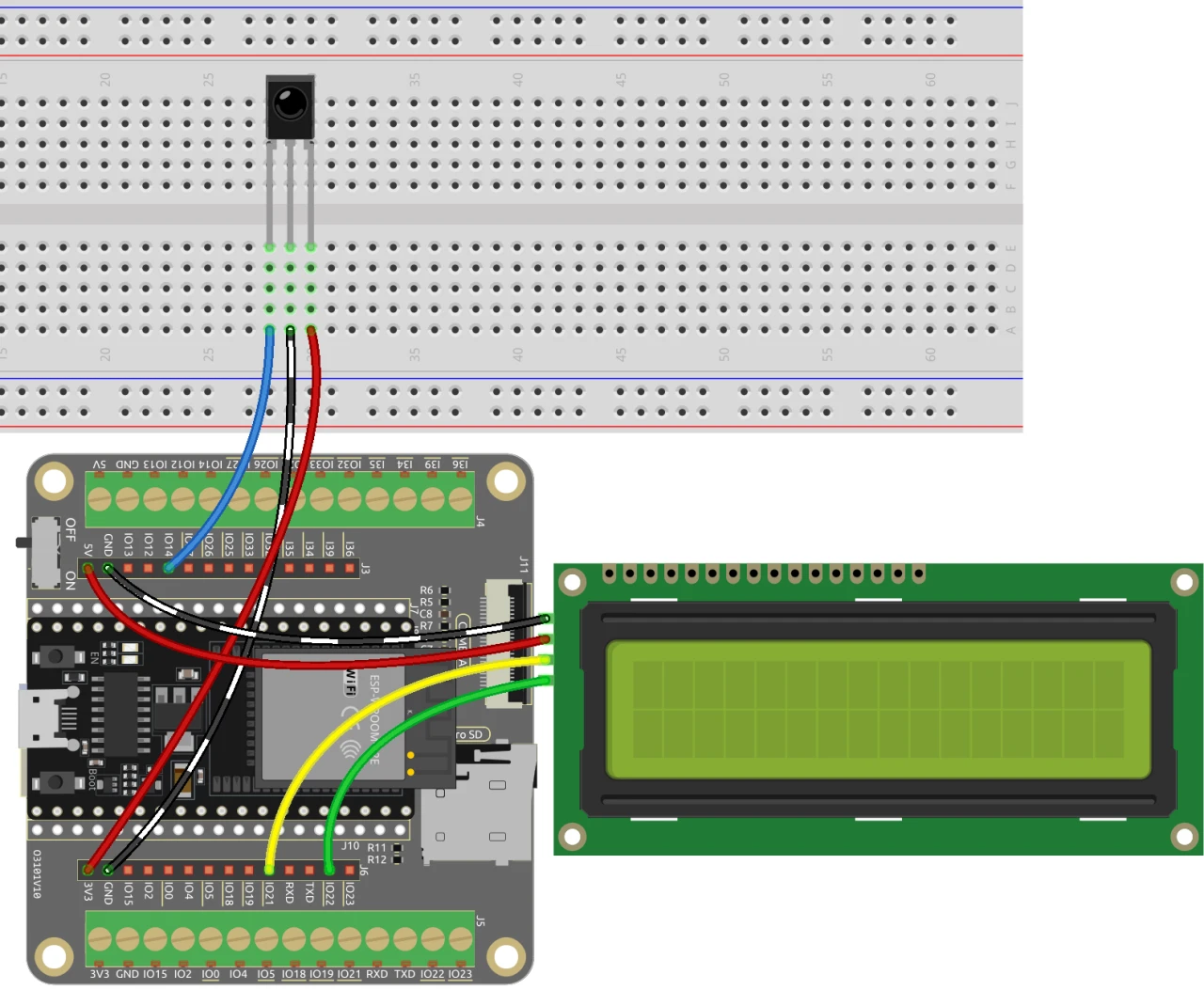
要设置猜数字游戏的接线,首先连接红外接收器。将接收器右侧引脚的红线连接到ESP32上的3.3 V电源。黑线应连接到地线,而红外接收器的左侧引脚连接到ESP32上的引脚14。
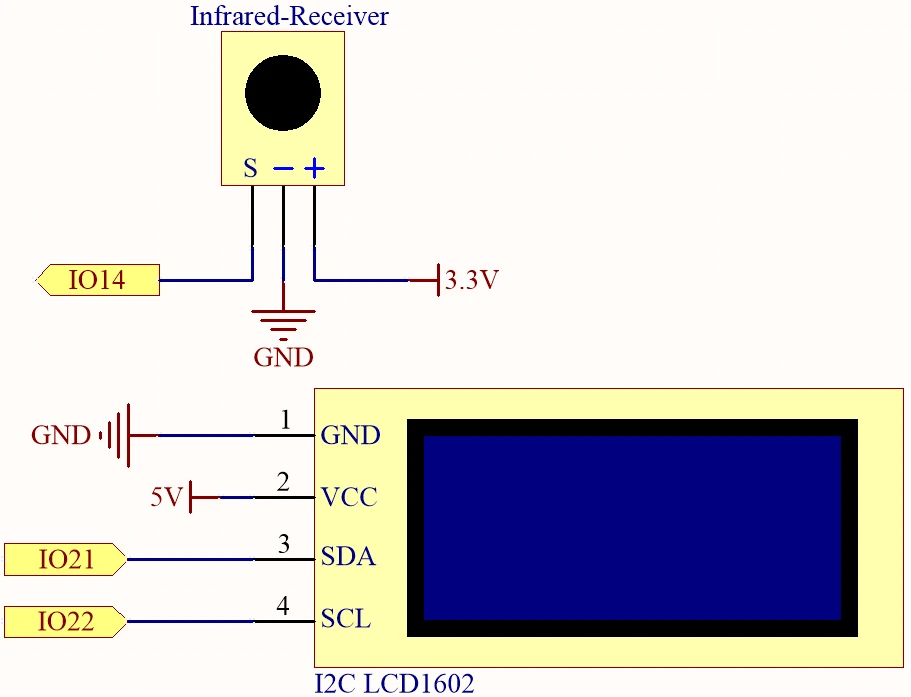
接下来,连接LCD显示屏。将LCD的VCC引脚连接到ESP32上的5 V电源,地线引脚连接到地线。LCD的SDA和SCL引脚应分别连接到引脚21和22。确保SDA和SCL连接之间有两个空位,以避免引脚冲突。最后,在给板子上电之前,务必移除电池上的任何塑料盖。
代码示例与讲解
以下代码片段说明了用于猜数字游戏程序的关键部分。我们首先包含必要的库并定义关键标识符。
#include
#include
#include
#include

const uint16_t IR_RECEIVE_PIN = 14;
IRrecv irrecv(IR_RECEIVE_PIN);
decode_results results;
在此摘录中,我们包含了用于处理LCD和IR接收器功能的库。红外接收器的引脚定义为14,我们创建了必要的对象实例来管理输入和输出。
void setup() {
  lcd.init();
  lcd.backlight();
  Serial.begin(9600);
  irrecv.enableIRIn();
  initNewValue();
}此片段显示了setup函数,我们在其中初始化LCD、启动串行通信并启用IR接收器。调用initNewValue()函数来生成一个新的随机数供玩家猜测。
bool detectPoint() {
  if (count > pointValue) {
    if (count < upper) upper = count;
  } else if (count < pointValue) {
    if (count > lower) lower = count;
  } else if (count == pointValue) {
    count = 0;
    return 1;
  }
  count = 0;
  return 0;
}
此函数检查玩家的猜测与随机生成的数字,并相应地调整上限和下限。如果猜测正确,则重置计数并返回true。
完整代码加载在文章下方供您参考。
演示 / 预期效果
一切连接完毕并上传代码后,游戏会提示你按下遥控器上的任意数字键。随后,游戏会对你的猜测给出反馈,不断更新可能的数字范围,直到你正确猜中目标数字。如果你按下电源按钮,游戏将重置并重新开始(视频中02:30处)。
常见的陷阱包括确保红外接收器方向正确,以及所有连接牢固。如果游戏没有响应,请检查电源供应,并确认在Arduino IDE中选择了正确的开发板和端口。
视频时间戳
- 00:00 开始
- 2:17 游戏项目介绍
- 4:37 接线
- 6:15 Arduino代码讲解
- 12:32 在Arduino IDE中选择ESP32开发板和COM端口
- 16:16 玩猜数字游戏
图像
#include <Wire.h>
#include <LiquidCrystal_I2C.h>
#include <IRremoteESP8266.h>
#include <IRrecv.h>

// Define the IR receiver pin
const uint16_t IR_RECEIVE_PIN = 14;

// Create an IRrecv object
IRrecv irrecv(IR_RECEIVE_PIN);

// Create a decode_results object
decode_results results;

const long interval = 1000;

unsigned long previousMillis = 0;

// Initialize the LCD object
LiquidCrystal_I2C lcd(0x27, 16, 2);

// Initialize the input number value
int count = 0;

// Initialize the random lucky point
int pointValue = 0;

// Initialize the upper and lower limit tips
int upper = 99;
int lower = 0;

void setup() {
  // Initialize the LCD screen
  lcd.init();
  lcd.backlight();

  // Start the serial communication
  Serial.begin(9600);

  // Enable the IR receiver
  irrecv.enableIRIn();

  // Initialize a new lucky point value
  initNewValue();
}

void loop() {
  // If a signal is received from the IR receiver
  if (irrecv.decode(&results)) {
    bool result = 0;
    String num = decodeKeyValue(results.value);

    // If the POWER button is pressed
    if (num == "POWER") {
      initNewValue(); // Initialize a new lucky point value
    }

    // If the CYCLE button is pressed
    else if (num == "CYCLE") {
      result = detectPoint(); // Detect the input number
      lcdShowInput(result); // Show the result on the LCD screen
    }

    // If a number button (0-9) is pressed,
    //add the digit to the input number
    //and detect the number if it is greater than or equal to 10
    else if (num >= "0" && num <= "9") {
      count = count * 10;
      count += num.toInt();
      if (count >= 10) {
        result = detectPoint();
      }
      lcdShowInput(result);
    }
    irrecv.resume();
  }
}

// Function to initialize a new lucky point value
void initNewValue() {
  // Set the random seed based on the analog value from pin A0
  randomSeed(analogRead(A0));

  // Generate a new random lucky point value
  pointValue = random(99);

  // Reset the upper and lower limit tips
  upper = 99;
  lower = 0;

  // Show the welcome message on the LCD screen
  lcd.clear();
  lcd.print("    Welcome!");
  lcd.setCursor(0, 1);
  lcd.print("Press Any Number");

  // Reset the input number value
  count = 0;

  // Print the lucky point value to the serial monitor
  Serial.print("point is ");
  Serial.println(pointValue);
}

// Detect the input number
//and update the upper/lower limit tips accordingly
bool detectPoint() {
  if (count > pointValue) {
    if (count < upper)upper = count;
  }
  else if (count < pointValue) {
    if (count > lower)lower = count;
  }

  // If the input number is equal to the lucky point value,
  else if (count == pointValue) {

    // Reset the input number and return true
    count = 0;
    return 1;
  }
  // Reset the input number and return false
  count = 0;
  return 0;
}

// Show the input number and the upper/lower limit tips
void lcdShowInput(bool result) {
  lcd.clear();

  // If the input number is equal to the lucky point value
  if (result == 1)
  {
    // Show the success message and initialize a new lucky point value
    lcd.setCursor(0, 1);
    lcd.print(" You've got it! ");
    delay(5000);
    initNewValue();
    return;
  }
  lcd.print("Enter number:");
  lcd.print(count);
  lcd.setCursor(0, 1);
  lcd.print(lower);
  lcd.print(" < Point < ");
  lcd.print(upper);
}

// Function to decode the key value from the IR receiver signal
String decodeKeyValue(long result)
{
  switch(result){
    case 0xFF6897:
      return "0";
    case 0xFF30CF:
      return "1";
    case 0xFF18E7:
      return "2";
    case 0xFF7A85:
      return "3";
    case 0xFF10EF:
      return "4";
    case 0xFF38C7:
      return "5";
    case 0xFF5AA5:
     return "6";
    case 0xFF42BD:
      return "7";
    case 0xFF4AB5:
      return "8";
    case 0xFF52AD:
      return "9";
    case 0xFF906F:
      return "+";
    case 0xFFA857:
      return "-";
    case 0xFFE01F:
      return "EQ";
    case 0xFFB04F:
      return "U/SD";
    case 0xFF9867:
      return "CYCLE";
    case 0xFF22DD:
      return "PLAY/PAUSE";
    case 0xFF02FD:
      return "BACKWARD";
    case 0xFFC23D:
      return "FORWARD";
    case 0xFFA25D:
      return "POWER";
    case 0xFFE21D:
      return "MUTE";
    case 0xFF629D:
      return "MODE";
    case 0xFFFFFFFF:
      return "ERROR";
    default :
      return "ERROR";
    }
}
Common Course Links
Common Course Files
资源与参考
-
文档ESP32教程 36/55 - SunFounder文档页面用于猜数字docs.sunfounder.com
文件📁
没有可用的文件。