Ezali na ndenge ya kolakisa motango ya masano na ESP32.
Na boyekoli oyo, tokosala lisano ya kosakana ya koyeba motángo na esaleli ya ESP32 microcontroller elongo na remote ya infrarouge mpe écran LCD. Mobeti akomeka koyeba motángo oyo ebimaki na ndenge ya mbala moko kati na 0 mpe 99, mpe lisano ekopesa bilembo ya soki motángo ezali koleka monene to moké. Na nzela ya projet oyo, okoyekola kosalela récepteur ya infrarouge, kolakisa bamvula na écran LCD, mpe kokamba bokotisi ya mosaleli na remote. Okoki kotala vidéo mpo na bososoli ya libala (na vidéo na 00:00).


Biloko ya Mateki oyo Elobami
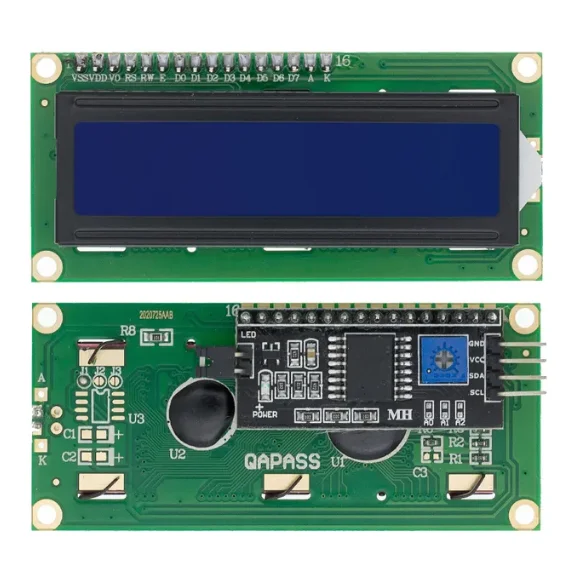
Biloko ya liboso oyo esalelami na projet oyo ezali na ESP32 microcontroller, remote ya infrarouge, récepteur ya infrarouge, mpe écran LCD. ESP32 ezali lokola eteni ya liboso ya kosala mpe ekoki kosala communication sans fil, yango wana ezali choix ya malamu mpo na ba projets IoT. Remote ya infrarouge epesaka bato nzela ya kokotisa bamvula na bango na esika ya kosangana na board, wana écran LCD elakisaka état ya lisano mpe ba demandes.
Récepteur ya infrarouge emonaka ba signaux oyo ewuti na remote mpe efungolaka yango mpo na kosalela na lisano. Mbala nyonso oyo moto abetu bouton na remote, yango ekokani na valeur spécifique oyo ESP32 ekoki kososola. Écran LCD epesaka interface visuelle mpo na mosaleli, kolakisa étendue ya motángo ya sik’oyo mpe soki motángo ezali ya semba.
Biloko ya Datasheet
| Fabricant | SunFounder |
|---|---|
| Numéro ya eteni | ESP32 |
| Tension ya logique/IO | 3.3 V |
| Tension ya alimentation | 5 V (na nzela ya USB) |
| Courant ya sortie (na canal) | 12 mA (max) |
| Directive ya fréquence PWM | 1 kHz |
| Seuils ya logique ya bokotisi | 0.3 * Vcc to 0.7 * Vcc |
| Chute ya tension / RDS(on) / saturation | 0.2 V |
| Limites ya température | Température ya fonctionnement: -40 to 85 °C |
| Paquet | Module WROOM-32 |
| Notes / variantes | Esalelaka Wi-Fi mpe Bluetooth |
- Kokamba ete biloko nyonso ezali na rating ya 3.3 V mpe 5 V esika esengeli.
- Salela ba résistances pull-up ya malamu mpo na récepteur IR mpo na kokima ba entrées oyo ezali na flottement.
- Kokanisa kosalela dissipateur de chaleur soki ozali kosalela courant ya sortie ya maximum mpo na ntango molai.
- Ntango ozali kosalela PWM, keba na fréquence ya 1 kHz mpo na fonctionnement ya malamu.
- Keba na câblage; kamba ete ba connexions ezali ya makasi mpo na kokima ba pannes ya mbala na mbala.
Bilenge ya Câblage
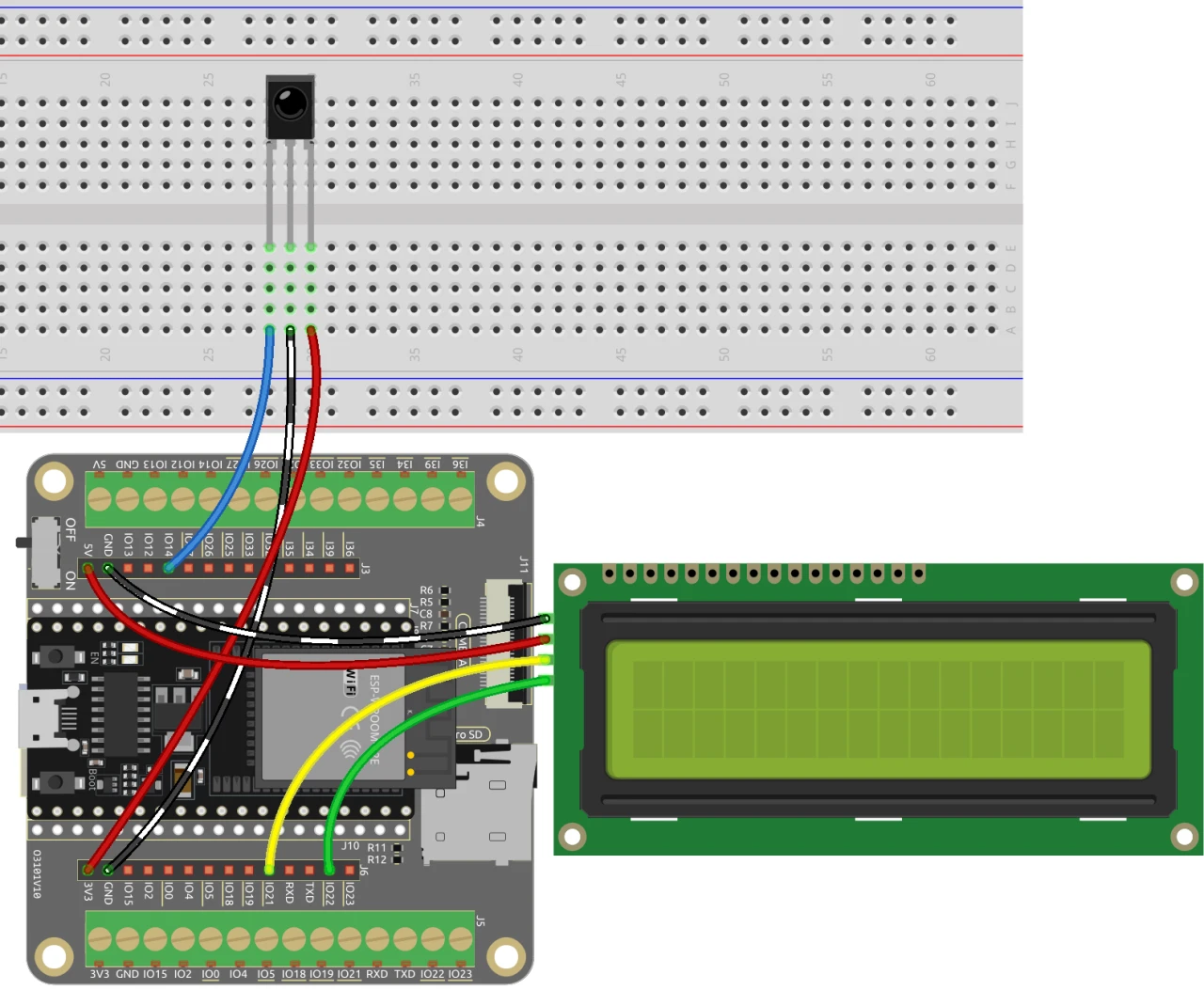
Mpo na kobongisa câblage ya lisano ya koyeba motángo, banda na kosangisa récepteur ya infrarouge. Sangisa fil ya motane oyo ewuti na pin ya droite ya récepteur na alimentation ya 3.3 V na ESP32. Fil ya noir esengeli kokende na terre, wana pin ya gauche ya récepteur ya infrarouge esangisami na pin 14 na ESP32.
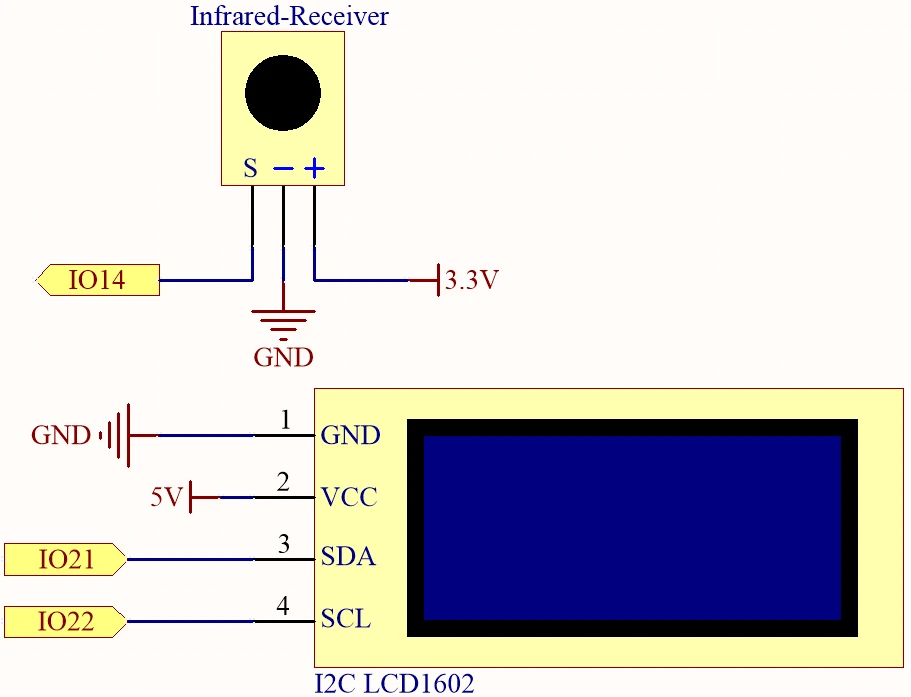
Na sima, sangisa écran LCD. Sangisa pin VCC ya LCD na alimentation ya 5 V na ESP32 mpe pin ya terre na terre. Ba pin SDA mpe SCL ya LCD esengeli kosangisama na ba pin 21 mpe 22 na ndenge ya kolandana. Kamba ete ezali na ba espaces mibale ya pamba kati na ba connexions SDA mpe SCL mpo na kokima ba conflits ya pin. Na suka, keba na kolongola ba couvertures ya plastique nyonso na batterie liboso ya kopelisa board.
Ba Exemples ya Code & Explication
Ba extraits ya code oyo elandi kolakisa ba parties ya liboso ya programme oyo esalelami mpo na lisano ya koyeba motángo. Tobanda na kosangisa ba bibliothèques ya liboso mpe kopesa ba identifiants ya minene.
#include
#include
#include
#include

const uint16_t IR_RECEIVE_PIN = 14;
IRrecv irrecv(IR_RECEIVE_PIN);
decode_results results;
Na extrait oyo, tozali kosangisa ba bibliothèques mpo na kosalela LCD mpe fonction ya récepteur IR. Pin ya récepteur infrarouge ezwami lokola 14, mpe tozali kosala ba instances ya ba objets ya liboso mpo na kokamba bokotisi mpe bobimisi.
void setup() {
  lcd.init();
  lcd.backlight();
  Serial.begin(9600);
  irrecv.enableIRIn();
  initNewValue();
}
Extrait oyo elakisaka fonction setup epai tozali ko-initialiser LCD, kobanda communication série, mpe kopelisa récepteur IR. Fonction initNewValue() ebengami mpo na kobimisa motángo ya sika ya mbala moko mpo na mobeti mpo na koyeba.
bool detectPoint() {
  if (count > pointValue) {
    if (count < upper) upper = count;
  } else if (count < pointValue) {
    if (count > lower) lower = count;
  } else if (count == pointValue) {
    count = 0;
    return 1;
  }
  count = 0;
  return 0;
}
Fonction oyo etyolaka mbano ya mobeti na motángo oyo ebimaki na ndenge ya mbala moko, mpe ebongisaka ba limites ya likolo mpe ya se na ndenge ya kolanda. Soki mbano ezali ya semba, ezongisaka count na zéro mpe ezongisaka vrai.
Code ya mobimba ekomami na se ya article mpo na référence na yo.
Démonstration / Nini Okoki Kozela
Ntango nyonso esili kokangama mpe kode esili kotomelama, lisano ekotinda yo opesa motángo nyonso na télécommande. Lisano ekopesa yo eyano na makanisi na yo, ekobongola motángo ya mikakatano kino okoki koyeba motángo ya solo. Soki opesi bouton ya POWER, lisano ekofutama mpe ebanda lisusu (na vidéo na 02:30).
Makambo ya mbeba oyo ezali koyangela mingi ezali ete récepteur ya infrarouge esengeli kotyama na ndenge ya malamu mpe ba connexions nyonso esengeli kokangama makasi. Soki lisano eza koyanola te, tala soki courant ezali mpe sengola ete board mpe port ya malamu esili koponama na Arduino IDE.
Ba Timestamps ya Vidéo
- 00:00 Ebandeli
- 2:17 Boyebisi ya projet ya lisano
- 4:37 Kokangama ya ba fils
- 6:15 Ndimbola ya Code ya Arduino
- 12:32 Kopona Board ya ESP32 mpe COM Port na Arduino IDE
- 16:16 Kobeta lisano ya koyeba motángo
Images
#include <Wire.h>
#include <LiquidCrystal_I2C.h>
#include <IRremoteESP8266.h>
#include <IRrecv.h>

// Define the IR receiver pin
const uint16_t IR_RECEIVE_PIN = 14;

// Create an IRrecv object
IRrecv irrecv(IR_RECEIVE_PIN);

// Create a decode_results object
decode_results results;

const long interval = 1000;

unsigned long previousMillis = 0;

// Initialize the LCD object
LiquidCrystal_I2C lcd(0x27, 16, 2);

// Initialize the input number value
int count = 0;

// Initialize the random lucky point
int pointValue = 0;

// Initialize the upper and lower limit tips
int upper = 99;
int lower = 0;

void setup() {
  // Initialize the LCD screen
  lcd.init();
  lcd.backlight();

  // Start the serial communication
  Serial.begin(9600);

  // Enable the IR receiver
  irrecv.enableIRIn();

  // Initialize a new lucky point value
  initNewValue();
}

void loop() {
  // If a signal is received from the IR receiver
  if (irrecv.decode(&results)) {
    bool result = 0;
    String num = decodeKeyValue(results.value);

    // If the POWER button is pressed
    if (num == "POWER") {
      initNewValue(); // Initialize a new lucky point value
    }

    // If the CYCLE button is pressed
    else if (num == "CYCLE") {
      result = detectPoint(); // Detect the input number
      lcdShowInput(result); // Show the result on the LCD screen
    }

    // If a number button (0-9) is pressed,
    //add the digit to the input number
    //and detect the number if it is greater than or equal to 10
    else if (num >= "0" && num <= "9") {
      count = count * 10;
      count += num.toInt();
      if (count >= 10) {
        result = detectPoint();
      }
      lcdShowInput(result);
    }
    irrecv.resume();
  }
}

// Function to initialize a new lucky point value
void initNewValue() {
  // Set the random seed based on the analog value from pin A0
  randomSeed(analogRead(A0));

  // Generate a new random lucky point value
  pointValue = random(99);

  // Reset the upper and lower limit tips
  upper = 99;
  lower = 0;

  // Show the welcome message on the LCD screen
  lcd.clear();
  lcd.print("    Welcome!");
  lcd.setCursor(0, 1);
  lcd.print("Press Any Number");

  // Reset the input number value
  count = 0;

  // Print the lucky point value to the serial monitor
  Serial.print("point is ");
  Serial.println(pointValue);
}

// Detect the input number
//and update the upper/lower limit tips accordingly
bool detectPoint() {
  if (count > pointValue) {
    if (count < upper)upper = count;
  }
  else if (count < pointValue) {
    if (count > lower)lower = count;
  }

  // If the input number is equal to the lucky point value,
  else if (count == pointValue) {

    // Reset the input number and return true
    count = 0;
    return 1;
  }
  // Reset the input number and return false
  count = 0;
  return 0;
}

// Show the input number and the upper/lower limit tips
void lcdShowInput(bool result) {
  lcd.clear();

  // If the input number is equal to the lucky point value
  if (result == 1)
  {
    // Show the success message and initialize a new lucky point value
    lcd.setCursor(0, 1);
    lcd.print(" You've got it! ");
    delay(5000);
    initNewValue();
    return;
  }
  lcd.print("Enter number:");
  lcd.print(count);
  lcd.setCursor(0, 1);
  lcd.print(lower);
  lcd.print(" < Point < ");
  lcd.print(upper);
}

// Function to decode the key value from the IR receiver signal
String decodeKeyValue(long result)
{
  switch(result){
    case 0xFF6897:
      return "0";
    case 0xFF30CF:
      return "1";
    case 0xFF18E7:
      return "2";
    case 0xFF7A85:
      return "3";
    case 0xFF10EF:
      return "4";
    case 0xFF38C7:
      return "5";
    case 0xFF5AA5:
     return "6";
    case 0xFF42BD:
      return "7";
    case 0xFF4AB5:
      return "8";
    case 0xFF52AD:
      return "9";
    case 0xFF906F:
      return "+";
    case 0xFFA857:
      return "-";
    case 0xFFE01F:
      return "EQ";
    case 0xFFB04F:
      return "U/SD";
    case 0xFF9867:
      return "CYCLE";
    case 0xFF22DD:
      return "PLAY/PAUSE";
    case 0xFF02FD:
      return "BACKWARD";
    case 0xFFC23D:
      return "FORWARD";
    case 0xFFA25D:
      return "POWER";
    case 0xFFE21D:
      return "MUTE";
    case 0xFF629D:
      return "MODE";
    case 0xFFFFFFFF:
      return "ERROR";
    default :
      return "ERROR";
    }
}
Common Course Links
Common Course Files
Mokili na bisika
-
DokumentasiESP32 Tutorial 36/55- SunFounder doc page for guessing numberdocs.sunfounder.com
Fichiers📁
Aucun fichier disponible.