ESP32 教學 54/55 - 透過 Wi-Fi 設定 WS2812 LED 燈條顏色 | SunFounder 嘅 ESP32 IoT 學習套件
喺呢個教學入面,我哋會學吓點樣用ESP32微控制器透過Wi-Fi控制WS2812 RGB LED燈帶嘅顏色。透過使用顏色選擇器,你可以喺流動裝置或者桌面電腦揀唔同顏色,然後將嗰啲資訊傳去LED燈帶。呢個項目展示咗ESP32嘅能力,令你可以透過網頁介面同LED燈光無縫互動。

ESP32微控制器同時配備Wi-Fi同藍牙,令佢成為物聯網應用嘅多功能選擇。喺呢個項目入面,我哋會集中用Wi-Fi功能嚟控制LED燈帶。用戶可以動態揀顏色,創造出視覺上吸引嘅體驗。如果想對呢個項目有更清楚嘅了解,記得睇吓影片(喺影片00:00位置)。
硬件解說
呢個項目嘅主要組件包括ESP32微控制器同WS2812 LED燈帶。ESP32係一個功能強大嘅微控制器,內置Wi-Fi功能,可以實現無線通訊同控制。
WS2812 LED燈帶由獨立可尋址嘅RGB LED組成,令你可以獨立設定每粒LED嘅顏色。每粒LED喺單一封裝入面包含一個控制電路同一個RGB LED,咁樣簡化咗多粒LED嘅接線同控制。
數據手冊詳情
| 製造商 | Worldsemi |
|---|---|
| 零件編號 | WS2812B |
| 邏輯/IO電壓 | 3.5–5.3 V |
| 供電電壓 | 5 V |
| 輸出電流(每通道) | 20 mA |
| 峰值電流(每通道) | 60 mA |
| PWM頻率指引 | 400 Hz |
| 輸入邏輯閾值 | 0.3 × VDD(低),0.7 × VDD(高) |
| 電壓降 / RDS(on) / 飽和 | 0.5 V |
| 熱限制 | –40 至 +80 °C |
| 封裝 | 5050 SMD |
| 備註 / 變體 | 有多種長度同配置可供選擇。 |
- 確保供電充足,以免損壞LED。
- 喺ESP32同LED燈帶之間使用共同接地。
- 保持數據線短,以防止信號衰減。
- 考慮喺電源兩端加一個電容(1000 µF)以增加穩定性。
- 喺數據線上使用一個電阻(470 Ω)以確保信號完整性。
接線說明
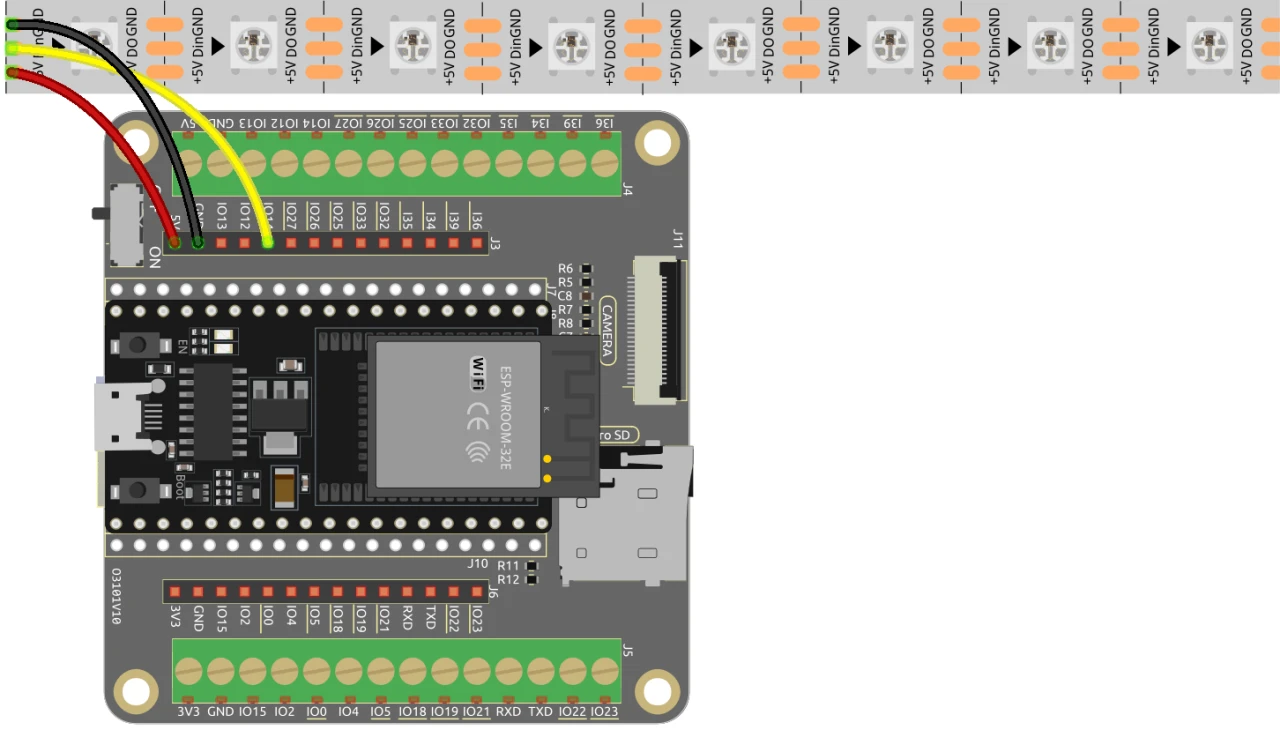
要將ESP32連接到WS2812 LED燈帶,請按以下方式連接組件:首先,將LED燈帶嘅5V引腳連接到ESP32嘅5V輸出。接下來,將LED燈帶嘅接地(GND)引腳連接到ESP32上嘅一個GND引腳。最後,將LED燈帶嘅數據引腳(通常標示為DI或Data In)連接到ESP32上嘅GPIO 13引腳。確保所有連接穩固,以確保正常運作。
喺影片入面,有簡單提到其他接線方法,但呢度描述嘅設置係建議用嚟獲得最佳性能嘅配置(喺影片03:00位置)。
代碼示例同講解
代碼首先包含控制WS2812 LED燈帶同設置網頁伺服器所需嘅庫。LED引腳定義為LED_PIN,而燈帶上嘅LED數量則用NUM_LEDS設置。
#define LED_PIN 13 // NeoPixel LED燈帶
#define NUM_LEDS 8 // LED數量
Adafruit_NeoPixel strip = Adafruit_NeoPixel(NUM_LEDS, LED_PIN, NEO_GRB + NEO_KHZ800);
呢段代碼初始化NeoPixel庫,並喺指定引腳上設置LED燈帶。Adafruit_NeoPixel物件strip就係你用嚟控制LED顏色嘅工具。
接下來,代碼初始化Wi-Fi並設置一個網頁伺服器嚟處理傳入請求。網絡嘅SSID同密碼已定義,令ESP32可以連接到Wi-Fi。
const char *ssid = "your_SSID";
const char *password = "your_PASSWORD";
WebServer server(80);
喺呢段代碼入面,將your_SSID同your_PASSWORD替換成你實際嘅Wi-Fi憑證。呢個連接令ESP32可以同同一網絡上嘅設備通訊,從而實現對LED燈帶嘅遠程控制。
用嚟改變LED顏色嘅主要函數係setColor(),佢會遍歷每粒LED,並根據所選嘅RGB值設置其顏色。
void setColor() {
  for (int i = 0; i < NUM_LEDS; i++) {
    strip.setPixelColor(i, valueR, valueG, valueB); // 設置第i粒LED嘅顏色
    strip.show(); // 用新顏色更新LED燈帶
    delay(10); // 等待10毫秒
  }
}
呢個函數確保燈帶上每粒LED都用所選顏色更新。延遲令LED可以平滑噉改變顏色。當你同網頁介面互動時,呢個函數就會被調用嚟反映你嘅顏色選擇。
示範 / 預期效果
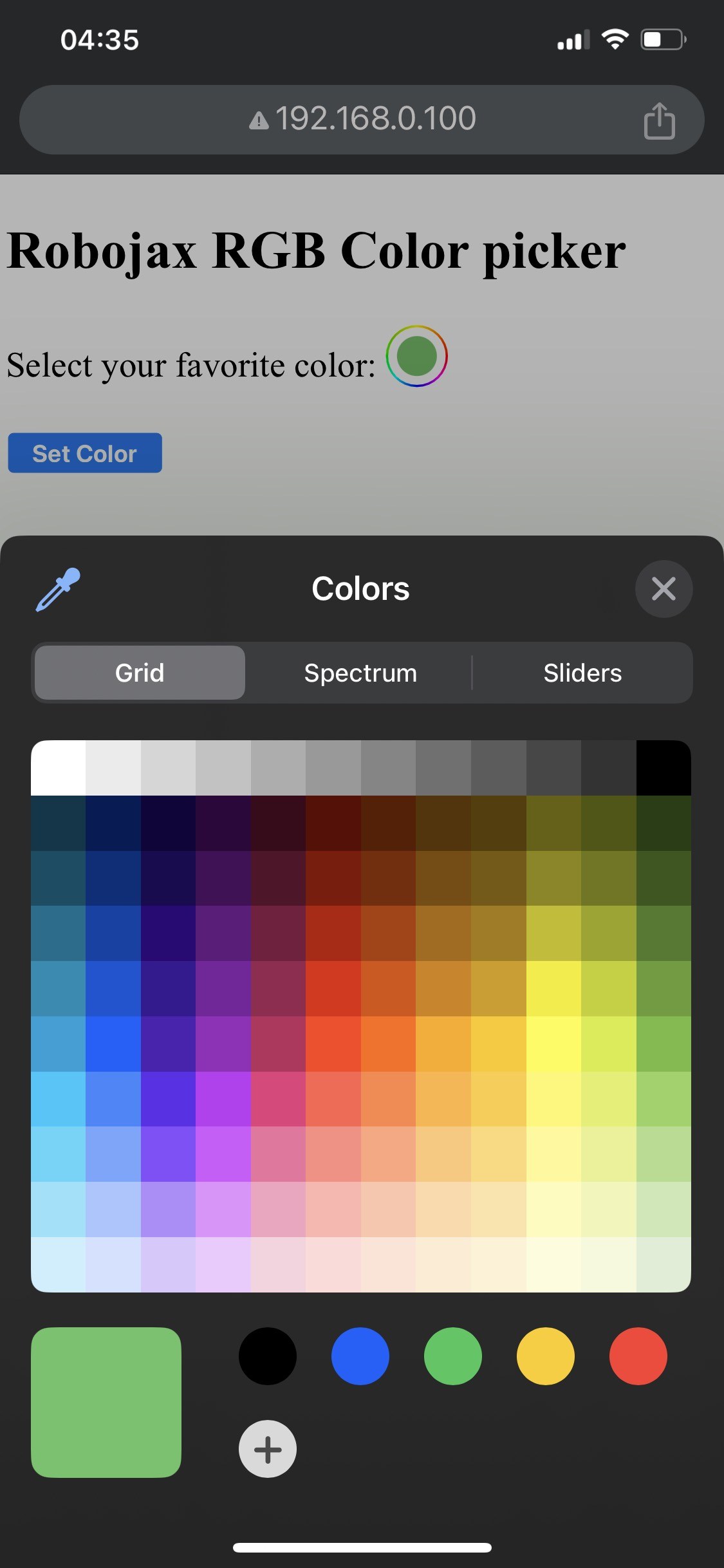

當設定完成之後,你應該可以透過ESP32嘅IP地址嚟存取網頁介面。你會見到一個顏色揀選器,可以揀任何顏色,跟住就會傳送去LED燈帶。如果ESP32斷咗Wi-Fi連線,燈帶會閃警告顏色,表示有問題(喺影片14:30度)。
常見嘅錯誤包括接線唔啱,搞到LED唔着,或者用錯SSID/密碼組合,令ESP32連唔到網絡。記得要再三檢查你嘅接線同登入資料。
影片時間標記
- 00:00 開始
- 2:01 項目介紹
- 3:09 文件
- 3:47 RGB顏色解釋
- 7:47 接線
- 8:40 用於WS2812加WIFI嘅Arduino程式碼解釋
- 19:35 喺Arduino IDE度揀ESP32板同COM埠
- 21:17 透過Wi-Fi控制LED燈帶示範
圖片
/*
 * Control RGB LED over wifi using ESP32
 *
 full video instrucions https://youtu.be/J_UFHk_T9aE
📚⬇️ Download and resource page https://robojax.com/RJT687
 * Written by Ahmad Shamshiri on Dec 18, 2023
 *
 * Watch video instruciton for this video:
 *
 * I have combined DHT library of Adafruit with ESP8266 WebServer both links
 * Adafruit DHT library on GitHub: https://github.com/adafruit/DHT-sensor-library
 * and
 * ESP8266 on GitHub : https://github.com/esp8266/Arduino
 *
   Copyright (c) 2015, Majenko Technologies
   All rights reserved.

   Redistribution and use in source and binary forms, with or without modification,
   are permitted provided that the following conditions are met:

 * * Redistributions of source code must retain the above copyright notice, this
     list of conditions and the following disclaimer.

 * * Redistributions in binary form must reproduce the above copyright notice, this
     list of conditions and the following disclaimer in the documentation and/or
     other materials provided with the distribution.

 * * Neither the name of Majenko Technologies nor the names of its
     contributors may be used to endorse or promote products derived from
     this software without specific prior written permission.

   THIS SOFTWARE IS PROVIDED BY THE COPYRIGHT HOLDERS AND CONTRIBUTORS "AS IS" AND
   ANY EXPRESS OR IMPLIED WARRANTIES, INCLUDING, BUT NOT LIMITED TO, THE IMPLIED
   WARRANTIES OF MERCHANTABILITY AND FITNESS FOR A PARTICULAR PURPOSE ARE
   DISCLAIMED. IN NO EVENT SHALL THE COPYRIGHT HOLDER OR CONTRIBUTORS BE LIABLE FOR
   ANY DIRECT, INDIRECT, INCIDENTAL, SPECIAL, EXEMPLARY, OR CONSEQUENTIAL DAMAGES
   (INCLUDING, BUT NOT LIMITED TO, PROCUREMENT OF SUBSTITUTE GOODS OR SERVICES;
   LOSS OF USE, DATA, OR PROFITS; OR BUSINESS INTERRUPTION) HOWEVER CAUSED AND ON
   ANY THEORY OF LIABILITY, WHETHER IN CONTRACT, STRICT LIABILITY, OR TORT
   (INCLUDING NEGLIGENCE OR OTHERWISE) ARISING IN ANY WAY OUT OF THE USE OF THIS
   SOFTWARE, EVEN IF ADVISED OF THE POSSIBILITY OF SUCH DAMAGE.
*/

#include <Adafruit_NeoPixel.h> // Include the Adafruit NeoPixel library

#define LED_PIN 13 // NeoPixel LED strip
#define NUM_LEDS 8 // Number of LEDs
// Create an instance of the Adafruit_NeoPixel class
Adafruit_NeoPixel strip = Adafruit_NeoPixel(NUM_LEDS, LED_PIN, NEO_GRB + NEO_KHZ800);


//initial color of LED strip
int valueR = 178;//from 0 to 255 for Red
int valueG = 27;//from 0 to 255 for Green
int valueB = 84;//from 0 to 255 for Blue

bool showSerialData = false;
String theColorR, theColorG, theColorB;
String theColor ="ff0000";

#include <WiFi.h>
#include <WiFiClient.h>
#include <WebServer.h>
#include <ESPmDNS.h>

const char *ssid = "dars";
const char *password = "hhhhhhhhhhh";

WebServer server(80);

void showColorPicker() {
  String page = "<!DOCTYPE html>\n";
  page +="<html>\n";
  page +="<body>\n";
  page +="<div style=\"zoom: 300%;\">\n";
  page +="<h2>Robojax RGB Color picker</h2>\n";
  page +="<p id=\"result\"></p>\n";
  page +="<form action=\"/color\">\n";
  page +="  <label for=\"favcolor\">Select your favorite color:</label>\n";
  page +="  <input type=\"color\" id=\"favcolor\" name=\"favcolor\" value=\"#";
  page += theColor;
  page +="\"><br><br>\n";
  page +="   <input type=\"submit\" value=\"Set Color\" />\n";
  page +="</form> \n</div>\n";
  page +="</body>\n";
  page +="</html>\n";

  server.send(200,  "text/html", page);


}

//from https://stackoverflow.com/questions/44683071/convert-string-as-hex-to-hexadecimal
uint64_t StrToHex(const char* str)
{
  return (uint64_t) strtoull(str, 0, 16);
}

void getColor(){

 // server.send(200, "text/plain", message);

  if(server.argName(0) == "favcolor")
  {
    String newColor = String(server.arg(0));//get the GET ardument 0 and convert it to string
    theColor = newColor.substring(1);//remove the # sybmot from the begining of color like #B2a48d
    theColorR = newColor.substring(1, 3);//extract B2 from  #B2a48d for example
    theColorG = newColor.substring(3, 5);//extract a4 from  #B2a48d for example
    theColorB = newColor.substring(5, 7);//extract 8d from  #B2a48d for example

    valueR = StrToHex(theColorR.c_str());//convert String to HEX for R
    valueG = StrToHex(theColorG.c_str());//convert String to HEX for G
    valueB = StrToHex(theColorB.c_str());//convert String to HEX for B
    if(showSerialData)
    {
      Serial.print("valueR: ");
      Serial.println(valueR);
      Serial.print("valueG: ");
      Serial.println(valueG);
      Serial.print("valueB: ");
      Serial.println(valueB );
    }

  }

  showColorPicker();//make sure the color picker is shown
  //server.send(200, "text/plain", message);

}


void setColor()
{
  for (int i = 0; i < NUM_LEDS; i++) {
    strip.setPixelColor(i, valueR, valueG, valueB); // Set the color of the i-th LED to red
    strip.show(); // Update the LED strip with the new colors
    delay(10); // Wait for 100 milliseconds
  }
}//

void noConnection()
{
   for (int i = 0; i < NUM_LEDS; i++) {
    strip.setPixelColor(i, 255, 45, 0); // Set the color of the i-th LED to red
    strip.show(); // Update the LED strip with the new colors
    delay(50); // Wait for 100 milliseconds
  }

  delay(200);
   for (int i = NUM_LEDS-1; i >=0; i--) {
    strip.setPixelColor(i, 0, 255, 180); // Set the color of the i-th LED to red
    strip.show(); // Update the LED strip with the new colors
    delay(50); // Wait for 100 milliseconds
  }
}

void handleNotFound() {
  String message = "File Not Found\n\n";
  message += "URI: ";
  message += server.uri();
  message += "\nMethod: ";
  message += (server.method() == HTTP_GET) ? "GET" : "POST";
  message += "\nArguments: ";
  message += server.args();
  message += "\n";

  for (uint8_t i = 0; i < server.args(); i++) {
    message += " " + server.argName(i) + ": " + server.arg(i) + "\n";
  }

  server.send(404, "text/plain", message);

}

void setup_wifi() {
  delay(10);
  // We start by connecting to a WiFi network
  WiFi.mode(WIFI_STA);
  WiFi.begin(ssid, password);
  Serial.println("");

  // Wait for connection
  while (WiFi.status() != WL_CONNECTED) {
    noConnection();
    delay(500);
    Serial.print(".");
  }

  Serial.println("");
  Serial.print("Connected to ");
  Serial.println(ssid);
  Serial.print("Open: http://");
  Serial.print(WiFi.localIP());
  Serial.println(" to read temperature");

  if (MDNS.begin("robojaxRGB")) {
    Serial.println("MDNS responder started");
  }

}

void setup(void) {

  Serial.begin(115200);

  strip.begin(); // Initialize the NeoPixel strip
  strip.show(); // Set initial color to black

  setup_wifi();

  server.on("/", showColorPicker);//show the main page with color picker
  //server.on("/color", setColor);//changes teh color on WS2812 RGB LED


  server.on("/color", HTTP_GET, getColor);


  server.on("/inline", []() {
    server.send(200, "text/plain", "this works as well");
  });
  server.onNotFound(handleNotFound);
  server.begin();
  Serial.println("HTTP server started");
}

void loop(void) {
  //Robojax.com
    while (WiFi.status() != WL_CONNECTED) {
      setup_wifi();
    }

  server.handleClient();
  //showColorPicker();
  setColor();
  delay(300);// change this to larger value (1000 or more) if you don't need very often reading
  // Robojax.com code for ESP32 and DHT11 DHT22
}
Common Course Links
Common Course Files
資源與參考資料
暫時冇資源。
文件📁
冇文件可用。