Tutoriel ESP32 54/55 - Définir la couleur de la bande LED WS2812 via Wifi | Kit d'apprentissage IoT ESP32 de SunFounder
Na boyekoli oyo, tokoyekola ndenge ya kokamba langi ya singa ya miinda ya WS2812 RGB na esaleli ya ESP32 microcontroller na nzela ya Wi-Fi. Na kosalela color picker, okoki kopona ba couleurs ndenge na ndenge longwa na téléphone na yo to na ordinateur na yo mpe kotinda boyebi wana na singa ya miinda. Projet oyo emonisi makoki ya ESP32, mpe epesaka posibilité ya kosalela na ba miinda ya LED na nzela ya web interface.

ESP32 microcontroller ezali na Wi-Fi mpe Bluetooth, oyo esalaka ete ezala choix ya malamu mpo na ba applications ya IoT. Na projet oyo, tokotalela mingi fonctionnalité ya Wi-Fi mpo na kokamba singa ya miinda. Ba utilisateurs bakokoka kopona ba couleurs dynamiquement, mpe kosala expérience ya kitoko mpo na miso. Mpo na bosemboli ya projet oyo, tala vidéo na (na vidéo na 00:00).
Matériel oyo esengeli
Ba composants ya liboso mpo na projet oyo ezali ESP32 microcontroller mpe singa ya miinda ya WS2812. ESP32 ezali microcontroller ya makasi oyo ezali na capacité ya Wi-Fi, oyo esalaka ete communication mpe contrôle ezala sans fil.
Singa ya miinda ya WS2812 ezali na ba LEDs RGB oyo bakoki kokamba moko-moko, mpe okoki kosala ete langi ya chaque LED ezala indépendant. Chaque LED ezali na circuit ya contrôle mpe LED ya RGB na kati ya emballage moko, oyo esalaka ete câblage mpe contrôle ya ba LEDs ebele ezala pete.
Détails ya Datasheet
| Fabricant | Worldsemi |
|---|---|
| Numéro ya pièce | WS2812B |
| Tension ya logique/IO | 3.5–5.3 V |
| Tension ya alimentation | 5 V |
| Courant de sortie (par canal) | 20 mA |
| Courant de pointe (par canal) | 60 mA |
| Guidance ya fréquence PWM | 400 Hz |
| Seuils logiques d'entrée | 0.3 × VDD (bas), 0.7 × VDD (haut) |
| Chute de tension / RDS(on) / saturation | 0.5 V |
| Limites thermiques | –40 to +80 °C |
| Package | 5050 SMD |
| Notes / variantes | Ezali na ba longueurs mpe ba configurations ndenge na ndenge. |
- Keba ete alimentation ezala malamu mpo na kobundisa ba LEDs te.
- Salela terre commune kati na ESP32 mpe singa ya miinda.
- Keba ete ba lignes ya données ezala mokuse mpo na kopekisa dégradation ya signal.
- Loba kokotisa condensateur (1000 µF) na kati ya alimentation mpo na stabilité.
- Salela résistance (470 Ω) na ligne ya données mpo na intégrité ya signal.
Instructions ya câblage
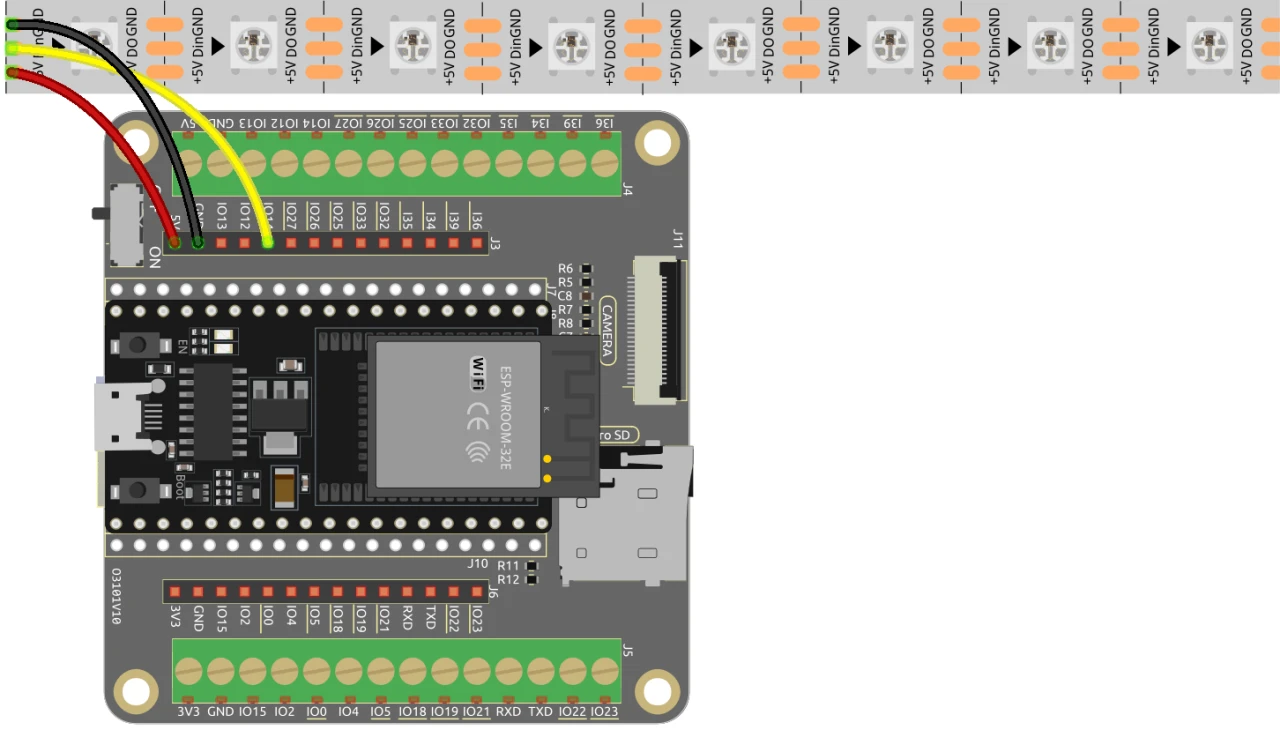
Mpo na kokangisa ESP32 na singa ya miinda ya WS2812, kanga ba composants boye: Liboso, kanga pin ya 5V ya singa ya miinda na sortie ya 5V ya ESP32. Na sima, kanga pin ya terre (GND) ya singa ya miinda na pin ya GND na ESP32. Na suka, kanga pin ya données ya singa ya miinda (oyo mingi bakomaka DI to Data In) na GPIO pin 13 na ESP32. Mpo na fonctionnement ya malamu, keba ete ba connexions nyonso ezala ya makasi.
Na vidéo, ba méthodes mosusu ya câblage emonami mokuse, kasi configuration oyo elobami awa ezali oyo bazali kotinda mpo na performance ya malamu (na vidéo na 03:00).
Ba exemples ya code mpe explication
Code ebandi na kotya ba bibliothèques oyo esengeli mpo na kokamba singa ya miinda ya WS2812 mpe mpo na kobongisa serveur web. Pin ya LED ezwami lokola LED_PIN mpe motango ya ba LEDs na singa ezwami na NUM_LEDS.
#define LED_PIN 13 // Singa ya miinda ya NeoPixel
#define NUM_LEDS 8 // Motango ya ba LEDs
Adafruit_NeoPixel strip = Adafruit_NeoPixel(NUM_LEDS, LED_PIN, NEO_GRB + NEO_KHZ800);
Extrait oyo ebandisi bibliothèque ya NeoPixel mpe ebongisi singa ya miinda na pin oyo baponaki. Objet Adafruit_NeoPixel, strip, ezali oyo okosalela mpo na kokamba ba couleurs ya ba LEDs.
Na sima, code ebandisi Wi-Fi mpe ebongisi serveur web mpo na koyamba ba demandes oyo ezali koya. SSID mpe mot de passe ya réseau ezwami, mpe esalaka ete ESP32 ekoka kokangama na Wi-Fi.
const char *ssid = "your_SSID";
const char *password = "your_PASSWORD";
WebServer server(80);
Na extrait oyo, bongola your_SSID mpe your_PASSWORD na ba identifiants ya Wi-Fi na yo. Connexion oyo esalaka ete ESP32 ekoka kosolola na ba appareils oyo ezali na réseau moko, mpe esalaka ete contrôle ya singa ya miinda ezala ya mosika.
Fonction principale mpo na kobongola langi ya LED ezali setColor(), oyo etambolaka na kati ya chaque LED mpe etyaka langi na yango kolanda ba valeurs RGB oyo baponaki.
void setColor() {
  for (int i = 0; i < NUM_LEDS; i++) {
    strip.setPixelColor(i, valueR, valueG, valueB); // Tya langi ya LED ya i
    strip.show(); // Bongola singa ya miinda na ba couleurs ya sika
    delay(10); // Zela mwa secondes 10
  }
}
Fonction oyo esalaka ete chaque LED na singa ebongola na langi oyo baponaki. Delay esalaka ete ba LEDs babongola langi na ndenge ya malamu. Ntango okosalela web interface, fonction oyo ekobenga mpo na kolakisa ba choix ya couleurs na yo.
Démonstration / Nini okomona
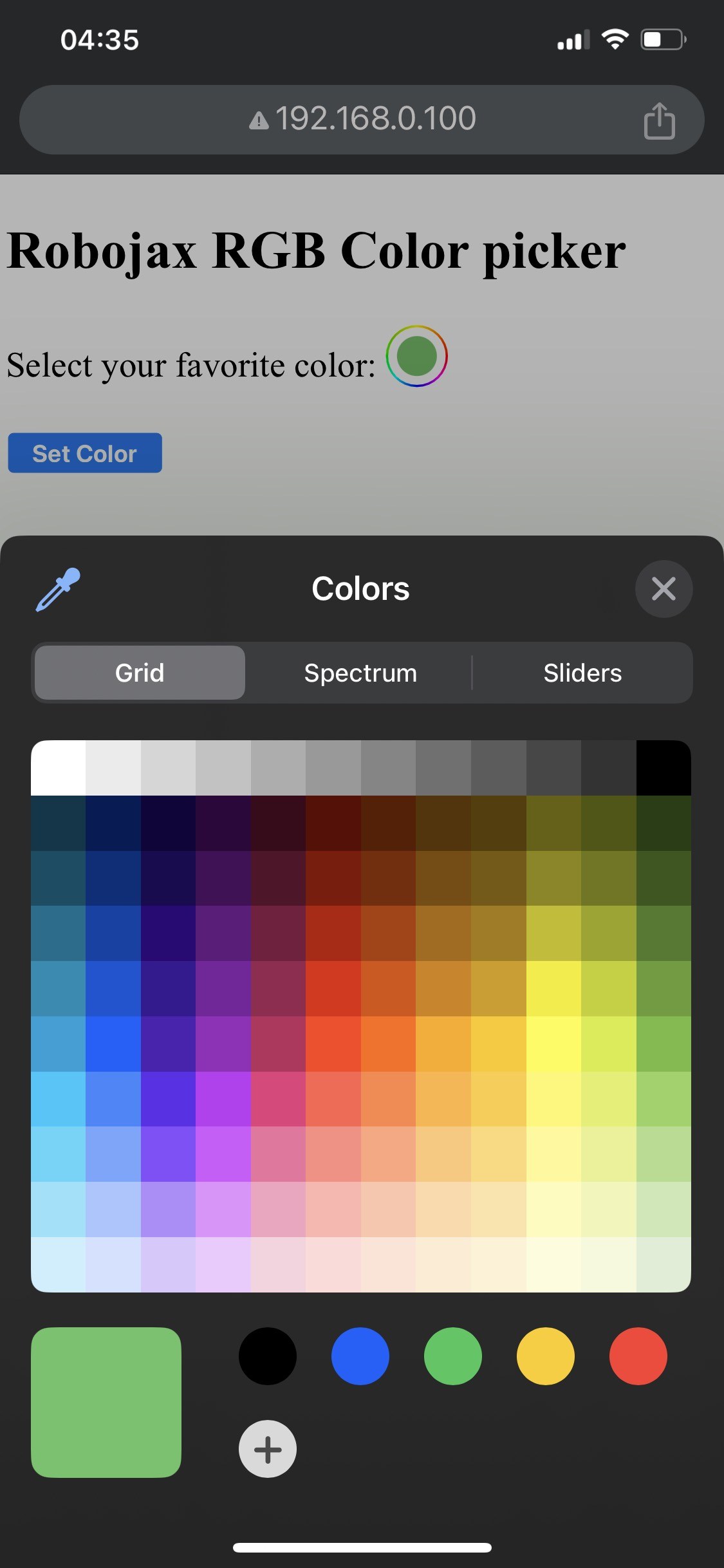

Ntango bobongisi esili kosala, okokoka kozwa interface ya web na nzela ya adresi ya IP ya ESP32. Okomona color picker oyo ekopesa yo nzela ya kopona couleur nyonso, oyo ekotindama na LED strip. Soki ESP32 abungisi connexion ya Wi-Fi, strip ekobwaka couleur ya kokebisa, kolakisa ete ezali na problème (na vidéo na 14:30).
Makambo ya mbala mingi oyo ezalaka na yango ezali kosangisa ba fils na ndenge ya mabe, oyo ekoki kosala ete ba LEDs epekisa kopelisa, to kosalela ba combinaisons ya SSID/mot de passe oyo ezali mabe oyo epekisaka ESP32 kosangana na réseau. Tika ete otonga lisusu ba connexions na yo mpe ba identifiants na yo mbala na mbala.
Ba Timestamps ya Vidéo
- 00:00 Ebandeli
- 2:01 Boyebisi ya projet
- 3:09 Ba documents
- 3:47 Explication ya couleur RGB
- 7:47 Kosangisa ba fils
- 8:40 Code ya Arduino mpo na WS2812 na WIFI esili kolimbolama
- 19:35 Kopona carte ya ESP32 mpe port ya COM na Arduino IDE
- 21:17 Demo ya kopambola LED Strip na nzela ya wifi
Images
/*
 * Control RGB LED over wifi using ESP32
 *
 full video instrucions https://youtu.be/J_UFHk_T9aE
📚⬇️ Download and resource page https://robojax.com/RJT687
 * Written by Ahmad Shamshiri on Dec 18, 2023
 *
 * Watch video instruciton for this video:
 *
 * I have combined DHT library of Adafruit with ESP8266 WebServer both links
 * Adafruit DHT library on GitHub: https://github.com/adafruit/DHT-sensor-library
 * and
 * ESP8266 on GitHub : https://github.com/esp8266/Arduino
 *
   Copyright (c) 2015, Majenko Technologies
   All rights reserved.

   Redistribution and use in source and binary forms, with or without modification,
   are permitted provided that the following conditions are met:

 * * Redistributions of source code must retain the above copyright notice, this
     list of conditions and the following disclaimer.

 * * Redistributions in binary form must reproduce the above copyright notice, this
     list of conditions and the following disclaimer in the documentation and/or
     other materials provided with the distribution.

 * * Neither the name of Majenko Technologies nor the names of its
     contributors may be used to endorse or promote products derived from
     this software without specific prior written permission.

   THIS SOFTWARE IS PROVIDED BY THE COPYRIGHT HOLDERS AND CONTRIBUTORS "AS IS" AND
   ANY EXPRESS OR IMPLIED WARRANTIES, INCLUDING, BUT NOT LIMITED TO, THE IMPLIED
   WARRANTIES OF MERCHANTABILITY AND FITNESS FOR A PARTICULAR PURPOSE ARE
   DISCLAIMED. IN NO EVENT SHALL THE COPYRIGHT HOLDER OR CONTRIBUTORS BE LIABLE FOR
   ANY DIRECT, INDIRECT, INCIDENTAL, SPECIAL, EXEMPLARY, OR CONSEQUENTIAL DAMAGES
   (INCLUDING, BUT NOT LIMITED TO, PROCUREMENT OF SUBSTITUTE GOODS OR SERVICES;
   LOSS OF USE, DATA, OR PROFITS; OR BUSINESS INTERRUPTION) HOWEVER CAUSED AND ON
   ANY THEORY OF LIABILITY, WHETHER IN CONTRACT, STRICT LIABILITY, OR TORT
   (INCLUDING NEGLIGENCE OR OTHERWISE) ARISING IN ANY WAY OUT OF THE USE OF THIS
   SOFTWARE, EVEN IF ADVISED OF THE POSSIBILITY OF SUCH DAMAGE.
*/

#include <Adafruit_NeoPixel.h> // Include the Adafruit NeoPixel library

#define LED_PIN 13 // NeoPixel LED strip
#define NUM_LEDS 8 // Number of LEDs
// Create an instance of the Adafruit_NeoPixel class
Adafruit_NeoPixel strip = Adafruit_NeoPixel(NUM_LEDS, LED_PIN, NEO_GRB + NEO_KHZ800);


//initial color of LED strip
int valueR = 178;//from 0 to 255 for Red
int valueG = 27;//from 0 to 255 for Green
int valueB = 84;//from 0 to 255 for Blue

bool showSerialData = false;
String theColorR, theColorG, theColorB;
String theColor ="ff0000";

#include <WiFi.h>
#include <WiFiClient.h>
#include <WebServer.h>
#include <ESPmDNS.h>

const char *ssid = "dars";
const char *password = "hhhhhhhhhhh";

WebServer server(80);

void showColorPicker() {
  String page = "<!DOCTYPE html>\n";
  page +="<html>\n";
  page +="<body>\n";
  page +="<div style=\"zoom: 300%;\">\n";
  page +="<h2>Robojax RGB Color picker</h2>\n";
  page +="<p id=\"result\"></p>\n";
  page +="<form action=\"/color\">\n";
  page +="  <label for=\"favcolor\">Select your favorite color:</label>\n";
  page +="  <input type=\"color\" id=\"favcolor\" name=\"favcolor\" value=\"#";
  page += theColor;
  page +="\"><br><br>\n";
  page +="   <input type=\"submit\" value=\"Set Color\" />\n";
  page +="</form> \n</div>\n";
  page +="</body>\n";
  page +="</html>\n";

  server.send(200,  "text/html", page);


}

//from https://stackoverflow.com/questions/44683071/convert-string-as-hex-to-hexadecimal
uint64_t StrToHex(const char* str)
{
  return (uint64_t) strtoull(str, 0, 16);
}

void getColor(){

 // server.send(200, "text/plain", message);

  if(server.argName(0) == "favcolor")
  {
    String newColor = String(server.arg(0));//get the GET ardument 0 and convert it to string
    theColor = newColor.substring(1);//remove the # sybmot from the begining of color like #B2a48d
    theColorR = newColor.substring(1, 3);//extract B2 from  #B2a48d for example
    theColorG = newColor.substring(3, 5);//extract a4 from  #B2a48d for example
    theColorB = newColor.substring(5, 7);//extract 8d from  #B2a48d for example

    valueR = StrToHex(theColorR.c_str());//convert String to HEX for R
    valueG = StrToHex(theColorG.c_str());//convert String to HEX for G
    valueB = StrToHex(theColorB.c_str());//convert String to HEX for B
    if(showSerialData)
    {
      Serial.print("valueR: ");
      Serial.println(valueR);
      Serial.print("valueG: ");
      Serial.println(valueG);
      Serial.print("valueB: ");
      Serial.println(valueB );
    }

  }

  showColorPicker();//make sure the color picker is shown
  //server.send(200, "text/plain", message);

}


void setColor()
{
  for (int i = 0; i < NUM_LEDS; i++) {
    strip.setPixelColor(i, valueR, valueG, valueB); // Set the color of the i-th LED to red
    strip.show(); // Update the LED strip with the new colors
    delay(10); // Wait for 100 milliseconds
  }
}//

void noConnection()
{
   for (int i = 0; i < NUM_LEDS; i++) {
    strip.setPixelColor(i, 255, 45, 0); // Set the color of the i-th LED to red
    strip.show(); // Update the LED strip with the new colors
    delay(50); // Wait for 100 milliseconds
  }

  delay(200);
   for (int i = NUM_LEDS-1; i >=0; i--) {
    strip.setPixelColor(i, 0, 255, 180); // Set the color of the i-th LED to red
    strip.show(); // Update the LED strip with the new colors
    delay(50); // Wait for 100 milliseconds
  }
}

void handleNotFound() {
  String message = "File Not Found\n\n";
  message += "URI: ";
  message += server.uri();
  message += "\nMethod: ";
  message += (server.method() == HTTP_GET) ? "GET" : "POST";
  message += "\nArguments: ";
  message += server.args();
  message += "\n";

  for (uint8_t i = 0; i < server.args(); i++) {
    message += " " + server.argName(i) + ": " + server.arg(i) + "\n";
  }

  server.send(404, "text/plain", message);

}

void setup_wifi() {
  delay(10);
  // We start by connecting to a WiFi network
  WiFi.mode(WIFI_STA);
  WiFi.begin(ssid, password);
  Serial.println("");

  // Wait for connection
  while (WiFi.status() != WL_CONNECTED) {
    noConnection();
    delay(500);
    Serial.print(".");
  }

  Serial.println("");
  Serial.print("Connected to ");
  Serial.println(ssid);
  Serial.print("Open: http://");
  Serial.print(WiFi.localIP());
  Serial.println(" to read temperature");

  if (MDNS.begin("robojaxRGB")) {
    Serial.println("MDNS responder started");
  }

}

void setup(void) {

  Serial.begin(115200);

  strip.begin(); // Initialize the NeoPixel strip
  strip.show(); // Set initial color to black

  setup_wifi();

  server.on("/", showColorPicker);//show the main page with color picker
  //server.on("/color", setColor);//changes teh color on WS2812 RGB LED


  server.on("/color", HTTP_GET, getColor);


  server.on("/inline", []() {
    server.send(200, "text/plain", "this works as well");
  });
  server.onNotFound(handleNotFound);
  server.begin();
  Serial.println("HTTP server started");
}

void loop(void) {
  //Robojax.com
    while (WiFi.status() != WL_CONNECTED) {
      setup_wifi();
    }

  server.handleClient();
  //showColorPicker();
  setColor();
  delay(300);// change this to larger value (1000 or more) if you don't need very often reading
  // Robojax.com code for ESP32 and DHT11 DHT22
}
Common Course Links
Common Course Files
Mokili na bisika
Pas encore de ressources.
Fichiers📁
Aucun fichier disponible.