Lisano ya ESP32 49/55 - Kokamba moteur DC na internet na kosalela Adafruit IoT | Kit ya SunFounder ya ESP32
Na boyekoli oyo, tokotala ndenge ya kokamba moteur ya DC na internet na kozanga kosalela ESP32 mpe Adafruit IO MQTT. Mbangu ya moteur mpe direction na yango ekoki kobongisama na mosika, mpo na kokamba yango na esika nyonso oyo ezali na internet. Proje oyo emonisi makoki ya ESP32, oyo ezali na Wi-Fi ya kati, mpo na kosalela yango na Internet of Things (IoT).

Tokosalela système oyo moteur ekoki kobanda, kosopa, mpe mbangu na yango ebongisama na nzela ya web interface oyo esangani na Adafruit IO. Basaleli bakoki kosala abonnement na ba topics ya kokamba moteur mpe kobongisa ba paramètres. Mpo na kososola malamu, tala vidéo oyo ezali na boyekoli oyo (na vidéo na 00:00).
Hardware Explication
Mpo na proje oyo, tokosalela ESP32, oyo ezali motema ya système na biso. ESP32 ekoki kokamba ba communications Wi-Fi, mpo na kosalela yango na IoT. Esangani na Adafruit IO, mpo na kotinda mpe kozwa ba messages na nzela ya MQTT protocol.
Lolenge mosusu, tokosalela L293D motor driver, oyo ezali na tina mpo na kokamba moteur ya DC. L293D ekoki kokamba ba moteurs mibale ya DC mpe ekoki kokamba direction mpe mbangu na nzela ya Pulse Width Modulation (PWM). Ezali lokola interface kati na ESP32 mpe moteur, mpe ezali kokamba courant ya makasi oyo moteur esengeli, mpe ezali kopekisa ESP32 na ba signaux ya back-emf oyo ekoki kosala yango mabe.
Ba Détails ya Datasheet
| Fabricant | Texas Instruments |
|---|---|
| Numéro ya partie | L293D |
| Tension ya logique/IO | 4.5 - 36 V |
| Tension ya alimentation | 4.5 - 36 V |
| Courant de sortie (na canal) | 600 mA |
| Courant de pointe (na canal) | 1.2 A |
| Guidance ya fréquence PWM | 10 kHz (typ.) |
| Seuils ya logique d'entrée | 0.8 V (élevé), 2.0 V (faible) |
| Chute de tension / RDS(on) / saturation | 1.5 V max |
| Limites thermiques | 150 °C |
| Paquet | DIP-16 |
| Notes / variantes | Quadruple driver demi-H à courant élevé |
- Kokanola ete ezala na heat sinking malamu mpo na fonctionnement ya libela.
- Salela PWM mpo na kokamba mbangu ya moteur na ndenge ya malamu.
- Botala ba limites ya tension d'entrée mpo na kopekisa kobeba.
- Vérifier ba connexions ya terre kati na ba composants nyonso.
- Kokanela back-emf; salela ba diodes soki esengeli.
- Vérifier ba câblages mpo na polarité oyo ekoki kobongola direction ya moteur.
- Testa na tension ya moke liboso ya fonctionnement ya mobimba.
- Botala mpo na échauffement na ntango ya kosalela ya libela.
- Kokanola ete ba switches mécaniques esengeli na debounce soki basaleli yango.
- Kokanola ete ESP32 ezali na charge te na courant ya moteur.
Instructions ya Câblage
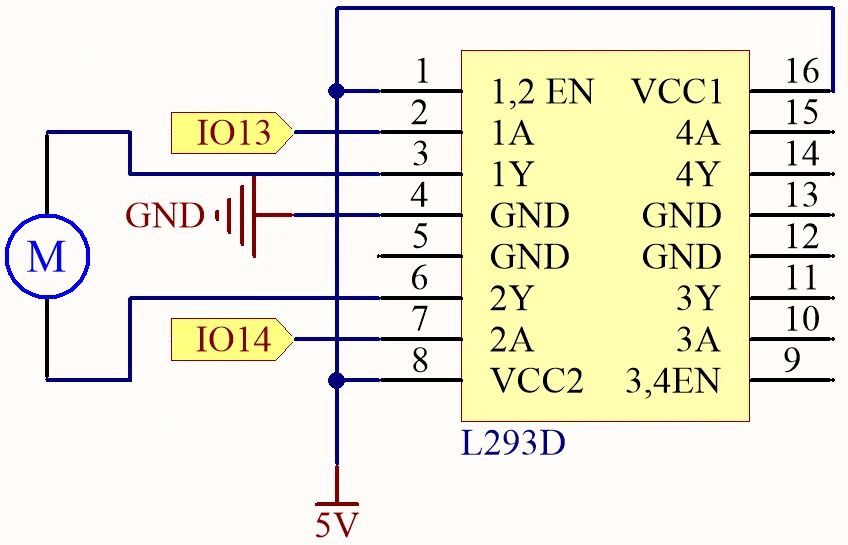
Banda na kosangisa alimentation. Sangisa borne positive ya source ya courant externe na pin VCC ya L293D (pin 8) mpe terre na pin GND (pin 4). Kanola ete ESP32 ezali na alimentation séparée soki esengeli, mingi mingi na nzela ya connexion micro USB.
Na sima, sangisa moteur na L293D. Borne moko ya moteur esengeli kosangisama na pin de sortie 3 (pin 2 ya L293D) mpe borne mosusu na pin de sortie 6 (pin 7 ya L293D). Mpo na ba signaux de contrôle, sangisa pin 13 ya ESP32 na pin d'entrée 2 (pin 1 ya L293D) mpe pin 14 na pin d'entrée 7 (pin 2 ya L293D). Pin ya enable (pin 1) esengeli mpe kosangisama na alimentation 5V mpo na activer le driver. Na suka, kanola ete terre ya ESP32 esangani na terre ya L293D mpo na référence commune.
Ba Exemples ya Code & Explication
Code oyo epesami ebandisi ba bibliothèques nécessaires mpe esaleli client Wi-Fi mpe MQTT. Ba identifiants clés ezali motorSpeed, motorDirection, mpe motorStart, oyo ezali kokamba fonctionnement ya moteur kolanda ba commandes oyo ezwami na Adafruit IO.
bool debug = false;
#define motor1A 13
#define motor2A 14
int motorSpeed = 0;
int motorDirection = 1;
int motorStart = 1;
Na extrait oyo, ba pins ya moteur ezwami définis elongo na ba variables ya liboso mpo na kokamba mbangu, direction, mpe état ya start/stop ya moteur. Variable motorSpeed ekobongisama kolanda entrée oyo ezwami na Adafruit IO.
void setup() {
  Serial.begin(115200);
  WiFi.begin(WLAN_SSID, WLAN_PASS);
  delay(2000);
  while (WiFi.status() != WL_CONNECTED) {
    delay(500);
  }
}
Na fonction setup, communication série ebandisi, mpe ESP32 esangani na réseau Wi-Fi oyo epesami. Connexion oyo ezali na tina mpo na kosalela communication MQTT.
void loop() {
  MQTT_connect();
  mqtt.processPackets(500);
  runMotor();
}
Fonction loop oyo esaleli connexion MQTT mpe ezali kosala traitement ya ba paquets oyo ezwami mpo na kokamba moteur kolanda ba commandes ya suka. Fonction runMotor() ebengami mpo na kosalela ba réglages ya sik’oyo na moteur.
Démonstration / Nini Okokanela
Soki setup esili mokéngé mpe code ekomi kotomama, okokoka kokamba moteur na nzela ya tableau Adafruit IO. Okoki kobongola mbonge ya moteur na slider mpe kobongola direction na yango na toggle switch. Soki nyonso esili kokangama malamu, moteur akoyanola na mitindo oyo na tango ya solo, kolakisa faible latence ya système (na vidéo na 00:00).
Makambo ya mbala mingi ezali na kati na yango ezali direction ya moteur oyo ebaluki mpo na kokangama ya mabe ya ba fils, yango wana tala lisusu ba connexions soki moteur ezali kosala te ndenge ozalaki kolikia. Lisusu, tia ete ba sujets na yo ya MQTT esili kotiama malamu na Adafruit IO mpo na kokokana na code.
Ba Timestamps ya Vidéo
- 00:00 Ebandeli
- 2:21 Boyebisi ya projet
- 4:20 Ndenge DC Motor ezali kokamba
- 6:39 L293D Motor Driver
- 11:42 MQTT ezali nini?
- 15:03 Malamu ya Adafruit IO
- 19:17 Explication ya ba fils
- 22:42 Explication ya code
- 35:28 Demonstration ya Projet
Images
/***********************************************************************
 This is Arduino sketch for ESP32 to DC Motor using MQTT service of Adafruit
 Watch video instruction https://youtu.be/OUgyPXNYg3g
 📚⬇️ Download and resource page https://robojax.com/RJT673
 Written By Ahamd Shamshiri
 on Feb 18, 2024

  Adafruit MQTT Library ESP32 Adafruit IO SSL/TLS example


/// ref: https://www.electronicwings.com/esp32/esp32-mqtt-client
*/
bool debug = false;
#define motor1A 13
#define motor2A 14

// PWM settings
const int freq = 500; // PWM frequency: 500 Hz
const int resolution = 8; // PWM resolution: 8 bits
const int channelA = 0; // PWM channel for motor1A: 0
const int channelB = 1; // PWM channel for motor2A: 1

char* dir[]={"CCW", "CW"};

int motorSpeed =0;
int motorDirection =1;
int motorStart = 1;
int dutyCycle =0;

#include <WiFi.h>
#include "WiFiClientSecure.h"
#include "Adafruit_MQTT.h"
#include "Adafruit_MQTT_Client.h"

/************************* WiFi Access Point *********************************/


#define WLAN_SSID "Book"
#define WLAN_PASS "88888888"

/************************* Adafruit.io Setup *********************************/

#define AIO_SERVER "io.adafruit.com"

// Using port 8883 for MQTTS
#define AIO_SERVERPORT 8883

// Adafruit IO Account Configuration
// (to obtain these values, visit https://io.adafruit.com and click on Active Key)
// #define AIO_USERNAME "YOUR_ADAFRUIT_IO_USERNAME"
// #define AIO_KEY      "YOUR_ADAFRUIT_IO_KEY"

#define AIO_USERNAME "robojax"
#define AIO_KEY "aio_jHpm60SEsWUdU5x472FViZjWzsY9"

/************ Global State (you don't need to change this!) ******************/

// WiFiFlientSecure for SSL/TLS support
WiFiClientSecure client;

// Setup the MQTT client class by passing in the WiFi client and MQTT server and login details.
Adafruit_MQTT_Client mqtt(&client, AIO_SERVER, AIO_SERVERPORT, AIO_USERNAME, AIO_KEY);


// io.adafruit.com root CA
const char* adafruitio_root_ca = \
      "-----BEGIN CERTIFICATE-----\n"
      "MIIEjTCCA3WgAwIBAgIQDQd4KhM/xvmlcpbhMf/ReTANBgkqhkiG9w0BAQsFADBh\n"
      "MQswCQYDVQQGEwJVUzEVMBMGA1UEChMMRGlnaUNlcnQgSW5jMRkwFwYDVQQLExB3\n"
      "d3cuZGlnaWNlcnQuY29tMSAwHgYDVQQDExdEaWdpQ2VydCBHbG9iYWwgUm9vdCBH\n"
      "MjAeFw0xNzExMDIxMjIzMzdaFw0yNzExMDIxMjIzMzdaMGAxCzAJBgNVBAYTAlVT\n"
      "MRUwEwYDVQQKEwxEaWdpQ2VydCBJbmMxGTAXBgNVBAsTEHd3dy5kaWdpY2VydC5j\n"
      "b20xHzAdBgNVBAMTFkdlb1RydXN0IFRMUyBSU0EgQ0EgRzEwggEiMA0GCSqGSIb3\n"
      "DQEBAQUAA4IBDwAwggEKAoIBAQC+F+jsvikKy/65LWEx/TMkCDIuWegh1Ngwvm4Q\n"
      "yISgP7oU5d79eoySG3vOhC3w/3jEMuipoH1fBtp7m0tTpsYbAhch4XA7rfuD6whU\n"
      "gajeErLVxoiWMPkC/DnUvbgi74BJmdBiuGHQSd7LwsuXpTEGG9fYXcbTVN5SATYq\n"
      "DfbexbYxTMwVJWoVb6lrBEgM3gBBqiiAiy800xu1Nq07JdCIQkBsNpFtZbIZhsDS\n"
      "fzlGWP4wEmBQ3O67c+ZXkFr2DcrXBEtHam80Gp2SNhou2U5U7UesDL/xgLK6/0d7\n"
      "6TnEVMSUVJkZ8VeZr+IUIlvoLrtjLbqugb0T3OYXW+CQU0kBAgMBAAGjggFAMIIB\n"
      "PDAdBgNVHQ4EFgQUlE/UXYvkpOKmgP792PkA76O+AlcwHwYDVR0jBBgwFoAUTiJU\n"
      "IBiV5uNu5g/6+rkS7QYXjzkwDgYDVR0PAQH/BAQDAgGGMB0GA1UdJQQWMBQGCCsG\n"
      "AQUFBwMBBggrBgEFBQcDAjASBgNVHRMBAf8ECDAGAQH/AgEAMDQGCCsGAQUFBwEB\n"
      "BCgwJjAkBggrBgEFBQcwAYYYaHR0cDovL29jc3AuZGlnaWNlcnQuY29tMEIGA1Ud\n"
      "HwQ7MDkwN6A1oDOGMWh0dHA6Ly9jcmwzLmRpZ2ljZXJ0LmNvbS9EaWdpQ2VydEds\n"
      "b2JhbFJvb3RHMi5jcmwwPQYDVR0gBDYwNDAyBgRVHSAAMCowKAYIKwYBBQUHAgEW\n"
      "HGh0dHBzOi8vd3d3LmRpZ2ljZXJ0LmNvbS9DUFMwDQYJKoZIhvcNAQELBQADggEB\n"
      "AIIcBDqC6cWpyGUSXAjjAcYwsK4iiGF7KweG97i1RJz1kwZhRoo6orU1JtBYnjzB\n"
      "c4+/sXmnHJk3mlPyL1xuIAt9sMeC7+vreRIF5wFBC0MCN5sbHwhNN1JzKbifNeP5\n"
      "ozpZdQFmkCo+neBiKR6HqIA+LMTMCMMuv2khGGuPHmtDze4GmEGZtYLyF8EQpa5Y\n"
      "jPuV6k2Cr/N3XxFpT3hRpt/3usU/Zb9wfKPtWpoznZ4/44c1p9rzFcZYrWkj3A+7\n"
      "TNBJE0GmP2fhXhP1D/XVfIW/h0yCJGEiV9Glm/uGOa3DXHlmbAcxSyCRraG+ZBkA\n"
      "7h4SeM6Y8l/7MBRpPCz6l8Y=\n"
      "-----END CERTIFICATE-----\n";

/****************************** Feeds ***************************************/

// Setup a feed called 'test' for publishing and 'test2' for subscription.
// Notice MQTT paths for AIO follow the form: <username>/feeds/<feedname>
Adafruit_MQTT_Subscribe MOTOR_SPEED = Adafruit_MQTT_Subscribe(&mqtt, AIO_USERNAME "/feeds/motor.speed");
Adafruit_MQTT_Subscribe MOTOR_DIRECTION = Adafruit_MQTT_Subscribe(&mqtt, AIO_USERNAME "/feeds/motor.direction");
Adafruit_MQTT_Subscribe MOTOR_START = Adafruit_MQTT_Subscribe(&mqtt, AIO_USERNAME "/feeds/motor.start");


/*************************** Sketch Code ************************************/


void setup() {
  // Set up PWM
  ledcSetup(channelA, freq, resolution);
  ledcSetup(channelB, freq, resolution);

  // Attach PWM channels to GPIO pins
  ledcAttachPin(motor1A, channelA);
  ledcAttachPin(motor2A, channelB);

  Serial.begin(115200);
  delay(10);

  Serial.println(F("DC Motor over MQTT EXample"));

  // Connect to WiFi access point.
  Serial.println();
  Serial.println();
  Serial.print("Connecting to ");
  Serial.println(WLAN_SSID);

  delay(1000);

  WiFi.begin(WLAN_SSID, WLAN_PASS);
  delay(2000);

  while (WiFi.status() != WL_CONNECTED) {
    delay(500);
    Serial.print(".");
  }
  Serial.println();

  Serial.println("WiFi connected");
  Serial.println("IP address: ");
  Serial.println(WiFi.localIP());

  // Set Adafruit IO's root CA
  client.setCACert(adafruitio_root_ca);

  // register callback for feed
  MOTOR_SPEED.setCallback(MOTOR_SPEED_Callback);
  // Setup MQTT subscription for time feed.
  mqtt.subscribe(&MOTOR_SPEED);

  // register callback for feed
  MOTOR_DIRECTION.setCallback(MOTOR_DIRECTION_Callback);
  // Setup MQTT subscription for time feed.
  mqtt.subscribe(&MOTOR_DIRECTION);

  // register callback for feed
  MOTOR_START.setCallback(MOTOR_START_Callback);
  // Setup MQTT subscription for time feed.
  mqtt.subscribe(&MOTOR_START);

}

// uint32_t x=0;


void loop() {

  // Ensure the connection to the MQTT server is alive (this will make the first
  // connection and automatically reconnect when disconnected).  See the MQTT_connect
  // function definition further below.
  MQTT_connect();


  // Serial.print("Speed: ");
  // Serial.print (motorSpeed);
  // Serial.print(" Dir: ");
  // Serial.print (dir[motorDirection]);
  // Serial.print(" Sart: ");
  // Serial.println(motorStart);

  // Serial.print("DutyCycle: ");
  // Serial.println(dutyCycle);

  // wait 0.5 seconds for subscription messages
  mqtt.processPackets(500);

   runMotor();//very important
  // wait a couple seconds to avoid rate limit
  //delay(2000);
}

void MOTOR_SPEED_Callback(char* message, uint16_t len) {
  char messageBuffer[40];
  //snprintf(messageBuffer, sizeof(messageBuffer), "Color status is :: %s, len :: %u", message, len);
  //Serial.println(messageBuffer);
  Serial.println(message);
  String inString = message;//sotre the message to String

  motorSpeed  =  inString.toInt();//convert the message to Integer
  if(motorSpeed >100 || motorSpeed < 0)
  {
    motorSpeed = 0;
  }
  dutyCycle = map (motorSpeed, 0, 100, 0, 255);

}


void MOTOR_DIRECTION_Callback(char* message, uint16_t len) {
  char messageBuffer[40];
  //snprintf(messageBuffer, sizeof(messageBuffer), "Color status is :: %s, len :: %u", message, len);
  //Serial.println(messageBuffer);
  Serial.println(message);
  String inString = message;//sotre the message to String

  motorDirection  =  inString.toInt();//convert the message to Integer


}


void MOTOR_START_Callback(char* message, uint16_t len) {
  char messageBuffer[40];
  //snprintf(messageBuffer, sizeof(messageBuffer), "Color status is :: %s, len :: %u", message, len);
  //Serial.println(messageBuffer);
  Serial.println(message);

  String inString = message;//sotre the message to String

  motorStart  =  inString.toInt();//convert the message to Integer


}


void runMotor()
{

  if(motorStart ==1)
  {
      if(debug)
      {
        Serial.print("Motor running:");
        Serial.print(dir[motorDirection]);
        Serial.print(" at ");
        Serial.print(motorSpeed);
        Serial.println("%");
      }
    if(motorDirection)
    {
      ledcWrite(channelA, dutyCycle);
      ledcWrite(channelB, 0);
      delay(50);
    }else{

      ledcWrite(channelA, 0);
      ledcWrite(channelB, dutyCycle);
      delay(50);
    }
  }else{
    if(debug)
    {
      Serial.println("***Motor Stopped***");
    }
      ledcWrite(channelA, 0);
      ledcWrite(channelB, 0);
  }

}//runMotor() end

// Function to connect and reconnect as necessary to the MQTT server.
// Should be called in the loop function and it will take care if connecting.
void MQTT_connect() {
  int8_t ret;
  // Stop if already connected.
  if (mqtt.connected()) {
    return;
  }
  Serial.print("Connecting to MQTT... ");
  uint8_t retries = 3;
  while ((ret = mqtt.connect()) != 0) {  // connect will return 0 for connected
    Serial.println(mqtt.connectErrorString(ret));
    Serial.println("Retrying MQTT connection in 5 seconds...");
    mqtt.disconnect();
    delay(5000);  // wait 5 seconds
    retries--;
    if (retries == 0) {
      // basically die and wait for WDT to reset me
      while (1)
        ;
    }
  }
  Serial.println("MQTT Connected!");
}
Common Course Links
Common Course Files
Mokili na bisika
Pas encore de ressources.
Fichiers📁
Aucun fichier disponible.