ESP32 튜토리얼 45/55 - LED 제어 CAM-3가 포함된 맞춤형 스트리밍 서버 l SunFounder의 ESP32 학습 키트
이 튜토리얼에서는 SunFounder의 ESP32 확장 보드를 사용하여 맞춤형 스트리밍 서버를 설정하는 방법을 살펴보겠습니다. 이 프로젝트를 통해 브라우저에서 실시간 비디오를 스트리밍하면서 인터페이스에서 직접 LED를 제어할 수 있습니다. 이러한 기능의 조합은 IoT 및 웹 기술에 대한 실습 학습 경험을 제공합니다.
ESP32의 내장 Wi-Fi 기능을 사용하여 비디오를 스트리밍하고 LED 제어 명령을 처리하는 웹 서버를 만들 것입니다. 이 프로젝트에는 코딩, 배선, 그리고 구성 요소 간의 상호 작용 이해가 포함됩니다. 설정에 대해 더 명확히 이해하려면 (비디오 00:00)의 비디오를 확인하세요.
하드웨어 설명
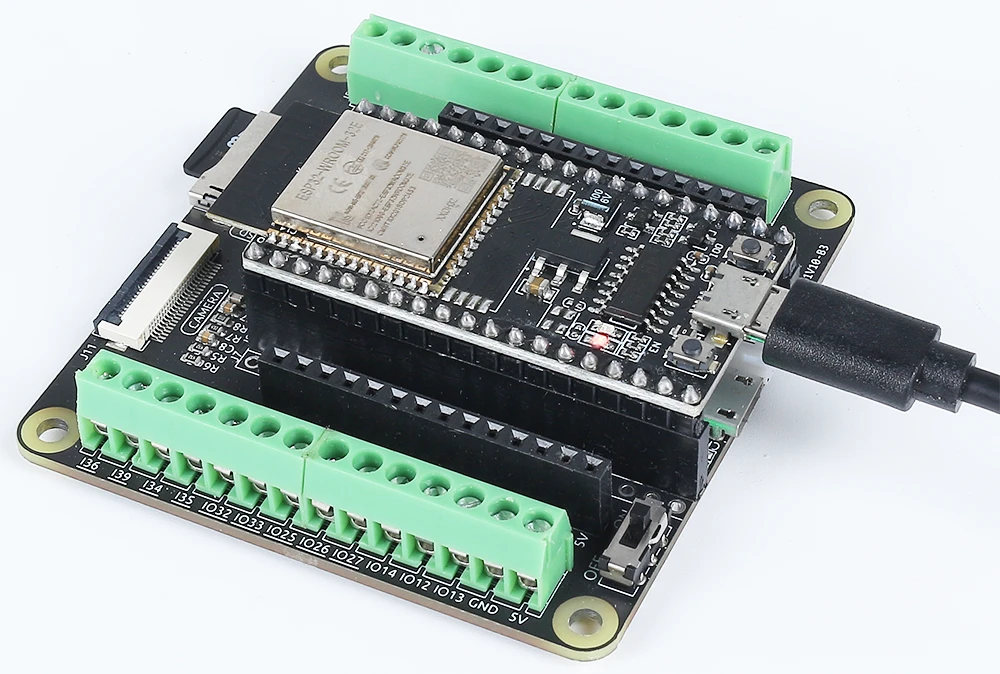
이 프로젝트의 주요 구성 요소로는 ESP32 마이크로컨트롤러, 카메라 모듈, LED, 저항이 있습니다. ESP32는 내장 Wi-Fi와 Bluetooth를 갖춘 다재다능한 마이크로컨트롤러로, IoT 애플리케이션에 완벽합니다. 카메라 모듈은 비디오를 캡처할 수 있게 해주며, LED는 제어를 위한 간단한 출력 장치를 제공합니다.
LED는 전류를 제한하기 위해 저항을 통해 연결되어 LED와 마이크로컨트롤러 모두의 손상을 방지합니다. 이 설정을 통해 웹 인터페이스에서 LED를 켜고 끌 수 있으며, 네트워크를 통해 입력과 출력을 처리하는 ESP32의 기능을 보여줍니다.
데이터시트 세부 정보
| 제조업체 | Espressif |
|---|---|
| 부품 번호 | ESP32-WROOM-32 |
| 로직/IO 전압 | 3.3 V |
| 공급 전압 | 3.0–3.6 V |
| 출력 전류 (채널당) | 12 mA |
| 피크 전류 (채널당) | 40 mA |
| PWM 주파수 가이드 | 1 kHz |
| 입력 로직 임계값 | 0.2 V (낮음) / 0.8 V (높음) |
| 전압 강하 / RDS(on) / 포화 | 0.2 V (일반) |
| 열 제한 | 최대 접합 온도: 125 °C |
| 패키지 | QFN48 |
| 참고 사항 / 변형 | 다양한 구성으로 제공됨 |
- ESP32에 안정화된 3.3 V 전원을 공급하세요.
- LED와 함께 전류 제한 저항(220옴)을 사용하여 손상을 방지하세요.
- 플로팅 입력을 피하기 위해 올바른 연결을 유지하세요.
- Wi-Fi 자격 증명이 정확하고 대소문자를 구분하는지 확인하세요.
- 일관된 성능을 위해 안정적인 전원을 사용하세요.
- 밀폐된 공간에서의 방열을 고려하세요.
배선 지침
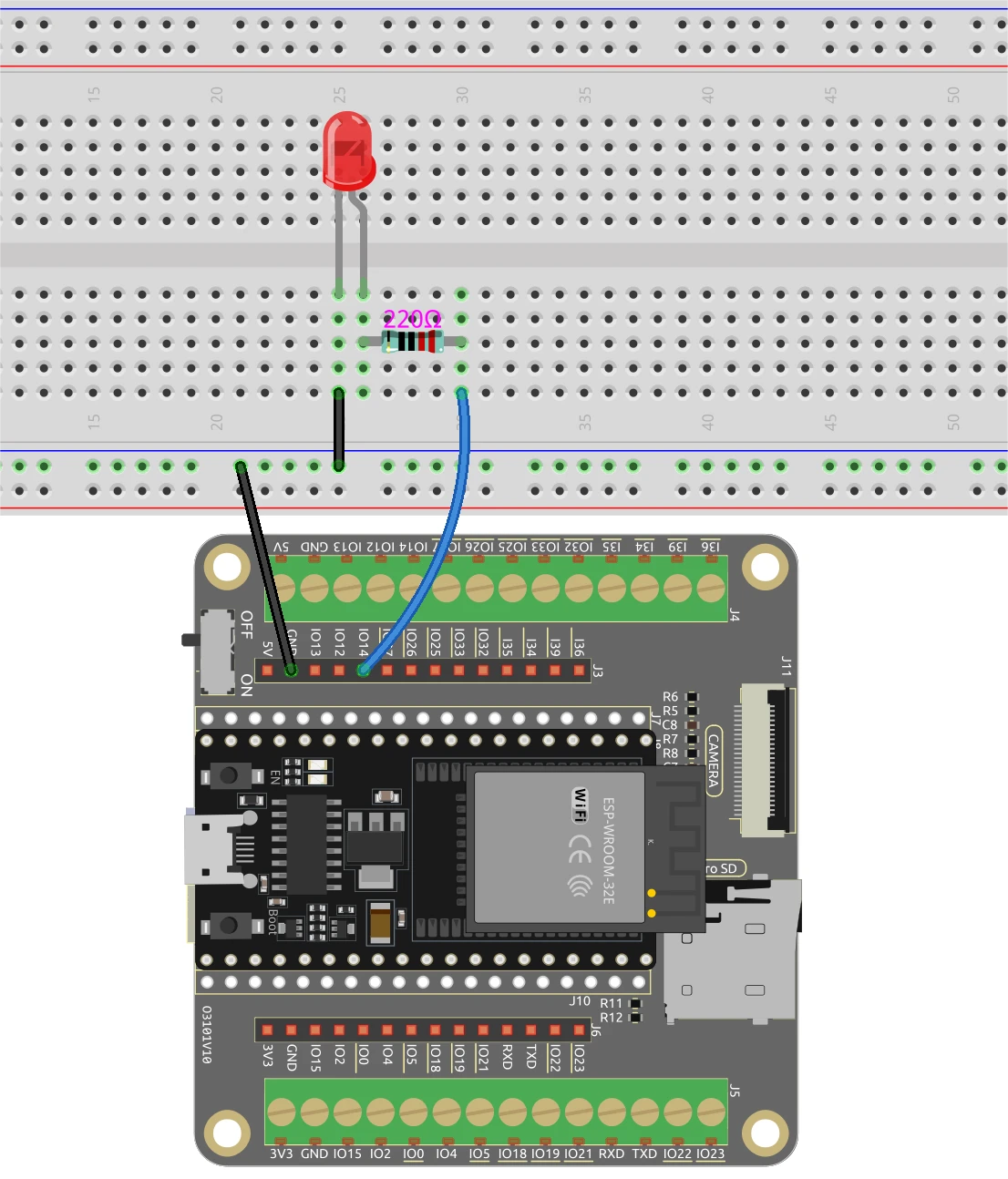
ESP32와 LED를 배선하려면 LED의 긴 핀을 적절한 GPIO 핀(이 경우 핀 14)에 연결하는 것으로 시작하세요. 짧은 핀은 브레드보드의 접지 라인에 연결해야 합니다. 다음으로, 220옴 저항을 LED와 직렬로 배치하여 한쪽 끝을 GPIO 핀(핀 14)에, 다른 쪽 끝을 접지에 연결하세요. ESP32가 마이크로 USB 포트 또는 18650 리튬 배터리를 통해 올바르게 전원이 공급되는지 확인하세요.
카메라 모듈의 경우, 사용 중인 카메라 모델에 따라 배선이 약간 다를 수 있으므로 필요한 핀을 해당 모델에 맞게 연결하세요. ESP32는 내장 기능을 통해 비디오 스트림을 처리하며, LED 제어는 코드에서 설정할 웹 인터페이스를 통해 관리됩니다.
코드 예제 및 설명
프로그램은 필요한 라이브러리를 포함하고 Wi-Fi 자격 증명을 정의하는 것으로 시작합니다. ESP32를 네트워크에 연결하려면 ssid와 password를 실제 Wi-Fi 자격 증명으로 교체해야 합니다.
const char* ssid = "SSID";
const char* password = "PASSWORD";
다음으로, LED 핀을 정의하고 카메라 구성을 설정합니다. LED에 사용되는 핀은 LED_PIN으로 정의되며, 이는 나중에 코드에서 LED 상태를 제어하는 데 사용됩니다.
#define LED_PIN    14
pinMode(LED_PIN, OUTPUT);
LED 제어를 위한 요청 핸들러에서 웹 인터페이스로부터 수신된 명령을 확인합니다. 명령이 "on"인지 "off"인지에 따라 digitalWrite(LED_PIN, 1);을 사용하여 LED를 켜고 digitalWrite(LED_PIN, 0);을 사용하여 끕니다.
if(!strcmp(variable, "on")) {
  Serial.println("ON");
  digitalWrite(LED_PIN, 1);
}
else if(!strcmp(variable, "off")) {
  Serial.println("OFF");
  digitalWrite(LED_PIN, 0);
}
이 로직을 통해 웹 인터페이스가 ESP32와 효과적으로 통신하여 사용자 상호 작용에 따라 LED를 실시간으로 제어할 수 있습니다. 전체 코드는 아래 기사 아래에 로드되어 더 자세히 탐색할 수 있습니다.
시연 / 기대 효과
모든 것이 설정되고 코드가 업로드되면 웹 브라우저에서 ESP32의 IP 주소에 접속할 수 있습니다. 스트리밍 비디오가 표시되며, 인터페이스의 버튼을 사용하여 LED를 제어할 수 있습니다. "ON"을 클릭하면 LED가 켜지고, "OFF"를 클릭하면 꺼집니다. ESP32와 컴퓨터가 동일한 네트워크에 연결되어 있는지 확인하여 제대로 작동하는지 확인하세요 (비디오 12:30).
비디오 타임스탬프
- 00:00 시작
- 1:51 프로젝트 소개
- 2:31 문서 페이지
- 3:33 배선 설명
- 5:08 Arduino 코드 설명
- 13:28 Arduino IDE에서 ESP32 보드 및 COM 포트 선택
- 15:10 시연
이미지
/*********
  Permission is hereby granted, free of charge,
  to any person obtaining a copy of this software and associated documentation files.
  The above copyright notice and this permission
  notice shall be included in all copies or substantial portions of the Software.
*********/

#include "esp_camera.h"
#include <WiFi.h>
#include "esp_timer.h"
#include "img_converters.h"
#include "Arduino.h"
#include "fb_gfx.h"
#include "soc/soc.h"             // disable brownout problems
#include "soc/rtc_cntl_reg.h"    // disable brownout problems
#include "esp_http_server.h"

// Replace the next variables with your SSID/Password combination
const char* ssid = "SSID";
const char* password = "PASSWORD";

#define PART_BOUNDARY "123456789000000000000987654321"

#define CAMERA_MODEL_AI_THINKER
//#define CAMERA_MODEL_M5STACK_PSRAM
//#define CAMERA_MODEL_M5STACK_WITHOUT_PSRAM
//#define CAMERA_MODEL_M5STACK_PSRAM_B
//#define CAMERA_MODEL_WROVER_KIT

#if defined(CAMERA_MODEL_WROVER_KIT)
  #define PWDN_GPIO_NUM    -1
  #define RESET_GPIO_NUM   -1
  #define XCLK_GPIO_NUM    21
  #define SIOD_GPIO_NUM    26
  #define SIOC_GPIO_NUM    27

  #define Y9_GPIO_NUM      35
  #define Y8_GPIO_NUM      34
  #define Y7_GPIO_NUM      39
  #define Y6_GPIO_NUM      36
  #define Y5_GPIO_NUM      19
  #define Y4_GPIO_NUM      18
  #define Y3_GPIO_NUM       5
  #define Y2_GPIO_NUM       4
  #define VSYNC_GPIO_NUM   25
  #define HREF_GPIO_NUM    23
  #define PCLK_GPIO_NUM    22

#elif defined(CAMERA_MODEL_M5STACK_PSRAM)
  #define PWDN_GPIO_NUM     -1
  #define RESET_GPIO_NUM    15
  #define XCLK_GPIO_NUM     27
  #define SIOD_GPIO_NUM     25
  #define SIOC_GPIO_NUM     23

  #define Y9_GPIO_NUM       19
  #define Y8_GPIO_NUM       36
  #define Y7_GPIO_NUM       18
  #define Y6_GPIO_NUM       39
  #define Y5_GPIO_NUM        5
  #define Y4_GPIO_NUM       34
  #define Y3_GPIO_NUM       35
  #define Y2_GPIO_NUM       32
  #define VSYNC_GPIO_NUM    22
  #define HREF_GPIO_NUM     26
  #define PCLK_GPIO_NUM     21

#elif defined(CAMERA_MODEL_M5STACK_WITHOUT_PSRAM)
  #define PWDN_GPIO_NUM     -1
  #define RESET_GPIO_NUM    15
  #define XCLK_GPIO_NUM     27
  #define SIOD_GPIO_NUM     25
  #define SIOC_GPIO_NUM     23

  #define Y9_GPIO_NUM       19
  #define Y8_GPIO_NUM       36
  #define Y7_GPIO_NUM       18
  #define Y6_GPIO_NUM       39
  #define Y5_GPIO_NUM        5
  #define Y4_GPIO_NUM       34
  #define Y3_GPIO_NUM       35
  #define Y2_GPIO_NUM       17
  #define VSYNC_GPIO_NUM    22
  #define HREF_GPIO_NUM     26
  #define PCLK_GPIO_NUM     21

#elif defined(CAMERA_MODEL_AI_THINKER)
  #define PWDN_GPIO_NUM     32
  #define RESET_GPIO_NUM    33
  #define XCLK_GPIO_NUM      0
  #define SIOD_GPIO_NUM     26
  #define SIOC_GPIO_NUM     27

  #define Y9_GPIO_NUM       35
  #define Y8_GPIO_NUM       34
  #define Y7_GPIO_NUM       39
  #define Y6_GPIO_NUM       36
  #define Y5_GPIO_NUM       21
  #define Y4_GPIO_NUM       19
  #define Y3_GPIO_NUM       18
  #define Y2_GPIO_NUM        5
  #define VSYNC_GPIO_NUM    25
  #define HREF_GPIO_NUM     23
  #define PCLK_GPIO_NUM     22

#elif defined(CAMERA_MODEL_M5STACK_PSRAM_B)
  #define PWDN_GPIO_NUM     -1
  #define RESET_GPIO_NUM    15
  #define XCLK_GPIO_NUM     27
  #define SIOD_GPIO_NUM     22
  #define SIOC_GPIO_NUM     23

  #define Y9_GPIO_NUM       19
  #define Y8_GPIO_NUM       36
  #define Y7_GPIO_NUM       18
  #define Y6_GPIO_NUM       39
  #define Y5_GPIO_NUM        5
  #define Y4_GPIO_NUM       34
  #define Y3_GPIO_NUM       35
  #define Y2_GPIO_NUM       32
  #define VSYNC_GPIO_NUM    25
  #define HREF_GPIO_NUM     26
  #define PCLK_GPIO_NUM     21

#else
  #error "Camera model not selected"
#endif

#define LED_PIN    14

static const char* _STREAM_CONTENT_TYPE = "multipart/x-mixed-replace;boundary=" PART_BOUNDARY;
static const char* _STREAM_BOUNDARY = "\r\n--" PART_BOUNDARY "\r\n";
static const char* _STREAM_PART = "Content-Type: image/jpeg\r\nContent-Length: %u\r\n\r\n";

httpd_handle_t camera_httpd = NULL;
httpd_handle_t stream_httpd = NULL;

static const char PROGMEM INDEX_HTML[] = R"rawliteral(
<html>
  <head>
    <title>ESP32-CAM Robot</title>
    <meta name="viewport" content="width=device-width, initial-scale=1">
    <style>
      body { font-family: Arial; text-align: center; margin:0px auto; padding-top: 30px;}
      table { margin-left: auto; margin-right: auto; }
      td { padding: 8 px; }
      .button {
        background-color: #2f4468;
        border: none;
        color: white;
        padding: 10px 20px;
        text-align: center;
        text-decoration: none;
        display: inline-block;
        font-size: 18px;
        margin: 6px 3px;
        cursor: pointer;
        -webkit-touch-callout: none;
        -webkit-user-select: none;
        -khtml-user-select: none;
        -moz-user-select: none;
        -ms-user-select: none;
        user-select: none;
        -webkit-tap-highlight-color: rgba(0,0,0,0);
      }
      img {  width: auto ;
        max-width: 100% ;
        height: auto ;
        transform: rotate(180deg);
      }
    </style>
  </head>
  <body>
    <h1>ESP32 CAMERA</h1>
    <img src="" id="photo" >
    <table>
      <tr><td align="center"><button class="button" onmousedown="toggleCheckbox('on');" ontouchstart="toggleCheckbox('on');onmouseup="toggleCheckbox('on');" ontouchend="toggleCheckbox('on');">ON</button></td>
      <td align="center"><button class="button" onmousedown="toggleCheckbox('off');" ontouchstart="toggleCheckbox('off');onmouseup="toggleCheckbox('off');" ontouchend="toggleCheckbox('off');">OFF</button></td></tr>
    </table>
   <script>
   function toggleCheckbox(x) {
     var xhr = new XMLHttpRequest();
     xhr.open("GET", "/action?go=" + x, true);
     xhr.send();
   }
   window.onload = document.getElementById("photo").src = window.location.href.slice(0, -1) + ":81/stream";
  </script>
  </body>
</html>
)rawliteral";

static esp_err_t index_handler(httpd_req_t *req){
  httpd_resp_set_type(req, "text/html");
  return httpd_resp_send(req, (const char *)INDEX_HTML, strlen(INDEX_HTML));
}

static esp_err_t stream_handler(httpd_req_t *req){
  camera_fb_t * fb = NULL;
  esp_err_t res = ESP_OK;
  size_t _jpg_buf_len = 0;
  uint8_t * _jpg_buf = NULL;
  char * part_buf[64];

  res = httpd_resp_set_type(req, _STREAM_CONTENT_TYPE);
  if(res != ESP_OK){
    return res;
  }

  while(true){
    fb = esp_camera_fb_get();
    if (!fb) {
      Serial.println("Camera capture failed");
      res = ESP_FAIL;
    } else {
      if(fb->width > 400){
        if(fb->format != PIXFORMAT_JPEG){
          bool jpeg_converted = frame2jpg(fb, 80, &_jpg_buf, &_jpg_buf_len);
          esp_camera_fb_return(fb);
          fb = NULL;
          if(!jpeg_converted){
            Serial.println("JPEG compression failed");
            res = ESP_FAIL;
          }
        } else {
          _jpg_buf_len = fb->len;
          _jpg_buf = fb->buf;
        }
      }
    }
    if(res == ESP_OK){
      size_t hlen = snprintf((char *)part_buf, 64, _STREAM_PART, _jpg_buf_len);
      res = httpd_resp_send_chunk(req, (const char *)part_buf, hlen);
    }
    if(res == ESP_OK){
      res = httpd_resp_send_chunk(req, (const char *)_jpg_buf, _jpg_buf_len);
    }
    if(res == ESP_OK){
      res = httpd_resp_send_chunk(req, _STREAM_BOUNDARY, strlen(_STREAM_BOUNDARY));
    }
    if(fb){
      esp_camera_fb_return(fb);
      fb = NULL;
      _jpg_buf = NULL;
    } else if(_jpg_buf){
      free(_jpg_buf);
      _jpg_buf = NULL;
    }
    if(res != ESP_OK){
      break;
    }
    //Serial.printf("MJPG: %uB\n",(uint32_t)(_jpg_buf_len));
  }
  return res;
}

static esp_err_t cmd_handler(httpd_req_t *req){
  char*  buf;
  size_t buf_len;
  char variable[32] = {0,};

  buf_len = httpd_req_get_url_query_len(req) + 1;
  if (buf_len > 1) {
    buf = (char*)malloc(buf_len);
    if(!buf){
      httpd_resp_send_500(req);
      return ESP_FAIL;
    }
    if (httpd_req_get_url_query_str(req, buf, buf_len) == ESP_OK) {
      if (httpd_query_key_value(buf, "go", variable, sizeof(variable)) == ESP_OK) {
      } else {
        free(buf);
        httpd_resp_send_404(req);
        return ESP_FAIL;
      }
    } else {
      free(buf);
      httpd_resp_send_404(req);
      return ESP_FAIL;
    }
    free(buf);
  } else {
    httpd_resp_send_404(req);
    return ESP_FAIL;
  }

  sensor_t * s = esp_camera_sensor_get();
  int res = 0;

  if(!strcmp(variable, "on")) {
    Serial.println("ON");
    digitalWrite(LED_PIN, 1);
  }
  else if(!strcmp(variable, "off")) {
    Serial.println("OFF");
    digitalWrite(LED_PIN, 0);
  }
  else {
    res = -1;
  }

  if(res){
    return httpd_resp_send_500(req);
  }

  httpd_resp_set_hdr(req, "Access-Control-Allow-Origin", "*");
  return httpd_resp_send(req, NULL, 0);
}

void startCameraServer(){
  httpd_config_t config = HTTPD_DEFAULT_CONFIG();
  config.server_port = 80;
  httpd_uri_t index_uri = {
    .uri       = "/",
    .method    = HTTP_GET,
    .handler   = index_handler,
    .user_ctx  = NULL
  };

  httpd_uri_t cmd_uri = {
    .uri       = "/action",
    .method    = HTTP_GET,
    .handler   = cmd_handler,
    .user_ctx  = NULL
  };
  httpd_uri_t stream_uri = {
    .uri       = "/stream",
    .method    = HTTP_GET,
    .handler   = stream_handler,
    .user_ctx  = NULL
  };
  if (httpd_start(&camera_httpd, &config) == ESP_OK) {
    httpd_register_uri_handler(camera_httpd, &index_uri);
    httpd_register_uri_handler(camera_httpd, &cmd_uri);
  }
  config.server_port += 1;
  config.ctrl_port += 1;
  if (httpd_start(&stream_httpd, &config) == ESP_OK) {
    httpd_register_uri_handler(stream_httpd, &stream_uri);
  }
}

void setup() {
  WRITE_PERI_REG(RTC_CNTL_BROWN_OUT_REG, 0); //disable brownout detector

  pinMode(LED_PIN, OUTPUT);

  Serial.begin(115200);
  Serial.setDebugOutput(false);

  camera_config_t config;
  config.ledc_channel = LEDC_CHANNEL_0;
  config.ledc_timer = LEDC_TIMER_0;
  config.pin_d0 = Y2_GPIO_NUM;
  config.pin_d1 = Y3_GPIO_NUM;
  config.pin_d2 = Y4_GPIO_NUM;
  config.pin_d3 = Y5_GPIO_NUM;
  config.pin_d4 = Y6_GPIO_NUM;
  config.pin_d5 = Y7_GPIO_NUM;
  config.pin_d6 = Y8_GPIO_NUM;
  config.pin_d7 = Y9_GPIO_NUM;
  config.pin_xclk = XCLK_GPIO_NUM;
  config.pin_pclk = PCLK_GPIO_NUM;
  config.pin_vsync = VSYNC_GPIO_NUM;
  config.pin_href = HREF_GPIO_NUM;
  config.pin_sscb_sda = SIOD_GPIO_NUM;
  config.pin_sscb_scl = SIOC_GPIO_NUM;
  config.pin_pwdn = PWDN_GPIO_NUM;
  config.pin_reset = RESET_GPIO_NUM;
  config.xclk_freq_hz = 20000000;
  config.pixel_format = PIXFORMAT_JPEG;

  if(psramFound()){
    config.frame_size = FRAMESIZE_VGA;
    config.jpeg_quality = 10;
    config.fb_count = 2;
  } else {
    config.frame_size = FRAMESIZE_SVGA;
    config.jpeg_quality = 12;
    config.fb_count = 1;
  }

  // Camera init
  esp_err_t err = esp_camera_init(&config);
  if (err != ESP_OK) {
    Serial.printf("Camera init failed with error 0x%x", err);
    return;
  }
  // Wi-Fi connection
  WiFi.begin(ssid, password);
  while (WiFi.status() != WL_CONNECTED) {
    delay(500);
    Serial.print(".");
  }
  Serial.println("");
  Serial.println("WiFi connected");

  Serial.print("Camera Stream Ready! Go to: http://");
  Serial.println(WiFi.localIP());

  // Start streaming web server
  startCameraServer();
}

void loop() {

}
Common Course Links
Common Course Files
자원 및 참고자료
-
문서화ESP32 Tutorial 45/55- SunFounder doc page for Custom Streamign Serverdocs.sunfounder.com
파일📁
파일이 없습니다.