Tutorial ESP32 45/55 - Server di streaming personalizzato con controllo LED CAM-3 l Kit di apprendimento ESP32 di SunFounder
In questo tutorial, esploreremo come impostare un server di streaming personalizzato utilizzando la scheda di estensione ESP32 di SunFounder. Il progetto consente di trasmettere video in diretta al tuo browser mentre controlli un LED direttamente dall'interfaccia. Questa combinazione di funzionalità consente un'esperienza di apprendimento pratica con le tecnologie IoT e web.
Utilizzeremo le capacità Wi-Fi integrate dell'ESP32 per creare un server web che trasmette video e gestisce i comandi di controllo dei LED. Il progetto prevede la programmazione, cablaggio e comprensione di come interagiscono i componenti. Se desideri una comprensione più chiara della configurazione, assicurati di controllare il video (nel video a :00).
Hardware Spiegato
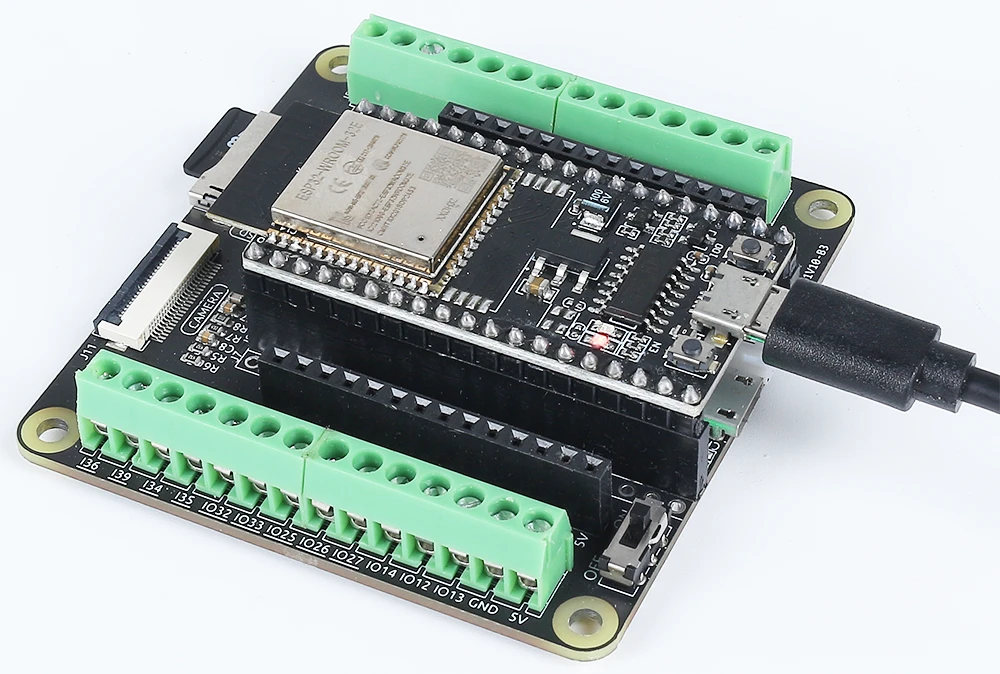
I componenti principali per questo progetto includono il microcontrollore ESP32, un modulo fotocamera, un LED e una resistenza. L'ESP32 è un microcontrollore versatile con Wi-Fi e Bluetooth integrati, rendendolo perfetto per le applicazioni IoT. Il modulo fotocamera ci consente di catturare video, mentre il LED fornisce un semplice dispositivo di uscita per il controllo.
Il LED è collegato attraverso una resistenza per limitare la corrente, prevenendo danni sia al LED che al microcontrollore. Questa configurazione ci permetterà di accendere e spegnere il LED tramite la nostra interfaccia web, mostrando le capacità dell'ESP32 nella gestione di ingressi e uscite su una rete.
Dettagli della scheda tecnica
| Produttore | Espressif |
|---|---|
| Numero di parte | ESP32-WROOM-32 |
| Tensione Logica/IO | 3,3 V |
| Tensione di alimentazione | 3.0-3.6 V |
| Corrente di uscita (per canale) | 12 mA |
| Corrente di picco (per canale) | 40 mA |
| Linee guida sulla frequenza PWM | 1 kHz |
| Soglie logiche di ingresso | 0,2 V (basso) / 0,8 V (alto) |
| Caduta di tensione / RDS(on)/ saturazione | 0,2 V (tip.) |
| Limiti termici | Temperatura massima di giunzione: 125 °C |
| Pacchetto | QFN48 |
| Note / varianti | Disponibile in diverse configurazioni |
- Assicurati che l'ESP32 sia alimentato con un'alimentazione regolata a 3,3 V.
- Usa una resistenza di limitazione della corrente (220 Ohm) con il LED per prevenire danni.
- Mantenere connessioni adeguate per evitare ingressi flottanti.
- Controlla che le credenziali Wi-Fi siano corrette e sensibili al maiuscolo.
- Utilizza una fonte di alimentazione stabile per prestazioni costanti.
- Considera la dissipaione del calore negli spazi chiusi.
Istruzioni di cablaggio
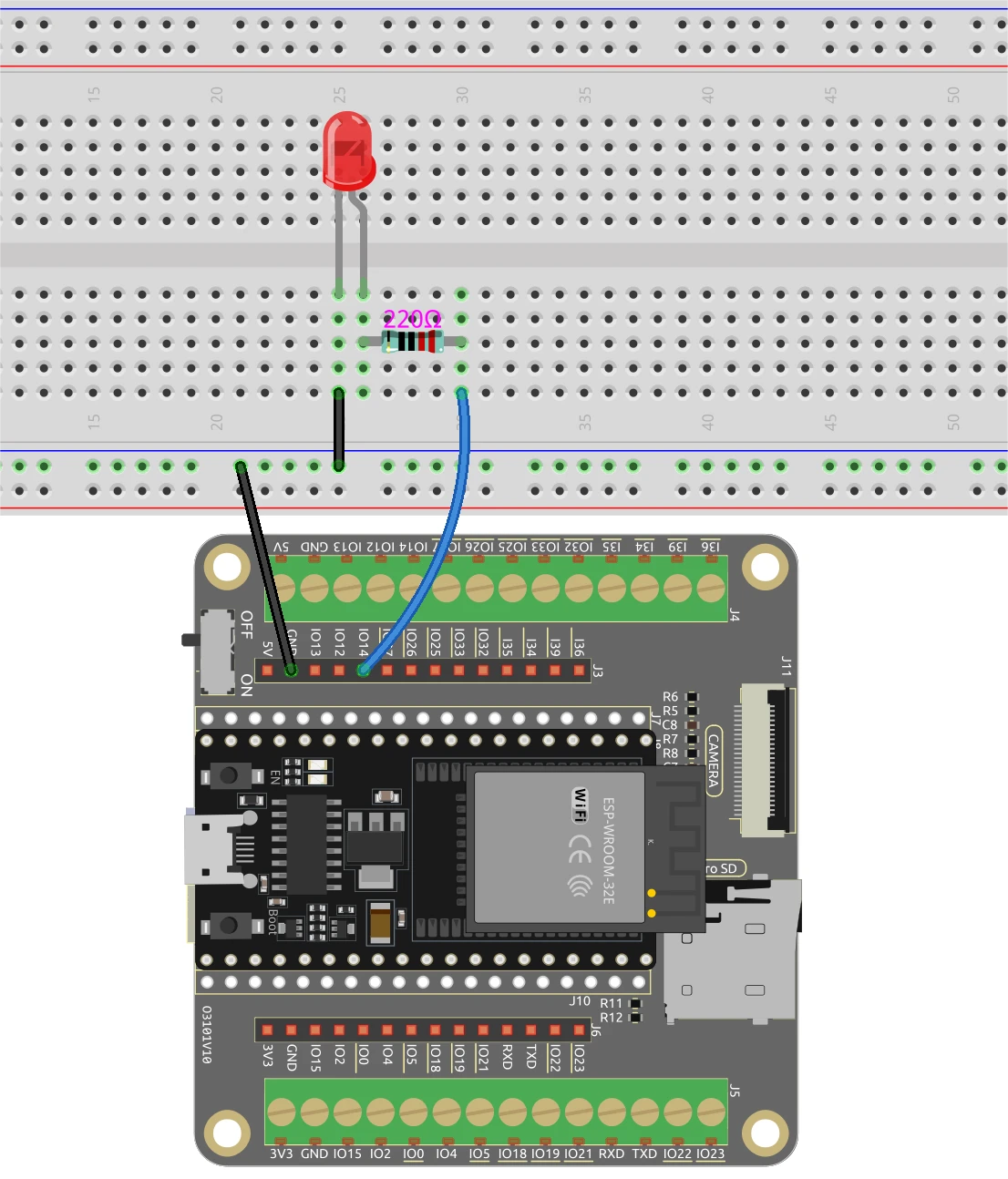
Per collegare l'ESP32 e il LED, inizia collegando il pin più lungo del LED a un pin GPIO adatto, in questo caso utilizzeremo il pin 14. Il pin più corto dovrebbe collegarsi alla linea di massa sulla tua breadboard. Successivamente, posiziona una resistenza da 220 Ohm in serie con il LED, collegando un'estremità al pin GPIO (pin 14) e l'altra estremità alla massa. Assicurati che l'ESP32 sia alimentato correttamente, sia tramite la porta micro USB che con una batteria al litio 18650.
Per il modulo della fotocamera, assicurati di collegare i pin necessari secondo il modello di fotocamera che stai usando, poiché il cablaggio può variare leggermente. L'ESP32 gestirà il flusso video tramite le sue capacità integrate, e il controllo dei LED sarà gestito attraverso l'interfaccia web che configureremo nel codice.
Esempi di codice e guida passo passo
Il programma inizia includendo le librerie necessarie e definendo le credenziali Wi-Fi. Dovrai sostituiressidepasswordcon le tue attuali credenziali Wi-Fi per connettere l'ESP32 alla tua rete.
const char* ssid = "SSID";
const char* password = "PASSWORD";
Successivamente, definiamo il pin LED e impostiamo le configurazioni della fotocamera. Il pin utilizzato per il LED è definito comeLED_PIN, che sarà utilizzato successivamente nel codice per controllare lo stato del LED.
#define LED_PIN    14
pinMode(LED_PIN, OUTPUT);
Nella funzione di gestione della richiesta per il controllo LED, controlliamo il comando ricevuto dall'interfaccia web. A seconda che il comando sia "on" o "off", utilizziamodigitalWrite(LED_PIN, 1);accendere il LED edigitalWrite(LED_PIN, 0);per spegnerlo.
if(!strcmp(variable, "on")) {
  Serial.println("ON");
  digitalWrite(LED_PIN, 1);
}
else if(!strcmp(variable, "off")) {
  Serial.println("OFF");
  digitalWrite(LED_PIN, 0);
}
Questa logica consente all'interfaccia web di comunicare in modo efficace con l'ESP32, abilitando il controllo in tempo reale del LED basato sulle interazioni degli utenti. Il codice completo è caricato sotto l'articolo per ulteriori esplorazioni.
Dimostrazione / Cosa Aspettarsi
Una volta che tutto è configurato e il codice è caricato, dovresti essere in grado di accedere all'indirizzo IP dell'ESP32 nel tuo browser web. Il video in streaming apparirà e puoi controllare il LED utilizzando i pulsanti sull'interfaccia. Cliccando su "ACCENDE" il LED si illuminerà, mentre "SPENGI" lo spegnerà. Assicurati che l'ESP32 e il tuo computer siano connessi alla stessa rete per garantire il corretto funzionamento (nel video alle 12:30).
Timestamp video
- 00:00 Inizio
- 1:51 Introduzione al progetto
- 2:31 Pagina di documentazione
- 3:33 Spiegazione del cablaggio
- 5:08 Codice Arduino spiegato
- 13:28 Selezionare la scheda ESP32 e la porta COM nell'Arduino IDE
- 15:10 Dimostrazione
Immagini
/*
 * Con la presente si concede, a titolo gratuito, il permesso a chiunque ottenga una copia di questo software e dei file di documentazione associati. La suddetta avviso di copyright e questo avviso di permesso dovranno essere inclusi in tutte le copie o porzioni sostanziali del software.
 */
#include "esp_camera.h"
#include <WiFi.h>
#include "esp_timer.h"
#include "img_converters.h"
#include "Arduino.h"
#include "fb_gfx.h"
#include "soc/soc.h" // disattivare i problemi di brownout
#include "soc/rtc_cntl_reg.h" // disattivare i problemi di brownout
#include "esp_http_server.h"

 // Sostituisci le seguenti variabili con la tua combinazione SSID/Password
const char* ssid = "SSID";
const char* password = "PASSWORD";

#define PART_BOUNDARY "123456789000000000000987654321"

#define CAMERA_MODEL_AI_THINKER
 // #define CAMERA_MODEL_M5STACK_PSRAM
 // #define CAMERA_MODEL_M5STACK_SENZA_PSRAM
 // #define CAMERA_MODEL_M5STACK_PSRAM_B
 // #define CAMERA_MODEL_WROVER_KIT

#if defined(CAMERA_MODEL_WROVER_KIT)
  #define PWDN_GPIO_NUM    -1
  #define RESET_GPIO_NUM   -1
  #define XCLK_GPIO_NUM    21
  #define SIOD_GPIO_NUM    26
  #define SIOC_GPIO_NUM    27

  #define Y9_GPIO_NUM      35
  #define Y8_GPIO_NUM      34
  #define Y7_GPIO_NUM      39
  #define Y6_GPIO_NUM      36
  #define Y5_GPIO_NUM      19
  #define Y4_GPIO_NUM      18
  #define Y3_GPIO_NUM       5
  #define Y2_GPIO_NUM       4
  #define VSYNC_GPIO_NUM   25
  #define HREF_GPIO_NUM    23
  #define PCLK_GPIO_NUM    22

#elif defined(CAMERA_MODEL_M5STACK_PSRAM)
  #define PWDN_GPIO_NUM     -1
  #define RESET_GPIO_NUM    15
  #define XCLK_GPIO_NUM     27
  #define SIOD_GPIO_NUM     25
  #define SIOC_GPIO_NUM     23

  #define Y9_GPIO_NUM       19
  #define Y8_GPIO_NUM       36
  #define Y7_GPIO_NUM       18
  #define Y6_GPIO_NUM       39
  #define Y5_GPIO_NUM        5
  #define Y4_GPIO_NUM       34
  #define Y3_GPIO_NUM       35
  #define Y2_GPIO_NUM       32
  #define VSYNC_GPIO_NUM    22
  #define HREF_GPIO_NUM     26
  #define PCLK_GPIO_NUM     21

#elif defined(CAMERA_MODEL_M5STACK_WITHOUT_PSRAM)
  #define PWDN_GPIO_NUM     -1
  #define RESET_GPIO_NUM    15
  #define XCLK_GPIO_NUM     27
  #define SIOD_GPIO_NUM     25
  #define SIOC_GPIO_NUM     23

  #define Y9_GPIO_NUM       19
  #define Y8_GPIO_NUM       36
  #define Y7_GPIO_NUM       18
  #define Y6_GPIO_NUM       39
  #define Y5_GPIO_NUM        5
  #define Y4_GPIO_NUM       34
  #define Y3_GPIO_NUM       35
  #define Y2_GPIO_NUM       17
  #define VSYNC_GPIO_NUM    22
  #define HREF_GPIO_NUM     26
  #define PCLK_GPIO_NUM     21

#elif defined(CAMERA_MODEL_AI_THINKER)
  #define PWDN_GPIO_NUM     32
  #define RESET_GPIO_NUM    33
  #define XCLK_GPIO_NUM      0
  #define SIOD_GPIO_NUM     26
  #define SIOC_GPIO_NUM     27

  #define Y9_GPIO_NUM       35
  #define Y8_GPIO_NUM       34
  #define Y7_GPIO_NUM       39
  #define Y6_GPIO_NUM       36
  #define Y5_GPIO_NUM       21
  #define Y4_GPIO_NUM       19
  #define Y3_GPIO_NUM       18
  #define Y2_GPIO_NUM        5
  #define VSYNC_GPIO_NUM    25
  #define HREF_GPIO_NUM     23
  #define PCLK_GPIO_NUM     22

#elif defined(CAMERA_MODEL_M5STACK_PSRAM_B)
  #define PWDN_GPIO_NUM     -1
  #define RESET_GPIO_NUM    15
  #define XCLK_GPIO_NUM     27
  #define SIOD_GPIO_NUM     22
  #define SIOC_GPIO_NUM     23

  #define Y9_GPIO_NUM       19
  #define Y8_GPIO_NUM       36
  #define Y7_GPIO_NUM       18
  #define Y6_GPIO_NUM       39
  #define Y5_GPIO_NUM        5
  #define Y4_GPIO_NUM       34
  #define Y3_GPIO_NUM       35
  #define Y2_GPIO_NUM       32
  #define VSYNC_GPIO_NUM    25
  #define HREF_GPIO_NUM     26
  #define PCLK_GPIO_NUM     21

#else
  #error "Camera model not selected"
#endif

#define LED_PIN    14

static const char* _STREAM_CONTENT_TYPE = "multipart/x-mixed-replace;boundary=" PART_BOUNDARY;
static const char* _STREAM_BOUNDARY = "\r\n--" PART_BOUNDARY "\r\n";
static const char* _STREAM_PART = "Content-Type: image/jpeg\r\nContent-Length: %u\r\n\r\n";

httpd_handle_t camera_httpd = NULL;
httpd_handle_t stream_httpd = NULL;

static const char PROGMEM INDEX_HTML[] = R"rawliteral(
<html>
  <head>
    <title>ESP32-CAM Robot</title>
    <meta name="viewport" content="width=device-width, initial-scale=1">
    <style>
      body { font-family: Arial; text-align: center; margin:0px auto; padding-top: 30px;}
      table { margin-left: auto; margin-right: auto; }
      td { padding: 8 px; }
      .button {
        background-color: #2f4468;
        border: none;
        color: white;
        padding: 10px 20px;
        text-align: center;
        text-decoration: none;
        display: inline-block;
        font-size: 18px;
        margin: 6px 3px;
        cursor: pointer;
        -webkit-touch-callout: none;
        -webkit-user-select: none;
        -khtml-user-select: none;
        -moz-user-select: none;
        -ms-user-select: none;
        user-select: none;
        -webkit-tap-highlight-color: rgba(0,0,0,0);
      }
      img {  width: auto ;
        max-width: 100% ;
        height: auto ;
        transform: rotate(180deg);
      }
    </style>
  </head>
  <body>
    <h1>ESP32 CAMERA</h1>
    <img src="" id="photo" >
    <table>
      <tr><td align="center"><button class="button" onmousedown="toggleCheckbox('on');" ontouchstart="toggleCheckbox('on');onmouseup="toggleCheckbox('on');" ontouchend="toggleCheckbox('on');">ON</button></td>
      <td align="center"><button class="button" onmousedown="toggleCheckbox('off');" ontouchstart="toggleCheckbox('off');onmouseup="toggleCheckbox('off');" ontouchend="toggleCheckbox('off');">OFF</button></td></tr>
    </table>
   <script>
   function toggleCheckbox(x) {
     var xhr = new XMLHttpRequest();
     xhr.open("GET", "/action?go=" + x, true);
     xhr.send();
   }
   window.onload = document.getElementById("photo").src = window.location.href.slice(0, -1) + ":81/stream";
  </script>
  </body>
</html>
)rawliteral";

static esp_err_t index_handler(httpd_req_t *req){
  httpd_resp_set_type(req, "text/html");
  return httpd_resp_send(req, (const char *)INDEX_HTML, strlen(INDEX_HTML));
}

static esp_err_t stream_handler(httpd_req_t *req){
  camera_fb_t * fb = NULL;
  esp_err_t res = ESP_OK;
  size_t _jpg_buf_len = 0;
  uint8_t * _jpg_buf = NULL;
  char * part_buf[64];

  res = httpd_resp_set_type(req, _STREAM_CONTENT_TYPE);
  if(res != ESP_OK){
    return res;
  }

  while(true){
    fb = esp_camera_fb_get();
    if (!fb) {
      Serial.println("Camera capture failed");
      res = ESP_FAIL;
    } else {
      if(fb->width > 400){
        if(fb->format != PIXFORMAT_JPEG){
          bool jpeg_converted = frame2jpg(fb, 80, &_jpg_buf, &_jpg_buf_len);
          esp_camera_fb_return(fb);
          fb = NULL;
          if(!jpeg_converted){
            Serial.println("JPEG compression failed");
            res = ESP_FAIL;
          }
        } else {
          _jpg_buf_len = fb->len;
          _jpg_buf = fb->buf;
        }
      }
    }
    if(res == ESP_OK){
      size_t hlen = snprintf((char *)part_buf, 64, _STREAM_PART, _jpg_buf_len);
      res = httpd_resp_send_chunk(req, (const char *)part_buf, hlen);
    }
    if(res == ESP_OK){
      res = httpd_resp_send_chunk(req, (const char *)_jpg_buf, _jpg_buf_len);
    }
    if(res == ESP_OK){
      res = httpd_resp_send_chunk(req, _STREAM_BOUNDARY, strlen(_STREAM_BOUNDARY));
    }
    if(fb){
      esp_camera_fb_return(fb);
      fb = NULL;
      _jpg_buf = NULL;
    } else if(_jpg_buf){
      free(_jpg_buf);
      _jpg_buf = NULL;
    }
    if(res != ESP_OK){
      break;
    }
 // Serial.printf("MJPG: %uB\n",(uint32_t)(_jpg_buf_len));
  }
  return res;
}

static esp_err_t cmd_handler(httpd_req_t *req){
  char*  buf;
  size_t buf_len;
  char variable[32] = {0,};

  buf_len = httpd_req_get_url_query_len(req) + 1;
  if (buf_len > 1) {
    buf = (char*)malloc(buf_len);
    if(!buf){
      httpd_resp_send_500(req);
      return ESP_FAIL;
    }
    if (httpd_req_get_url_query_str(req, buf, buf_len) == ESP_OK) {
      if (httpd_query_key_value(buf, "go", variable, sizeof(variable)) == ESP_OK) {
      } else {
        free(buf);
        httpd_resp_send_404(req);
        return ESP_FAIL;
      }
    } else {
      free(buf);
      httpd_resp_send_404(req);
      return ESP_FAIL;
    }
    free(buf);
  } else {
    httpd_resp_send_404(req);
    return ESP_FAIL;
  }

  sensor_t * s = esp_camera_sensor_get();
  int res = 0;

  if(!strcmp(variable, "on")) {
    Serial.println("ON");
    digitalWrite(LED_PIN, 1);
  }
  else if(!strcmp(variable, "off")) {
    Serial.println("OFF");
    digitalWrite(LED_PIN, 0);
  }
  else {
    res = -1;
  }

  if(res){
    return httpd_resp_send_500(req);
  }

  httpd_resp_set_hdr(req, "Access-Control-Allow-Origin", "*");
  return httpd_resp_send(req, NULL, 0);
}

void startCameraServer(){
  httpd_config_t config = HTTPD_DEFAULT_CONFIG();
  config.server_port = 80;
  httpd_uri_t index_uri = {
    .uri       = "/",
    .method    = HTTP_GET,
    .handler   = index_handler,
    .user_ctx  = NULL
  };

  httpd_uri_t cmd_uri = {
    .uri       = "/action",
    .method    = HTTP_GET,
    .handler   = cmd_handler,
    .user_ctx  = NULL
  };
  httpd_uri_t stream_uri = {
    .uri       = "/stream",
    .method    = HTTP_GET,
    .handler   = stream_handler,
    .user_ctx  = NULL
  };
  if (httpd_start(&camera_httpd, &config) == ESP_OK) {
    httpd_register_uri_handler(camera_httpd, &index_uri);
    httpd_register_uri_handler(camera_httpd, &cmd_uri);
  }
  config.server_port += 1;
  config.ctrl_port += 1;
  if (httpd_start(&stream_httpd, &config) == ESP_OK) {
    httpd_register_uri_handler(stream_httpd, &stream_uri);
  }
}

void setup() {
  WRITE_PERI_REG(RTC_CNTL_BROWN_OUT_REG, 0); // disattivare il rilevatore di brownout

  pinMode(LED_PIN, OUTPUT);

  Serial.begin(115200);
  Serial.setDebugOutput(false);

  camera_config_t config;
  config.ledc_channel = LEDC_CHANNEL_0;
  config.ledc_timer = LEDC_TIMER_0;
  config.pin_d0 = Y2_GPIO_NUM;
  config.pin_d1 = Y3_GPIO_NUM;
  config.pin_d2 = Y4_GPIO_NUM;
  config.pin_d3 = Y5_GPIO_NUM;
  config.pin_d4 = Y6_GPIO_NUM;
  config.pin_d5 = Y7_GPIO_NUM;
  config.pin_d6 = Y8_GPIO_NUM;
  config.pin_d7 = Y9_GPIO_NUM;
  config.pin_xclk = XCLK_GPIO_NUM;
  config.pin_pclk = PCLK_GPIO_NUM;
  config.pin_vsync = VSYNC_GPIO_NUM;
  config.pin_href = HREF_GPIO_NUM;
  config.pin_sscb_sda = SIOD_GPIO_NUM;
  config.pin_sscb_scl = SIOC_GPIO_NUM;
  config.pin_pwdn = PWDN_GPIO_NUM;
  config.pin_reset = RESET_GPIO_NUM;
  config.xclk_freq_hz = 20000000;
  config.pixel_format = PIXFORMAT_JPEG;

  if(psramFound()){
    config.frame_size = FRAMESIZE_VGA;
    config.jpeg_quality = 10;
    config.fb_count = 2;
  } else {
    config.frame_size = FRAMESIZE_SVGA;
    config.jpeg_quality = 12;
    config.fb_count = 1;
  }

 // Inizializzazione della camera
  esp_err_t err = esp_camera_init(&config);
  if (err != ESP_OK) {
    Serial.printf("Camera init failed with error 0x%x", err);
    return;
  }
 // Connessione Wi-Fi
  WiFi.begin(ssid, password);
  while (WiFi.status() != WL_CONNECTED) {
    delay(500);
    Serial.print(".");
  }
  Serial.println("");
  Serial.println("WiFi connected");

  Serial.print("Camera Stream Ready! Go to: http: // ");
  Serial.println(WiFi.localIP());

 // Avvia il server web in streaming
  startCameraServer();
}

void loop() {

}
Common Course Links
Common Course Files
Risorse e riferimenti
-
Documentazione
File📁
Nessun file disponibile.