ESP32 Tutorijal 45/55 - Prilagođeni streaming server sa LED kontrolom CAM-3 l SunFounder-ov ESP32 komplet za učenje
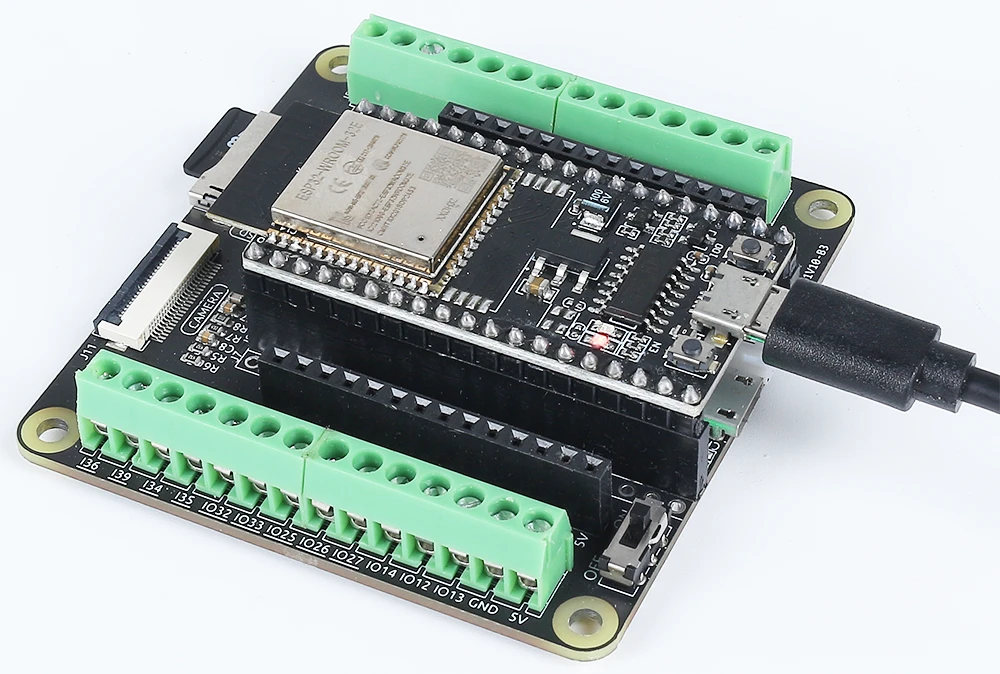
U ovom tutorijalu ćemo istražiti kako postaviti prilagođeni streaming server koristeći ESP32 proširujuću ploču kompanije SunFounder. Projekat vam omogućava da streamujete video uživo u vaš preglednik, dok također kontrolišete LED direktno iz interfejsa. Ova kombinacija funkcija omogućava praktično učenje o IoT i web tehnologijama.
Koristit ćemo ugrađene Wi-Fi mogućnosti ESP32-a za kreiranje web servera koji streamuje video i upravlja komandama za kontrolu LED-a. Projekat uključuje kodiranje, povezivanje i razumijevanje interakcije komponenti. Ako želite jasnije razumijevanje postavke, svakako pogledajte video na (u videu na 00:00).
Objašnjenje hardvera
Glavne komponente za ovaj projekat uključuju ESP32 mikrokontroler, kameru modul, LED i otpornik. ESP32 je svestran mikrokontroler sa ugrađenim Wi-Fi i Bluetooth mogućnostima, što ga čini savršenim za IoT aplikacije. Kamera modul nam omogućava snimanje videa, dok LED pruža jednostavan izlazni uređaj za kontrolu.
LED je povezan kroz otpornik kako bi se ograničila struja, sprečavajući oštećenje i LED-a i mikrokontrolera. Ova postavka će nam omogućiti da uključimo i isključimo LED putem našeg web interfejsa, prikazujući mogućnosti ESP32-a u upravljanju ulazima i izlazima preko mreže.
Detalji iz tehničke dokumentacije
| Proizvođač | Espressif |
|---|---|
| Broj dijela | ESP32-WROOM-32 |
| Logički/IO napon | 3.3 V |
| Napon napajanja | 3.0–3.6 V |
| Izlazna struja (po kanalu) | 12 mA |
| Maksimalna struja (po kanalu) | 40 mA |
| Preporuka za PWM frekvenciju | 1 kHz |
| Ulazni logički pragovi | 0.2 V (nisko) / 0.8 V (visoko) |
| Pad napona / RDS(on) / zasićenje | 0.2 V (tip.) |
| Termička ograničenja | Maksimalna temperatura spoja: 125 °C |
| Pakovanje | QFN48 |
| Napomene / varijante | Dostupan u različitim konfiguracijama |
- Osigurajte da je ESP32 napajan regulisanim naponom od 3.3 V.
- Koristite otpornik za ograničenje struje (220 Ohma) sa LED-om kako biste spriječili oštećenje.
- Održavajte ispravne veze kako biste izbjegli plutajuće ulaze.
- Provjerite da su Wi-Fi akreditivi ispravni i da razlikuju velika i mala slova.
- Koristite stabilan izvor napajanja za dosljedne performanse.
- Uzmite u obzir disipaciju topline u zatvorenim prostorima.
Upute za povezivanje
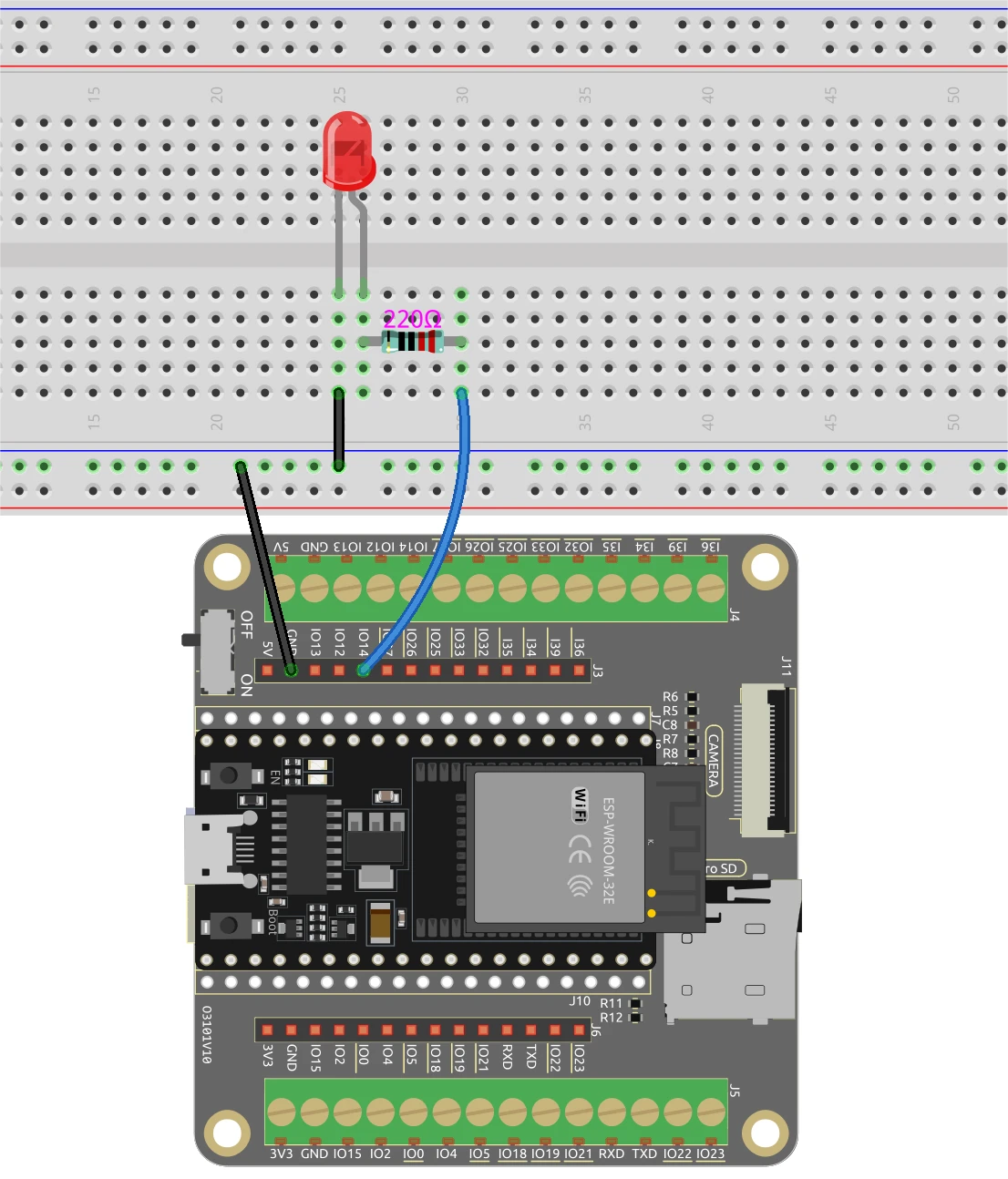
Za povezivanje ESP32-a i LED-a, počnite spajanjem duže nogice LED-a na odgovarajući GPIO pin, u ovom slučaju koristit ćemo pin 14. Kraća nogica treba biti spojena na liniju uzemljenja na vašoj breadboard ploči. Zatim postavite otpornik od 220 Ohma u seriju sa LED-om, spajajući jedan kraj na GPIO pin (pin 14), a drugi kraj na uzemljenje. Osigurajte da je ESP32 ispravno napajan, bilo putem micro USB porta ili pomoću 18650 litijumske baterije.
Za kameru modul, obavezno spojite potrebne pinove prema modelu kamere koju koristite, jer povezivanje može neznatno varirati. ESP32 će upravljati video streamom putem svojih ugrađenih mogućnosti, a kontrola LED-a će se upravljati putem web interfejsa koji ćemo postaviti u kodu.
Primjeri koda i objašnjenje
Program počinje uključivanjem potrebnih biblioteka i definiranjem Wi-Fi akreditiva. Morat ćete zamijeniti ssid i password sa vašim stvarnim Wi-Fi akreditivima kako biste povezali ESP32 na vašu mrežu.
const char* ssid = "SSID";
const char* password = "PASSWORD";
Zatim definiramo pin za LED i postavljamo konfiguracije kamere. Pin koji se koristi za LED definiran je kao LED_PIN, koji će se kasnije koristiti u kodu za kontrolu stanja LED-a.
#define LED_PIN    14
pinMode(LED_PIN, OUTPUT);
U handleru zahtjeva za kontrolu LED-a, provjeravamo komandu primljenu sa web interfejsa. Ovisno o tome da li je komanda "on" ili "off", koristimo digitalWrite(LED_PIN, 1); za uključivanje LED-a i digitalWrite(LED_PIN, 0); za njegovo isključivanje.
if(!strcmp(variable, "on")) {
  Serial.println("ON");
  digitalWrite(LED_PIN, 1);
}
else if(!strcmp(variable, "off")) {
  Serial.println("OFF");
  digitalWrite(LED_PIN, 0);
}
Ova logika omogućava web interfejsu da efikasno komunicira sa ESP32-om, omogućavajući kontrolu LED-a u realnom vremenu na osnovu interakcija korisnika. Kompletan kod se učitava ispod članka za daljnje istraživanje.
Demonstracija / Šta očekivati
Kada je sve postavljeno i kod učitan, trebali biste moći pristupiti IP adresi ESP32-a u vašem web pregledniku. Streaming video će se pojaviti, a LED možete kontrolirati pomoću dugmadi na interfejsu. Klik na "ON" će upaliti LED, dok će "OFF" ugasiti. Provjerite da su ESP32 i vaš računar povezani na istu mrežu kako biste osigurali ispravnu funkcionalnost (u videu na 12:30).
Vremenske oznake videa
- 00:00 Početak
- 1:51 Uvod u projekat
- 2:31 Stranica dokumentacije
- 3:33 Objašnjenje povezivanja
- 5:08 Objašnjenje Arduino koda
- 13:28 Odabir ESP32 ploče i COM porta u Arduino IDE-u
- 15:10 Demonstracija
Slike
/*********
  Permission is hereby granted, free of charge,
  to any person obtaining a copy of this software and associated documentation files.
  The above copyright notice and this permission
  notice shall be included in all copies or substantial portions of the Software.
*********/

#include "esp_camera.h"
#include <WiFi.h>
#include "esp_timer.h"
#include "img_converters.h"
#include "Arduino.h"
#include "fb_gfx.h"
#include "soc/soc.h"             // disable brownout problems
#include "soc/rtc_cntl_reg.h"    // disable brownout problems
#include "esp_http_server.h"

// Replace the next variables with your SSID/Password combination
const char* ssid = "SSID";
const char* password = "PASSWORD";

#define PART_BOUNDARY "123456789000000000000987654321"

#define CAMERA_MODEL_AI_THINKER
//#define CAMERA_MODEL_M5STACK_PSRAM
//#define CAMERA_MODEL_M5STACK_WITHOUT_PSRAM
//#define CAMERA_MODEL_M5STACK_PSRAM_B
//#define CAMERA_MODEL_WROVER_KIT

#if defined(CAMERA_MODEL_WROVER_KIT)
  #define PWDN_GPIO_NUM    -1
  #define RESET_GPIO_NUM   -1
  #define XCLK_GPIO_NUM    21
  #define SIOD_GPIO_NUM    26
  #define SIOC_GPIO_NUM    27

  #define Y9_GPIO_NUM      35
  #define Y8_GPIO_NUM      34
  #define Y7_GPIO_NUM      39
  #define Y6_GPIO_NUM      36
  #define Y5_GPIO_NUM      19
  #define Y4_GPIO_NUM      18
  #define Y3_GPIO_NUM       5
  #define Y2_GPIO_NUM       4
  #define VSYNC_GPIO_NUM   25
  #define HREF_GPIO_NUM    23
  #define PCLK_GPIO_NUM    22

#elif defined(CAMERA_MODEL_M5STACK_PSRAM)
  #define PWDN_GPIO_NUM     -1
  #define RESET_GPIO_NUM    15
  #define XCLK_GPIO_NUM     27
  #define SIOD_GPIO_NUM     25
  #define SIOC_GPIO_NUM     23

  #define Y9_GPIO_NUM       19
  #define Y8_GPIO_NUM       36
  #define Y7_GPIO_NUM       18
  #define Y6_GPIO_NUM       39
  #define Y5_GPIO_NUM        5
  #define Y4_GPIO_NUM       34
  #define Y3_GPIO_NUM       35
  #define Y2_GPIO_NUM       32
  #define VSYNC_GPIO_NUM    22
  #define HREF_GPIO_NUM     26
  #define PCLK_GPIO_NUM     21

#elif defined(CAMERA_MODEL_M5STACK_WITHOUT_PSRAM)
  #define PWDN_GPIO_NUM     -1
  #define RESET_GPIO_NUM    15
  #define XCLK_GPIO_NUM     27
  #define SIOD_GPIO_NUM     25
  #define SIOC_GPIO_NUM     23

  #define Y9_GPIO_NUM       19
  #define Y8_GPIO_NUM       36
  #define Y7_GPIO_NUM       18
  #define Y6_GPIO_NUM       39
  #define Y5_GPIO_NUM        5
  #define Y4_GPIO_NUM       34
  #define Y3_GPIO_NUM       35
  #define Y2_GPIO_NUM       17
  #define VSYNC_GPIO_NUM    22
  #define HREF_GPIO_NUM     26
  #define PCLK_GPIO_NUM     21

#elif defined(CAMERA_MODEL_AI_THINKER)
  #define PWDN_GPIO_NUM     32
  #define RESET_GPIO_NUM    33
  #define XCLK_GPIO_NUM      0
  #define SIOD_GPIO_NUM     26
  #define SIOC_GPIO_NUM     27

  #define Y9_GPIO_NUM       35
  #define Y8_GPIO_NUM       34
  #define Y7_GPIO_NUM       39
  #define Y6_GPIO_NUM       36
  #define Y5_GPIO_NUM       21
  #define Y4_GPIO_NUM       19
  #define Y3_GPIO_NUM       18
  #define Y2_GPIO_NUM        5
  #define VSYNC_GPIO_NUM    25
  #define HREF_GPIO_NUM     23
  #define PCLK_GPIO_NUM     22

#elif defined(CAMERA_MODEL_M5STACK_PSRAM_B)
  #define PWDN_GPIO_NUM     -1
  #define RESET_GPIO_NUM    15
  #define XCLK_GPIO_NUM     27
  #define SIOD_GPIO_NUM     22
  #define SIOC_GPIO_NUM     23

  #define Y9_GPIO_NUM       19
  #define Y8_GPIO_NUM       36
  #define Y7_GPIO_NUM       18
  #define Y6_GPIO_NUM       39
  #define Y5_GPIO_NUM        5
  #define Y4_GPIO_NUM       34
  #define Y3_GPIO_NUM       35
  #define Y2_GPIO_NUM       32
  #define VSYNC_GPIO_NUM    25
  #define HREF_GPIO_NUM     26
  #define PCLK_GPIO_NUM     21

#else
  #error "Camera model not selected"
#endif

#define LED_PIN    14

static const char* _STREAM_CONTENT_TYPE = "multipart/x-mixed-replace;boundary=" PART_BOUNDARY;
static const char* _STREAM_BOUNDARY = "\r\n--" PART_BOUNDARY "\r\n";
static const char* _STREAM_PART = "Content-Type: image/jpeg\r\nContent-Length: %u\r\n\r\n";

httpd_handle_t camera_httpd = NULL;
httpd_handle_t stream_httpd = NULL;

static const char PROGMEM INDEX_HTML[] = R"rawliteral(
<html>
  <head>
    <title>ESP32-CAM Robot</title>
    <meta name="viewport" content="width=device-width, initial-scale=1">
    <style>
      body { font-family: Arial; text-align: center; margin:0px auto; padding-top: 30px;}
      table { margin-left: auto; margin-right: auto; }
      td { padding: 8 px; }
      .button {
        background-color: #2f4468;
        border: none;
        color: white;
        padding: 10px 20px;
        text-align: center;
        text-decoration: none;
        display: inline-block;
        font-size: 18px;
        margin: 6px 3px;
        cursor: pointer;
        -webkit-touch-callout: none;
        -webkit-user-select: none;
        -khtml-user-select: none;
        -moz-user-select: none;
        -ms-user-select: none;
        user-select: none;
        -webkit-tap-highlight-color: rgba(0,0,0,0);
      }
      img {  width: auto ;
        max-width: 100% ;
        height: auto ;
        transform: rotate(180deg);
      }
    </style>
  </head>
  <body>
    <h1>ESP32 CAMERA</h1>
    <img src="" id="photo" >
    <table>
      <tr><td align="center"><button class="button" onmousedown="toggleCheckbox('on');" ontouchstart="toggleCheckbox('on');onmouseup="toggleCheckbox('on');" ontouchend="toggleCheckbox('on');">ON</button></td>
      <td align="center"><button class="button" onmousedown="toggleCheckbox('off');" ontouchstart="toggleCheckbox('off');onmouseup="toggleCheckbox('off');" ontouchend="toggleCheckbox('off');">OFF</button></td></tr>
    </table>
   <script>
   function toggleCheckbox(x) {
     var xhr = new XMLHttpRequest();
     xhr.open("GET", "/action?go=" + x, true);
     xhr.send();
   }
   window.onload = document.getElementById("photo").src = window.location.href.slice(0, -1) + ":81/stream";
  </script>
  </body>
</html>
)rawliteral";

static esp_err_t index_handler(httpd_req_t *req){
  httpd_resp_set_type(req, "text/html");
  return httpd_resp_send(req, (const char *)INDEX_HTML, strlen(INDEX_HTML));
}

static esp_err_t stream_handler(httpd_req_t *req){
  camera_fb_t * fb = NULL;
  esp_err_t res = ESP_OK;
  size_t _jpg_buf_len = 0;
  uint8_t * _jpg_buf = NULL;
  char * part_buf[64];

  res = httpd_resp_set_type(req, _STREAM_CONTENT_TYPE);
  if(res != ESP_OK){
    return res;
  }

  while(true){
    fb = esp_camera_fb_get();
    if (!fb) {
      Serial.println("Camera capture failed");
      res = ESP_FAIL;
    } else {
      if(fb->width > 400){
        if(fb->format != PIXFORMAT_JPEG){
          bool jpeg_converted = frame2jpg(fb, 80, &_jpg_buf, &_jpg_buf_len);
          esp_camera_fb_return(fb);
          fb = NULL;
          if(!jpeg_converted){
            Serial.println("JPEG compression failed");
            res = ESP_FAIL;
          }
        } else {
          _jpg_buf_len = fb->len;
          _jpg_buf = fb->buf;
        }
      }
    }
    if(res == ESP_OK){
      size_t hlen = snprintf((char *)part_buf, 64, _STREAM_PART, _jpg_buf_len);
      res = httpd_resp_send_chunk(req, (const char *)part_buf, hlen);
    }
    if(res == ESP_OK){
      res = httpd_resp_send_chunk(req, (const char *)_jpg_buf, _jpg_buf_len);
    }
    if(res == ESP_OK){
      res = httpd_resp_send_chunk(req, _STREAM_BOUNDARY, strlen(_STREAM_BOUNDARY));
    }
    if(fb){
      esp_camera_fb_return(fb);
      fb = NULL;
      _jpg_buf = NULL;
    } else if(_jpg_buf){
      free(_jpg_buf);
      _jpg_buf = NULL;
    }
    if(res != ESP_OK){
      break;
    }
    //Serial.printf("MJPG: %uB\n",(uint32_t)(_jpg_buf_len));
  }
  return res;
}

static esp_err_t cmd_handler(httpd_req_t *req){
  char*  buf;
  size_t buf_len;
  char variable[32] = {0,};

  buf_len = httpd_req_get_url_query_len(req) + 1;
  if (buf_len > 1) {
    buf = (char*)malloc(buf_len);
    if(!buf){
      httpd_resp_send_500(req);
      return ESP_FAIL;
    }
    if (httpd_req_get_url_query_str(req, buf, buf_len) == ESP_OK) {
      if (httpd_query_key_value(buf, "go", variable, sizeof(variable)) == ESP_OK) {
      } else {
        free(buf);
        httpd_resp_send_404(req);
        return ESP_FAIL;
      }
    } else {
      free(buf);
      httpd_resp_send_404(req);
      return ESP_FAIL;
    }
    free(buf);
  } else {
    httpd_resp_send_404(req);
    return ESP_FAIL;
  }

  sensor_t * s = esp_camera_sensor_get();
  int res = 0;

  if(!strcmp(variable, "on")) {
    Serial.println("ON");
    digitalWrite(LED_PIN, 1);
  }
  else if(!strcmp(variable, "off")) {
    Serial.println("OFF");
    digitalWrite(LED_PIN, 0);
  }
  else {
    res = -1;
  }

  if(res){
    return httpd_resp_send_500(req);
  }

  httpd_resp_set_hdr(req, "Access-Control-Allow-Origin", "*");
  return httpd_resp_send(req, NULL, 0);
}

void startCameraServer(){
  httpd_config_t config = HTTPD_DEFAULT_CONFIG();
  config.server_port = 80;
  httpd_uri_t index_uri = {
    .uri       = "/",
    .method    = HTTP_GET,
    .handler   = index_handler,
    .user_ctx  = NULL
  };

  httpd_uri_t cmd_uri = {
    .uri       = "/action",
    .method    = HTTP_GET,
    .handler   = cmd_handler,
    .user_ctx  = NULL
  };
  httpd_uri_t stream_uri = {
    .uri       = "/stream",
    .method    = HTTP_GET,
    .handler   = stream_handler,
    .user_ctx  = NULL
  };
  if (httpd_start(&camera_httpd, &config) == ESP_OK) {
    httpd_register_uri_handler(camera_httpd, &index_uri);
    httpd_register_uri_handler(camera_httpd, &cmd_uri);
  }
  config.server_port += 1;
  config.ctrl_port += 1;
  if (httpd_start(&stream_httpd, &config) == ESP_OK) {
    httpd_register_uri_handler(stream_httpd, &stream_uri);
  }
}

void setup() {
  WRITE_PERI_REG(RTC_CNTL_BROWN_OUT_REG, 0); //disable brownout detector

  pinMode(LED_PIN, OUTPUT);

  Serial.begin(115200);
  Serial.setDebugOutput(false);

  camera_config_t config;
  config.ledc_channel = LEDC_CHANNEL_0;
  config.ledc_timer = LEDC_TIMER_0;
  config.pin_d0 = Y2_GPIO_NUM;
  config.pin_d1 = Y3_GPIO_NUM;
  config.pin_d2 = Y4_GPIO_NUM;
  config.pin_d3 = Y5_GPIO_NUM;
  config.pin_d4 = Y6_GPIO_NUM;
  config.pin_d5 = Y7_GPIO_NUM;
  config.pin_d6 = Y8_GPIO_NUM;
  config.pin_d7 = Y9_GPIO_NUM;
  config.pin_xclk = XCLK_GPIO_NUM;
  config.pin_pclk = PCLK_GPIO_NUM;
  config.pin_vsync = VSYNC_GPIO_NUM;
  config.pin_href = HREF_GPIO_NUM;
  config.pin_sscb_sda = SIOD_GPIO_NUM;
  config.pin_sscb_scl = SIOC_GPIO_NUM;
  config.pin_pwdn = PWDN_GPIO_NUM;
  config.pin_reset = RESET_GPIO_NUM;
  config.xclk_freq_hz = 20000000;
  config.pixel_format = PIXFORMAT_JPEG;

  if(psramFound()){
    config.frame_size = FRAMESIZE_VGA;
    config.jpeg_quality = 10;
    config.fb_count = 2;
  } else {
    config.frame_size = FRAMESIZE_SVGA;
    config.jpeg_quality = 12;
    config.fb_count = 1;
  }

  // Camera init
  esp_err_t err = esp_camera_init(&config);
  if (err != ESP_OK) {
    Serial.printf("Camera init failed with error 0x%x", err);
    return;
  }
  // Wi-Fi connection
  WiFi.begin(ssid, password);
  while (WiFi.status() != WL_CONNECTED) {
    delay(500);
    Serial.print(".");
  }
  Serial.println("");
  Serial.println("WiFi connected");

  Serial.print("Camera Stream Ready! Go to: http://");
  Serial.println(WiFi.localIP());

  // Start streaming web server
  startCameraServer();
}

void loop() {

}
Common Course Links
Common Course Files
Resursi i reference
-
DokumentacijaESP32 Tutorial 45/55 - SunFounder doc page for Custom Streaming Serverdocs.sunfounder.com
Datoteke📁
Nema dostupnih datoteka.