呢一課係……嘅一部分:
基于 SunFounder 三合一学习套件的 Arduino 课程
第12/31課:使用Arduino程式設計函數同開關 | SunFounder Robojax
喺呢一課入面,我哋會深入探討Arduino程式設計函數同switch陳述式嘅基本概念。我哋會提供四個清晰嘅例子,確保你以最佳方式掌握函數嘅實際應用,之後再配合示範。跟住落嚟,我哋會探討switch陳述式同佢嘅各種case情境,透過三個唔同嘅例子嚟講解。理解呢啲C++程式設計元素對有效嘅Arduino開發嚟講係非常重要嘅。
圖片
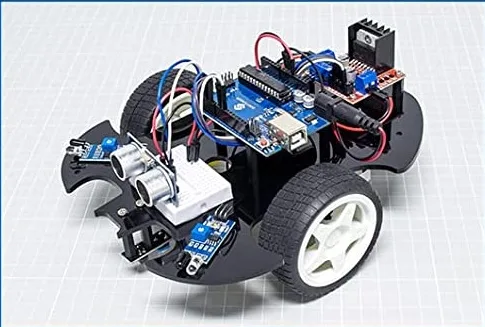
Sunfounder car assembled
923-Lesson 12/31: Arduino programming function
語言: C++
/*
This sketch demonstrates the Arduino programming : function
Download and resource page https://robojax.com/RJT595
watch video https://www.youtube.com/watch?v=JLF7FQeVlkY
*/

const float voltage = 3.3;

void setup() {
   // Robojax Arduino floating points
  Serial.begin(9600);// initialize the Serial Monitor
}


void loop() {
  //3.141592
  Serial.println(    pi(), 10  );


  //delay(1000);

}

/*
  printText: prints the text on Serial monitor

  @param t is String text
  @ returns nothing
 */
void printText(String t)
{

   Serial.println(t);
}


/*
 * getDays is calculation the number of days in a year
 * @param a is integer
 * @param returns integer value of number of days
 */
int getDays(int a)
{
  return (a * 365);// multiply  a by 365 to get number of days and return it
}


float getArea(float l, float w)
{
  float area = l * w;
  return area;
}


String makeText(double temperature)
{
  String newText;
   if (temperature > 60.5)
   {
    newText = "Very hot";
   }else{
    newText = "Not hot";
   }
   return newText;
}


double pi()
{

  double p = 3.141592;// 6 decimal points
  return p;// returns value of pi
}


float getPower(float i)
{
  return i*voltage;//
}
Common Course Links
Common Course Files
你可能需要嘅嘢
-
亞馬遜SunFounder Arduino Learning Kit on AliExpresss.click.aliexpress.com
-
亞馬遜
-
亞馬遜
-
亞馬遜
資源與參考資料
-
文件记录Documentation for SunFounder 3 in 1 IoT/Smart Car/Learning Kitdocs.sunfounder.com
-
外部Purchase SunFounder's 3-in-1 Smart car learning kitsunfounder.com
文件📁
Arduino 函式庫 (zip)
-
SunFounder 3合1智能車學習套件原始碼
3in1-kit-main-v2.zip12.80 MB
用户手册
-
SunFounder 3合1 Arduino 智能車組裝手冊呢份文件逐步展示 SunFounder 3合1 Arduino 智能車嘅組裝過程
SunFounder_car_assembly_manual.pdf1.20 MB