ይህ ትምህርት አካል ነው: የዋይፋይ ሎራ 32 አጋዥ ስልጠናዎች
ከሄልቴክ ዋይፋይ ሎራ 32 ጋር የተያያዙ ሁሉም ቪዲዮዎች ከዚህ ቡድን ጋር የተያያዙ ናቸው። ወደ ሌሎች ቪዲዮዎች የሚወስዱ አገናኞች ከዚህ ጽሑፍ በታች ይገኛሉ።
የሄልቴክ WiFi LoRa 32 V3 በመጠቀም የሙቀት መጠንን በDHT22 ወደ 1.4 ኪሎ ሜትር ለማስተላለፍ
በዚህ መማሪያ ውስጥ፣ የHeltec WiFi LoRa 32 V3 ሞጁልን በመጠቀም ከDHT22 ዳሳሽ የሙቀት መረጃን በረዥም ርቀት እንዴት ማስተላለፍ እንደምንችል እንመረምራለን፣ ይህም እስከ 1.4 ኪሎ ሜትር ርቀት ድረስ ይደርሳል። ይህ አቅም የሚቻለው በLoRa ቴክኖሎጂ አማካኝነት ነው፣ ይህም አነስተኛ ኃይል የሚፈልግ እና ረጅም ርቀት ግንኙነትን ያስችላል። በዚህ መመሪያ መጨረሻ ላይ፣ የሙቀት መረጃን በገመድ አልባ መልክ የሚልክ የሚሰራ ስርዓት ይኖርዎታል።
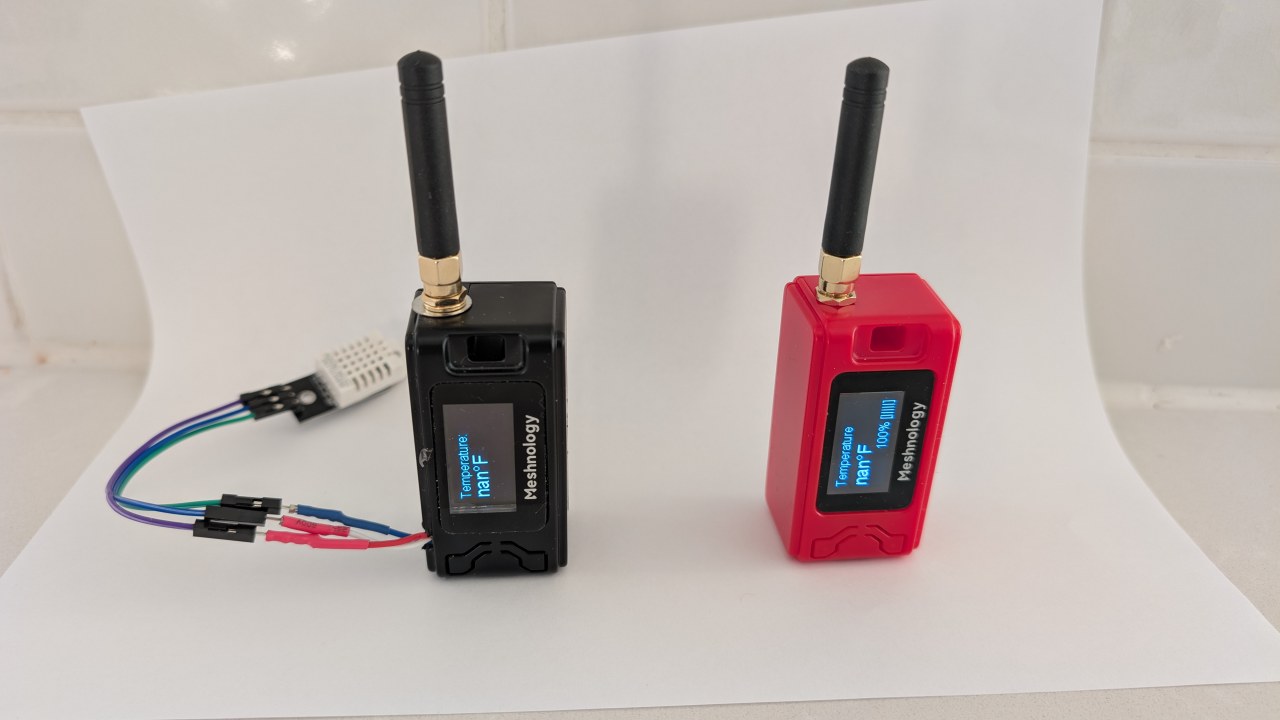
በዚህ ፕሮጀክት ውስጥ የተካተቱትን የሃርድዌር ክፍሎች አጠቃላይ እይታ በመስጠት እንጀምራለን፣ ይህም የHeltec WiFi LoRa 32 V3 ሞጁል እና የDHT22 ዳሳሽን ያካትታል። ከዚያ በኋላ፣ ወደ ሽቦ ግንኙነት መመሪያዎች እንቀጥላለን፣ እነዚህን ክፍሎች እንዴት ማገናኘት እንደሚችሉ ይማራሉ። በመጨረሻም፣ ይህን ስርዓት ተግባራዊ ለማድረግ የሚያስፈልገውን ኮድ እንመለከታለን። ለእይታ መመሪያ፣ እባክዎ ቪዲዮውን በተለያዩ የጊዜ ምልክቶች ይመልከቱ (በቪዲዮው ላይ በ00:00)።
ሃርድዌር ተብራርቷል
ለዚህ ፕሮጀክት ዋና ክፍሎቹ የHeltec WiFi LoRa 32 V3 ሞጁል እና የDHT22 የሙቀት እና እርጥበት ዳሳሽ ናቸው። የHeltec ሞጁል የESP32 ማይክሮ መቆጣጠሪያን ያካትታል፣ ይህም ከLoRa ግንኙነት ጎን ለጎን የWi-Fi እና የብሉቱዝ አቅሞችን ይሰጣል። ይህ ተለዋዋጭ የመረጃ ማስተላለፊያ አማራጮችን ይፈቅዳል።
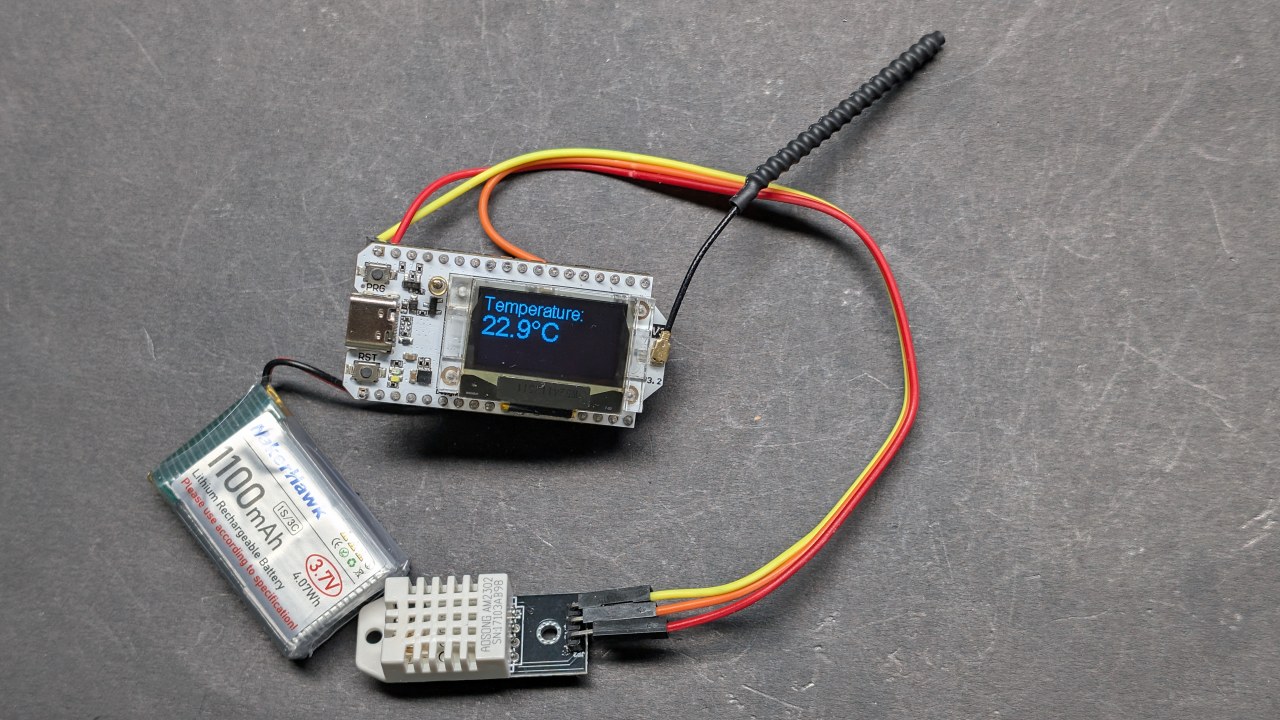
የDHT22 ዳሳሽ ትክክለኛ የሙቀት እና የእርጥበት መረጃዎችን የሚሰጥ ዲጂታል ዳሳሽ ነው። ከESP32 ጋር በአንድ ዲጂታል የውጤት ፒን በኩል ይገናኛል፣ ይህም በፕሮጀክቶችዎ ውስጥ ለማገናኘት እና ለመጠቀም ቀላል ያደርገዋል። አንድ ላይ ሆነው፣ እነዚህ ክፍሎች ለገመድ አልባ የሙቀት ክትትል ጠንካራ ስርዓት ይመሰርታሉ።
የዳታሼት ዝርዝሮች
| አምራች | Heltec Automation |
|---|---|
| የክፍል ቁጥር | WiFi LoRa 32 V3 |
| የሎጂክ/IO ቮልቴጅ | 3.3 ቮልት |
| የአቅርቦት ቮልቴጅ | 3.7–4.2 ቮልት |
| የውጤት ጅረት (በአንድ ቻናል) | ~1 አምፕ |
| ከፍተኛ ጅረት (በአንድ ቻናል) | ~2 አምፕ |
| የPWM ድግግሞሽ መመሪያ | 1 kHz (በተለምዶ) |
| የግቤት ሎጂክ ገደቦች | 0.7 ቮልት (ከፍተኛ)፣ 0.3 ቮልት (ዝቅተኛ) |
| የቮልቴጅ ጠብታ / RDS(on) / ሙሌት | 0.3 ቮልት (ከፍተኛ) |
| የሙቀት ገደቦች | 85 ዲግሪ ሴንቲግሬድ (ከፍተኛ) |
| ፓኬጅ | የPCB ሞጁል |
| ማስታወሻዎች / ልዩነቶች | የተለያዩ የድግግሞሽ አማራጮች ይገኛሉ (ለምሳሌ፣ 433 MHz፣ 868 MHz፣ 915 MHz) |
- DHT22ን በ3.3V ማብራትዎን ያረጋግጡ፣ በ5V አይደለም።
- በESP32 እና DHT22 መካከል ለግንኙነት ተገቢ የሎጂክ ደረጃዎችን ይጠቀሙ።
- ለረጅም ጊዜ በከፍተኛ ጅረት የሚሰሩ ከሆነ የሙቀት መሙጫ (heat-sink) መጠቀምን ያስቡ።
- ርቀትን ከፍ ለማድረግ የLoRa አንቴና ግንኙነትን ያረጋግጡ።
- በክልልዎ ያሉትን የLoRa ድግግሞሽ ደንቦች ያስተውሉ።
የሽቦ ግንኙነት መመሪያዎች
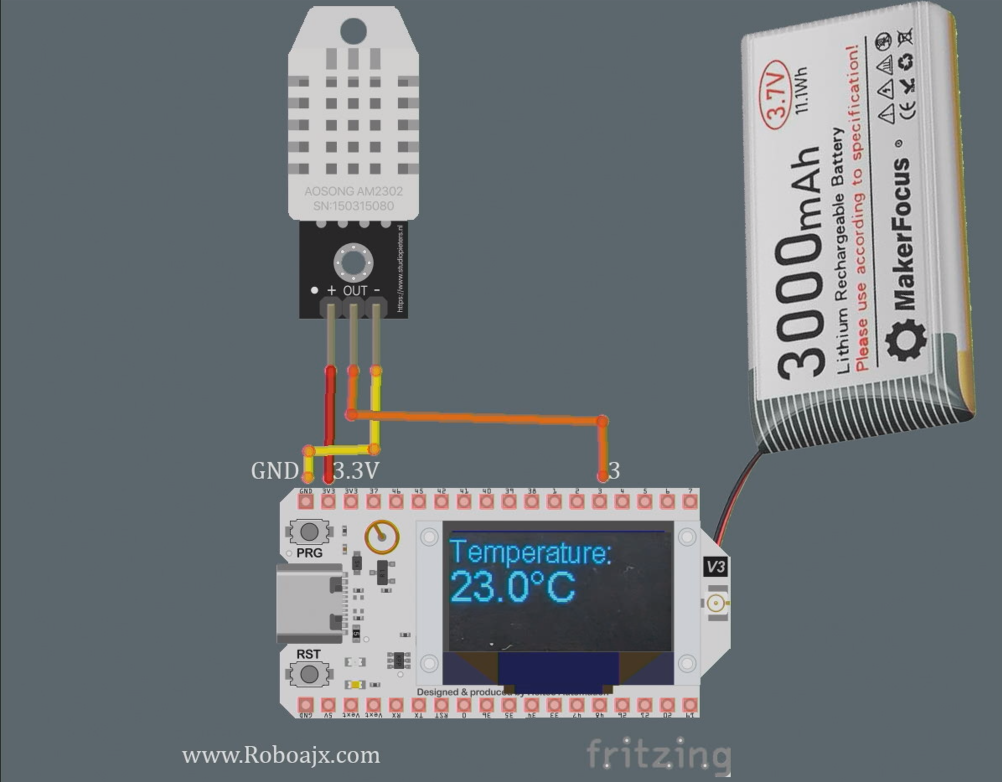
Heltec WiFi LoRa 32 V3ን ከDHT22 ዳሳሽ ጋር ለማገናኘት፣ የዳሳሹን VCC ፒን ከHeltec ሞጁል ላይ ካለው 3.3V ፒን ጋር በማገናኘት ይጀምሩ። በመቀጠል፣ የDHT22ን GND ፒን በHeltec ላይ ካሉት የGND ፒኖች በአንዱ ጋር ያገናኙ። የDHT22 የውሂብ ፒን በHeltec ላይ ካለው GPIO ፒን 3 ጋር መገናኘት አለበት።
ለተረጋጋ ንባቦች በውሂብ ፒን እና VCC መካከል የመጎተቻ ተቃዋሚ (pull-up resistor) (በግምት 10kΩ) መጠቀምዎን ያረጋግጡ። በተጨማሪም፣ የማስተላለፊያ ርቀትን ለማሻሻል የLoRa አንቴና በአስተማማኝ ሁኔታ መገናኘቱን ያረጋግጡ። ውጫዊ ኃይል የሚጠቀሙ ከሆነ፣ የአሰራር ችግሮችን ለማስወገድ የHeltec ሞጁል በትክክል መብራቱን ያረጋግጡ።
የHeltec ESP32 ቦርዶችን መጫን
ይህን መንገድ በቪዲዮው ላይ እንደሚታየው ወደ የArduino IDE ምርጫዎች ያክሉ፡-https://resource.heltec.cn/download/package_heltec_esp32_index.json
የHeltec ESP32 ቤተ-መጻሕፍትን መጫን
በArduino IDE ላይ ሲከፈት፣ እባክዎ የቤተ-መጻሕፍት አዶን (1) ጠቅ ያድርጉ፣ ከዚያ "Heltec" በፍለጋ ሳጥን ውስጥ ይተይቡ (2) እና ጫን (3) ን ጠቅ ያድርጉ፣ ምስሉን ይመልከቱ።

የኮድ ምሳሌዎች እና ማብራሪያ
የሚከተሉት የኮድ ቁርጥራጮች የHeltec ሞጁልን ከDHT22 ዳሳሽ የሙቀት መረጃን ለማንበብ እና በLoRa በኩል ለማስተላለፍ እንዴት ማዋቀር እንደሚቻል ያሳያሉ። ኮዱ ማሳያውን ያስነሳል እና የDHT ዳሳሹን ያዘጋጃል።
#include
#define DHTPIN 3         // ለDHT22 የGPIO ፒን
#define DHTTYPE DHT22    // የDHT አይነትን ይግለጹ
DHT dht(DHTPIN, DHTTYPE);
void setup() {
  Serial.begin(115200);
  dht.begin(); // የDHT ዳሳሽን ያስነሳ
}
በዚህ ቁርጥራጭ ውስጥ፣ የDHT22 ዳሳሽ የተገናኘበትን ፒን እንገልጻለን እና በsetup() ተግባር ውስጥ እናስነሳዋለን። የSerial.begin(115200) መስመር ለማረም ውጤት ነው።
void loop() {
  float tempC = dht.readTemperature(); // የሙቀት መጠንን በሴልሺየስ ያንብቡ
  float tempF = dht.convertCtoF(tempC); // ወደ ፋረንሃይት ይቀይሩ
  sendData(tempC, tempF); // የሙቀት መረጃን ለመላክ ተግባር
}
ይህ ቁርጥራጭ በloop() ተግባር ውስጥ የሙቀት መረጃን እንዴት ማንበብ እንደሚቻል ያሳያል። የsendData() ተግባር የሙቀት ንባቦችን በLoRa በኩል ለማስተላለፍ ይጠራል።
void sendData(float tempC, float tempF) {
  String data = "ሙቀት፡ " + String(tempC) + "°C"; // የውሂብ ሕብረቁምፊ መፍጠር
  Radio.Send(data.c_str(), data.length()); // ውሂብ መላክ
}
እዚህ፣ የሙቀት መጠኑን የያዘ የውሂብ ሕብረቁምፊ እንፈጥራለን እና Radio.Send() ዘዴን በመጠቀም እንልካለን። ይህ ውሂቡን ወደ ተቀባዩ ሞጁል በገመድ አልባ መንገድ ያስተላልፋል።
ለዝርዝር አተገባበር ከጽሑፉ በታች የተጫነውን ሙሉ ኮድ ይመልከቱ።
ማሳያ / ምን እንደሚጠበቅ
ሁሉም ነገር ከተዘጋጀ እና ኮዱ ወደ Heltec ሞጁል ከተጫነ በኋላ፣ የሙቀት መጠን ንባቦች በOLED ስክሪን ላይ ሲታዩ ማየት ይኖርዎታል። ስርዓቱ የሙቀት መጠን ውሂቡን ያስተላልፋል፣ ይህም ውሂቡን ለማንበብ በተዋቀረ ሌላ Heltec ሞጁል ሊቀበለው ይችላል። ተቀባዩን ከአስተላላፊው በማራቅ ክልሉን መሞከር ይችላሉ፣ ይህም የሚገኘውን ከፍተኛ ርቀት ያረጋግጣል (በቪዲዮ 1:30 ላይ)።
እንደ የተሳሳተ ሽቦ አያያዝ፣ በቂ ያልሆነ የኃይል አቅርቦት፣ ወይም የተሳሳተ LoRa ድግግሞሽ መጠቀም ካሉ የተለመዱ ችግሮች ይጠንቀቁ። DHT22 በትክክል እየሰራ መሆኑን እና ክልሉን ለማሳደግ አንቴናው መገናኘቱን ያረጋግጡ።
የቪዲዮ ጊዜ ምልክቶች
- 00:00 መጀመሪያ
- 3:51 ዝርዝሮች
- 8:32 የሰነድ ገጽ
- 9:52 ጥቅል እና ባትሪ
- 12:58 ለመጀመሪያ ጊዜ ማብራት
- 16:37 ቤተ-መጻሕፍት መጫን
- 18:19 የአስተላላፊ መሠረታዊ ኮድ
- 19:43 የተቀባይ መሠረታዊ ኮድ
- 20:39 የጽሑፍ መላክ እና መቀበል ማሳያ
- 23:02 OLED ማሳያ ኮድ
- 24:06 በOLED ማሳያ ላይ መሠረታዊ ጽሑፍ ኮድ
- 26:26 በOLED ላይ መሠረታዊ ጽሑፍ ማሳያ
- 26:58 ከDHT22 ጋር የሙቀት መጠን ማንበብ
- 28:49 LoRa የሙቀት መጠን አስተላላፊ እና ማሳያ
- 30:07 LoRa የሙቀት መጠን ተቀባይ እና ማሳያ
- 32:13 የሙቀት መጠኑ ሲጨምር LED ማብራት
- 22:26 LoRa የማስተላለፊያ ክልል ሙከራ
- 35:01 dBm እና ሚሊ ዋት
ምስሎች
ይህ ትምህርት አካል ነው: የዋይፋይ ሎራ 32 አጋዥ ስልጠናዎች
- 13 ማይል 20ኪሜ ያለ WiFi? LoRa ቮልቴጅን በእንደዚህ አይነት እጅግ ሩቅ ርቀት እንዴት ላከ! (Heltec WiFi LoRa 32 V3)
- መሣሪያን ከ13 ማይል (21ኪሜ) ርቀት ላይ አብራ – ከWiFi LoRa 32 ጋር የሆነ የመጨረሻው ከግሪድ ውጭ የሆነ የLoRa ፕሮጀክት!
- የርቀት በር ማንቂያ ስርዓት ከ13 ማይል 21 ኪሜ ርቀት ላይ በLoRa – ከግሪድ ውጭ! (Heltec WiFi LoRa 32 V3)
- የሰርቮ ሞተርን ከሩቅ ቦታ ይቆጣጠሩ! Heltec WiFi LoRa 32 V3 Arduino ትምህርት (TX)
- የDIY ርቀት መቆጣጠሪያ ፕሮጀክት፡ 13 ማይል ያለ Wi-Fi/ያለ SIM Heltec LoRa 32 ሞጁል
- How to Use the Heltec LoRa CubeCell Development Board HTCC-AB01
/*
This is a simple code to display text on the OLED display
WiFi LoRa 32 V3 ESP32 module
Written by Ahmad Shamshiri 02 April 2025
Watch full video explanation https://youtu.be/WkyQMXkQhE8
Resources page https://robojax.com/tutorial_view.php?id=387
*/
#include <Wire.h>
#include "HT_SSD1306Wire.h"


static SSD1306Wire  display(0x3c, 500000, SDA_OLED, SCL_OLED, GEOMETRY_128_64, RST_OLED); // addr , freq , i2c group , resolution , rst


void setup() {
  Serial.begin(115200);
  Serial.println();
  Serial.println();
  VextON();
  delay(100);

  // Initialising the UI will init the display too.
  display.init();

  display.setFont(ArialMT_Plain_10);

}


void displayTemperature(double temperature, int unit) {
    display.clear();  // Clear display before new content

    // Line 1: "Temperature:" in 16pt font
    display.setTextAlignment(TEXT_ALIGN_LEFT);
    display.setFont(ArialMT_Plain_16);
    display.drawString(0, 0, "Temperature:");

    // Line 2: Temperature value in 24pt font
    display.setFont(ArialMT_Plain_24);

    // Format temperature with correct unit symbol
    String tempString = String(temperature, 1); // 1 decimal place
    switch(unit) {
        case 1:  tempString += "�C"; break;  // Celsius
        case 2:  tempString += "�F"; break;  // Fahrenheit
        default: tempString += "�U"; break;  // Unknown unit
    }

    display.drawString(0, 20, tempString);  // Display at Y=20 (below label)
    display.display();  // Update OLED
}


void VextON(void)
{
  pinMode(Vext,OUTPUT);
  digitalWrite(Vext, LOW);
}

void VextOFF(void) //Vext default OFF
{
  pinMode(Vext,OUTPUT);
  digitalWrite(Vext, HIGH);
}


void loop() {
  // clear the display
  display.clear();
  displayTemperature(23.5, 1); // Displays "23.5�C" /1
  delay(2000);

}/*
written on March 27, 2025
written by Ahmad Shamshiri for www.Robojax.com
Transmits Temperature and Humidity over LoRa RF using ESP32 LoRA 32 V3 module.
and displays the information on the screen.
Watch full video explanation https://youtu.be/WkyQMXkQhE8
Resources page: https://robojax.com/tutorial_view.php?id=387
*/
#include <Wire.h>
#include "HT_SSD1306Wire.h"
static SSD1306Wire display(0x3c, 500000, SDA_OLED, SCL_OLED, GEOMETRY_128_64, RST_OLED); // addr , freq , i2c group , resolution , rst
#include <DHT.h>
#define DHTPIN 3 // GPIO21
#define DHTTYPE DHT22 // DHT22 (AM2302)
DHT dht(DHTPIN, DHTTYPE);
float tempC, tempF;
int humidity ;
//1=C
//2=F
//3=C, Humidity //only for display not for transmission
//4=F, Humidity //only for display not for transmission
//5=Humidity only
int dataType = 2;
String labelTemp = "Temperature";
String labelHumidity = "Humidity";
const int TX_POWER = 2;//dBm from 2 to 20. when powered via battery 2 to 14dBm is the best option
#include "mbedtls/aes.h"
#include <cstring> // For memset, memcpy
mbedtls_aes_context aes;
const char *userKey = "hyhT676#h~_876s"; //Security key.
#include "LoRaWan_APP.h"
#include "Arduino.h"
#define RF_FREQUENCY 915000000 // Hz
#define TX_OUTPUT_POWER TX_POWER // dBm from 2 to 20. when powered via battery 2 to 14dBm
#define LORA_BANDWIDTH 0 // [0: 125 kHz,
// 1: 250 kHz,
// 2: 500 kHz,
// 3: Reserved]
#define LORA_SPREADING_FACTOR 7 // [SF7..SF12]
#define LORA_CODINGRATE 1 // [1: 4/5,
// 2: 4/6,
// 3: 4/7,
// 4: 4/8]
#define LORA_PREAMBLE_LENGTH 8 // Same for Tx and Rx
#define LORA_SYMBOL_TIMEOUT 0 // Symbols
#define LORA_FIX_LENGTH_PAYLOAD_ON false
#define LORA_IQ_INVERSION_ON false
#define RX_TIMEOUT_VALUE 1000
#define BUFFER_SIZE 30 // Define the payload size here
char txpacket[BUFFER_SIZE];
char rxpacket[BUFFER_SIZE];
double txNumber;
bool lora_idle=true;
static RadioEvents_t RadioEvents;
unsigned long lastTxTime = 0;
void OnTxDone( void );
void OnTxTimeout( void );
void decryptAES(uint8_t *data, const char *key);
void encryptAES(uint8_t *data, const char *key);
void processKey(const char *userKey, uint8_t *processedKey, size_t keySize);
void setup() {
Serial.begin(115200);
Serial.println();
VextON();
delay(100);
// Initialising the UI will init the display too.
display.init();
display.setFont(ArialMT_Plain_10);
dht.begin();
//LoRa stuff
Mcu.begin(HELTEC_BOARD,SLOW_CLK_TPYE);
txNumber=0;
RadioEvents.TxDone = OnTxDone;
RadioEvents.TxTimeout = OnTxTimeout;
Radio.Init( &RadioEvents );
Radio.SetChannel( RF_FREQUENCY );
Radio.SetTxConfig( MODEM_LORA, TX_OUTPUT_POWER, 0, LORA_BANDWIDTH,
LORA_SPREADING_FACTOR, LORA_CODINGRATE,
LORA_PREAMBLE_LENGTH, LORA_FIX_LENGTH_PAYLOAD_ON,
true, 0, 0, LORA_IQ_INVERSION_ON, 3000 );
}
void displayTemperature(int unit) {
display.clear(); // Clear display before new content
// Line 1: "Temperature:" in 16pt font
display.setTextAlignment(TEXT_ALIGN_LEFT);
// Line 2: Temperature value in 24pt font
display.setFont(ArialMT_Plain_24);
// Format temperature with correct unit symbol
String tempStringC = String(tempC, 1) + "°C"; // 1 decimal place
String tempStringF = String(tempF, 1)+ "°F"; // 1 decimal place
String tempStringHumidity = String(humidity)+ "% RH";
String tempString;
switch(unit) {
case 1:
tempString =tempStringC;
display.setFont(ArialMT_Plain_16);
display.drawString(0, 0, "Temperature:");
display.setFont(ArialMT_Plain_24);
display.drawString(0, 15, tempString);
break; // Celsius
case 2: tempString =tempStringF;
display.setFont(ArialMT_Plain_16);
display.drawString(0, 0, "Temperature:");
display.setFont(ArialMT_Plain_24);
display.drawString(0, 15, tempString);
break; // Fahrenheit
case 3: tempString =tempStringC;
display.setFont(ArialMT_Plain_16);
display.drawString(0, 0, "Temperature:");
display.setFont(ArialMT_Plain_24);
display.drawString(0, 15, tempString);
display.setFont(ArialMT_Plain_16);
display.drawString(0, 40, "Humidity:");
display.drawString(70, 40, tempStringHumidity);
break; // Celsius
case 4: tempString =tempStringF;
display.setFont(ArialMT_Plain_16);
display.drawString(0, 0, "Temperature:");
display.setFont(ArialMT_Plain_24);
display.drawString(0, 15, tempString);
display.setFont(ArialMT_Plain_16);
display.drawString(0, 40, "Humidity:");
display.drawString(70, 40, tempStringHumidity );
break; // Celsius
case 5:
display.setFont(ArialMT_Plain_16);
display.drawString(0, 0, "Humidity:");
display.setFont(ArialMT_Plain_24);
display.drawString(0, 20, tempStringHumidity);
break; // Celsius
default: tempString =tempStringC + "°C"; break;; // default
}
display.display(); // Update OLED
}
void readSensor()
{
tempC = dht.readTemperature();
humidity = dht.readHumidity();
tempF = dht.convertCtoF(tempC);
}
void VextON(void)
{
pinMode(Vext,OUTPUT);
digitalWrite(Vext, LOW);
}
void VextOFF(void) //Vext default OFF
{
pinMode(Vext,OUTPUT);
digitalWrite(Vext, HIGH);
}
void sendData()
{
String tempStringC = String(tempC, 1) + " °C"; // 1 decimal place
String tempStringF = String(tempF, 1)+ " °F"; // 1 decimal place
String tempStringHumidity = String(humidity)+ " % RH";
String txData;
//1=C
//2=F
//3=C, Humidity
//4=F, Humidity
//5=Humidity only
switch(dataType) {
case 1:
txData = labelTemp + " " + tempStringC;
break;
case 2:
txData = labelTemp + " " + tempStringF;
break;
case 3:
txData = labelHumidity + " " + tempStringHumidity;
break;
default:
txData = labelTemp + " " + tempStringC;
break;
}
uint8_t data[32];
memset(data, 0, sizeof(data)); // Zero-padding
strncpy((char*)data, txData.c_str(), sizeof(data) - 1); // Copy string safely
encryptAES(data, userKey); // Encrypt before sending
if(lora_idle == true)
{
delay(1000);
Radio.Send(data, sizeof(data));
Serial.print("Sending: ");
Serial.println((char *)data);
lora_idle = false;
}
Radio.IrqProcess( );
}
void loop() {
readSensor();//read the data
// clear the display
display.clear();
displayTemperature(dataType); //
sendData();
delay(100);
}
void OnTxDone( void )
{
Serial.println("TX done......");
lora_idle = true;
}
void OnTxTimeout( void )
{
Radio.Sleep( );
Serial.println("TX Timeout......");
lora_idle = true;
}
/**
* Converts a user-provided plaintext key into a fixed-length 16-byte (128-bit)
* or 32-byte (256-bit) key.
*/
void processKey(const char *userKey, uint8_t *processedKey, size_t keySize) {
memset(processedKey, 0, keySize); // Fill with zeros
size_t len = strlen(userKey);
if (len > keySize) len = keySize; // Truncate if too long
memcpy(processedKey, userKey, len); // Copy valid key part
}
/**
* Encrypts a 16-byte (one block) message using AES-128.
*/
void encryptAES(uint8_t *data, const char *key) {
uint8_t processedKey[16]; // 128-bit key
processKey(key, processedKey, 16);
mbedtls_aes_init(&aes);
mbedtls_aes_setkey_enc(&aes, processedKey, 128);
mbedtls_aes_crypt_ecb(&aes, MBEDTLS_AES_ENCRYPT, data, data);
mbedtls_aes_free(&aes);
}
/**
* Decrypts a 16-byte (one block) message using AES-128.
*/
void decryptAES(uint8_t *data, const char *key) {
uint8_t processedKey[16]; // 128-bit key
processKey(key, processedKey, 16);
mbedtls_aes_init(&aes);
mbedtls_aes_setkey_dec(&aes, processedKey, 128);
mbedtls_aes_crypt_ecb(&aes, MBEDTLS_AES_DECRYPT, data, data);
mbedtls_aes_free(&aes);
}/*
Written on April 01, 2025
written by Ahmad Shamshiri for www.Robojax.com
this sktech receives the secure temperature or humidity from WiFi LoRa 32 and decrypts it
and displays it on the OLED. There is action feature to triggerd if the temperature is below triggerdValue
Watch full video explaination https://youtu.be/WkyQMXkQhE8
Resources page: https://robojax.com/tutorial_view.php?id=387
*/
#include <Arduino.h>
// Alert configuration
const String triggerdText = "Too High"; // Correct String type
const float triggerdValue = 90.0f; // exclusive (this value is not included)
const int triggerdYpos = 45;
const bool triggerdType = true;//true is > (greter than triggerdValue) and false is < (less than triggerdValue)
const int triggerdOutputPin = 7;//GPIO07 goes HIGH when triggered
const bool triggerdBlink4Me= true;//should blink or not
#include "mbedtls/aes.h"
#include <cstring> // For memset, memcpy
mbedtls_aes_context aes;
const char *userKey = "hyhT676#h~_876s"; //Security key
#define MIN_RSSI -120 // Worst possible signal
#define MAX_RSSI -50 // Best possible signal
// For a connection via I2C using the Arduino Wire include:
#include <Wire.h>
#include "HT_SSD1306Wire.h"
static SSD1306Wire display(0x3c, 500000, SDA_OLED, SCL_OLED, GEOMETRY_128_64, RST_OLED); // addr , freq , i2c group , resolution , rst
#include "LoRaWan_APP.h"
#include "Arduino.h"
#define RF_FREQUENCY 915000000 // Hz
#define TX_OUTPUT_POWER 14 // dBm
#define LORA_BANDWIDTH 0 // [0: 125 kHz,
// 1: 250 kHz,
// 2: 500 kHz,
// 3: Reserved]
#define LORA_SPREADING_FACTOR 7 // [SF7..SF12]
#define LORA_CODINGRATE 1 // [1: 4/5,
// 2: 4/6,
// 3: 4/7,
// 4: 4/8]
#define LORA_PREAMBLE_LENGTH 8 // Same for Tx and Rx
#define LORA_SYMBOL_TIMEOUT 0 // Symbols
#define LORA_FIX_LENGTH_PAYLOAD_ON false
#define LORA_IQ_INVERSION_ON false
#define RX_TIMEOUT_VALUE 1000
#define BUFFER_SIZE 30 // Define the payload size here
char txpacket[BUFFER_SIZE];
char rxpacket[BUFFER_SIZE];
static RadioEvents_t RadioEvents;
int16_t txNumber;
int16_t rssi,rxSize;
bool lora_idle = true;
unsigned long lastRxTime = 0;
const unsigned long SIGNAL_TIMEOUT = 5000; // 5 seconds
void decryptAES(uint8_t *data, const char *key);
void encryptAES(uint8_t *data, const char *key);
void processKey(const char *userKey, uint8_t *processedKey, size_t keySize);
void setup() {
Serial.begin(115200);
Serial.println();
Serial.println();
VextON();
delay(100);
// Initialising the UI will init the display too.
display.init();
display.setFont(ArialMT_Plain_10);
pinMode(triggerdOutputPin, OUTPUT);
//LoRa stuff blow this line
Mcu.begin(HELTEC_BOARD,SLOW_CLK_TPYE);
txNumber=0;
rssi=0;
RadioEvents.RxDone = OnRxDone;
Radio.Init( &RadioEvents );
Radio.SetChannel( RF_FREQUENCY );
Radio.SetRxConfig( MODEM_LORA, LORA_BANDWIDTH, LORA_SPREADING_FACTOR,
LORA_CODINGRATE, 0, LORA_PREAMBLE_LENGTH,
LORA_SYMBOL_TIMEOUT, LORA_FIX_LENGTH_PAYLOAD_ON,
0, true, 0, 0, LORA_IQ_INVERSION_ON, true );
}
void displayTemperature(String data1, String data2) {
display.clear(); // Clear display before new content
// Line 1: "Temperature:" in 16pt font
display.setTextAlignment(TEXT_ALIGN_LEFT);
display.setFont(ArialMT_Plain_16);
display.drawString(0, 0, data1);
// Line 2: Temperature value in 24pt font
display.setFont(ArialMT_Plain_24);
display.drawString(0, 20, data2); //
displaySignalStrength(rssi);
// display.display(); // Update OLED
}
void displayLine(String data, int y) {
// Line 1: "Temperature:" in 16pt font
display.setTextAlignment(TEXT_ALIGN_LEFT);
display.setFont(ArialMT_Plain_10);
if (triggerdBlink4Me) {
// Blink effect: Display text, wait, clear text, wait, then return
display.drawString(0, y, data);
display.display();
delay(500); // Keep text visible for 500ms
display.clear(); // Clear the screen
display.display();
delay(500); // Keep screen blank for 500ms
}
else {
// Normal display without blinking
display.drawString(0, y, data);
display.display();
}
}
void VextON(void)
{
pinMode(Vext,OUTPUT);
digitalWrite(Vext, LOW);
}
void VextOFF(void) //Vext default OFF
{
pinMode(Vext,OUTPUT);
digitalWrite(Vext, HIGH);
}
void loop() {
RaIrqProcessdio( );
if(lora_idle)
{
lora_idle = false;
Serial.println("into RX mode");
Radio.Rx(0);
}
noSignalCheck();
delay(100);
}
void displaySignalStrength(int16_t rssi) {
// Convert RSSI to percentage (0-100%)
int percent = map(constrain(rssi, MIN_RSSI, MAX_RSSI), MIN_RSSI, MAX_RSSI, 0, 100);
// Display at bottom right corner
display.setTextAlignment(TEXT_ALIGN_RIGHT);
display.setFont(ArialMT_Plain_16);
// Create signal strength indicator
String strength = String(percent) + "% [";
for (int i = 0; i < 5; i++) {
strength += (percent > (i * 20)) ? "|" : " ";
}
strength += "]";
display.drawString(128, 45, strength); // Position at bottom-right
}
void noSignalCheck()
{
// Automatic "No Signal" after timeout
if (millis() - lastRxTime > SIGNAL_TIMEOUT) {
display.clear();
display.setTextAlignment(TEXT_ALIGN_CENTER);
display.setFont(ArialMT_Plain_16);
display.drawString(64, 20, "No Signal");
display.display();
}
}
/**
* Triggers an action based on a threshold comparison.
*
* @param type - If true, triggers when floatValue **exceeds** triggerdValue.
* If false, triggers when floatValue **falls below** triggerdValue.
* @param floatValue - The current measured value to compare.
* @param triggerdValue - The threshold value that determines the trigger condition.
*/
void triggerAction(float floatValue)
{
if(triggerdType)
{
if (floatValue > triggerdValue) {
displayLine(triggerdText, triggerdYpos);
Serial.println(triggerdText);
digitalWrite(triggerdOutputPin, HIGH);//turns triggerdOutputPin to HIGH
}else{
digitalWrite(triggerdOutputPin, LOW);
}
}else{
if (floatValue < triggerdValue) {
displayLine(triggerdText, triggerdYpos);
Serial.println(triggerdText);
digitalWrite(triggerdOutputPin, HIGH);//turns triggerdOutputPin to HIGH
} else{
digitalWrite(triggerdOutputPin, LOW);//turns triggerdOutputPin to LOW
}
}
}
void OnRxDone( uint8_t *payload, uint16_t size, int16_t rssi, int8_t snr )
{
lastRxTime = millis(); // Reset timer on new data
rssi=rssi;
rxSize=size;
memcpy(rxpacket, payload, size );
rxpacket[size]='\0';
Radio.Sleep( );
Serial.printf("\r\nreceived packet \"%s\" with rssi %d , length %d\r\n",rxpacket,rssi,rxSize);
// Serial.println("Encrypted Data (Hex):");
// for (int i = 0; i < 16; i++) {
// Serial.printf("%02X ", rxpacket[i]);
// }
// Serial.println();
decryptAES((uint8_t *)rxpacket, userKey);
// Split the received packet into parts
String receivedStr = String((char*)rxpacket);
int firstSpacePos = receivedStr.indexOf(' ');
if (firstSpacePos != -1) {
// First part (before first space)
String part1 = receivedStr.substring(0, firstSpacePos); // "Temperature"
// Find second space (after the number)
int secondSpacePos = receivedStr.indexOf(' ', firstSpacePos + 1);
if (secondSpacePos != -1) {
// Second part (numeric value)
String part2 = receivedStr.substring(firstSpacePos + 1, secondSpacePos); // "34.5"
float floatValue = part2.toFloat(); // Convert to float 34.5
// Third part (unit)
String part3 = receivedStr.substring(secondSpacePos + 1); // "°C"
displayTemperature(part1, part2+part3);
display.display();
Serial.print("part1: " + part1);
Serial.print(" part2: " + part2);
Serial.println(" part3: " + part3);
Serial.println("floatValue " + String(floatValue));
//to trigger an action.
triggerAction(floatValue);
} else {
Serial.println("No second space found for unit");
}
}else {
Serial.println("No space found in packet - can't split");
}
lora_idle = true;
}
/**
* Converts a user-provided plaintext key into a fixed-length 16-byte (128-bit)
* or 32-byte (256-bit) key.
*/
void processKey(const char *userKey, uint8_t *processedKey, size_t keySize) {
memset(processedKey, 0, keySize); // Fill with zeros
size_t len = strlen(userKey);
if (len > keySize) len = keySize; // Truncate if too long
memcpy(processedKey, userKey, len); // Copy valid key part
}
/**
* Encrypts a 16-byte (one block) message using AES-128.
*/
void encryptAES(uint8_t *data, const char *key) {
uint8_t processedKey[16]; // 128-bit key
processKey(key, processedKey, 16);
mbedtls_aes_init(&aes);
mbedtls_aes_setkey_enc(&aes, processedKey, 128);
mbedtls_aes_crypt_ecb(&aes, MBEDTLS_AES_ENCRYPT, data, data);
mbedtls_aes_free(&aes);
}
/**
* Decrypts a 16-byte (one block) message using AES-128.
*/
void decryptAES(uint8_t *data, const char *key) {
uint8_t processedKey[16]; // 128-bit key
processKey(key, processedKey, 16);
mbedtls_aes_init(&aes);
mbedtls_aes_setkey_dec(&aes, processedKey, 128);
mbedtls_aes_crypt_ecb(&aes, MBEDTLS_AES_DECRYPT, data, data);
mbedtls_aes_free(&aes);
}Common Course Links
Common Course Files
ምንጮች እና ምንጮች
-
ውስጥ
-
ውስጥ
-
ውስጥ
-
ውስጥ
-
ውስጥPurchase a WiFi LoRa 32 V3 from AliExpresss.click.aliexpress.com
-
ውስጥPurchase a WiFi LoRa 32 V3 from AliExpress-2s.click.aliexpress.com
-
ውስጥ
-
ውስጥPurchase Wi-Fi LoRa 32 from Meshnologymeshnology.com
ፋይሎች📁
Arduino ቤተ መዝገቦች (zip)
-
Heltec ESP32 libraries 2.1.5Libraries for all Heltec ESP32 boards. This is version 2.1.5.
Heltec_ESP32-master.zip3.86 MB
ሌላ ፋይሎች
-
Heltec WiFi LoRa 32 V3 Schematic Diagram (V3.1)
Heltec_WiFiLoRAV3_Schematic_Diagram.pdf0.18 MB