ESP32 ትምህርት 36/55 - ቁጥር መገመት ጨዋታ | SunFounder የESP32 IoT መማሪያ ኪት
በዚህ መማሪያ ውስጥ፣ የESP32 ማይክሮ መቆጣጠሪያን ከኢንፍራሬድ ሪሞት ኮንትሮል እና ከኤልሲዲ ማሳያ ጋር በመጠቀም አስደሳች የቁጥር መገመት ጨዋታ እንፈጥራለን። ተጫዋቹ በ0 እና 99 መካከል ያለውን በዘፈቀደ የመነጨ ቁጥር ለመገመት ይሞክራል፣ ጨዋታውም ግምቱ በጣም ከፍ ወይም በጣም ዝቅ ስለመሆኑ ፍንጭ ይሰጣል። በዚህ ፕሮጀክት አማካኝነት የኢንፍራሬድ መቀበያን እንዴት መጠቀም፣ እሴቶችን በኤልሲዲ ላይ ማሳየት እና ከሪሞት ኮንትሮል የተጠቃሚ ግብዓት ማስተዳደር ይማራሉ። ለተጨማሪ ግልጽነት ቪዲዮውን መመልከት ይችላሉ (በቪዲዮው በ00:00)።


የሃርድዌር ማብራሪያ
በዚህ ፕሮጀክት ውስጥ ጥቅም ላይ የሚውሉት ዋና ዋና ክፍሎች የESP32 ማይክሮ መቆጣጠሪያ፣ የኢንፍራሬድ ሪሞት ኮንትሮል፣ የኢንፍራሬድ መቀበያ እና የኤልሲዲ ማሳያ ያካትታሉ። ESP32 ዋናው የማቀነባበሪያ ክፍል ሆኖ የሚያገለግል ሲሆን ገመድ አልባ ግንኙነትን ማስተናገድ ይችላል፣ ይህም ለአይኦቲ ፕሮጀክቶች ሁለገብ ምርጫ ያደርገዋል። የኢንፍራሬድ ሪሞት ኮንትሮል ተጠቃሚዎች ከቦርዱ ጋር አካላዊ ግንኙነት ሳያደርጉ ግምቶችን እንዲያስገቡ ያስችላቸዋል፣ ኤልሲዲው ደግሞ የጨዋታውን ሁኔታ እና መመሪያዎችን ያሳያል።
የኢንፍራሬድ መቀበያ ከሪሞት ኮንትሮል የሚመጡ ምልክቶችን ይለያል እና ለጨዋታው ጥቅም ላይ እንዲውሉ ይፈታቸዋል። በሪሞት ላይ ያለ እያንዳንዱ የአዝራር ጭመቃ ESP32 ሊተረጉመው የሚችለውን የተወሰነ እሴት ይዛመዳል። የኤልሲዲ ማሳያ ለተጠቃሚው ምስላዊ በይነገጽ ይሰጣል፣ የአሁኑን የግምት ክልል እና ግምቱ ትክክል መሆን አለመሆኑን ያሳያል።
የዳታሼት ዝርዝሮች
| አምራች | SunFounder |
|---|---|
| የክፍል ቁጥር | ESP32 |
| የሎጂክ/አይኦ ቮልቴጅ | 3.3 ቪ |
| የአቅርቦት ቮልቴጅ | 5 ቪ (በዩኤስቢ በኩል) |
| የውጤት ኤሌክትሪክ (በአንድ ቻናል) | 12 ሚኤ (ከፍተኛ) |
| የፒደብሊውኤም ድግግሞሽ መመሪያ | 1 ኪሎሄርትዝ |
| የግብዓት ሎጂክ ገደቦች | 0.3 * ቪሲሲ እስከ 0.7 * ቪሲሲ |
| የቮልቴጅ ጠብታ / አርዲኤስ(ኦን) / ሳቹሬሽን | 0.2 ቪ |
| የሙቀት ገደቦች | የስራ ሙቀት፡ -40 እስከ 85 ዲግሪ ሴልሺየስ |
| ፓኬጅ | WROOM-32 ሞጁል |
| ማስታወሻዎች / ልዩነቶች | ዋይፋይ እና ብሉቱዝ ይደግፋል |
- ሁሉም ክፍሎች በሚመለከታቸው ቦታዎች ለ3.3 ቪ እና 5 ቪ የተመጣጠኑ መሆናቸውን ያረጋግጡ።
- ተንሳፋፊ ግብዓቶችን ለማስቀረት ለአይአር መቀበያ ትክክለኛ የፑል-አፕ ተቃዋሚዎችን ይጠቀሙ።
- ለረጅም ጊዜ በከፍተኛ የውጤት ኤሌክትሪክ የሚሰሩ ከሆነ የሙቀት መስጫ (ሂት ሲንክ) መጠቀምን ያስቡ።
- ፒደብሊውኤም ሲጠቀሙ፣ ለተሻለ አፈጻጸም ወደ 1 ኪሎሄርትዝ የሚጠጋ ድግግሞሽ ይጠብቁ።
- በሽቦ አያያዝ ጠንቃቃ ይሁኑ፤ የተቆራረጡ ችግሮችን ለማስቀረት ግንኙነቶቹ ደህንነታቸው የተጠበቀ መሆናቸውን ያረጋግጡ።
የሽቦ ግንኙነት መመሪያዎች
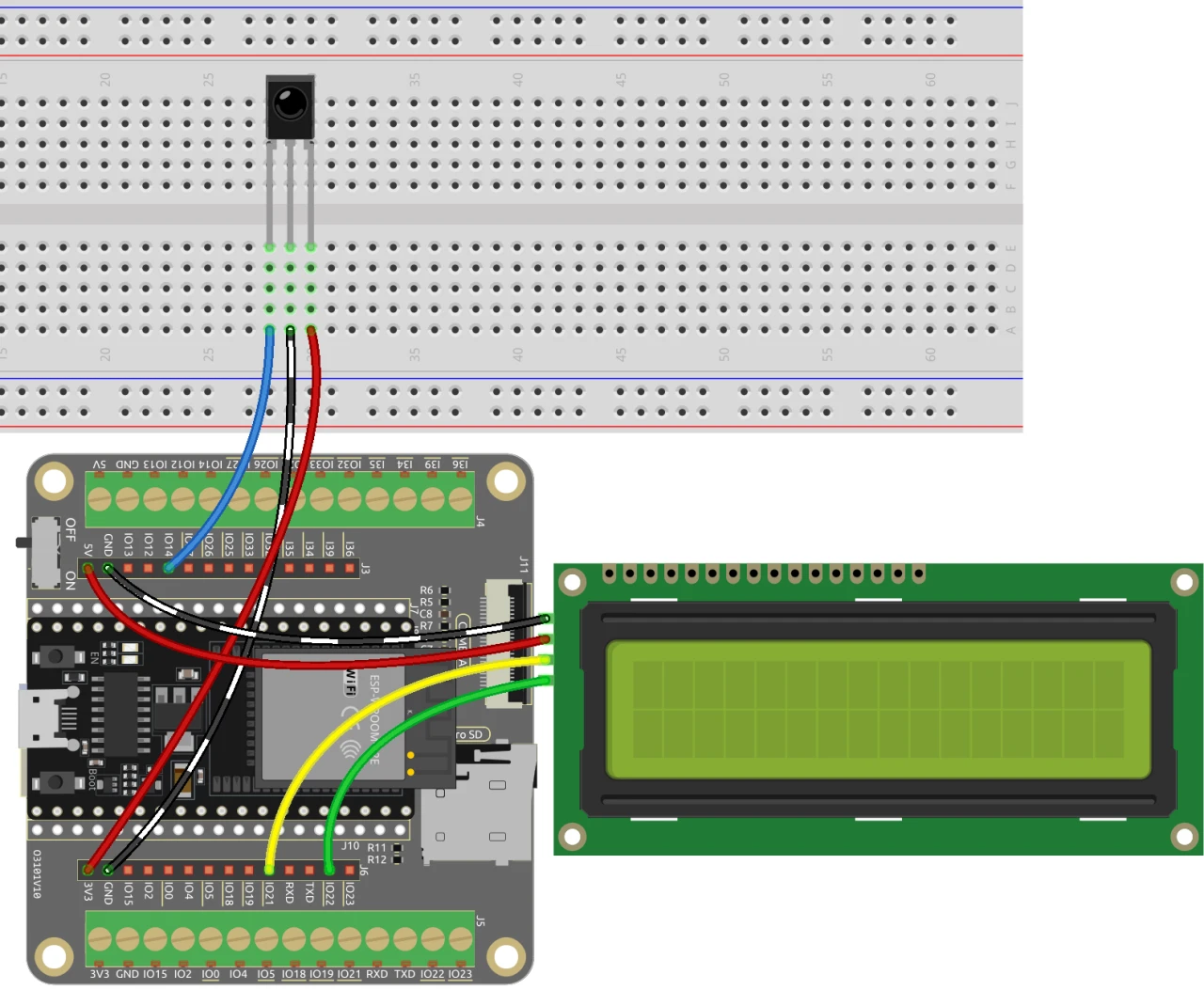
ለቁጥር መገመት ጨዋታው ሽቦዎችን ለማዘጋጀት፣ የኢንፍራሬድ መቀበያውን በማገናኘት ይጀምሩ። ከመቀበያው የቀኝ ፒን የሚመጣውን ቀይ ሽቦ በESP32 ላይ ካለው የ3.3 ቪ የኃይል አቅርቦት ጋር ያገናኙ። ጥቁሩ ሽቦ ወደ መሬት (ግራውንድ) መሄድ አለበት፣ የኢንፍራሬድ መቀበያው የግራ ፒን ደግሞ በESP32 ላይ ካለው ፒን 14 ጋር ይገናኛል።
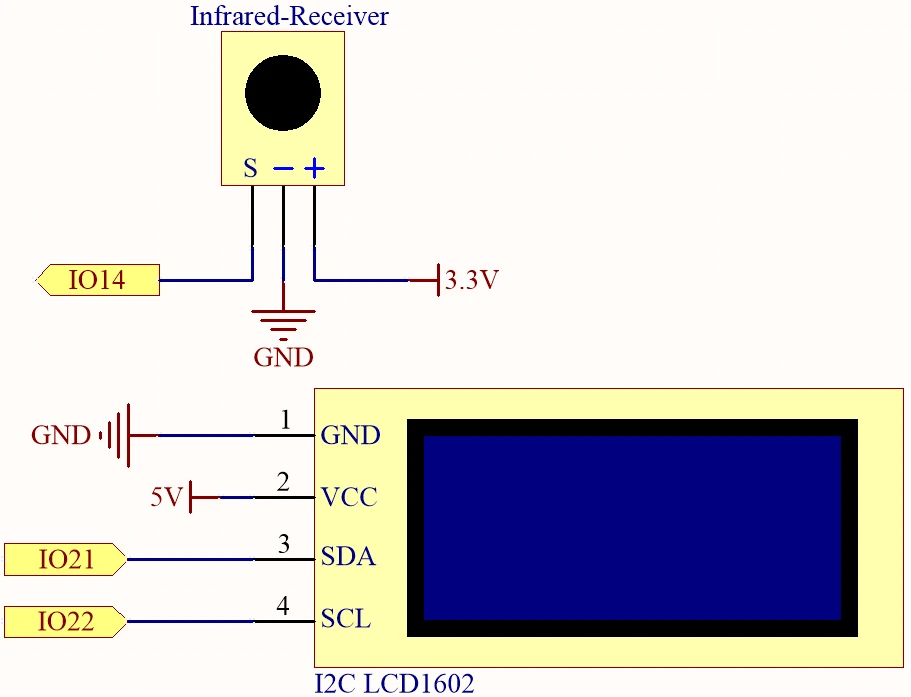
በመቀጠል፣ የኤልሲዲ ማሳያውን ያገናኙ። የኤልሲዲውን ቪሲሲ ፒን በESP32 ላይ ካለው የ5 ቪ አቅርቦት እና የመሬት ፒንን ከመሬት ጋር ያገናኙ። የኤልሲዲው ኤስዲኤ እና ኤስሲኤል ፒኖች በቅደም ተከተል ከፒኖች 21 እና 22 ጋር መገናኘት አለባቸው። የፒን ግጭቶችን ለማስቀረት በኤስዲኤ እና ኤስሲኤል ግንኙነቶች መካከል ሁለት ባዶ ቦታዎች መኖራቸውን ያረጋግጡ። በመጨረሻም፣ ቦርዱን ከማብራት በፊት ማንኛውንም የፕላስቲክ ሽፋኖች ከባትሪው ላይ ማስወገድዎን ያረጋግጡ።
የኮድ ምሳሌዎች እና ማብራሪያ
የሚከተሉት የኮድ ቁርጥራጮች ለቁጥር መገመት ጨዋታው ጥቅም ላይ የዋለውን የፕሮግራም አስፈላጊ ክፍሎች ያሳያሉ። አስፈላጊ ቤተ-መጻሕፍትን በማካተት እና ቁልፍ መለያዎችን በመግለጽ እንጀምራለን።
#include
#include
#include
#include

const uint16_t IR_RECEIVE_PIN = 14;
IRrecv irrecv(IR_RECEIVE_PIN);
decode_results results;
በዚህ ቁርጥራጭ ውስጥ፣ የኤልሲዲ እና የአይአር መቀበያ ተግባርን ለማስተዳደር ቤተ-መጻሕፍትን እናካትታለን። የኢንፍራሬድ መቀበያው ፒን እንደ 14 ይገለጻል፣ እና ግብዓት እና ውጤት ለማስተዳደር አስፈላጊ የሆኑ የነገሮች ምሳሌዎችን እንፈጥራለን።
void setup() {
  lcd.init();
  lcd.backlight();
  Serial.begin(9600);
  irrecv.enableIRIn();
  initNewValue();
}
ይህ ቁርጥራጭ የሴትአፕ ተግባሩን ያሳያል፣ እዚህ ላይ ኤልሲዲውን እንጀምራለን፣ ተከታታይ ግንኙነትን እንጀምራለን እና የአይአር መቀበያውን እናነቃለን። ተጫዋቹ እንዲገምተው አዲስ የዘፈቀደ ቁጥር ለማመንጨት initNewValue() ተግባር ይጠራል።
bool detectPoint() {
  if (count > pointValue) {
    if (count < upper) upper = count;
  } else if (count < pointValue) {
    if (count > lower) lower = count;
  } else if (count == pointValue) {
    count = 0;
    return 1;
  }
  count = 0;
  return 0;
}
ይህ ተግባር የተጫዋቹን ግምት በዘፈቀደ ከመነጨው ቁጥር ጋር ያነጻጽራል፣ የላይኛውን እና የታችኛውን ገደቦች በዚሁ መሠረት ያስተካክላል። ግምቱ ትክክል ከሆነ፣ ቆጠራውን ወደ ዜሮ ይመልሳል እና እውነት ይመልሳል።
ሙሉው ኮድ ለማጣቀሻዎ ከጽሑፉ በታች ተጭኗል።
ማሳያ / ምን እንደሚጠበቅ
ሁሉም ነገር ከተገናኘ እና ኮዱ ከተጫነ በኋላ፣ ጨዋታው በርቀት መቆጣጠሪያው ላይ ማንኛውንም ቁጥር እንዲጫኑ ይጠይቅዎታል። ከዚያም ጨዋታው በግምቶችዎ ላይ ግብረ መልስ ይሰጣል፣ የተቻሉ ቁጥሮችን ክልል እያሻሻለ በትክክል ዒላማውን ቁጥር እስኪገምቱ ድረስ። የ POWER ቁልፍን ከተጫኑ፣ ጨዋታው ዳግም ይጀምራል እና ከመጀመሪያው ይቀጥላል (በቪዲዮው 02:30 ላይ)።
የተለመዱ ችግሮች የኢንፍራሬድ መቀበያው በትክክል መቅጠሩን እና ሁሉም ግንኙነቶች ደህንነታቸው የተጠበቀ መሆኑን ማረጋገጥን ያካትታሉ። ጨዋታው ምላሽ ካልሰጠ፣ የኃይል አቅርቦቱን ያረጋግጡ እና በ Arduino IDE ውስጥ ትክክለኛው ቦርድ እና ፖርት መመረጡን ያረጋግጡ።
የቪዲዮ ጊዜ ምልክቶች
- 00:00 መጀመሪያ
- 2:17 ለጨዋታ ፕሮጀክቱ መግቢያ
- 4:37 ሽቦ መገጣጠም
- 6:15 የ Arduino ኮድ ተብራርቷል
- 12:32 በ Arduino IDE ውስጥ የ ESP32 ቦርድ እና COM ፖርት መምረጥ
- 16:16 የቁጥር መገመት ጨዋታ መጫወት
ምስሎች
#include <Wire.h>
#include <LiquidCrystal_I2C.h>
#include <IRremoteESP8266.h>
#include <IRrecv.h>

// Define the IR receiver pin
const uint16_t IR_RECEIVE_PIN = 14;

// Create an IRrecv object
IRrecv irrecv(IR_RECEIVE_PIN);

// Create a decode_results object
decode_results results;

const long interval = 1000;

unsigned long previousMillis = 0;

// Initialize the LCD object
LiquidCrystal_I2C lcd(0x27, 16, 2);

// Initialize the input number value
int count = 0;

// Initialize the random lucky point
int pointValue = 0;

// Initialize the upper and lower limit tips
int upper = 99;
int lower = 0;

void setup() {
  // Initialize the LCD screen
  lcd.init();
  lcd.backlight();

  // Start the serial communication
  Serial.begin(9600);

  // Enable the IR receiver
  irrecv.enableIRIn();

  // Initialize a new lucky point value
  initNewValue();
}

void loop() {
  // If a signal is received from the IR receiver
  if (irrecv.decode(&results)) {
    bool result = 0;
    String num = decodeKeyValue(results.value);

    // If the POWER button is pressed
    if (num == "POWER") {
      initNewValue(); // Initialize a new lucky point value
    }

    // If the CYCLE button is pressed
    else if (num == "CYCLE") {
      result = detectPoint(); // Detect the input number
      lcdShowInput(result); // Show the result on the LCD screen
    }

    // If a number button (0-9) is pressed,
    //add the digit to the input number
    //and detect the number if it is greater than or equal to 10
    else if (num >= "0" && num <= "9") {
      count = count * 10;
      count += num.toInt();
      if (count >= 10) {
        result = detectPoint();
      }
      lcdShowInput(result);
    }
    irrecv.resume();
  }
}

// Function to initialize a new lucky point value
void initNewValue() {
  // Set the random seed based on the analog value from pin A0
  randomSeed(analogRead(A0));

  // Generate a new random lucky point value
  pointValue = random(99);

  // Reset the upper and lower limit tips
  upper = 99;
  lower = 0;

  // Show the welcome message on the LCD screen
  lcd.clear();
  lcd.print("    Welcome!");
  lcd.setCursor(0, 1);
  lcd.print("Press Any Number");

  // Reset the input number value
  count = 0;

  // Print the lucky point value to the serial monitor
  Serial.print("point is ");
  Serial.println(pointValue);
}

// Detect the input number
//and update the upper/lower limit tips accordingly
bool detectPoint() {
  if (count > pointValue) {
    if (count < upper)upper = count;
  }
  else if (count < pointValue) {
    if (count > lower)lower = count;
  }

  // If the input number is equal to the lucky point value,
  else if (count == pointValue) {

    // Reset the input number and return true
    count = 0;
    return 1;
  }
  // Reset the input number and return false
  count = 0;
  return 0;
}

// Show the input number and the upper/lower limit tips
void lcdShowInput(bool result) {
  lcd.clear();

  // If the input number is equal to the lucky point value
  if (result == 1)
  {
    // Show the success message and initialize a new lucky point value
    lcd.setCursor(0, 1);
    lcd.print(" You've got it! ");
    delay(5000);
    initNewValue();
    return;
  }
  lcd.print("Enter number:");
  lcd.print(count);
  lcd.setCursor(0, 1);
  lcd.print(lower);
  lcd.print(" < Point < ");
  lcd.print(upper);
}

// Function to decode the key value from the IR receiver signal
String decodeKeyValue(long result)
{
  switch(result){
    case 0xFF6897:
      return "0";
    case 0xFF30CF:
      return "1";
    case 0xFF18E7:
      return "2";
    case 0xFF7A85:
      return "3";
    case 0xFF10EF:
      return "4";
    case 0xFF38C7:
      return "5";
    case 0xFF5AA5:
     return "6";
    case 0xFF42BD:
      return "7";
    case 0xFF4AB5:
      return "8";
    case 0xFF52AD:
      return "9";
    case 0xFF906F:
      return "+";
    case 0xFFA857:
      return "-";
    case 0xFFE01F:
      return "EQ";
    case 0xFFB04F:
      return "U/SD";
    case 0xFF9867:
      return "CYCLE";
    case 0xFF22DD:
      return "PLAY/PAUSE";
    case 0xFF02FD:
      return "BACKWARD";
    case 0xFFC23D:
      return "FORWARD";
    case 0xFFA25D:
      return "POWER";
    case 0xFFE21D:
      return "MUTE";
    case 0xFF629D:
      return "MODE";
    case 0xFFFFFFFF:
      return "ERROR";
    default :
      return "ERROR";
    }
}
Common Course Links
Common Course Files
ምንጮች እና ምንጮች
-
ሰነዶችESP32 Tutorial 36/55- SunFounder doc page for guessing numberdocs.sunfounder.com
ፋይሎች📁
አንድ ፋይል የለም።