Èkọ́ 54/55 ESP32 - Ṣeto Àwọ̀ WS2812 LED Strip lórí Wifi | SunFounder's ESP32 IoT Learning kit
Nínú ẹ̀kọ́ yìí, a óò kọ́ bí a ṣe lè ṣàkóso àwọ̀ ti ẹ̀dìtì LED WS2812 RGB ní lílo ESP32 microcontroller lórí Wi-Fi. Nípa lílo yíyan àwọ̀, o lè yan àwọn àwọ̀ ọ̀tọ̀ọ̀tọ̀ láti ẹ̀rọ alágbèéká rẹ tàbí kọ̀ǹpútà rẹ kí o sì fi ìsọfúnni yẹn ránṣẹ́ sí ẹ̀dìtì LED. Iṣẹ́-ọwọ́ yìí ṣàfihàn agbára ESP32, tí ó ń gbà fún ìbáṣepọ̀ láìsí ìṣòro pẹ̀lú ìmọ́lẹ̀ LED nípasẹ̀ ojú-ojú wẹ́bù.

ESP32 microcontroller ní Wi-Fi àti Bluetooth, tí ó sì jẹ́ yíyan tí ó bá ìwúlò fún àwọn ohun èlò IoT. Nínú iṣẹ́-ọwọ́ yìí, a óò dojú kọ ìṣiṣẹ́ Wi-Fi láti ṣàkóso ẹ̀dìtì LED. Àwọn olùṣàmúlò yóò ní anfàní láti yan àwọn àwọ̀ ní ìyára, tí ó ń dá ìrírí tí ó ń wúni lórí. Fún ìmúkún ìmọ́lẹ̀ sí i lórí iṣẹ́-ọwọ́ yìí, rí i dájú pé o wo fídíò náà (nínú fídíò ní 00:00).
Ohun èlò Tí A Ṣàlàyé
Àwọn èròjà pàtàkì fún iṣẹ́-ọwọ́ yìí ní ESP32 microcontroller àti ẹ̀dìtì LED WS2812. ESP32 jẹ́ microcontroller alágbára pẹ̀lú agbára Wi-Fi tí a kọ́ sínú rẹ̀, tí ó ń gbà fún ìbánisọ̀rọ̀ àti ìṣàkóso láìsí okun.
Ẹ̀dìtì LED WS2812 ní àwọn LED RGB tí a lè ṣàkóso kọ̀ọ̀kan, tí ó ń gbà ọ́ láàyè láti ṣeto àwọ̀ ti LED kọ̀ọ̀kan ní òmìnira. LED kọ̀ọ̀kan ní ẹ̀rọ ìṣàkóso àti LED RGB nínú àpótí kan, tí ó ń rọrùn ìsopọ̀ àti ìṣàkóso ọ̀pọ̀lọpọ̀ LED.
Àwọn Àlàyé Datasheet
| Olùṣelọ́pọ̀ | Worldsemi |
|---|---|
| Nọ́mbà apá | WS2812B |
| Fóltì Logic/IO | 3.5–5.3 V |
| Fóltì ìpèsè | 5 V |
| Ìṣàn jáde (fún ikanni) | 20 mA |
| Ìṣàn tó pọ̀ jù (fún ikanni) | 60 mA |
| Ìtọ́sọ́nà ìgbohùnsá PWM | 400 Hz |
| Àwọn ìwọ̀n àṣekára ìfisọ̀rọ̀ | 0.3 × VDD (rẹ̀lẹ̀), 0.7 × VDD (ga) |
| Ìrẹ̀wẹ̀sì fóltì / RDS(on) / ìkún | 0.5 V |
| Àwọn ìwọ̀n ooru | –40 sí +80 °C |
| Àpótí | 5050 SMD |
| Àwọn àkíyèsí / àwọn ìyàtọ̀ | Wà ní ọ̀pọ̀lọpọ̀ ìgùn àti ìtòlẹ́sẹẹsẹ. |
- Rí i dájú pé ìpèsè agbára tó tọ́ wà láti má bàa ba àwọn LED jẹ́.
- Lo ilẹ̀ tí ó wọ́pọ̀ láàárín ESP32 àti ẹ̀dìtì LED.
- Jẹ́ kí àwọn ìlà data kúrú láti ṣèdíwọ́ fún ìbàjẹ́ ìfihàn.
- Ròyìn láti fi capacitor (1000 µF) kọjá ìpèsè agbára fún ìdúróṣinṣin.
- Lo resistor (470 Ω) lórí ìlà data fún ìmúdájú ìfihàn.
Àwọn Ìtọ́sọ́nà Ìsopọ̀
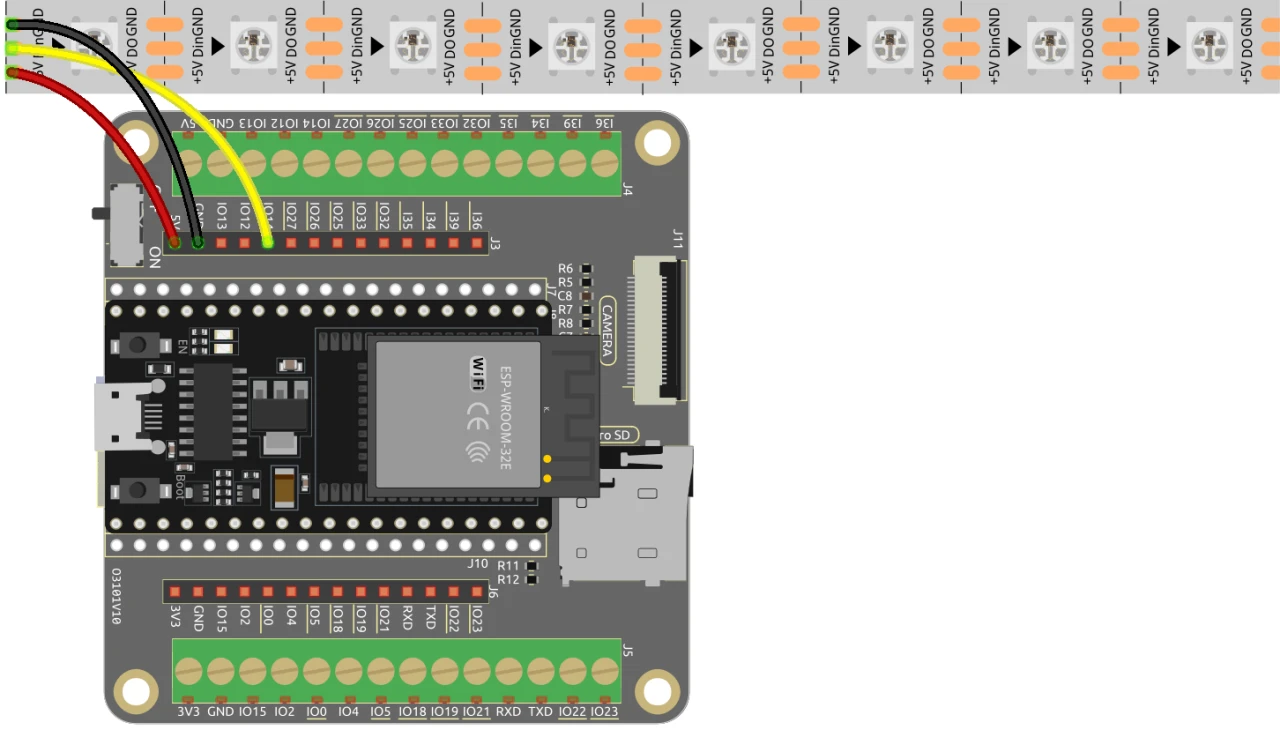
Láti sopọ̀ ESP32 sí ẹ̀dìtì LED WS2812, sopọ̀ àwọn èròjà bí àtẹ̀yìnwá: Kọ́kọ́, sopọ̀ pin 5V ti ẹ̀dìtì LED sí ìjàde 5V ti ESP32. Lẹ́yìn náà, sopọ̀ pin ilẹ̀ (GND) ti ẹ̀dìtì LED sí pin GND kan lórí ESP32. Níkẹyìn, sopọ̀ pin data ti ẹ̀dìtì LED (tí a sábà máa ń pè ní DI tàbí Data In) sí GPIO pin 13 lórí ESP32. Rí i dájú pé gbogbo àwọn ìsopọ̀ ṣe dáradára láti rí i dájú pé ìṣiṣẹ́ tó tọ́ wà.
Nínú fídíò náà, àwọn ọ̀nà ìsopọ̀ mìíràn ni a mẹ́nu kàn ní ṣókí, ṣùgbọ́n ìtòlẹ́sẹẹsẹ tí a ṣàpèjúwe níbí ni ìtòlẹ́sẹẹsẹ tí a dábàá fún ìṣiṣẹ́ tó dára jù (nínú fídíò ní 03:00).
Àwọn Àpẹẹrẹ Kóòdù & Ìtọ́sọ́nà
Kóòdù náà bẹ̀rẹ̀ nípa fífi àwọn ilé-ìkàwé pàtàkì sí i fún ìṣàkóso ẹ̀dìtì LED WS2812 àti ìtòlẹ́sẹẹsẹ olùpèsè ojú-ojú wẹ́bù. Pin LED jẹ́ ìtumọ̀ sí LED_PIN àti nọ́mbà àwọn LED nínú ẹ̀dìtì náà ni a ṣeto pẹ̀lú NUM_LEDS.
#define LED_PIN 13 // NeoPixel LED strip
#define NUM_LEDS 8 // Number of LEDs
Adafruit_NeoPixel strip = Adafruit_NeoPixel(NUM_LEDS, LED_PIN, NEO_GRB + NEO_KHZ800);
Àkójọpọ̀ yìí bẹ̀rẹ̀ ilé-ìkàwé NeoPixel àti ṣeto ẹ̀dìtì LED lórí pin tí a yàn. Ohun Adafruit_NeoPixel, strip, ni ohun tí o óò lò láti ṣàkóso àwọn àwọ̀ LED.
Lẹ́yìn náà, kóòdù náà bẹ̀rẹ̀ Wi-Fi àti ṣeto olùpèsè ojú-ojú wẹ́bù láti gba àwọn ìbéèrè tí ń bọ̀. SSID àti ọ̀rọ̀ìpààrọ̀ fún nẹ́tíwọ́ọ̀kì ni a ṣàlàyé, tí ó ń gbà ESP32 láàyè láti sopọ̀ sí Wi-Fi.
const char *ssid = "your_SSID";
const char *password = "your_PASSWORD";
WebServer server(80);
Nínú àkójọpọ̀ yìí, rọ́pò your_SSID àti your_PASSWORD pẹ̀lú àwọn ìdánimọ̀ Wi-Fi rẹ gangan. Ìsopọ̀ yìí ń gbà ESP32 láàyè láti bánisọ̀rọ̀ pẹ̀lú àwọn ẹ̀rọ lórí nẹ́tíwọ́ọ̀kì kan náà, tí ó ń gbà fún ìṣàkóso ẹ̀dìtì LED láti ọ̀nà jíjìn.
Ìṣiṣẹ́ pàtàkì fún yíyí àwọ̀ LED padà ni setColor(), tí ó ń ṣàtúnyẹ̀wò LED kọ̀ọ̀kan àti ṣeto àwọ̀ rẹ̀ nípa lílo àwọn iye RGB tí a yàn.
void setColor() {
  for (int i = 0; i < NUM_LEDS; i++) {
    strip.setPixelColor(i, valueR, valueG, valueB); // Set the color of the i-th LED
    strip.show(); // Update the LED strip with the new colors
    delay(10); // Wait for 10 milliseconds
  }
}
Ìṣiṣẹ́ yìí rí i dájú pé LED kọ̀ọ̀kan nínú ẹ̀dìtì náà ni a mú ìmúdójúìwọ̀n pẹ̀lú àwọ̀ tí a yàn. Ìdúró náà ń gbà àwọn LED láàyè láti yí àwọ̀ padà ní ọ̀nà tí ó dán. Bí o ṣe ń bá ojú-ojú wẹ́bù ṣiṣẹ́, ìṣiṣẹ́ yìí yóò máa pè láti ṣàfihàn àwọn yíyan àwọ̀ rẹ.
Ìṣàfihàn / Ohun Tí O Lè Retí
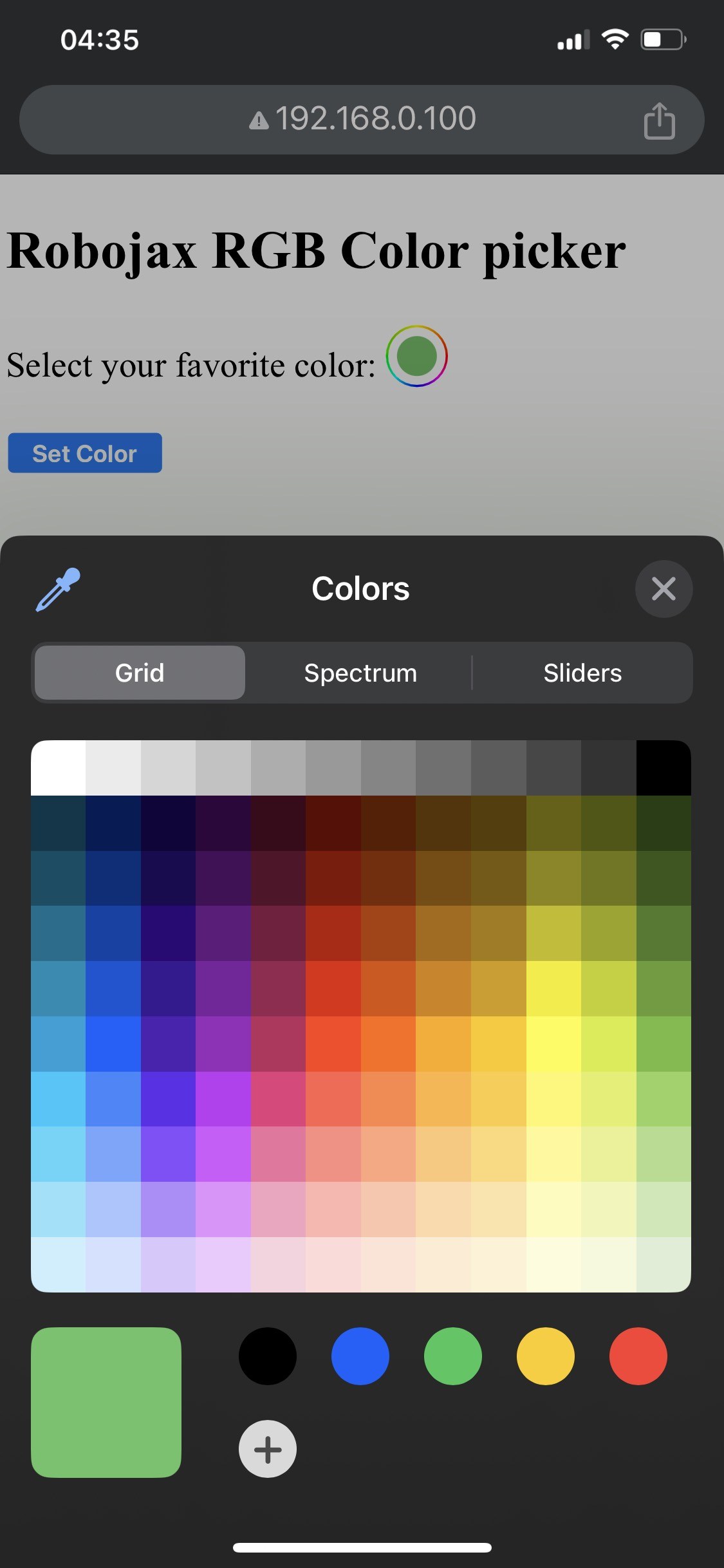

Nígbà tí ìṣètò bá parí, o yẹ kí o lè wọlé sí ojú ìwé ayélujára nípasẹ̀ àdírẹ́sì IP ti ESP32. Ìwọ yóò rí olùyàn àwọ̀ kan tí ó jẹ́ kí o yan àwọ̀ èyíkéyìí, èyí tí yóò wá ránṣẹ́ sí ìlà LED. Bí ESP32 bá pàdánù ìsopọ̀ Wi-Fi, ìlà náà yóò ṣẹ́ àwọ̀ ìkìlọ̀ kan, tí ó ń fi ìṣòro náà hàn (nínú fídíò ní 14:30).
Àwọn ìṣòro tí ó wọ́pọ̀ ní pẹ̀lú ìsopọ̀ oníná tí kò tọ́, èyí tí ó lè mú kí àwọn LED má̀ tàn, tàbí lílo àwọn àkópọ̀ SSID/password tí kò tọ́ tí ó ń dí ESP32 lọ́wọ́ láti sopọ̀ mọ́ nẹ́tíwọọkì. Máa ṣàyẹ̀wò àwọn ìsopọ̀ àti àwọn ìkọ̀wé ìwọ̀nà rẹ nígbà gbogbo.
Àwọn Àsìkò Fídíò
- 00:00 Ìbẹ̀rẹ̀
- 2:01 Ìfihàn sí iṣẹ́-ọnà náà
- 3:09 Àwọn ìwé
- 3:47 Àlàyé àwọ̀ RGB
- 7:47 Ìsopọ̀ oníná
- 8:40 Àlàyé kóòdù Arduino fún WS2812 pẹ̀lú WIFI
- 19:35 Yíyan bọ́ọ̀dù ESP32 àti èbúté COM nínú Arduino IDE
- 21:17 Ìṣàkóso Ìlà LED lórí wifi àṣefihàn
Aworan
/*
 * Control RGB LED over wifi using ESP32
 *
 full video instrucions https://youtu.be/J_UFHk_T9aE
📚⬇️ Download and resource page https://robojax.com/RJT687
 * Written by Ahmad Shamshiri on Dec 18, 2023
 *
 * Watch video instruciton for this video:
 *
 * I have combined DHT library of Adafruit with ESP8266 WebServer both links
 * Adafruit DHT library on GitHub: https://github.com/adafruit/DHT-sensor-library
 * and
 * ESP8266 on GitHub : https://github.com/esp8266/Arduino
 *
   Copyright (c) 2015, Majenko Technologies
   All rights reserved.

   Redistribution and use in source and binary forms, with or without modification,
   are permitted provided that the following conditions are met:

 * * Redistributions of source code must retain the above copyright notice, this
     list of conditions and the following disclaimer.

 * * Redistributions in binary form must reproduce the above copyright notice, this
     list of conditions and the following disclaimer in the documentation and/or
     other materials provided with the distribution.

 * * Neither the name of Majenko Technologies nor the names of its
     contributors may be used to endorse or promote products derived from
     this software without specific prior written permission.

   THIS SOFTWARE IS PROVIDED BY THE COPYRIGHT HOLDERS AND CONTRIBUTORS "AS IS" AND
   ANY EXPRESS OR IMPLIED WARRANTIES, INCLUDING, BUT NOT LIMITED TO, THE IMPLIED
   WARRANTIES OF MERCHANTABILITY AND FITNESS FOR A PARTICULAR PURPOSE ARE
   DISCLAIMED. IN NO EVENT SHALL THE COPYRIGHT HOLDER OR CONTRIBUTORS BE LIABLE FOR
   ANY DIRECT, INDIRECT, INCIDENTAL, SPECIAL, EXEMPLARY, OR CONSEQUENTIAL DAMAGES
   (INCLUDING, BUT NOT LIMITED TO, PROCUREMENT OF SUBSTITUTE GOODS OR SERVICES;
   LOSS OF USE, DATA, OR PROFITS; OR BUSINESS INTERRUPTION) HOWEVER CAUSED AND ON
   ANY THEORY OF LIABILITY, WHETHER IN CONTRACT, STRICT LIABILITY, OR TORT
   (INCLUDING NEGLIGENCE OR OTHERWISE) ARISING IN ANY WAY OUT OF THE USE OF THIS
   SOFTWARE, EVEN IF ADVISED OF THE POSSIBILITY OF SUCH DAMAGE.
*/

#include <Adafruit_NeoPixel.h> // Include the Adafruit NeoPixel library

#define LED_PIN 13 // NeoPixel LED strip
#define NUM_LEDS 8 // Number of LEDs
// Create an instance of the Adafruit_NeoPixel class
Adafruit_NeoPixel strip = Adafruit_NeoPixel(NUM_LEDS, LED_PIN, NEO_GRB + NEO_KHZ800);


//initial color of LED strip
int valueR = 178;//from 0 to 255 for Red
int valueG = 27;//from 0 to 255 for Green
int valueB = 84;//from 0 to 255 for Blue

bool showSerialData = false;
String theColorR, theColorG, theColorB;
String theColor ="ff0000";

#include <WiFi.h>
#include <WiFiClient.h>
#include <WebServer.h>
#include <ESPmDNS.h>

const char *ssid = "dars";
const char *password = "hhhhhhhhhhh";

WebServer server(80);

void showColorPicker() {
  String page = "<!DOCTYPE html>\n";
  page +="<html>\n";
  page +="<body>\n";
  page +="<div style=\"zoom: 300%;\">\n";
  page +="<h2>Robojax RGB Color picker</h2>\n";
  page +="<p id=\"result\"></p>\n";
  page +="<form action=\"/color\">\n";
  page +="  <label for=\"favcolor\">Select your favorite color:</label>\n";
  page +="  <input type=\"color\" id=\"favcolor\" name=\"favcolor\" value=\"#";
  page += theColor;
  page +="\"><br><br>\n";
  page +="   <input type=\"submit\" value=\"Set Color\" />\n";
  page +="</form> \n</div>\n";
  page +="</body>\n";
  page +="</html>\n";

  server.send(200,  "text/html", page);


}

//from https://stackoverflow.com/questions/44683071/convert-string-as-hex-to-hexadecimal
uint64_t StrToHex(const char* str)
{
  return (uint64_t) strtoull(str, 0, 16);
}

void getColor(){

 // server.send(200, "text/plain", message);

  if(server.argName(0) == "favcolor")
  {
    String newColor = String(server.arg(0));//get the GET ardument 0 and convert it to string
    theColor = newColor.substring(1);//remove the # sybmot from the begining of color like #B2a48d
    theColorR = newColor.substring(1, 3);//extract B2 from  #B2a48d for example
    theColorG = newColor.substring(3, 5);//extract a4 from  #B2a48d for example
    theColorB = newColor.substring(5, 7);//extract 8d from  #B2a48d for example

    valueR = StrToHex(theColorR.c_str());//convert String to HEX for R
    valueG = StrToHex(theColorG.c_str());//convert String to HEX for G
    valueB = StrToHex(theColorB.c_str());//convert String to HEX for B
    if(showSerialData)
    {
      Serial.print("valueR: ");
      Serial.println(valueR);
      Serial.print("valueG: ");
      Serial.println(valueG);
      Serial.print("valueB: ");
      Serial.println(valueB );
    }

  }

  showColorPicker();//make sure the color picker is shown
  //server.send(200, "text/plain", message);

}


void setColor()
{
  for (int i = 0; i < NUM_LEDS; i++) {
    strip.setPixelColor(i, valueR, valueG, valueB); // Set the color of the i-th LED to red
    strip.show(); // Update the LED strip with the new colors
    delay(10); // Wait for 100 milliseconds
  }
}//

void noConnection()
{
   for (int i = 0; i < NUM_LEDS; i++) {
    strip.setPixelColor(i, 255, 45, 0); // Set the color of the i-th LED to red
    strip.show(); // Update the LED strip with the new colors
    delay(50); // Wait for 100 milliseconds
  }

  delay(200);
   for (int i = NUM_LEDS-1; i >=0; i--) {
    strip.setPixelColor(i, 0, 255, 180); // Set the color of the i-th LED to red
    strip.show(); // Update the LED strip with the new colors
    delay(50); // Wait for 100 milliseconds
  }
}

void handleNotFound() {
  String message = "File Not Found\n\n";
  message += "URI: ";
  message += server.uri();
  message += "\nMethod: ";
  message += (server.method() == HTTP_GET) ? "GET" : "POST";
  message += "\nArguments: ";
  message += server.args();
  message += "\n";

  for (uint8_t i = 0; i < server.args(); i++) {
    message += " " + server.argName(i) + ": " + server.arg(i) + "\n";
  }

  server.send(404, "text/plain", message);

}

void setup_wifi() {
  delay(10);
  // We start by connecting to a WiFi network
  WiFi.mode(WIFI_STA);
  WiFi.begin(ssid, password);
  Serial.println("");

  // Wait for connection
  while (WiFi.status() != WL_CONNECTED) {
    noConnection();
    delay(500);
    Serial.print(".");
  }

  Serial.println("");
  Serial.print("Connected to ");
  Serial.println(ssid);
  Serial.print("Open: http://");
  Serial.print(WiFi.localIP());
  Serial.println(" to read temperature");

  if (MDNS.begin("robojaxRGB")) {
    Serial.println("MDNS responder started");
  }

}

void setup(void) {

  Serial.begin(115200);

  strip.begin(); // Initialize the NeoPixel strip
  strip.show(); // Set initial color to black

  setup_wifi();

  server.on("/", showColorPicker);//show the main page with color picker
  //server.on("/color", setColor);//changes teh color on WS2812 RGB LED


  server.on("/color", HTTP_GET, getColor);


  server.on("/inline", []() {
    server.send(200, "text/plain", "this works as well");
  });
  server.onNotFound(handleNotFound);
  server.begin();
  Serial.println("HTTP server started");
}

void loop(void) {
  //Robojax.com
    while (WiFi.status() != WL_CONNECTED) {
      setup_wifi();
    }

  server.handleClient();
  //showColorPicker();
  setColor();
  delay(300);// change this to larger value (1000 or more) if you don't need very often reading
  // Robojax.com code for ESP32 and DHT11 DHT22
}
Common Course Links
Common Course Files
Orisun & itọkasi
Ko si awọn orisun sibẹsibẹ.
Fáìlìs📁
Ko si awọn faili ti o wa.