ኢኤስፒ32 ቱቶሪያል 54/55 - የWS2812 LED ስትሪፕ ቀለም በዋይፋይ ላይ ያዘጋጁ | SunFounder የኢኤስፒ32 IoT መማሪያ ኪት
በዚህ ትምህርት፣ የWS2812 RGB LED ስትሪፕን ቀለም በESP32 ማይክሮኮንትሮለር በWi-Fi እንዴት መቆጣጠር እንደምንችል እንማራለን። የቀለም መራጭን በመጠቀም፣ ከሞባይል መሣሪያዎ ወይም ከዴስክቶፕዎ የተለያዩ ቀለሞችን መምረጥ እና ያንን መረጃ ወደ LED ስትሪፕ መላክ ይችላሉ። ይህ ፕሮጀክት የESP32ን አቅም ያሳያል፣ ይህም ከLED መብራት ጋር በድር በይነገጽ እንከን የለሽ መስተጋብር እንዲኖር ያስችላል።

የESP32 ማይክሮኮንትሮለር ሁለቱንም Wi-Fi እና ብሉቱዝ የተገጠመለት በመሆኑ ለIoT አፕሊኬሽኖች ሁለገብ ምርጫ ያደርገዋል። በዚህ ፕሮጀክት ውስጥ፣ LED ስትሪፕን ለመቆጣጠር በWi-Fi ተግባር ላይ እናተኩራለን። ተጠቃሚዎች ቀለሞችን በተለዋዋጭ መምረጥ ይችላሉ፣ ይህም ምስላዊ ማራኪ ተሞክሮ ይፈጥራል። ለዚህ ፕሮጀክት ተጨማሪ ግልጽነት፣ ቪዲዮውን በ (በቪዲዮ በ00:00) መመልከትዎን ያረጋግጡ።
ሃርድዌር ተብራርቷል
ለዚህ ፕሮጀክት ዋና ዋና ክፍሎች የESP32 ማይክሮኮንትሮለር እና የWS2812 LED ስትሪፕ ያካትታሉ። ESP32 አብሮ የተሰራ የWi-Fi አቅም ያለው ኃይለኛ ማይክሮኮንትሮለር ነው፣ ይህም ገመድ አልባ ግንኙነት እና ቁጥጥር ያስችላል።
የWS2812 LED ስትሪፕ በተናጠል ሊዳረሱ የሚችሉ RGB LEDs ያቀፈ ነው፣ ይህም የእ প্রতিটি LEDን ቀለም በተናጠል ለማዘጋጀት ያስችልዎታል። እያንዳንዱ LED በአንድ ጥቅል ውስጥ የቁጥጥር ወረዳ እና RGB LED ያካትታል፣ ይህም የበርካታ LEDs ሽቦ እና ቁጥጥርን ቀላል ያደርገዋል።
የዳታሼት ዝርዝሮች
| አምራች | Worldsemi |
|---|---|
| የክፍል ቁጥር | WS2812B |
| የሎጂክ/IO ቮልቴጅ | 3.5–5.3 ቪ |
| የአቅርቦት ቮልቴጅ | 5 ቪ |
| የውጤት ጅረት (በአንድ ቻናል) | 20 ሚኤ |
| ከፍተኛ ጅረት (በአንድ ቻናል) | 60 ሚኤ |
| የPWM ድግግሞሽ መመሪያ | 400 ኸርዝ |
| የግቤት ሎጂክ ገደቦች | 0.3 × VDD (ዝቅተኛ)፣ 0.7 × VDD (ከፍተኛ) |
| የቮልቴጅ ጠብታ / RDS(on) / ሙሌት | 0.5 ቪ |
| የሙቀት ገደቦች | –40 እስከ +80 °C |
| ጥቅል | 5050 SMD |
| ማስታወሻዎች / ልዩነቶች | በተለያዩ ርዝመቶች እና ውቅሮች ይገኛል። |
- LEDዎችን ከመጉዳት ለመቆጠብ ትክክለኛ የኃይል አቅርቦት ያረጋግጡ።
- በESP32 እና በLED ስትሪፕ መካከል የጋራ መሬት ይጠቀሙ።
- የምልክት መበላሸትን ለመከላከል የዳታ መስመሮችን አጭር ያድርጉ።
- ለመረጋጋት በኃይል አቅርቦቱ ላይ capacitor (1000 µF) ማከል ያስቡ።
- ለምልክት ትክክለኛነት በዳታ መስመር ላይ resistor (470 Ω) ይጠቀሙ።
የሽቦ መመሪያዎች
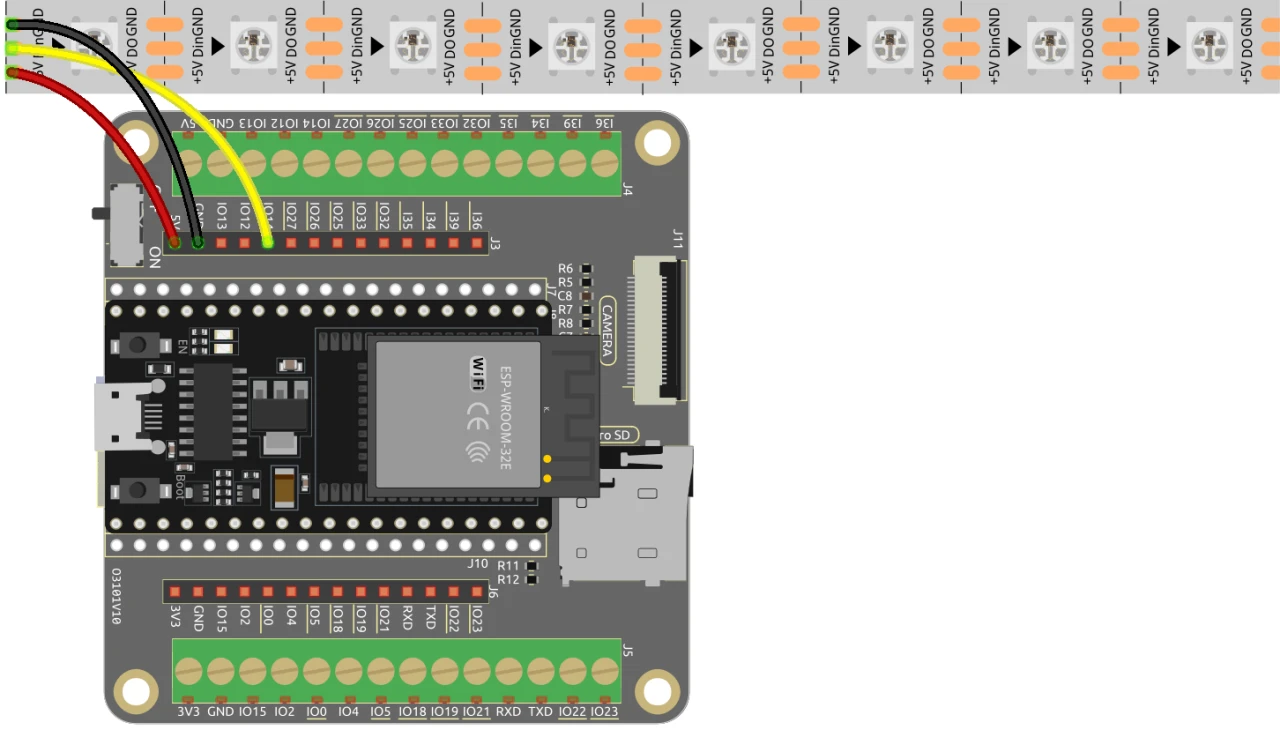
ESP32ን ከWS2812 LED ስትሪፕ ጋር ለማገናኘት፣ ክፍሎቹን እንደሚከተለው ያገናኙ፡- በመጀመሪያ፣ የLED ስትሪፕን 5V ፒን ከESP32 5V ውፅዓት ጋር ያገናኙ። በመቀጠል፣ የLED ስትሪፕን የመሬት (GND) ፒን በESP32 ላይ ካለው GND ፒን ጋር ያገናኙ። በመጨረሻም፣ የLED ስትሪፕን የዳታ ፒን (ብዙውን ጊዜ DI ወይም Data In ተብሎ የሚጠራው) በESP32 ላይ ካለው GPIO ፒን 13 ጋር ያገናኙ። ትክክለኛ ተግባርን ለማረጋገጥ ሁሉም ግንኙነቶች ደህንነታቸው የተጠበቀ መሆናቸውን ያረጋግጡ።
በቪዲዮው ውስጥ፣ አማራጭ የሽቦ ዘዴዎች በአጭሩ ተጠቅሰዋል፣ ነገር ግን እዚህ የተገለጸው ማዋቀር ለተመቻቸ አፈጻጸም የሚመከር ውቅር ነው (በቪዲዮ በ03:00)።
የኮድ ምሳሌዎች እና ጉዞ
ኮዱ የWS2812 LED ስትሪፕን ለመቆጣጠር እና የድር አገልጋዩን ለማዋቀር አስፈላጊ የሆኑትን ቤተ-መጻሕፍት በማካተት ይጀምራል። የLED ፒን እንደ LED_PIN ይገለጻል እና በስትሪፑ ውስጥ ያሉት የLEDዎች ብዛት በNUM_LEDS ይዘጋጃል።
#define LED_PIN 13 // NeoPixel LED ስትሪፕ
#define NUM_LEDS 8 // የLEDዎች ብዛት
Adafruit_NeoPixel strip = Adafruit_NeoPixel(NUM_LEDS, LED_PIN, NEO_GRB + NEO_KHZ800);
ይህ ቁርጥራጭ የNeoPixel ቤተ-መጻሕፍትን ያስጀምራል እና የLED ስትሪፕን በተገለጸው ፒን ላይ ያዘጋጃል። የAdafruit_NeoPixel ነገር፣ strip፣ የLED ቀለሞችን ለመቆጣጠር የሚጠቀሙበት ነው።
በመቀጠል፣ ኮዱ Wi-Fi ያስጀምራል እና የገቢ ጥያቄዎችን ለማስተናገድ የድር አገልጋይ ያዘጋጃል። ለአውታረ መረቡ SSID እና የይለፍ ቃል ተገልጸዋል፣ ይህም ESP32 ከWi-Fi ጋር እንዲገናኝ ያስችለዋል።
const char *ssid = "your_SSID";
const char *password = "your_PASSWORD";
WebServer server(80);
በዚህ ቁርጥራጭ ውስጥ፣ your_SSID እና your_PASSWORDን በእውነተኛ የWi-Fi ምስክርነቶችዎ ይተኩ። ይህ ግንኙነት ESP32 በተመሳሳይ አውታረ መረብ ላይ ካሉ መሣሪያዎች ጋር እንዲገናኝ ያስችለዋል፣ ይህም የLED ስትሪፕን በርቀት ለመቆጣጠር ያስችላል።
የLED ቀለምን ለመቀየር ዋናው ተግባር setColor() ነው፣ እሱም በእያንዳንዱ LED ውስጥ ይዞራል እና በተመረጡት RGB እሴቶች ላይ በመመስረት ቀለሙን ያዘጋጃል።
void setColor() {
  for (int i = 0; i < NUM_LEDS; i++) {
    strip.setPixelColor(i, valueR, valueG, valueB); // የi-ኛውን LED ቀለም ያዘጋጃል
    strip.show(); // የLED ስትሪፕን በአዲሶቹ ቀለሞች ያዘምናል
    delay(10); // ለ10 ሚሊሰከንድ ይጠብቃል
  }
}
ይህ ተግባር በስትሪፑ ውስጥ ያለ እያንዳንዱ LED በተመረጠው ቀለም መዘመኑን ያረጋግጣል። መዘግየቱ LEDs ቀለማቸውን በተቀላጠፈ ሁኔታ እንዲቀይሩ ያስችላቸዋል። ከድር በይነገጹ ጋር ሲገናኙ፣ ይህ ተግባር የቀለም ምርጫዎችዎን ለማንጸባረቅ ይጠራል።
ማሳያ / ምን እንደሚጠበቅ
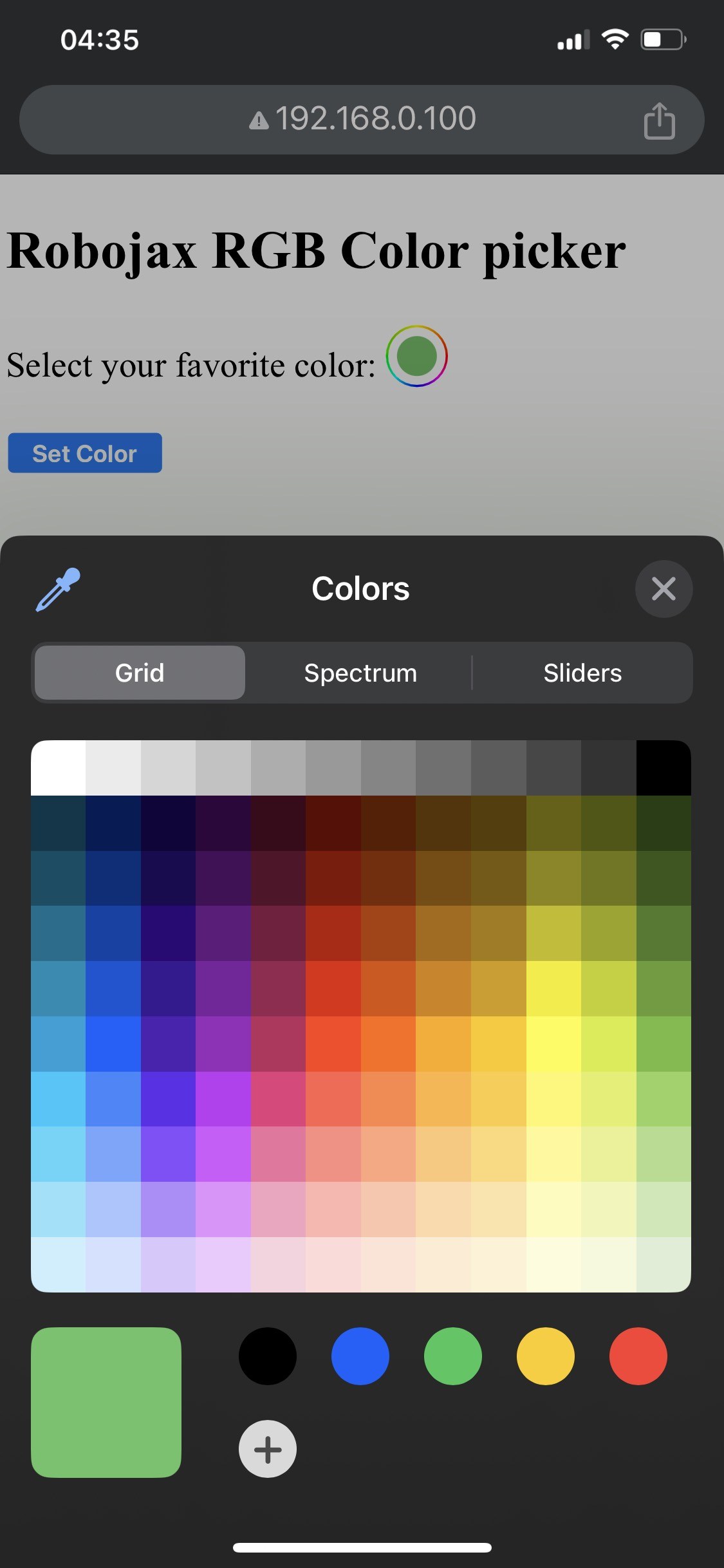

ማዋቀሩ ሲጠናቀቅ፣ በESP32 የIP አድራሻ በኩል የድር በይነገጹን መድረስ መቻል አለብዎት። ማንኛውንም ቀለም እንዲመርጡ የሚያስችልዎት የቀለም መራጭ ያያሉ፣ ከዚያም ወደ LED ስትሪፕ ይላካል። ESP32 የWi-Fi ግንኙነትን ካጣ፣ ስትሪፑ የማስጠንቀቂያ ቀለም ብልጭ ይላል፣ ይህም ችግሩን ያመለክታል (በቪዲዮ በ14:30)።
የተለመዱ ችግሮች የተሳሳተ ሽቦ መገጣጠምን ያካትታሉ፣ ይህም LEDs እንዳያበሩ ሊያደርግ ይችላል፣ ወይም የተሳሳተ የSSID/የይለፍ ቃል ጥምረት መጠቀም ESP32 ከአውታረ መረቡ ጋር እንዳይገናኝ ይከላከላል። ሁልጊዜ ግንኙነቶችዎን እና ማረጋገጫዎችዎን ሁለት ጊዜ ያረጋግጡ።
የቪዲዮ ጊዜ ምልክቶች
- 00:00 መጀመሪያ
- 2:01 የፕሮጀክቱ መግቢያ
- 3:09 ሰነዶች
- 3:47 RGB ቀለም ተብራርቷል
- 7:47 ሽቦ መገጣጠም
- 8:40 ለWS2812 ከWIFI ጋር የ Arduino ኮድ ተብራርቷል
- 19:35 በArduino IDE ውስጥ የESP32 ቦርድ እና የCOM ወደብ መምረጥ
- 21:17 የLED ስትሪፕን በwifi መቆጣጠር ማሳያ
ምስሎች
/*
 * Control RGB LED over wifi using ESP32
 *
 full video instrucions https://youtu.be/J_UFHk_T9aE
📚⬇️ Download and resource page https://robojax.com/RJT687
 * Written by Ahmad Shamshiri on Dec 18, 2023
 *
 * Watch video instruciton for this video:
 *
 * I have combined DHT library of Adafruit with ESP8266 WebServer both links
 * Adafruit DHT library on GitHub: https://github.com/adafruit/DHT-sensor-library
 * and
 * ESP8266 on GitHub : https://github.com/esp8266/Arduino
 *
   Copyright (c) 2015, Majenko Technologies
   All rights reserved.

   Redistribution and use in source and binary forms, with or without modification,
   are permitted provided that the following conditions are met:

 * * Redistributions of source code must retain the above copyright notice, this
     list of conditions and the following disclaimer.

 * * Redistributions in binary form must reproduce the above copyright notice, this
     list of conditions and the following disclaimer in the documentation and/or
     other materials provided with the distribution.

 * * Neither the name of Majenko Technologies nor the names of its
     contributors may be used to endorse or promote products derived from
     this software without specific prior written permission.

   THIS SOFTWARE IS PROVIDED BY THE COPYRIGHT HOLDERS AND CONTRIBUTORS "AS IS" AND
   ANY EXPRESS OR IMPLIED WARRANTIES, INCLUDING, BUT NOT LIMITED TO, THE IMPLIED
   WARRANTIES OF MERCHANTABILITY AND FITNESS FOR A PARTICULAR PURPOSE ARE
   DISCLAIMED. IN NO EVENT SHALL THE COPYRIGHT HOLDER OR CONTRIBUTORS BE LIABLE FOR
   ANY DIRECT, INDIRECT, INCIDENTAL, SPECIAL, EXEMPLARY, OR CONSEQUENTIAL DAMAGES
   (INCLUDING, BUT NOT LIMITED TO, PROCUREMENT OF SUBSTITUTE GOODS OR SERVICES;
   LOSS OF USE, DATA, OR PROFITS; OR BUSINESS INTERRUPTION) HOWEVER CAUSED AND ON
   ANY THEORY OF LIABILITY, WHETHER IN CONTRACT, STRICT LIABILITY, OR TORT
   (INCLUDING NEGLIGENCE OR OTHERWISE) ARISING IN ANY WAY OUT OF THE USE OF THIS
   SOFTWARE, EVEN IF ADVISED OF THE POSSIBILITY OF SUCH DAMAGE.
*/

#include <Adafruit_NeoPixel.h> // Include the Adafruit NeoPixel library

#define LED_PIN 13 // NeoPixel LED strip
#define NUM_LEDS 8 // Number of LEDs
// Create an instance of the Adafruit_NeoPixel class
Adafruit_NeoPixel strip = Adafruit_NeoPixel(NUM_LEDS, LED_PIN, NEO_GRB + NEO_KHZ800);


//initial color of LED strip
int valueR = 178;//from 0 to 255 for Red
int valueG = 27;//from 0 to 255 for Green
int valueB = 84;//from 0 to 255 for Blue

bool showSerialData = false;
String theColorR, theColorG, theColorB;
String theColor ="ff0000";

#include <WiFi.h>
#include <WiFiClient.h>
#include <WebServer.h>
#include <ESPmDNS.h>

const char *ssid = "dars";
const char *password = "hhhhhhhhhhh";

WebServer server(80);

void showColorPicker() {
  String page = "<!DOCTYPE html>\n";
  page +="<html>\n";
  page +="<body>\n";
  page +="<div style=\"zoom: 300%;\">\n";
  page +="<h2>Robojax RGB Color picker</h2>\n";
  page +="<p id=\"result\"></p>\n";
  page +="<form action=\"/color\">\n";
  page +="  <label for=\"favcolor\">Select your favorite color:</label>\n";
  page +="  <input type=\"color\" id=\"favcolor\" name=\"favcolor\" value=\"#";
  page += theColor;
  page +="\"><br><br>\n";
  page +="   <input type=\"submit\" value=\"Set Color\" />\n";
  page +="</form> \n</div>\n";
  page +="</body>\n";
  page +="</html>\n";

  server.send(200,  "text/html", page);


}

//from https://stackoverflow.com/questions/44683071/convert-string-as-hex-to-hexadecimal
uint64_t StrToHex(const char* str)
{
  return (uint64_t) strtoull(str, 0, 16);
}

void getColor(){

 // server.send(200, "text/plain", message);

  if(server.argName(0) == "favcolor")
  {
    String newColor = String(server.arg(0));//get the GET ardument 0 and convert it to string
    theColor = newColor.substring(1);//remove the # sybmot from the begining of color like #B2a48d
    theColorR = newColor.substring(1, 3);//extract B2 from  #B2a48d for example
    theColorG = newColor.substring(3, 5);//extract a4 from  #B2a48d for example
    theColorB = newColor.substring(5, 7);//extract 8d from  #B2a48d for example

    valueR = StrToHex(theColorR.c_str());//convert String to HEX for R
    valueG = StrToHex(theColorG.c_str());//convert String to HEX for G
    valueB = StrToHex(theColorB.c_str());//convert String to HEX for B
    if(showSerialData)
    {
      Serial.print("valueR: ");
      Serial.println(valueR);
      Serial.print("valueG: ");
      Serial.println(valueG);
      Serial.print("valueB: ");
      Serial.println(valueB );
    }

  }

  showColorPicker();//make sure the color picker is shown
  //server.send(200, "text/plain", message);

}


void setColor()
{
  for (int i = 0; i < NUM_LEDS; i++) {
    strip.setPixelColor(i, valueR, valueG, valueB); // Set the color of the i-th LED to red
    strip.show(); // Update the LED strip with the new colors
    delay(10); // Wait for 100 milliseconds
  }
}//

void noConnection()
{
   for (int i = 0; i < NUM_LEDS; i++) {
    strip.setPixelColor(i, 255, 45, 0); // Set the color of the i-th LED to red
    strip.show(); // Update the LED strip with the new colors
    delay(50); // Wait for 100 milliseconds
  }

  delay(200);
   for (int i = NUM_LEDS-1; i >=0; i--) {
    strip.setPixelColor(i, 0, 255, 180); // Set the color of the i-th LED to red
    strip.show(); // Update the LED strip with the new colors
    delay(50); // Wait for 100 milliseconds
  }
}

void handleNotFound() {
  String message = "File Not Found\n\n";
  message += "URI: ";
  message += server.uri();
  message += "\nMethod: ";
  message += (server.method() == HTTP_GET) ? "GET" : "POST";
  message += "\nArguments: ";
  message += server.args();
  message += "\n";

  for (uint8_t i = 0; i < server.args(); i++) {
    message += " " + server.argName(i) + ": " + server.arg(i) + "\n";
  }

  server.send(404, "text/plain", message);

}

void setup_wifi() {
  delay(10);
  // We start by connecting to a WiFi network
  WiFi.mode(WIFI_STA);
  WiFi.begin(ssid, password);
  Serial.println("");

  // Wait for connection
  while (WiFi.status() != WL_CONNECTED) {
    noConnection();
    delay(500);
    Serial.print(".");
  }

  Serial.println("");
  Serial.print("Connected to ");
  Serial.println(ssid);
  Serial.print("Open: http://");
  Serial.print(WiFi.localIP());
  Serial.println(" to read temperature");

  if (MDNS.begin("robojaxRGB")) {
    Serial.println("MDNS responder started");
  }

}

void setup(void) {

  Serial.begin(115200);

  strip.begin(); // Initialize the NeoPixel strip
  strip.show(); // Set initial color to black

  setup_wifi();

  server.on("/", showColorPicker);//show the main page with color picker
  //server.on("/color", setColor);//changes teh color on WS2812 RGB LED


  server.on("/color", HTTP_GET, getColor);


  server.on("/inline", []() {
    server.send(200, "text/plain", "this works as well");
  });
  server.onNotFound(handleNotFound);
  server.begin();
  Serial.println("HTTP server started");
}

void loop(void) {
  //Robojax.com
    while (WiFi.status() != WL_CONNECTED) {
      setup_wifi();
    }

  server.handleClient();
  //showColorPicker();
  setColor();
  delay(300);// change this to larger value (1000 or more) if you don't need very often reading
  // Robojax.com code for ESP32 and DHT11 DHT22
}
Common Course Links
Common Course Files
ምንጮች እና ምንጮች
አሁን ምንም ምንጮች የለም።
ፋይሎች📁
አንድ ፋይል የለም።