ESP32 Tutorial 41/55 - MP3 Player using Micro SD card | SunFounder's ESP32 IoT Learning kit
In this tutorial, we will create an MP3 player using the ESP32 microcontroller and a micro SD card. The ESP32 will read audio files stored on the micro SD card and output the sound through an audio amplifier and speaker. This project combines various components, including the ESP32, an audio amplifier, and a micro SD card, to allow you to play music in a straightforward manner.
Throughout the process, we will discuss the necessary wiring, coding, and how to troubleshoot common issues. For more visual guidance, be sure to check out the associated video (in video at 00:00).
Hardware Explained
The main components used in this project include the ESP32 microcontroller, a micro SD card, an audio amplifier, and a speaker. The ESP32 is a powerful microcontroller with built-in Wi-Fi and Bluetooth capabilities, making it ideal for IoT projects. It will handle the processing and control of audio playback.
The micro SD card is used to store audio files in MP3 format. It connects to the ESP32 and allows the program to read the files and send audio data to the amplifier. The audio amplifier takes the digital signal from the ESP32 and amplifies it to drive the speaker, allowing sound to be heard.
Datasheet Details
| Manufacturer | SunFounder |
|---|---|
| Part number | ESP32 |
| Logic/IO voltage | 3.3 V |
| Supply voltage | 5 V |
| Output current (per channel) | 2 A max |
| Peak current (per channel) | 3 A max |
| PWM frequency guidance | up to 40 kHz |
| Input logic thresholds | 0.3 x VCC (low), 0.7 x VCC (high) |
| Voltage drop / RDS(on) / saturation | 0.15 V |
| Thermal limits | 85 °C |
| Package | WROOM-32 |
| Notes / variants | Compatible with various audio libraries |
- Ensure the micro SD card is formatted as FAT32.
- Use a resistor for connecting the audio amplifier to prevent distortion.
- Keep power supply connections stable to avoid interruptions.
- Check wiring for loose connections before powering the system.
- Monitor the serial output for debugging information.
- Use low-impedance speakers for better sound quality.
- For best performance, ensure the ESP32 is not overloaded with tasks while playing audio.
SD_MMC is used for micro SD access, and AudioOutputI2S is utilized for audio output.
Wiring Instructions
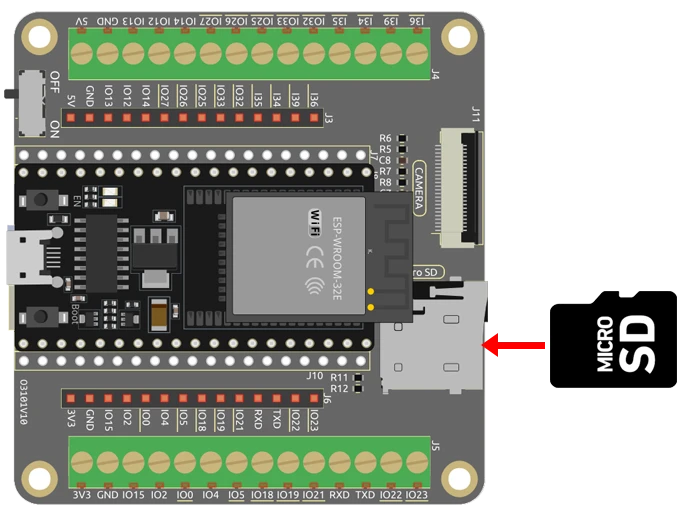
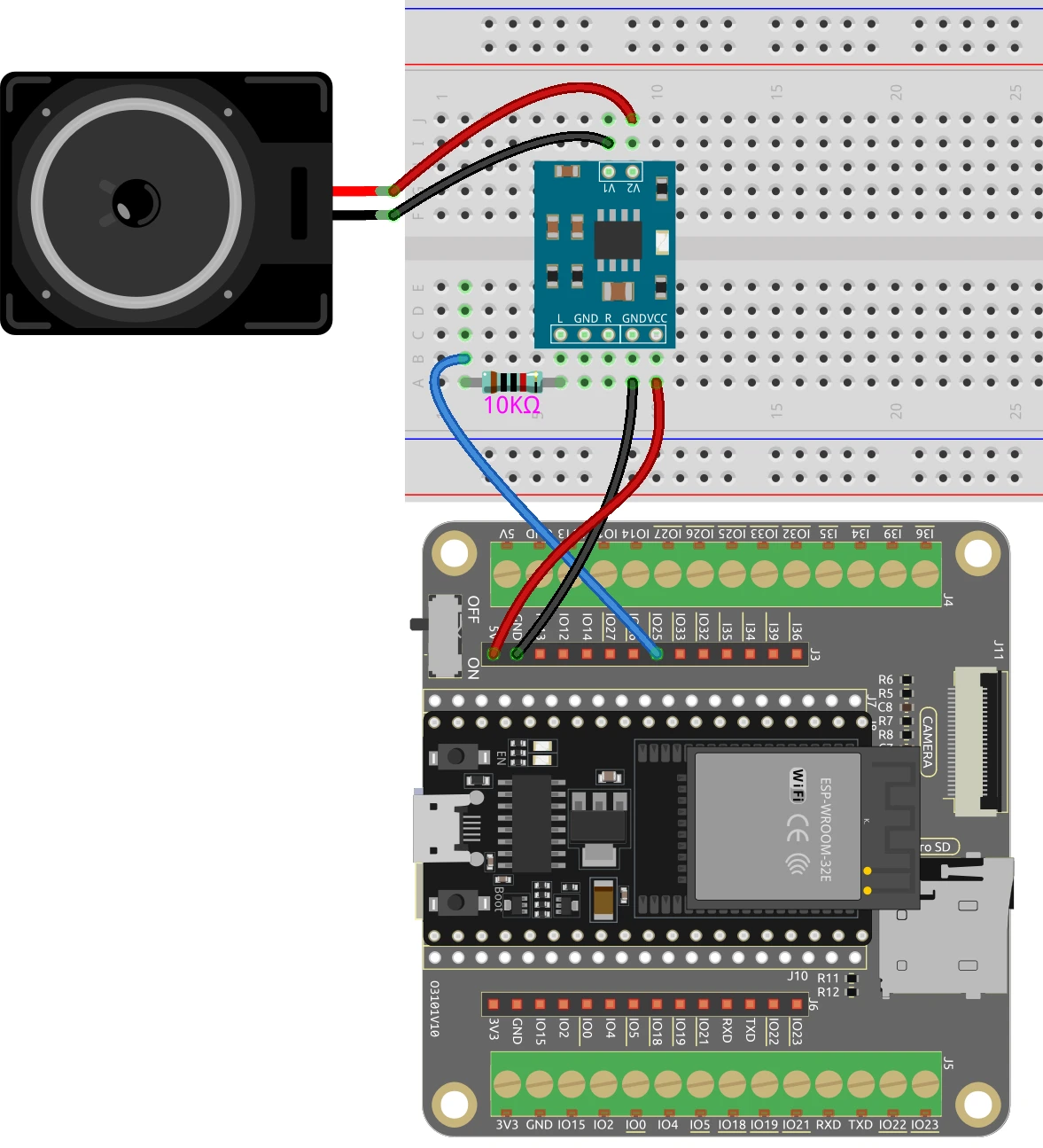
To wire the components together, start by connecting the power supply. Connect the 5 V from the ESP32 to the VCC pin of the audio amplifier. Next, connect the ground pin from the ESP32 to the ground pin of the amplifier. The audio output pin from the ESP32, usually GPIO25, should be connected to the input pin of the amplifier through a 10 kΩ resistor.
For the speaker, connect it to the output pins of the audio amplifier. Note that the speaker does not have polarity, so you can connect it either way. Insert the micro SD card into the designated slot on the ESP32. Make sure to double-check all the connections before powering up the system.
Code Examples & Walkthrough
In the provided code, we start by including the necessary libraries for audio playback and SD card access. The main identifiers are mp3, file, and out, which represent the MP3 generator, the audio file source, and the audio output, respectively.
AudioGeneratorMP3 *mp3;
AudioFileSourceSD_MMC *file;
AudioOutputI2S *out;
Here, we declare pointers for the MP3 generator and the audio file source. In the setup() function, we initialize the serial communication and the SD card.
void setup() {
  Serial.begin(115200);
  if (!SD_MMC.begin()) {
    Serial.println("SD card mount failed!");
  }
  file = new AudioFileSourceSD_MMC("/To Alice.mp3");
  out = new AudioOutputI2S(0, 1);
}
In this excerpt, we check if the SD card is mounted successfully. If it fails, an error message is printed. We then set up the MP3 file and the audio output mode.
void loop() {
  if (mp3->isRunning()) {
    if (!mp3->loop()) mp3->stop();
  } else {
    Serial.println("MP3 done");
    delay(1000);
  }
}
This loop checks if the MP3 file is still playing. If it is not, it prints a message indicating that the playback is complete. The full code will load below the article for further reference.
Demonstration / What to Expect
Once everything is wired and the code is uploaded, you should hear the audio play through the speaker when the micro SD card is inserted. Make sure to reset the ESP32 after inserting the card. If the audio does not play, check the wiring and ensure the audio file is named correctly in the code (in video at 05:00).
Common pitfalls include not formatting the micro SD card correctly or using unsupported audio file formats. Always ensure that the files are in MP3 format and placed in the root directory or specified folder as needed.
Video Timestamps
- 00:00 Start
- 2:19 Introduction to the project
- 4:27 Docs page
- 5:32 Wiring for audio amplifier
- 8:00 formatting microSD card for ESP32
- 10:16 Library and Code
- 15:16 Selecting ESP32 board and COM port in Arduino IDE
- 16:58 Playing Song using ESP32 from Micro SD card
- 19:14 Second demo using 18650 battery
图像


#include "AudioFileSourceSD_MMC.h"
#include "AudioOutputI2S.h"
#include "AudioGeneratorMP3.h"
#include "SD_MMC.h"
#include "FS.h"

 // 为MP3生成器、文件源和输出声明指针。
AudioGeneratorMP3 *mp3;
AudioFileSourceSD_MMC *file;
AudioOutputI2S *out;

void setup() {
 // 开始串行通信。
  Serial.begin(115200);
  delay(1000);

 // 初始化SD卡。如果失败,打印错误信息。
  if (!SD_MMC.begin()) {
    Serial.println("SD card mount failed!");
  }

 // 从SD卡中打开MP3文件。将“/To Alice.mp3”替换为您自己的MP3文件名。
  file = new AudioFileSourceSD_MMC("/To Alice.mp3");

 // 在ESP32的内置DAC上设置I2S输出。
  out = new AudioOutputI2S(0, 1);

 // 将输出设置为单声道。
  out->SetOutputModeMono(true);

 // 用文件和输出初始化 MP3 生成器。
  mp3 = new AudioGeneratorMP3();
  mp3->begin(file, out);
}

void loop() {
 // 如果MP3正在运行,就循环播放。否则,停止播放。
  if (mp3->isRunning()) {
    if (!mp3->loop()) mp3->stop();
  }
 // 如果MP3没有运行,打印一条消息并等待1秒。
  else {
    Serial.println("MP3 done");
    delay(1000);
  }
}
Common Course Links
Common Course Files
资源与参考
-
文档ESP32教程41/55- SunFounder文档页面用于从内存卡播放音乐docs.sunfounder.com
文件📁
没有可用的文件。