ESP32 教學 49/55 - 透過 Adafruit IoT 控制直流摩打 | SunFounder 嘅 ESP32 套件
喺呢個教學入面,我哋會探討點樣用ESP32同Adafruit IO MQTT服務,透過互聯網控制一個直流摩打。摩打嘅速度同方向可以遠端操控,令到只要有網絡連接,就可以喺任何地方進行有效控制。呢個項目展示咗ESP32微控制器嘅能力,佢內置Wi-Fi,好適合用喺物聯網(IoT)應用度。

我哋會實現一個系統,令到摩打可以透過連接Adafruit IO嘅網頁介面嚟啟動、停止同調整速度。用戶可以訂閱特定主題嚟控制摩打,並相應噉調整參數。為咗更清楚了解過程,記得睇吓呢個教學附帶嘅影片(影片喺00:00開始)。
硬件解說
為咗呢個項目,我哋會用ESP32微控制器,佢係我哋系統嘅核心。ESP32能夠處理Wi-Fi通訊,令到佢好適合我哋嘅IoT應用。佢連接Adafruit IO平台,等我哋可以透過MQTT協議收發訊息。
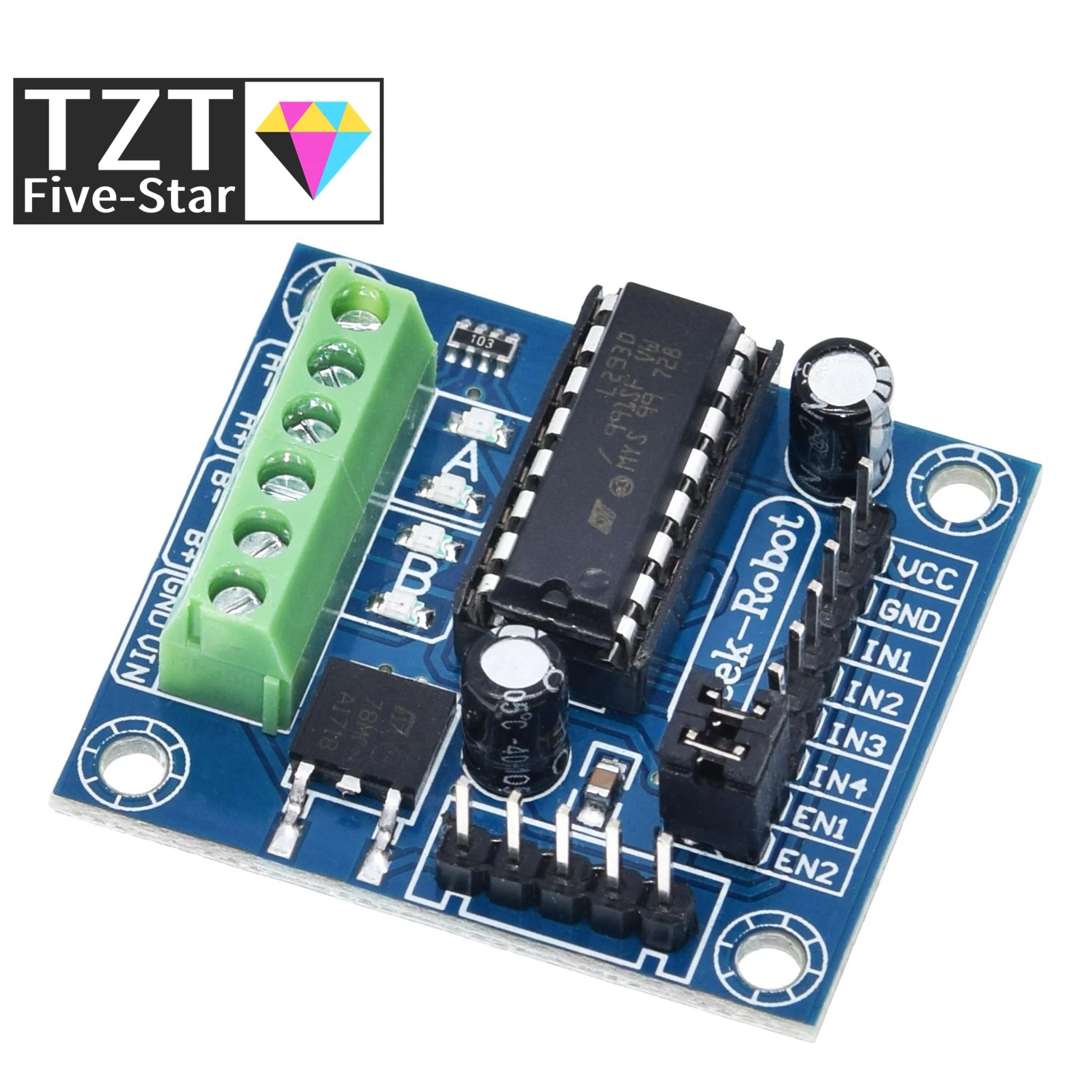
另外,我哋會用L293D摩打驅動器,佢對於控制直流摩打嚟講好重要。L293D可以驅動兩個直流摩打,並透過脈寬調變(PWM)控制方向同速度。佢基本上係ESP32同摩打之間嘅介面,處理摩打所需嘅較高電流,同時隔離ESP32免受任何可能有害嘅反向電動勢信號影響。
數據手冊詳情
| 製造商 | Texas Instruments |
|---|---|
| 零件編號 | L293D |
| 邏輯/IO電壓 | 4.5 - 36 V |
| 供電電壓 | 4.5 - 36 V |
| 輸出電流(每通道) | 600 mA |
| 峰值電流(每通道) | 1.2 A |
| PWM頻率指引 | 10 kHz(典型值) |
| 輸入邏輯閾值 | 0.8 V(高),2.0 V(低) |
| 電壓降 / RDS(on) / 飽和 | 最大1.5 V |
| 熱限制 | 150 °C |
| 封裝 | DIP-16 |
| 備註 / 變體 | 四重高電流半H橋驅動器 |
- 確保有適當散熱以作連續操作。
- 用PWM嚟有效控制摩打速度。
- 留意輸入電壓限制以防損壞。
- 檢查所有組件之間嘅接地連接是否正確。
- 小心反向電動勢;如有需要,用二極管。
- 再三檢查接線,因為極性會影響摩打方向。
- 喺全面操作前,先用較低電壓測試。
- 長時間使用時留意過熱情況。
- 如果用到機械開關,記得做防彈跳處理。
- 確保ESP32冇被摩打電流過載。
接線指示
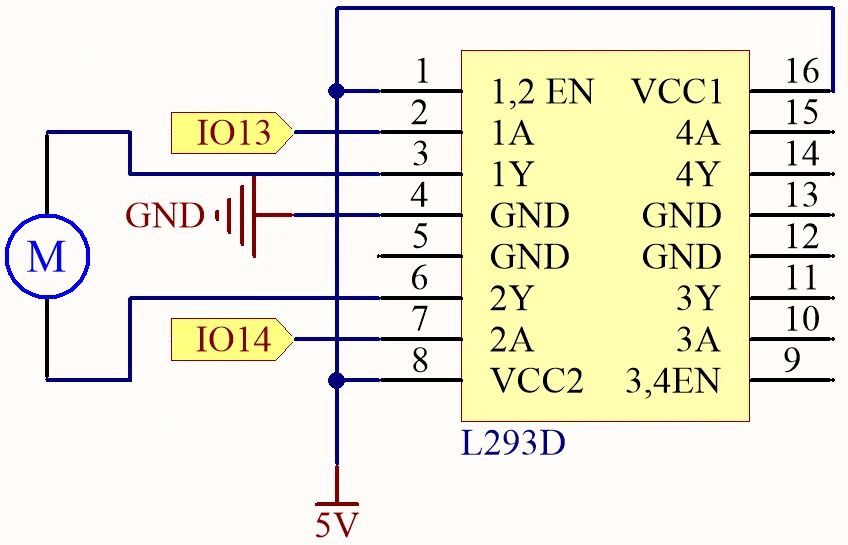
首先連接電源。將外部電源嘅正極連接到L293D嘅VCC引腳(第8腳),接地連接到GND引腳(第4腳)。確保ESP32如有需要就獨立供電,通常係透過micro USB連接。
跟住,將摩打連接到L293D。摩打嘅一個端子應該連接到輸出引腳3(L293D嘅第2腳),另一個端子連接到輸出引腳6(L293D嘅第7腳)。至於控制信號,將ESP32嘅第13腳連接到輸入引腳2(L293D嘅第1腳),第14腳連接到輸入引腳7(L293D嘅第2腳)。啟用引腳(第1腳)都應該連接到5V電源嚟啟動驅動器。最後,確保ESP32嘅接地連接到L293D嘅接地,以建立共同參考點。
程式碼範例同講解
提供嘅程式碼初始化所需嘅函式庫,並設定Wi-Fi同MQTT客戶端。主要識別碼包括motorSpeed、motorDirection同motorStart,佢哋根據從Adafruit IO收到嘅指令嚟管理摩打嘅操作。
bool debug = false;
#define motor1A 13
#define motor2A 14
int motorSpeed = 0;
int motorDirection = 1;
int motorStart = 1;
喺呢段摘錄入面,定義咗摩打引腳,以及用嚟控制速度、方向同摩打啟動/停止狀態嘅初始變數。motorSpeed變數會根據Adafruit IO嘅輸入嚟調整。
void setup() {
  Serial.begin(115200);
  WiFi.begin(WLAN_SSID, WLAN_PASS);
  delay(2000);
  while (WiFi.status() != WL_CONNECTED) {
    delay(500);
  }
}
喺setup函數入面,啟動串列通訊,ESP32連接指定嘅Wi-Fi網絡。呢個連接對於啟用MQTT通訊嚟講好重要。
void loop() {
  MQTT_connect();
  mqtt.processPackets(500);
  runMotor();
}
呢個loop函數建立MQTT連接,並處理接收嘅數據包,以根據最新收到嘅指令控制摩打。runMotor()函數會被呼叫,以將當前設定應用喺摩打度。
示範 / 預期效果
當設定完成並且代碼上傳之後,你應該可以透過Adafruit IO儀表板嚟控制摩打。你可以用滑桿調整摩打速度,用切換掣改變佢嘅方向。如果接線正確,摩打會即時回應呢啲指令,展示系統嘅低延遲(喺影片00:00)。
常見問題包括因為接線錯誤而導致摩打方向相反,所以如果摩打嘅行為同預期唔同,就要再檢查吓接線。另外,確保你喺Adafruit IO入面嘅MQTT主題設定正確,同代碼匹配。
影片時間戳
- 00:00 開始
- 2:21 項目介紹
- 4:20 直流摩打點樣控制
- 6:39 L293D摩打驅動器
- 11:42 咩係MQTT?
- 15:03 Adafruit IO設定
- 19:17 接線解釋
- 22:42 代碼解釋
- 35:28 項目示範
圖片
/***********************************************************************
 This is Arduino sketch for ESP32 to DC Motor using MQTT service of Adafruit
 Watch video instruction https://youtu.be/OUgyPXNYg3g
 📚⬇️ Download and resource page https://robojax.com/RJT673
 Written By Ahamd Shamshiri
 on Feb 18, 2024

  Adafruit MQTT Library ESP32 Adafruit IO SSL/TLS example


/// ref: https://www.electronicwings.com/esp32/esp32-mqtt-client
*/
bool debug = false;
#define motor1A 13
#define motor2A 14

// PWM settings
const int freq = 500; // PWM frequency: 500 Hz
const int resolution = 8; // PWM resolution: 8 bits
const int channelA = 0; // PWM channel for motor1A: 0
const int channelB = 1; // PWM channel for motor2A: 1

char* dir[]={"CCW", "CW"};

int motorSpeed =0;
int motorDirection =1;
int motorStart = 1;
int dutyCycle =0;

#include <WiFi.h>
#include "WiFiClientSecure.h"
#include "Adafruit_MQTT.h"
#include "Adafruit_MQTT_Client.h"

/************************* WiFi Access Point *********************************/


#define WLAN_SSID "Book"
#define WLAN_PASS "88888888"

/************************* Adafruit.io Setup *********************************/

#define AIO_SERVER "io.adafruit.com"

// Using port 8883 for MQTTS
#define AIO_SERVERPORT 8883

// Adafruit IO Account Configuration
// (to obtain these values, visit https://io.adafruit.com and click on Active Key)
// #define AIO_USERNAME "YOUR_ADAFRUIT_IO_USERNAME"
// #define AIO_KEY      "YOUR_ADAFRUIT_IO_KEY"

#define AIO_USERNAME "robojax"
#define AIO_KEY "aio_jHpm60SEsWUdU5x472FViZjWzsY9"

/************ Global State (you don't need to change this!) ******************/

// WiFiFlientSecure for SSL/TLS support
WiFiClientSecure client;

// Setup the MQTT client class by passing in the WiFi client and MQTT server and login details.
Adafruit_MQTT_Client mqtt(&client, AIO_SERVER, AIO_SERVERPORT, AIO_USERNAME, AIO_KEY);


// io.adafruit.com root CA
const char* adafruitio_root_ca = \
      "-----BEGIN CERTIFICATE-----\n"
      "MIIEjTCCA3WgAwIBAgIQDQd4KhM/xvmlcpbhMf/ReTANBgkqhkiG9w0BAQsFADBh\n"
      "MQswCQYDVQQGEwJVUzEVMBMGA1UEChMMRGlnaUNlcnQgSW5jMRkwFwYDVQQLExB3\n"
      "d3cuZGlnaWNlcnQuY29tMSAwHgYDVQQDExdEaWdpQ2VydCBHbG9iYWwgUm9vdCBH\n"
      "MjAeFw0xNzExMDIxMjIzMzdaFw0yNzExMDIxMjIzMzdaMGAxCzAJBgNVBAYTAlVT\n"
      "MRUwEwYDVQQKEwxEaWdpQ2VydCBJbmMxGTAXBgNVBAsTEHd3dy5kaWdpY2VydC5j\n"
      "b20xHzAdBgNVBAMTFkdlb1RydXN0IFRMUyBSU0EgQ0EgRzEwggEiMA0GCSqGSIb3\n"
      "DQEBAQUAA4IBDwAwggEKAoIBAQC+F+jsvikKy/65LWEx/TMkCDIuWegh1Ngwvm4Q\n"
      "yISgP7oU5d79eoySG3vOhC3w/3jEMuipoH1fBtp7m0tTpsYbAhch4XA7rfuD6whU\n"
      "gajeErLVxoiWMPkC/DnUvbgi74BJmdBiuGHQSd7LwsuXpTEGG9fYXcbTVN5SATYq\n"
      "DfbexbYxTMwVJWoVb6lrBEgM3gBBqiiAiy800xu1Nq07JdCIQkBsNpFtZbIZhsDS\n"
      "fzlGWP4wEmBQ3O67c+ZXkFr2DcrXBEtHam80Gp2SNhou2U5U7UesDL/xgLK6/0d7\n"
      "6TnEVMSUVJkZ8VeZr+IUIlvoLrtjLbqugb0T3OYXW+CQU0kBAgMBAAGjggFAMIIB\n"
      "PDAdBgNVHQ4EFgQUlE/UXYvkpOKmgP792PkA76O+AlcwHwYDVR0jBBgwFoAUTiJU\n"
      "IBiV5uNu5g/6+rkS7QYXjzkwDgYDVR0PAQH/BAQDAgGGMB0GA1UdJQQWMBQGCCsG\n"
      "AQUFBwMBBggrBgEFBQcDAjASBgNVHRMBAf8ECDAGAQH/AgEAMDQGCCsGAQUFBwEB\n"
      "BCgwJjAkBggrBgEFBQcwAYYYaHR0cDovL29jc3AuZGlnaWNlcnQuY29tMEIGA1Ud\n"
      "HwQ7MDkwN6A1oDOGMWh0dHA6Ly9jcmwzLmRpZ2ljZXJ0LmNvbS9EaWdpQ2VydEds\n"
      "b2JhbFJvb3RHMi5jcmwwPQYDVR0gBDYwNDAyBgRVHSAAMCowKAYIKwYBBQUHAgEW\n"
      "HGh0dHBzOi8vd3d3LmRpZ2ljZXJ0LmNvbS9DUFMwDQYJKoZIhvcNAQELBQADggEB\n"
      "AIIcBDqC6cWpyGUSXAjjAcYwsK4iiGF7KweG97i1RJz1kwZhRoo6orU1JtBYnjzB\n"
      "c4+/sXmnHJk3mlPyL1xuIAt9sMeC7+vreRIF5wFBC0MCN5sbHwhNN1JzKbifNeP5\n"
      "ozpZdQFmkCo+neBiKR6HqIA+LMTMCMMuv2khGGuPHmtDze4GmEGZtYLyF8EQpa5Y\n"
      "jPuV6k2Cr/N3XxFpT3hRpt/3usU/Zb9wfKPtWpoznZ4/44c1p9rzFcZYrWkj3A+7\n"
      "TNBJE0GmP2fhXhP1D/XVfIW/h0yCJGEiV9Glm/uGOa3DXHlmbAcxSyCRraG+ZBkA\n"
      "7h4SeM6Y8l/7MBRpPCz6l8Y=\n"
      "-----END CERTIFICATE-----\n";

/****************************** Feeds ***************************************/

// Setup a feed called 'test' for publishing and 'test2' for subscription.
// Notice MQTT paths for AIO follow the form: <username>/feeds/<feedname>
Adafruit_MQTT_Subscribe MOTOR_SPEED = Adafruit_MQTT_Subscribe(&mqtt, AIO_USERNAME "/feeds/motor.speed");
Adafruit_MQTT_Subscribe MOTOR_DIRECTION = Adafruit_MQTT_Subscribe(&mqtt, AIO_USERNAME "/feeds/motor.direction");
Adafruit_MQTT_Subscribe MOTOR_START = Adafruit_MQTT_Subscribe(&mqtt, AIO_USERNAME "/feeds/motor.start");


/*************************** Sketch Code ************************************/


void setup() {
  // Set up PWM
  ledcSetup(channelA, freq, resolution);
  ledcSetup(channelB, freq, resolution);

  // Attach PWM channels to GPIO pins
  ledcAttachPin(motor1A, channelA);
  ledcAttachPin(motor2A, channelB);

  Serial.begin(115200);
  delay(10);

  Serial.println(F("DC Motor over MQTT EXample"));

  // Connect to WiFi access point.
  Serial.println();
  Serial.println();
  Serial.print("Connecting to ");
  Serial.println(WLAN_SSID);

  delay(1000);

  WiFi.begin(WLAN_SSID, WLAN_PASS);
  delay(2000);

  while (WiFi.status() != WL_CONNECTED) {
    delay(500);
    Serial.print(".");
  }
  Serial.println();

  Serial.println("WiFi connected");
  Serial.println("IP address: ");
  Serial.println(WiFi.localIP());

  // Set Adafruit IO's root CA
  client.setCACert(adafruitio_root_ca);

  // register callback for feed
  MOTOR_SPEED.setCallback(MOTOR_SPEED_Callback);
  // Setup MQTT subscription for time feed.
  mqtt.subscribe(&MOTOR_SPEED);

  // register callback for feed
  MOTOR_DIRECTION.setCallback(MOTOR_DIRECTION_Callback);
  // Setup MQTT subscription for time feed.
  mqtt.subscribe(&MOTOR_DIRECTION);

  // register callback for feed
  MOTOR_START.setCallback(MOTOR_START_Callback);
  // Setup MQTT subscription for time feed.
  mqtt.subscribe(&MOTOR_START);

}

// uint32_t x=0;


void loop() {

  // Ensure the connection to the MQTT server is alive (this will make the first
  // connection and automatically reconnect when disconnected).  See the MQTT_connect
  // function definition further below.
  MQTT_connect();


  // Serial.print("Speed: ");
  // Serial.print (motorSpeed);
  // Serial.print(" Dir: ");
  // Serial.print (dir[motorDirection]);
  // Serial.print(" Sart: ");
  // Serial.println(motorStart);

  // Serial.print("DutyCycle: ");
  // Serial.println(dutyCycle);

  // wait 0.5 seconds for subscription messages
  mqtt.processPackets(500);

   runMotor();//very important
  // wait a couple seconds to avoid rate limit
  //delay(2000);
}

void MOTOR_SPEED_Callback(char* message, uint16_t len) {
  char messageBuffer[40];
  //snprintf(messageBuffer, sizeof(messageBuffer), "Color status is :: %s, len :: %u", message, len);
  //Serial.println(messageBuffer);
  Serial.println(message);
  String inString = message;//sotre the message to String

  motorSpeed  =  inString.toInt();//convert the message to Integer
  if(motorSpeed >100 || motorSpeed < 0)
  {
    motorSpeed = 0;
  }
  dutyCycle = map (motorSpeed, 0, 100, 0, 255);

}


void MOTOR_DIRECTION_Callback(char* message, uint16_t len) {
  char messageBuffer[40];
  //snprintf(messageBuffer, sizeof(messageBuffer), "Color status is :: %s, len :: %u", message, len);
  //Serial.println(messageBuffer);
  Serial.println(message);
  String inString = message;//sotre the message to String

  motorDirection  =  inString.toInt();//convert the message to Integer


}


void MOTOR_START_Callback(char* message, uint16_t len) {
  char messageBuffer[40];
  //snprintf(messageBuffer, sizeof(messageBuffer), "Color status is :: %s, len :: %u", message, len);
  //Serial.println(messageBuffer);
  Serial.println(message);

  String inString = message;//sotre the message to String

  motorStart  =  inString.toInt();//convert the message to Integer


}


void runMotor()
{

  if(motorStart ==1)
  {
      if(debug)
      {
        Serial.print("Motor running:");
        Serial.print(dir[motorDirection]);
        Serial.print(" at ");
        Serial.print(motorSpeed);
        Serial.println("%");
      }
    if(motorDirection)
    {
      ledcWrite(channelA, dutyCycle);
      ledcWrite(channelB, 0);
      delay(50);
    }else{

      ledcWrite(channelA, 0);
      ledcWrite(channelB, dutyCycle);
      delay(50);
    }
  }else{
    if(debug)
    {
      Serial.println("***Motor Stopped***");
    }
      ledcWrite(channelA, 0);
      ledcWrite(channelB, 0);
  }

}//runMotor() end

// Function to connect and reconnect as necessary to the MQTT server.
// Should be called in the loop function and it will take care if connecting.
void MQTT_connect() {
  int8_t ret;
  // Stop if already connected.
  if (mqtt.connected()) {
    return;
  }
  Serial.print("Connecting to MQTT... ");
  uint8_t retries = 3;
  while ((ret = mqtt.connect()) != 0) {  // connect will return 0 for connected
    Serial.println(mqtt.connectErrorString(ret));
    Serial.println("Retrying MQTT connection in 5 seconds...");
    mqtt.disconnect();
    delay(5000);  // wait 5 seconds
    retries--;
    if (retries == 0) {
      // basically die and wait for WDT to reset me
      while (1)
        ;
    }
  }
  Serial.println("MQTT Connected!");
}
Common Course Links
Common Course Files
資源與參考資料
暫時冇資源。
文件📁
冇文件可用。