Tutoriel ESP32 48/55 - Suivi de température à distance et contrôle de LED MQTT | Kit IoT ESP32 de SunFounder
Na boyekoli oyo, tokotalela ndenge ya kosalela module ya ESP32 elongo na tableau ya extension ya SunFounder mpo na kotala température mpe humidité na mosika na nzela ya platform ya Adafruit IO. Libanda na yango, tokosalela mosala ya kokamba LED na nzela ya web. Na suka ya projet oyo, okokoka komona ba données ya température mpe humidité na tango ya sika mpe kobongola LED na mokili ya internet.
Projet oyo esalelaka protocole ya MQTT mpo na kosala communication ya malamu kati na ESP32 mpe service ya Adafruit IO. MQTT ezali léger mpe ebongi mpo na ba applications ya IoT, oyo esalisi biso na kobimisa ba données ya capteur mpe kosala abonnement na ba commandes mpo na kokamba LED. Mpo na koyeba malamu code mpe ba connexions, tala vidéo oyo elandi na boyekoli oyo (na vidéo na 00:00).
Matériel oyo esili kolimbolama
Ba composants ya minene mpo na projet oyo ezali na microcontrôleur ya ESP32, capteur ya température mpe humidité DHT11, mpe LED. ESP32 ezali microcontrôleur ya makasi oyo ezali na ba capacités ya Wi-Fi mpe Bluetooth oyo esalemi na kati, oyo esalaka ete ezali choix ya malamu mpo na ba projets ya IoT. Ekoki kosala ba tâches ebele mpe kokɔta na internet na ndenge ya malamu.
Capteur DHT11 ezali na mokumba ya komeka température mpe humidité. Ebimisaka ba signaux numériques oyo ESP32 ekoki kotanga. LED esalaka lokola indicateur mpe ekoki kokambama na mosika mpo na kolakisa ndenge protocole ya MQTT ezali kosala na kokamba ba appareils na internet.
Ba Détails ya Datasheet
| Fabricant | Adafruit |
|---|---|
| Numéro ya partie | DHT11 |
| Tension ya logique/IO | 3.3 V |
| Tension ya alimentation | 3.3 V |
| Courant ya sortie (na canal) | 20 mA |
| Courant ya pointe (na canal) | 50 mA |
| Directive ya fréquence PWM | N/A |
| Ba seuils ya logique ya entrée | 0.3 V (moké), 0.7 V (monene) |
| Chute ya tension / RDS(on) / saturation | N/A |
| Ba limites thermiques | 0 to 50 °C |
| Paquet | 3-pin |
| Ba notes / ba variantes | Salela DHT22 mpo na précision ya likolo. |
- Kokamba connexions mpo na kopekisa kobebisama.
- Salela résistance ya 220 Ohm na LED mpo na kokamba courant.
- Salela ba résistances ya pull-up mpo na pin ya données ya DHT11 soki esengeli.
- Kotala ba identifiants ya Wi-Fi mpo na ndenge ya ba lettres ya minene mpe miké.
- Kotala sortie ya série mpo na kobongisa ba problèmes ya connexion.
- Kokamba ba sujets ya MQTT na ndenge ya unique mpo na kopekisa ba conflits.
- Komeka ba lectures ya capteur mpo na koyeba soki ezali ya malamu.
- Kozala na bokebi na ntango ya réponse ya DHT11; ekoki kosenga ntango mpo na kozala na ba lectures ya malamu.
LED = kokamba LED; temperature = kobimisa ba données ya température; humidity = kobimisa ba données ya humidité.
Ba Instructions ya Connexion
Mpo na kokamba ba composants, banda na kokɔta na capteur DHT11. Kokɔta pin ya gauche ya DHT11 na rail ya puissance 3.3V na tableau ya breadboard na nzela ya nsinga ya motane. Pin ya kati ya DHT11 esengeli kokɔta na pin 13 na ESP32 na nzela ya nsinga ya jaune. Na suka, kokɔta pin ya droite ya DHT11 na rail ya terre na nzela ya nsinga ya bleu.
Na sima, mpo na LED, kokɔta anode (longue jambe) na pin 15 ya ESP32 na nzela ya résistance ya 220 Ohm. Kokɔta cathode (jambe ya moké) na rail ya terre na tableau ya breadboard. Tika ete ba connexions nyonso ezala ya malamu mpe kotala lisusu mpo na ba nsinga oyo ezali na kati.
Kobongisa Dashboard
-
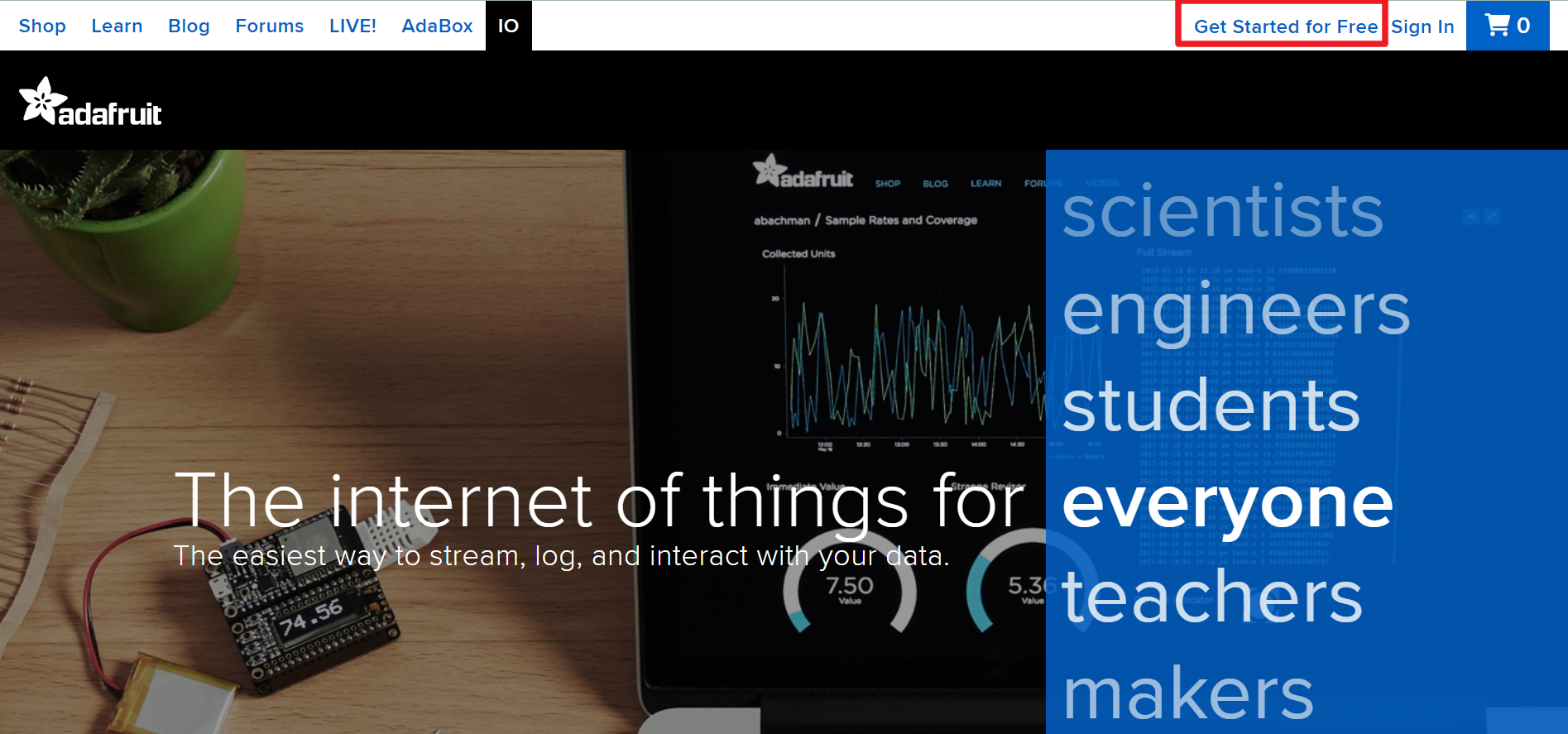
Kende na Adafruit IO, sima pɛntɛ na Start for free mpo na kosala compte ya pamba.
-
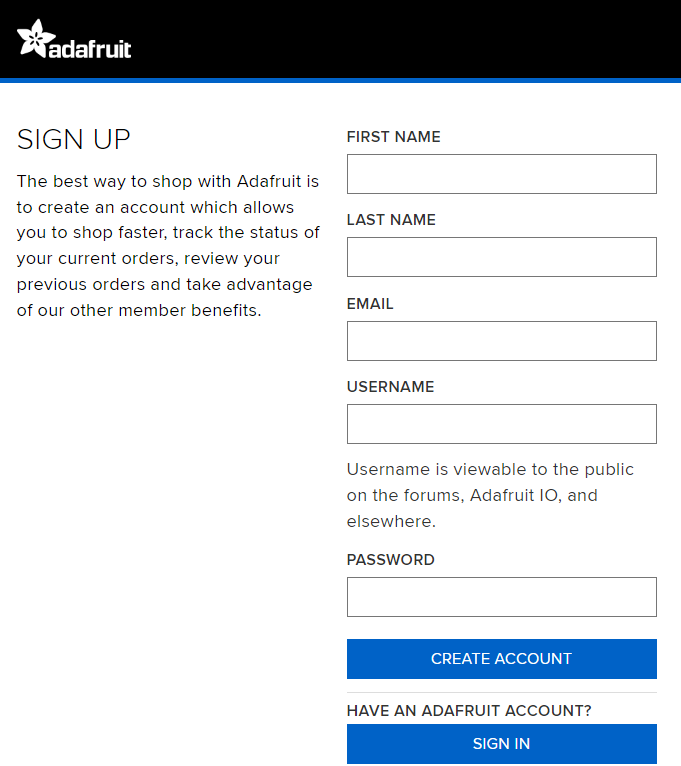
Lemba formulaire mpo na kosala compte.
-
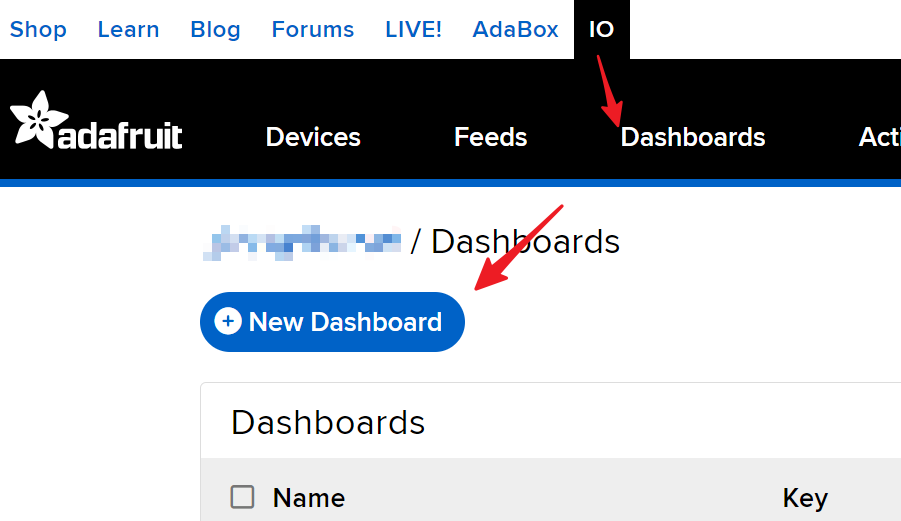
Sima ya kosala compte ya Adafruit, okokende lisusu na Adafruit IO. Pɛntɛ na Dashboards, sima pɛntɛ na New Dashboard.
-
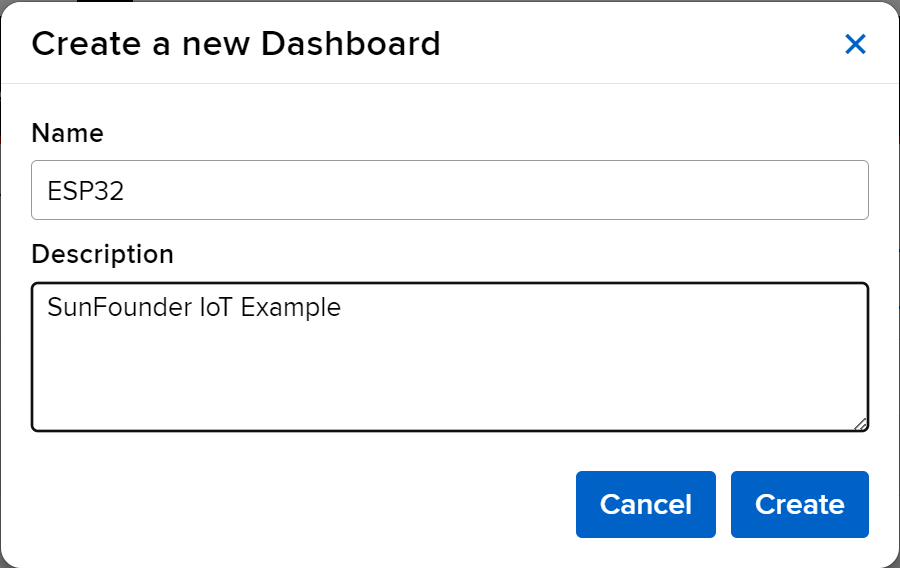
Kosala New Dashboard.
-
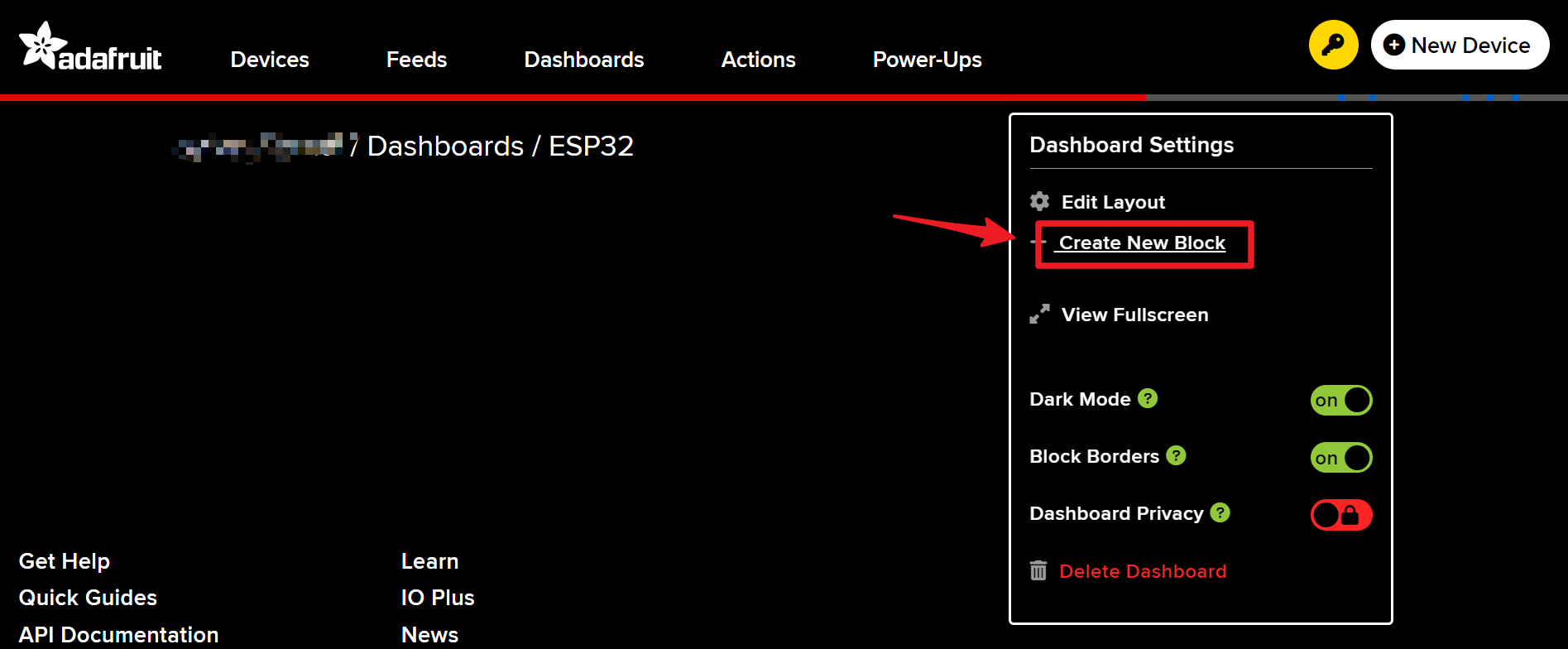
Kota na Dashboard oyo esalembe sika mpe kosala bloc ya sika.
-
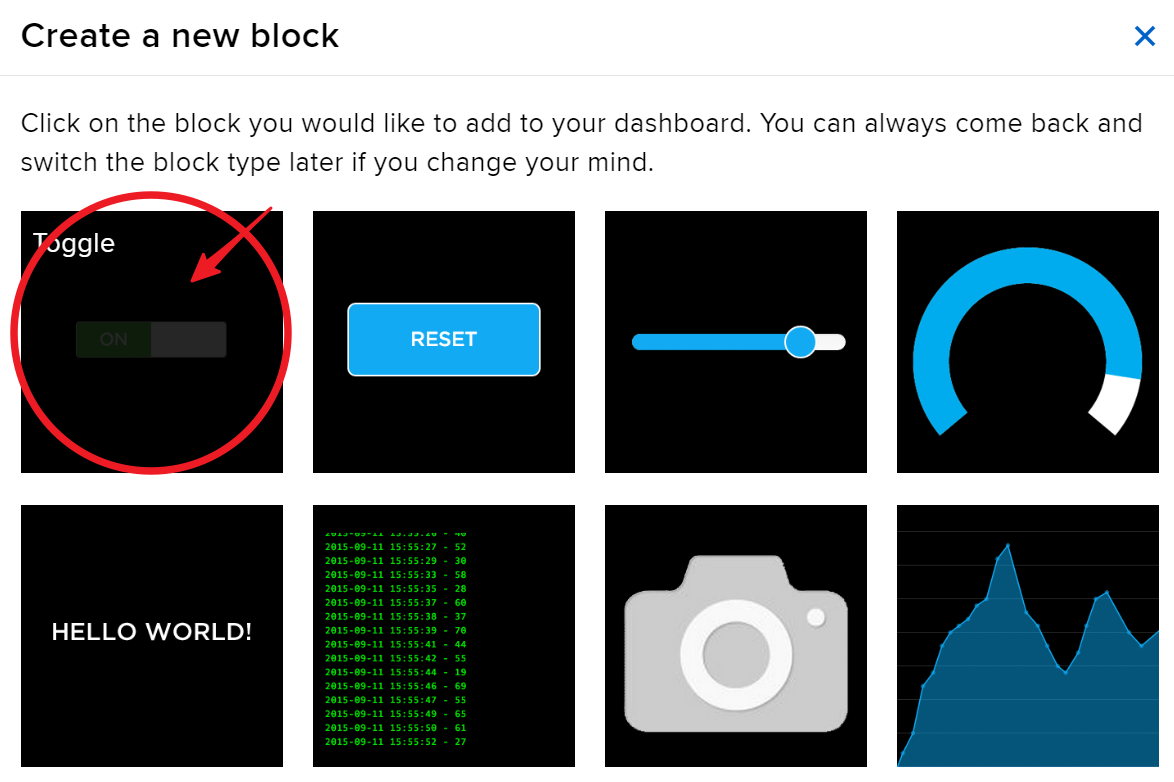
Kosala bloc moko ya Toggle.
-
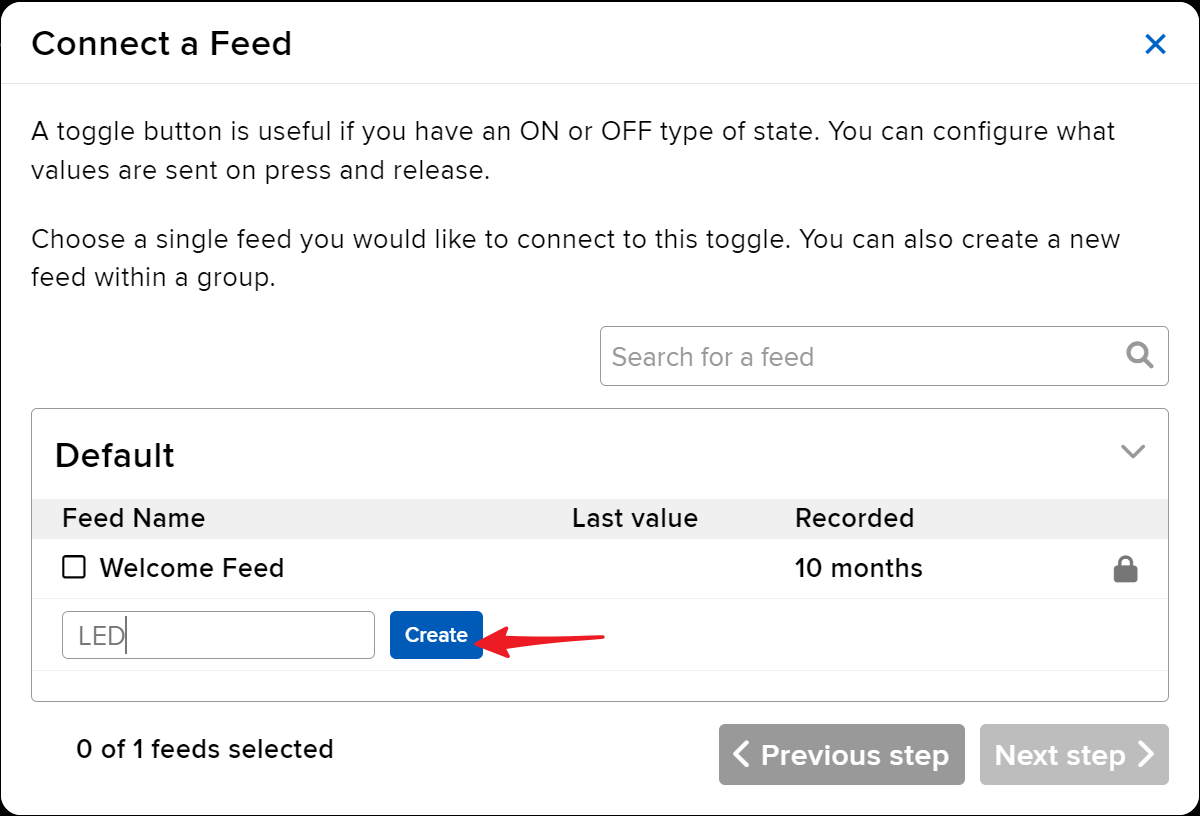
Na sima, okosengela kosala feed ya sika awa. Toggle oyo ekosalema mpo na kokamba LED, mpe tokopesa yango kombo “LED”.
-
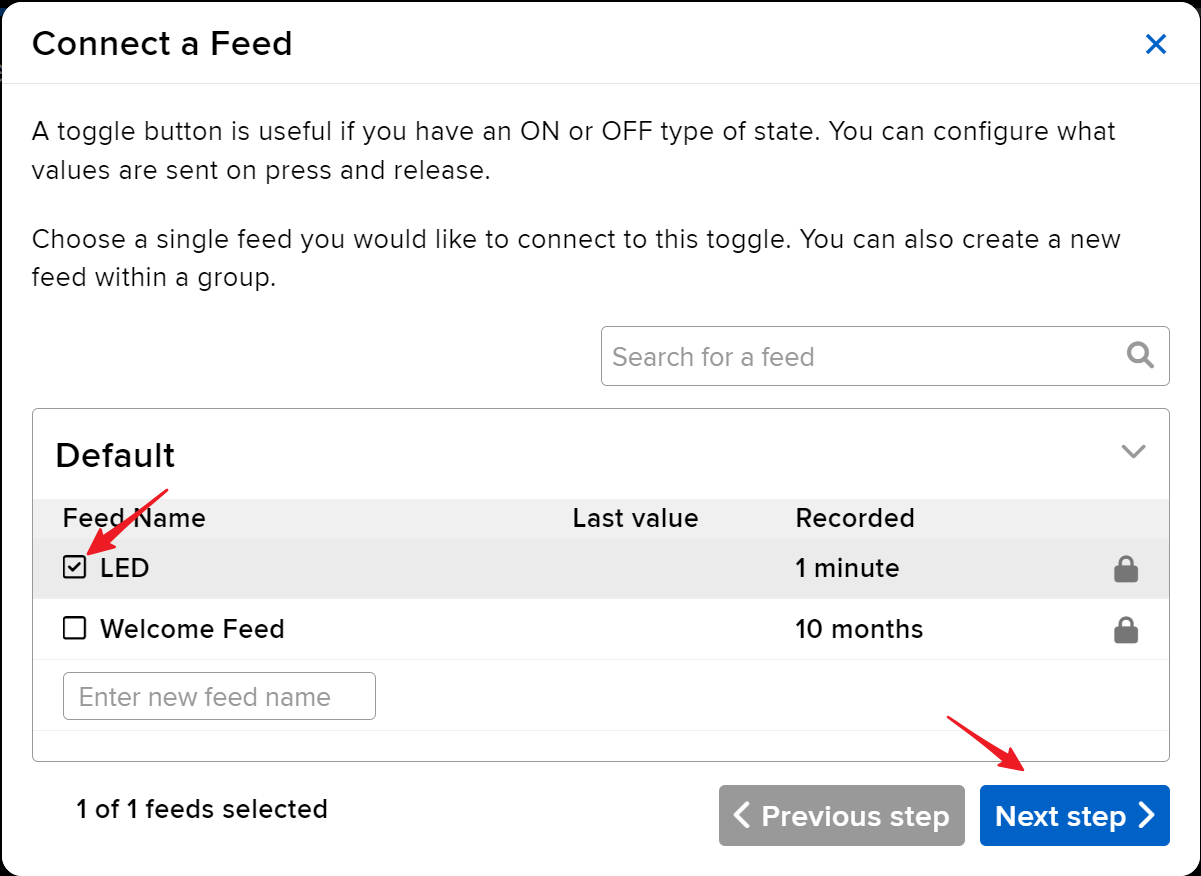
Pɛntɛ na feed ya LED, sima kende na etape oyo elandi.
-
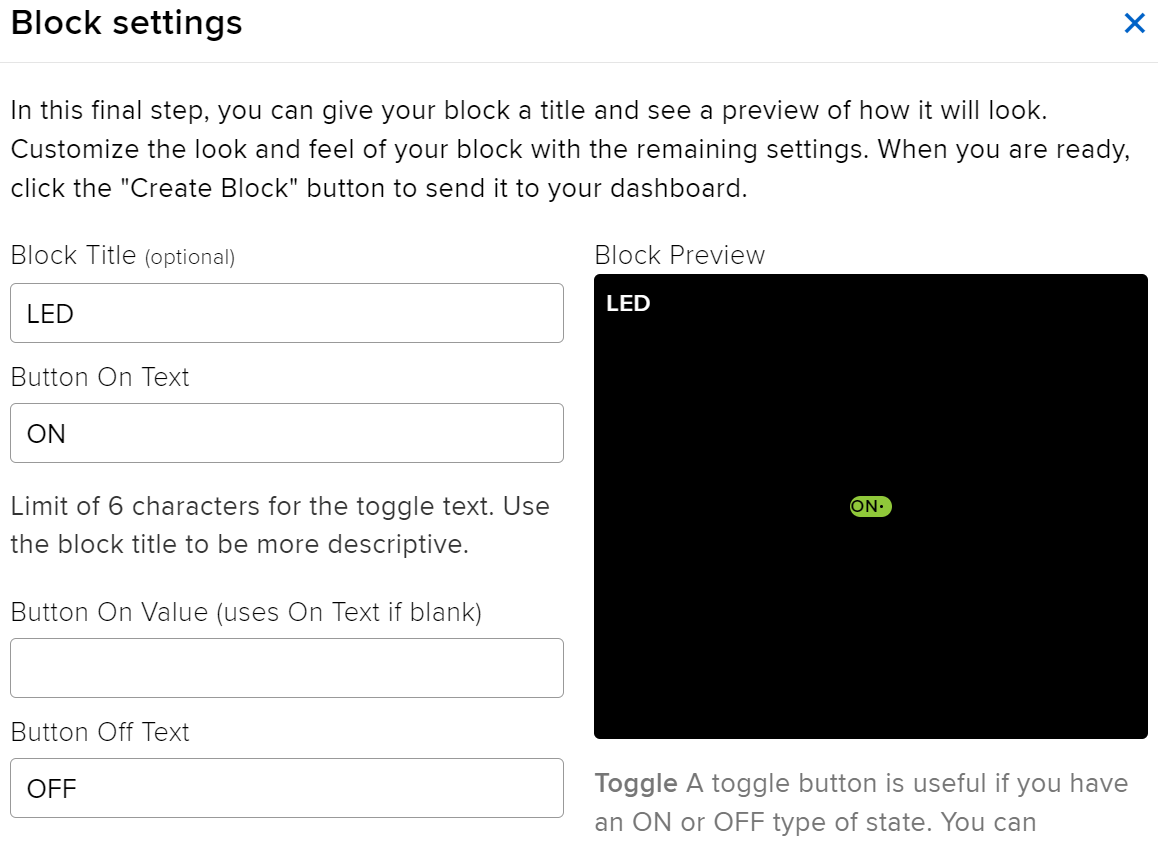
Kokisa paramètres ya bloc (mingi-mingi Block Title, On Text, mpe Off Text), sima pɛntɛ na bouton Create block oyo ezali na ngambo ya nkaka mpo na kosukisa.
-
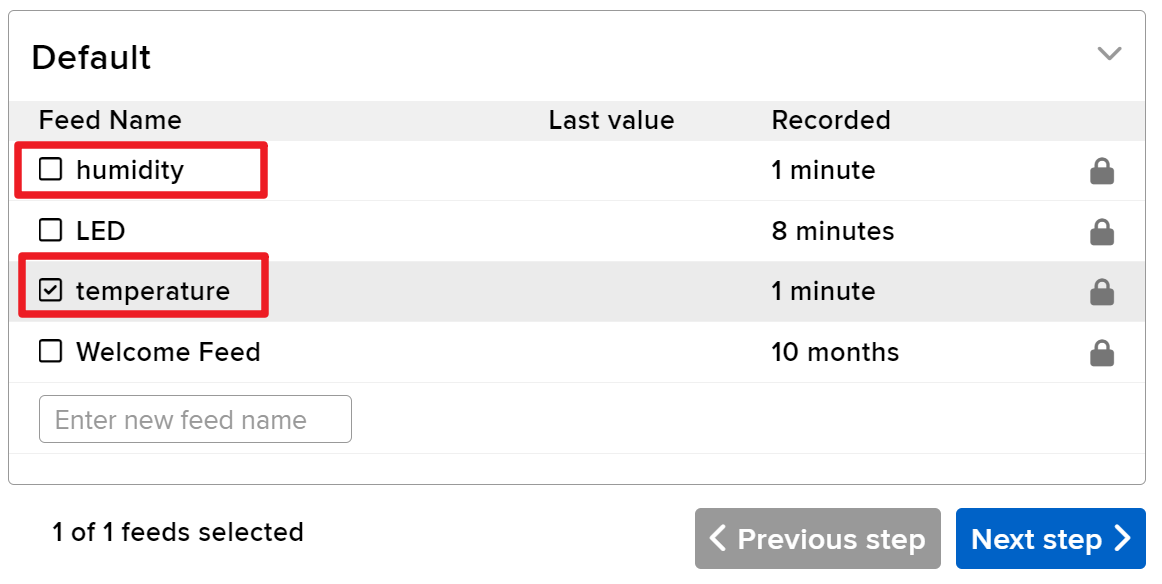
Tokosengela mpe kosala Text Blocks mibale na sima. Bakosalema mpo na kolakisa température mpe humidité. Na yango, kosala ba feeds mibale oyo babengami temperature mpe humidity.
-
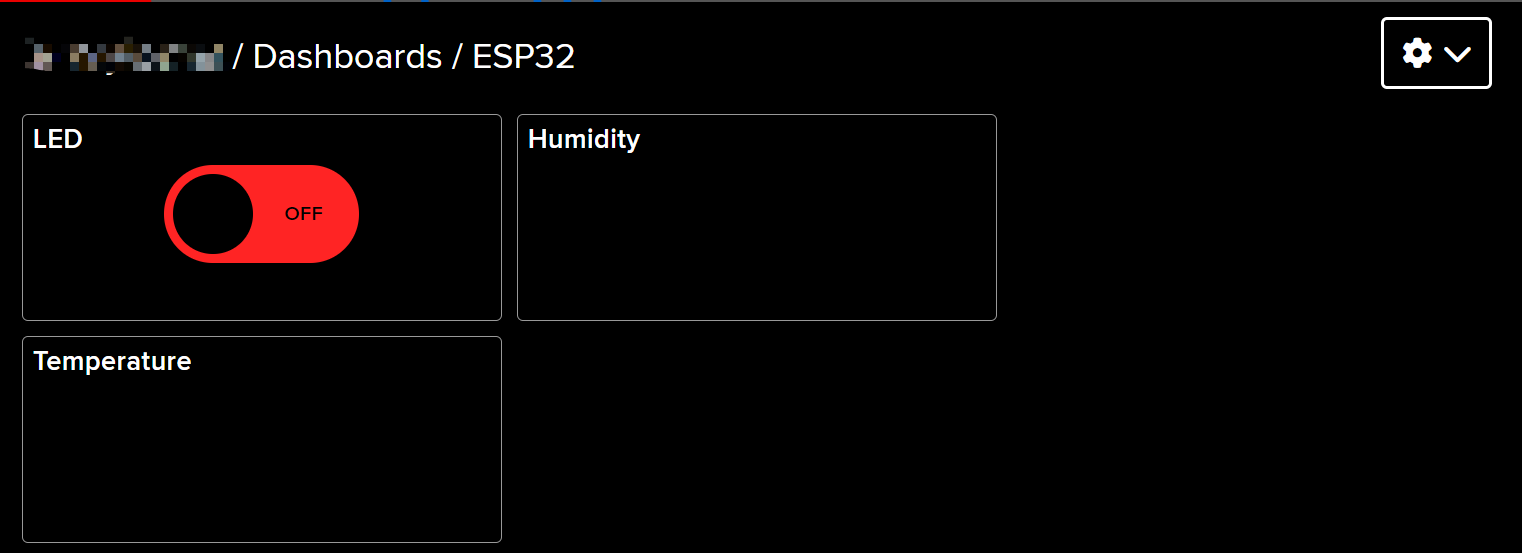
Sima ya kosala yango, Dashboard na yo ekosengela kolakisa eloko lokola oyo:
-
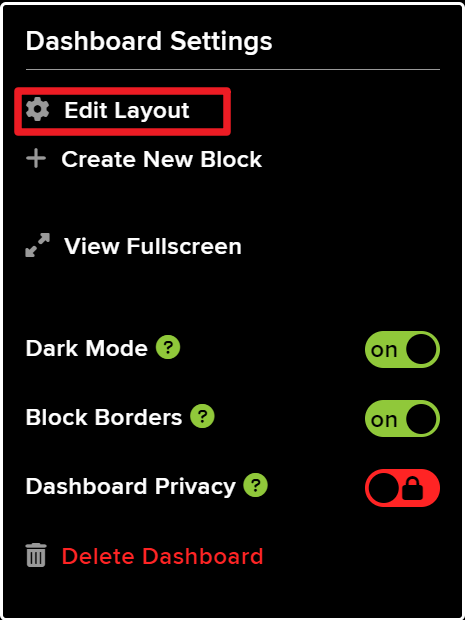
Okoki kobongola mise en page na kosalela opcion Edit Layout oyo ezali na Dashboard.
-
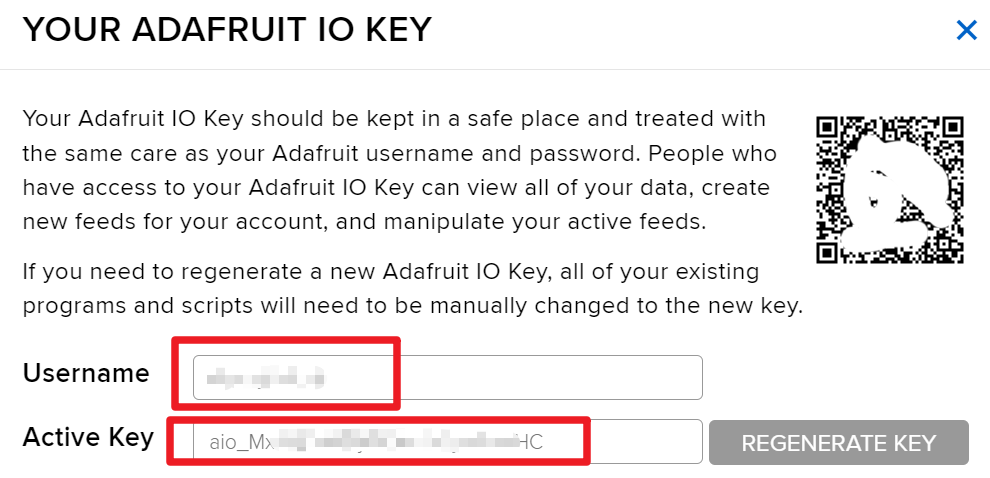
Pɛntɛ na API KEY, mpe okomona username na yo mpe API KEY oyo elakisami. Koma yango mpo okosengela yango na code na yo.
Ba Exemples ya Code & Explication
Code ebandi na kosangisa ba bibliothèques oyo esengeli, kotia ba identifiants ya Wi-Fi, mpe kolimbola ba paramètres ya MQTT. Ba identifiants ya ntina lokola AIO_USERNAME mpe AIO_KEY basalelami mpo na koyeba yo na service ya Adafruit IO.
#define AIO_USERNAME "YourUsername"
#define AIO_KEY "YourKey"
Ba lignes oyo balimboli username mpe clé ya Adafruit IO na yo, oyo ezali na ntina mingi mpo na kokɔta na broker ya MQTT. Tia ete ba valeurs oyo ezali ya solo mpo na kosala connexion oyo elongani.
Na fonction setup(), connexion ya Wi-Fi ebandisami, mpe client ya MQTT etiamaki na certificat ya CA ya racine mpo na communication ya libateli.
WiFi.begin(WLAN_SSID, WLAN_PASS);
client.setCACert(adafruitio_root_ca);
Code oyo ekangisi ESP32 na réseau Wi-Fi oyo epesami mpe etie CA ya racine mpo na ba connexions ya MQTT ya libateli. Kokamba ba connexions oyo na ndenge ya malamu ezali na ntina mingi mpo na kotinda ba données na ndenge ya semba.
Na suka, fonction loop() ekambaka connexion ya MQTT mpe epesaka ba mesures ya température mpe humidité na ba intervalles réguliers.
mqtt.processPackets(5000);Ligne oyo epesaka ESP32 nzela ya kosala ba messages oyo ezali koya mpo na ba sujets oyo esengeli, mpo na kotala ete appareil etikala na réponse mpo na ba commandes oyo ewuti na interface ya web.
Mpo na code mobimba, tala programme mobimba oyo ezali na nse ya article.
Démonstration / Nini Okokanela
Sima na esali ya kolonga, okomona mbala na mbala ba mise à jour ya température mpe humidité na tableau na yo ya Adafruit IO. Okoki mpe ko switcha LED na kozimisa yango na nzela ya interface ya web. Soki LED eyanoli te ndenge ozalaki kolikia, tala ba connexions na yo mpe sɔ́lɔ́kɔ́ ete ba nkombo ya ba sujets MQTT ekokani na ba oyo ezali na kati ya code.
Zala na likebi ete ba erreurs ya connexion MQTT mosusu ekoki kosalema likolo ya ba certificats oyo esili na ntango. Sɔ́lɔ́kɔ́ ete ozali na certificat ya sika ya root CA na code na yo mpo na kokima ba problèmes oyo (na vidéo na 15:30).
Ba Timestamps ya Vidéo
- 00:00 Ebandeli
- 1:50 Introduction na projet
- 3:16 Nini MQTT ezali
- 6:36 Mise en place ya Adafruit IO
- 11:13 Ba connexions (wiring)
- 13:38 Explication ya code Arduino
- 22:03 Kopona carte ESP32 mpe port COM
- 23:44 Démonstration ya projet
- 27:05 Mise à jour ya tableau
/***********************************************************************
  Adafruit MQTT Library ESP32 Adafruit IO SSL/TLS example

  Use the latest version of the ESP32 Arduino Core:
    https://github.com/espressif/arduino-esp32

  Works great with Adafruit Huzzah32 Feather and Breakout Board:
    https://www.adafruit.com/product/3405
    https://www.adafruit.com/products/4172

  Adafruit invests time and resources providing this open source code,
  please support Adafruit and open-source hardware by purchasing
  products from Adafruit!

  Written by Tony DiCola for Adafruit Industries.
  Modified by Brent Rubell for Adafruit Industries
  MIT license, all text above must be included in any redistribution
 **********************************************************************/


/// ref: https://www.electronicwings.com/esp32/esp32-mqtt-client

#include <WiFi.h>
#include "WiFiClientSecure.h"
#include "Adafruit_MQTT.h"
#include "Adafruit_MQTT_Client.h"

/************************* WiFi Access Point *********************************/

#define WLAN_SSID "SSID"
#define WLAN_PASS "PASSWORD"

/************************* Adafruit.io Setup *********************************/

#define AIO_SERVER "io.adafruit.com"

// Using port 8883 for MQTTS
#define AIO_SERVERPORT 8883

// Adafruit IO Account Configuration
// (to obtain these values, visit https://io.adafruit.com and click on Active Key)
// #define AIO_USERNAME "YOUR_ADAFRUIT_IO_USERNAME"
// #define AIO_KEY      "YOUR_ADAFRUIT_IO_KEY"

#define AIO_USERNAME "JimmyKernel"
#define AIO_KEY "aio_Mxiv12i74b5jKfKNSKLYjlhPmoHC"

/************ Global State (you don't need to change this!) ******************/

// WiFiFlientSecure for SSL/TLS support
WiFiClientSecure client;

// Setup the MQTT client class by passing in the WiFi client and MQTT server and login details.
Adafruit_MQTT_Client mqtt(&client, AIO_SERVER, AIO_SERVERPORT, AIO_USERNAME, AIO_KEY);


// io.adafruit.com root CA
const char* adafruitio_root_ca = \
      "-----BEGIN CERTIFICATE-----\n"
      "MIIEjTCCA3WgAwIBAgIQDQd4KhM/xvmlcpbhMf/ReTANBgkqhkiG9w0BAQsFADBh\n"
      "MQswCQYDVQQGEwJVUzEVMBMGA1UEChMMRGlnaUNlcnQgSW5jMRkwFwYDVQQLExB3\n"
      "d3cuZGlnaWNlcnQuY29tMSAwHgYDVQQDExdEaWdpQ2VydCBHbG9iYWwgUm9vdCBH\n"
      "MjAeFw0xNzExMDIxMjIzMzdaFw0yNzExMDIxMjIzMzdaMGAxCzAJBgNVBAYTAlVT\n"
      "MRUwEwYDVQQKEwxEaWdpQ2VydCBJbmMxGTAXBgNVBAsTEHd3dy5kaWdpY2VydC5j\n"
      "b20xHzAdBgNVBAMTFkdlb1RydXN0IFRMUyBSU0EgQ0EgRzEwggEiMA0GCSqGSIb3\n"
      "DQEBAQUAA4IBDwAwggEKAoIBAQC+F+jsvikKy/65LWEx/TMkCDIuWegh1Ngwvm4Q\n"
      "yISgP7oU5d79eoySG3vOhC3w/3jEMuipoH1fBtp7m0tTpsYbAhch4XA7rfuD6whU\n"
      "gajeErLVxoiWMPkC/DnUvbgi74BJmdBiuGHQSd7LwsuXpTEGG9fYXcbTVN5SATYq\n"
      "DfbexbYxTMwVJWoVb6lrBEgM3gBBqiiAiy800xu1Nq07JdCIQkBsNpFtZbIZhsDS\n"
      "fzlGWP4wEmBQ3O67c+ZXkFr2DcrXBEtHam80Gp2SNhou2U5U7UesDL/xgLK6/0d7\n"
      "6TnEVMSUVJkZ8VeZr+IUIlvoLrtjLbqugb0T3OYXW+CQU0kBAgMBAAGjggFAMIIB\n"
      "PDAdBgNVHQ4EFgQUlE/UXYvkpOKmgP792PkA76O+AlcwHwYDVR0jBBgwFoAUTiJU\n"
      "IBiV5uNu5g/6+rkS7QYXjzkwDgYDVR0PAQH/BAQDAgGGMB0GA1UdJQQWMBQGCCsG\n"
      "AQUFBwMBBggrBgEFBQcDAjASBgNVHRMBAf8ECDAGAQH/AgEAMDQGCCsGAQUFBwEB\n"
      "BCgwJjAkBggrBgEFBQcwAYYYaHR0cDovL29jc3AuZGlnaWNlcnQuY29tMEIGA1Ud\n"
      "HwQ7MDkwN6A1oDOGMWh0dHA6Ly9jcmwzLmRpZ2ljZXJ0LmNvbS9EaWdpQ2VydEds\n"
      "b2JhbFJvb3RHMi5jcmwwPQYDVR0gBDYwNDAyBgRVHSAAMCowKAYIKwYBBQUHAgEW\n"
      "HGh0dHBzOi8vd3d3LmRpZ2ljZXJ0LmNvbS9DUFMwDQYJKoZIhvcNAQELBQADggEB\n"
      "AIIcBDqC6cWpyGUSXAjjAcYwsK4iiGF7KweG97i1RJz1kwZhRoo6orU1JtBYnjzB\n"
      "c4+/sXmnHJk3mlPyL1xuIAt9sMeC7+vreRIF5wFBC0MCN5sbHwhNN1JzKbifNeP5\n"
      "ozpZdQFmkCo+neBiKR6HqIA+LMTMCMMuv2khGGuPHmtDze4GmEGZtYLyF8EQpa5Y\n"
      "jPuV6k2Cr/N3XxFpT3hRpt/3usU/Zb9wfKPtWpoznZ4/44c1p9rzFcZYrWkj3A+7\n"
      "TNBJE0GmP2fhXhP1D/XVfIW/h0yCJGEiV9Glm/uGOa3DXHlmbAcxSyCRraG+ZBkA\n"
      "7h4SeM6Y8l/7MBRpPCz6l8Y=\n"
      "-----END CERTIFICATE-----\n";


/****************************** Feeds ***************************************/

// Setup a feed called 'test' for publishing and 'test2' for subscription.
// Notice MQTT paths for AIO follow the form: <username>/feeds/<feedname>
Adafruit_MQTT_Subscribe LED = Adafruit_MQTT_Subscribe(&mqtt, AIO_USERNAME "/feeds/LED");
Adafruit_MQTT_Publish humidity = Adafruit_MQTT_Publish(&mqtt, AIO_USERNAME "/feeds/humidity");
Adafruit_MQTT_Publish temperature = Adafruit_MQTT_Publish(&mqtt, AIO_USERNAME "/feeds/temperature");

/*************************** Sketch Code ************************************/

// set pin numbers
const int ledPin = 15;  // the number of the led pin

#include "DHT.h"

#define DHTPIN 13      // Set the pin connected to the DHT11 data pin
#define DHTTYPE DHT11  // DHT 11

DHT dht(DHTPIN, DHTTYPE);

void setup() {
  Serial.begin(115200);
  delay(10);

  Serial.println(F("Adafruit IO MQTTS (SSL/TLS) Example"));

  // Connect to WiFi access point.
  Serial.println();
  Serial.println();
  Serial.print("Connecting to ");
  Serial.println(WLAN_SSID);

  delay(1000);

  WiFi.begin(WLAN_SSID, WLAN_PASS);
  delay(2000);

  while (WiFi.status() != WL_CONNECTED) {
    delay(500);
    Serial.print(".");
  }
  Serial.println();

  Serial.println("WiFi connected");
  Serial.println("IP address: ");
  Serial.println(WiFi.localIP());

  // Set Adafruit IO's root CA
  client.setCACert(adafruitio_root_ca);

  // register callback for feed
  LED.setCallback(ledCallback);
  // Setup MQTT subscription for time feed.
  mqtt.subscribe(&LED);

  // initialize the LED pin as an output
  pinMode(ledPin, OUTPUT);

  // Initialize the dht11
  dht.begin();
}

// uint32_t x=0;


void loop() {

  // Ensure the connection to the MQTT server is alive (this will make the first
  // connection and automatically reconnect when disconnected).  See the MQTT_connect
  // function definition further below.
  MQTT_connect();

  indicatorPublish();

  // wait 10 seconds for subscription messages
  mqtt.processPackets(5000);

  // wait a couple seconds to avoid rate limit
  //delay(2000);
}

void ledCallback(char* message, uint16_t len) {
  char messageBuffer[40];
  snprintf(messageBuffer, sizeof(messageBuffer), "LED status is :: %s, len :: %u", message, len);
  Serial.println(messageBuffer);
  if (strcmp(message, "ON") == 0) {
    Serial.println("Turning ON LED");
    digitalWrite(ledPin, HIGH);
  } else {
    Serial.println("Turning OFF LED");
    digitalWrite(ledPin, LOW);
  }
}

void indicatorPublish() {

  // Reading temperature or humidity takes about 250 milliseconds!
  // Sensor readings may also be up to 2 seconds 'old' (it's a very slow sensor)
  float humValue = dht.readHumidity();
  float tempValue = dht.readTemperature();

  if (isnan(humValue) || isnan(tempValue)) {
    Serial.println("Failed to read from DHT sensor!");
    return;
  }

  if (!temperature.publish(tempValue)) {
    Serial.println(F("Failed"));
  } else {
    Serial.print("Temperature: ");
    Serial.println(tempValue);
  }
  if (!humidity.publish(humValue)) {
    Serial.println(F("Failed"));
  } else {
    Serial.print("Humidity: ");
    Serial.println(humValue);
  }
}

// Function to connect and reconnect as necessary to the MQTT server.
// Should be called in the loop function and it will take care if connecting.
void MQTT_connect() {
  int8_t ret;
  // Stop if already connected.
  if (mqtt.connected()) {
    return;
  }
  Serial.print("Connecting to MQTT... ");
  uint8_t retries = 3;
  while ((ret = mqtt.connect()) != 0) {  // connect will return 0 for connected
    Serial.println(mqtt.connectErrorString(ret));
    Serial.println("Retrying MQTT connection in 5 seconds...");
    mqtt.disconnect();
    delay(5000);  // wait 5 seconds
    retries--;
    if (retries == 0) {
      // basically die and wait for WDT to reset me
      while (1)
        ;
    }
  }
  Serial.println("MQTT Connected!");
}
/***********************************************************************
  Adafruit MQTT Basic lesson 1
Watch video instruction for this code on YouTube https://youtu.be/M9BQweAsHJM
Resource page for this lesson and code:
📚⬇️ Download and resource page https://robojax.com/RJT670
Tutoril by https://youTube.com/@robojax

  Adafruit MQTT Library ESP32 Adafruit IO SSL/TLS example

  Use the latest version of the ESP32 Arduino Core:
    https://github.com/espressif/arduino-esp32

  Works great with Adafruit Huzzah32 Feather and Breakout Board:
    https://www.adafruit.com/product/3405
    https://www.adafruit.com/products/4172

  Adafruit invests time and resources providing this open source code,
  please support Adafruit and open-source hardware by purchasing
  products from Adafruit!

  Written by Tony DiCola for Adafruit Industries.
  Modified by Brent Rubell for Adafruit Industries
  MIT license, all text above must be included in any redistribution
 **********************************************************************/


/// ref: https://www.electronicwings.com/esp32/esp32-mqtt-client

#include <WiFi.h>
#include "WiFiClientSecure.h"
#include "Adafruit_MQTT.h"
#include "Adafruit_MQTT_Client.h"

/************************* WiFi Access Point *********************************/

#define WLAN_SSID "dars"
#define WLAN_PASS "5152535455"

/************************* Adafruit.io Setup *********************************/

#define AIO_SERVER "io.adafruit.com"

// Using port 8883 for MQTTS
#define AIO_SERVERPORT 8883

// Adafruit IO Account Configuration
// (to obtain these values, visit https://io.adafruit.com and click on Active Key)
// #define AIO_USERNAME "YOUR_ADAFRUIT_IO_USERNAME"
// #define AIO_KEY      "YOUR_ADAFRUIT_IO_KEY"

#define AIO_USERNAME "robojax"
#define AIO_KEY "aio_wCyL33EVKLcGoAotGNEQ4dGQYOLZ"

/************ Global State (you don't need to change this!) ******************/

// WiFiFlientSecure for SSL/TLS support
WiFiClientSecure client;

// Setup the MQTT client class by passing in the WiFi client and MQTT server and login details.
Adafruit_MQTT_Client mqtt(&client, AIO_SERVER, AIO_SERVERPORT, AIO_USERNAME, AIO_KEY);


// io.adafruit.com root CA
const char* adafruitio_root_ca =
  "-----BEGIN CERTIFICATE-----\n"
  "MIIDrzCCApegAwIBAgIQCDvgVpBCRrGhdWrJWZHHSjANBgkqhkiG9w0BAQUFADBh\n"
  "MQswCQYDVQQGEwJVUzEVMBMGA1UEChMMRGlnaUNlcnQgSW5jMRkwFwYDVQQLExB3\n"
  "d3cuZGlnaWNlcnQuY29tMSAwHgYDVQQDExdEaWdpQ2VydCBHbG9iYWwgUm9vdCBD\n"
  "QTAeFw0wNjExMTAwMDAwMDBaFw0zMTExMTAwMDAwMDBaMGExCzAJBgNVBAYTAlVT\n"
  "MRUwEwYDVQQKEwxEaWdpQ2VydCBJbmMxGTAXBgNVBAsTEHd3dy5kaWdpY2VydC5j\n"
  "b20xIDAeBgNVBAMTF0RpZ2lDZXJ0IEdsb2JhbCBSb290IENBMIIBIjANBgkqhkiG\n"
  "9w0BAQEFAAOCAQ8AMIIBCgKCAQEA4jvhEXLeqKTTo1eqUKKPC3eQyaKl7hLOllsB\n"
  "CSDMAZOnTjC3U/dDxGkAV53ijSLdhwZAAIEJzs4bg7/fzTtxRuLWZscFs3YnFo97\n"
  "nh6Vfe63SKMI2tavegw5BmV/Sl0fvBf4q77uKNd0f3p4mVmFaG5cIzJLv07A6Fpt\n"
  "43C/dxC//AH2hdmoRBBYMql1GNXRor5H4idq9Joz+EkIYIvUX7Q6hL+hqkpMfT7P\n"
  "T19sdl6gSzeRntwi5m3OFBqOasv+zbMUZBfHWymeMr/y7vrTC0LUq7dBMtoM1O/4\n"
  "gdW7jVg/tRvoSSiicNoxBN33shbyTApOB6jtSj1etX+jkMOvJwIDAQABo2MwYTAO\n"
  "BgNVHQ8BAf8EBAMCAYYwDwYDVR0TAQH/BAUwAwEB/zAdBgNVHQ4EFgQUA95QNVbR\n"
  "TLtm8KPiGxvDl7I90VUwHwYDVR0jBBgwFoAUA95QNVbRTLtm8KPiGxvDl7I90VUw\n"
  "DQYJKoZIhvcNAQEFBQADggEBAMucN6pIExIK+t1EnE9SsPTfrgT1eXkIoyQY/Esr\n"
  "hMAtudXH/vTBH1jLuG2cenTnmCmrEbXjcKChzUyImZOMkXDiqw8cvpOp/2PV5Adg\n"
  "06O/nVsJ8dWO41P0jmP6P6fbtGbfYmbW0W5BjfIttep3Sp+dWOIrWcBAI+0tKIJF\n"
  "PnlUkiaY4IBIqDfv8NZ5YBberOgOzW6sRBc4L0na4UU+Krk2U886UAb3LujEV0ls\n"
  "YSEY1QSteDwsOoBrp+uvFRTp2InBuThs4pFsiv9kuXclVzDAGySj4dzp30d8tbQk\n"
  "CAUw7C29C79Fv1C5qfPrmAESrciIxpg0X40KPMbp1ZWVbd4=\n"
  "-----END CERTIFICATE-----\n";

/****************************** Feeds ***************************************/

// Setup a feed called 'test' for publishing and 'test2' for subscription.
// Notice MQTT paths for AIO follow the form: <username>/feeds/<feedname>
Adafruit_MQTT_Subscribe LED = Adafruit_MQTT_Subscribe(&mqtt, AIO_USERNAME "/feeds/LED");
//Adafruit_MQTT_Publish humidity = Adafruit_MQTT_Publish(&mqtt, AIO_USERNAME "/feeds/humidity");
//Adafruit_MQTT_Publish temperature = Adafruit_MQTT_Publish(&mqtt, AIO_USERNAME "/feeds/temperature");

/*************************** Sketch Code ************************************/

// set pin numbers
const int ledPin = 15;  // the number of the led pin


void setup() {
  Serial.begin(115200);
  delay(10);

  Serial.println(F("Adafruit IO MQTTS (SSL/TLS) Example"));

  // Connect to WiFi access point.
  Serial.println();
  Serial.println();
  Serial.print("Connecting to ");
  Serial.println(WLAN_SSID);

  delay(1000);

  WiFi.begin(WLAN_SSID, WLAN_PASS);
  delay(2000);

  while (WiFi.status() != WL_CONNECTED) {
    delay(500);
    Serial.print(".");
  }
  Serial.println();

  Serial.println("WiFi connected");
  Serial.println("IP address: ");
  Serial.println(WiFi.localIP());

  // Set Adafruit IO's root CA
  client.setCACert(adafruitio_root_ca);

  // register callback for feed
  LED.setCallback(ledCallback);
  // Setup MQTT subscription for time feed.
  mqtt.subscribe(&LED);

  // initialize the LED pin as an output
  pinMode(ledPin, OUTPUT);


}

// uint32_t x=0;


void loop() {

  // Ensure the connection to the MQTT server is alive (this will make the first
  // connection and automatically reconnect when disconnected).  See the MQTT_connect
  // function definition further below.
  MQTT_connect();

 // indicatorPublish();

  // wait 10 seconds for subscription messages
  mqtt.processPackets(10000);

  // wait a couple seconds to avoid rate limit
  //delay(2000);
}

void ledCallback(char* message, uint16_t len) {
  char messageBuffer[40];
  snprintf(messageBuffer, sizeof(messageBuffer), "LED status is :: %s, len :: %u", message, len);
  Serial.println(messageBuffer);
  if (strcmp(message, "ON") == 0) {
    Serial.println("Turning ON LED");
    digitalWrite(ledPin, LOW);
  } else {
    Serial.println("Turning OFF LED");
    digitalWrite(ledPin, HIGH);
  }
}


// Function to connect and reconnect as necessary to the MQTT server.
// Should be called in the loop function and it will take care if connecting.
void MQTT_connect() {
  int8_t ret;
  // Stop if already connected.
  if (mqtt.connected()) {
    return;
  }
  Serial.print("Connecting to MQTT... ");
  uint8_t retries = 3;
  while ((ret = mqtt.connect()) != 0) {  // connect will return 0 for connected
    Serial.println(mqtt.connectErrorString(ret));
    Serial.println("Retrying MQTT connection in 5 seconds...");
    mqtt.disconnect();
    delay(5000);  // wait 5 seconds
    retries--;
    if (retries == 0) {
      // basically die and wait for WDT to reset me
      while (1)
        ;
    }
  }
  Serial.println("MQTT Connected!");
}
Common Course Links
Common Course Files
Mokili na bisika
-
Dokumentasi
Fichiers📁
Aucun fichier disponible.