ESP32 教學 45/55 - 自訂串流伺服器配合 LED 控制 CAM-3 l SunFounder 嘅 ESP32 學習套件
喺呢個教學入面,我哋會探討點樣用SunFounder嘅ESP32擴展板嚟設定一個自訂串流伺服器。呢個項目可以畀你將即時視頻串流到瀏覽器,同時直接喺介面度控制一粒LED。呢種功能組合可以令你透過動手實踐嚟學習IoT同網頁技術。
我哋會用ESP32內置嘅Wi-Fi功能嚟建立一個網頁伺服器,用嚟串流視頻同處理LED控制指令。呢個項目涉及編程、接線,同埋理解各組件點樣互動。如果你想更清楚了解個設定,記得睇吓喺(視頻00:00位置)嘅影片。
硬件講解
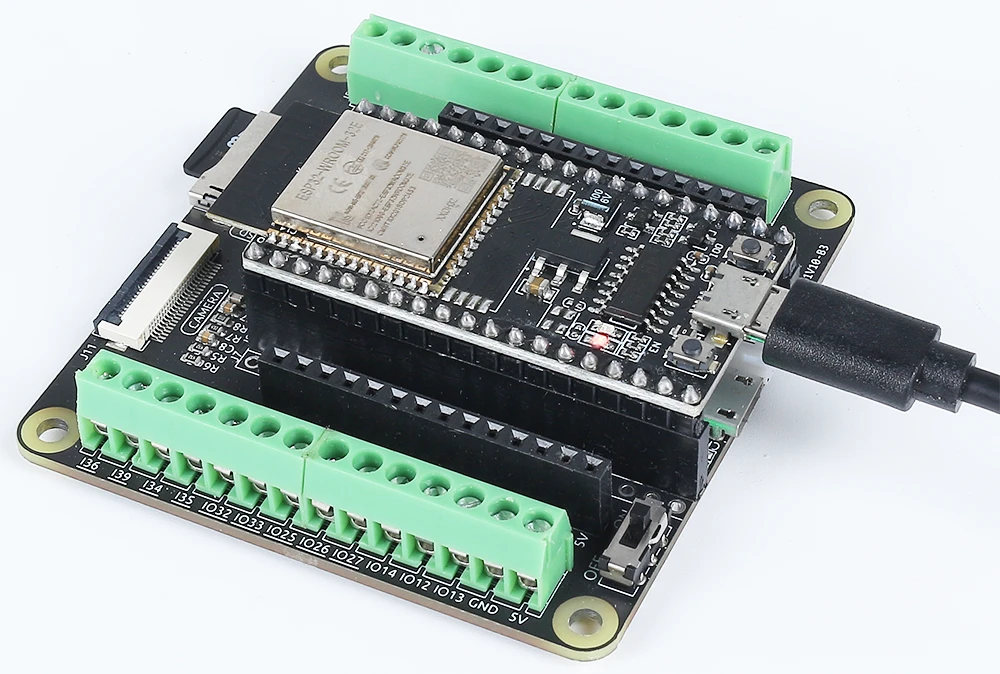
呢個項目嘅主要組件包括ESP32微控制器、一個相機模組、一粒LED同埋一粒電阻。ESP32係一款多功能微控制器,內置Wi-Fi同藍牙,非常適合IoT應用。相機模組可以畀我哋捕捉視頻,而LED就提供一個簡單嘅輸出裝置用嚟控制。
LED透過一粒電阻連接嚟限制電流,防止損壞LED同微控制器。呢個設定可以畀我哋透過網頁介面開關LED,展示ESP32喺網絡上處理輸入同輸出嘅能力。
數據手冊詳情
| 製造商 | Espressif |
|---|---|
| 零件編號 | ESP32-WROOM-32 |
| 邏輯/IO電壓 | 3.3 V |
| 供電電壓 | 3.0–3.6 V |
| 輸出電流(每通道) | 12 mA |
| 峰值電流(每通道) | 40 mA |
| PWM頻率指引 | 1 kHz |
| 輸入邏輯閾值 | 0.2 V(低)/ 0.8 V(高) |
| 電壓降 / RDS(on) / 飽和 | 0.2 V(典型值) |
| 熱限制 | 最高接面溫度:125 °C |
| 封裝 | QFN48 |
| 備註 / 變體 | 有多種配置可供選擇 |
- 確保ESP32使用經穩壓嘅3.3 V電源供電。
- 使用限流電阻(220 Ohm)同LED串聯,以防止損壞。
- 保持正確嘅連接,避免浮空輸入。
- 檢查Wi-Fi憑證是否正確同埋區分大小寫。
- 使用穩定嘅電源以確保性能一致。
- 喺密封空間入面要考慮散熱問題。
接線說明
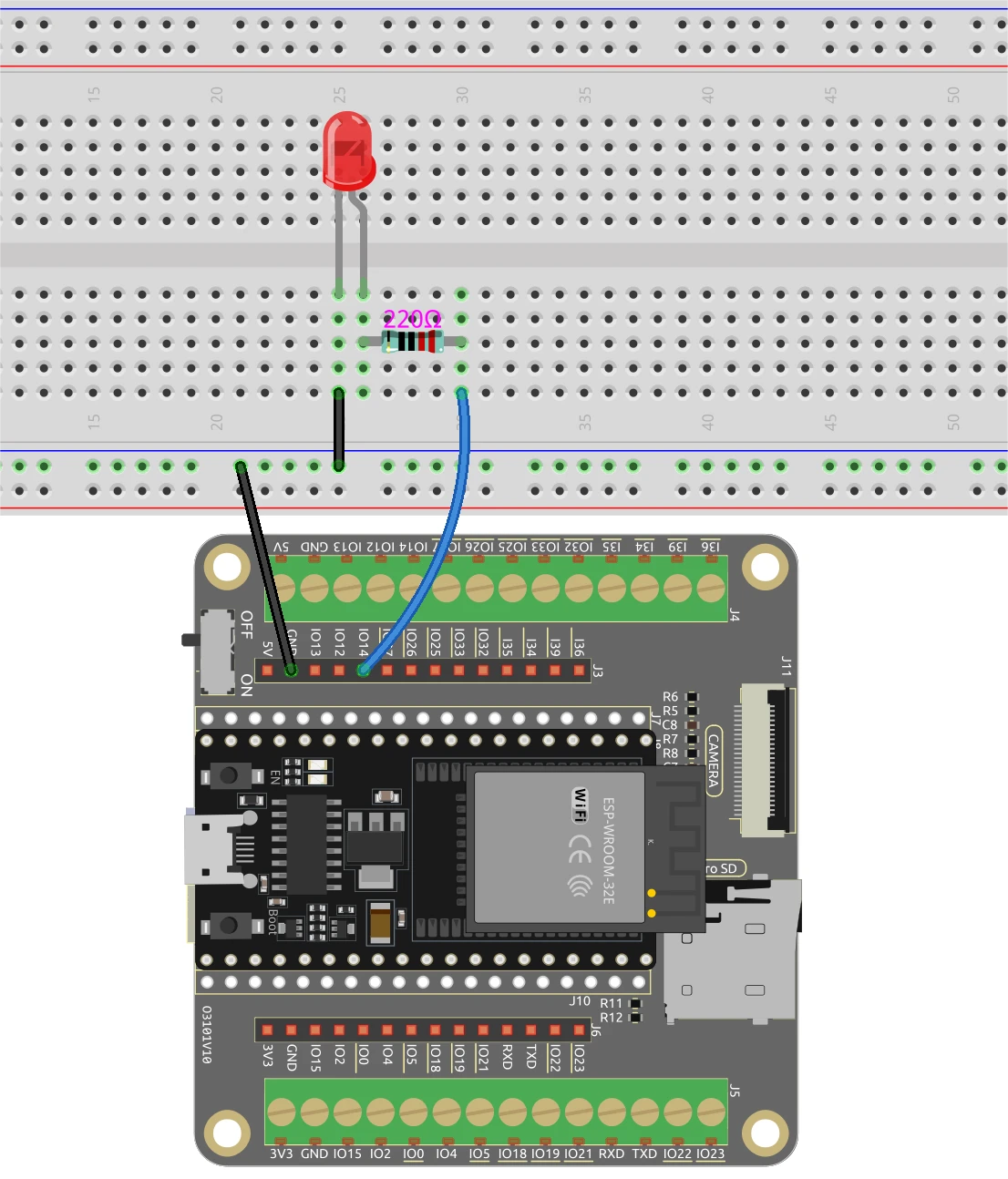
要接線ESP32同LED,首先將LED較長嘅腳連接到一個合適嘅GPIO引腳,喺呢個情況下,我哋會用引腳14。較短嘅腳就應該連接到麵包板上嘅地線。跟住,將一粒220 Ohm電阻同LED串聯,一端連接到GPIO引腳(引腳14),另一端連接到地。確保ESP32正確供電,可以透過micro USB接口或者用一粒18650鋰電池。
至於相機模組,請根據你所用嘅相機型號連接所需嘅引腳,因為接線可能略有不同。ESP32會透過其內置功能處理視頻串流,而LED控制就會透過我哋喺程式入面設定嘅網頁介面嚟管理。
程式碼示例同講解
程式一開始會包含必要嘅程式庫並定義Wi-Fi憑證。你需要將ssid同password替換成你實際嘅Wi-Fi憑證,先可以將ESP32連接到你嘅網絡。
const char* ssid = "SSID";
const char* password = "PASSWORD";跟住,我哋定義LED引腳並設定相機配置。用嚟控制LED嘅引腳定義為LED_PIN,稍後會喺程式入面用嚟控制LED嘅狀態。
#define LED_PIN    14
pinMode(LED_PIN, OUTPUT);喺處理LED控制嘅請求處理器入面,我哋檢查從網頁介面收到嘅指令。根據指令係"on"定"off",我哋用digitalWrite(LED_PIN, 1);嚟開LED,同用digitalWrite(LED_PIN, 0);嚟關LED。
if(!strcmp(variable, "on")) {
  Serial.println("ON");
  digitalWrite(LED_PIN, 1);
}
else if(!strcmp(variable, "off")) {
  Serial.println("OFF");
  digitalWrite(LED_PIN, 0);
}
呢個邏輯可以令網頁介面有效地同ESP32溝通,根據用戶操作實現對LED嘅實時控制。完整程式碼會載入喺文章下面,方便進一步探索。
示範 / 預期效果
當所有嘢都設定好並上傳咗程式碼之後,你應該可以喺網頁瀏覽器入面存取ESP32嘅IP地址。串流視頻會顯示出嚟,你可以用介面上嘅按鈕控制LED。撳"ON"會點亮LED,而"OFF"就會熄滅佢。確保ESP32同你嘅電腦連接喺同一個網絡,以確保功能正常(喺視頻12:30位置)。
視頻時間戳
- 00:00 開始
- 1:51 項目介紹
- 2:31 文檔頁面
- 3:33 接線講解
- 5:08 Arduino程式碼講解
- 13:28 喺Arduino IDE入面選擇ESP32開發板同COM端口
- 15:10 示範
圖片
/*********
  Permission is hereby granted, free of charge,
  to any person obtaining a copy of this software and associated documentation files.
  The above copyright notice and this permission
  notice shall be included in all copies or substantial portions of the Software.
*********/

#include "esp_camera.h"
#include <WiFi.h>
#include "esp_timer.h"
#include "img_converters.h"
#include "Arduino.h"
#include "fb_gfx.h"
#include "soc/soc.h"             // disable brownout problems
#include "soc/rtc_cntl_reg.h"    // disable brownout problems
#include "esp_http_server.h"

// Replace the next variables with your SSID/Password combination
const char* ssid = "SSID";
const char* password = "PASSWORD";

#define PART_BOUNDARY "123456789000000000000987654321"

#define CAMERA_MODEL_AI_THINKER
//#define CAMERA_MODEL_M5STACK_PSRAM
//#define CAMERA_MODEL_M5STACK_WITHOUT_PSRAM
//#define CAMERA_MODEL_M5STACK_PSRAM_B
//#define CAMERA_MODEL_WROVER_KIT

#if defined(CAMERA_MODEL_WROVER_KIT)
  #define PWDN_GPIO_NUM    -1
  #define RESET_GPIO_NUM   -1
  #define XCLK_GPIO_NUM    21
  #define SIOD_GPIO_NUM    26
  #define SIOC_GPIO_NUM    27

  #define Y9_GPIO_NUM      35
  #define Y8_GPIO_NUM      34
  #define Y7_GPIO_NUM      39
  #define Y6_GPIO_NUM      36
  #define Y5_GPIO_NUM      19
  #define Y4_GPIO_NUM      18
  #define Y3_GPIO_NUM       5
  #define Y2_GPIO_NUM       4
  #define VSYNC_GPIO_NUM   25
  #define HREF_GPIO_NUM    23
  #define PCLK_GPIO_NUM    22

#elif defined(CAMERA_MODEL_M5STACK_PSRAM)
  #define PWDN_GPIO_NUM     -1
  #define RESET_GPIO_NUM    15
  #define XCLK_GPIO_NUM     27
  #define SIOD_GPIO_NUM     25
  #define SIOC_GPIO_NUM     23

  #define Y9_GPIO_NUM       19
  #define Y8_GPIO_NUM       36
  #define Y7_GPIO_NUM       18
  #define Y6_GPIO_NUM       39
  #define Y5_GPIO_NUM        5
  #define Y4_GPIO_NUM       34
  #define Y3_GPIO_NUM       35
  #define Y2_GPIO_NUM       32
  #define VSYNC_GPIO_NUM    22
  #define HREF_GPIO_NUM     26
  #define PCLK_GPIO_NUM     21

#elif defined(CAMERA_MODEL_M5STACK_WITHOUT_PSRAM)
  #define PWDN_GPIO_NUM     -1
  #define RESET_GPIO_NUM    15
  #define XCLK_GPIO_NUM     27
  #define SIOD_GPIO_NUM     25
  #define SIOC_GPIO_NUM     23

  #define Y9_GPIO_NUM       19
  #define Y8_GPIO_NUM       36
  #define Y7_GPIO_NUM       18
  #define Y6_GPIO_NUM       39
  #define Y5_GPIO_NUM        5
  #define Y4_GPIO_NUM       34
  #define Y3_GPIO_NUM       35
  #define Y2_GPIO_NUM       17
  #define VSYNC_GPIO_NUM    22
  #define HREF_GPIO_NUM     26
  #define PCLK_GPIO_NUM     21

#elif defined(CAMERA_MODEL_AI_THINKER)
  #define PWDN_GPIO_NUM     32
  #define RESET_GPIO_NUM    33
  #define XCLK_GPIO_NUM      0
  #define SIOD_GPIO_NUM     26
  #define SIOC_GPIO_NUM     27

  #define Y9_GPIO_NUM       35
  #define Y8_GPIO_NUM       34
  #define Y7_GPIO_NUM       39
  #define Y6_GPIO_NUM       36
  #define Y5_GPIO_NUM       21
  #define Y4_GPIO_NUM       19
  #define Y3_GPIO_NUM       18
  #define Y2_GPIO_NUM        5
  #define VSYNC_GPIO_NUM    25
  #define HREF_GPIO_NUM     23
  #define PCLK_GPIO_NUM     22

#elif defined(CAMERA_MODEL_M5STACK_PSRAM_B)
  #define PWDN_GPIO_NUM     -1
  #define RESET_GPIO_NUM    15
  #define XCLK_GPIO_NUM     27
  #define SIOD_GPIO_NUM     22
  #define SIOC_GPIO_NUM     23

  #define Y9_GPIO_NUM       19
  #define Y8_GPIO_NUM       36
  #define Y7_GPIO_NUM       18
  #define Y6_GPIO_NUM       39
  #define Y5_GPIO_NUM        5
  #define Y4_GPIO_NUM       34
  #define Y3_GPIO_NUM       35
  #define Y2_GPIO_NUM       32
  #define VSYNC_GPIO_NUM    25
  #define HREF_GPIO_NUM     26
  #define PCLK_GPIO_NUM     21

#else
  #error "Camera model not selected"
#endif

#define LED_PIN    14

static const char* _STREAM_CONTENT_TYPE = "multipart/x-mixed-replace;boundary=" PART_BOUNDARY;
static const char* _STREAM_BOUNDARY = "\r\n--" PART_BOUNDARY "\r\n";
static const char* _STREAM_PART = "Content-Type: image/jpeg\r\nContent-Length: %u\r\n\r\n";

httpd_handle_t camera_httpd = NULL;
httpd_handle_t stream_httpd = NULL;

static const char PROGMEM INDEX_HTML[] = R"rawliteral(
<html>
  <head>
    <title>ESP32-CAM Robot</title>
    <meta name="viewport" content="width=device-width, initial-scale=1">
    <style>
      body { font-family: Arial; text-align: center; margin:0px auto; padding-top: 30px;}
      table { margin-left: auto; margin-right: auto; }
      td { padding: 8 px; }
      .button {
        background-color: #2f4468;
        border: none;
        color: white;
        padding: 10px 20px;
        text-align: center;
        text-decoration: none;
        display: inline-block;
        font-size: 18px;
        margin: 6px 3px;
        cursor: pointer;
        -webkit-touch-callout: none;
        -webkit-user-select: none;
        -khtml-user-select: none;
        -moz-user-select: none;
        -ms-user-select: none;
        user-select: none;
        -webkit-tap-highlight-color: rgba(0,0,0,0);
      }
      img {  width: auto ;
        max-width: 100% ;
        height: auto ;
        transform: rotate(180deg);
      }
    </style>
  </head>
  <body>
    <h1>ESP32 CAMERA</h1>
    <img src="" id="photo" >
    <table>
      <tr><td align="center"><button class="button" onmousedown="toggleCheckbox('on');" ontouchstart="toggleCheckbox('on');onmouseup="toggleCheckbox('on');" ontouchend="toggleCheckbox('on');">ON</button></td>
      <td align="center"><button class="button" onmousedown="toggleCheckbox('off');" ontouchstart="toggleCheckbox('off');onmouseup="toggleCheckbox('off');" ontouchend="toggleCheckbox('off');">OFF</button></td></tr>
    </table>
   <script>
   function toggleCheckbox(x) {
     var xhr = new XMLHttpRequest();
     xhr.open("GET", "/action?go=" + x, true);
     xhr.send();
   }
   window.onload = document.getElementById("photo").src = window.location.href.slice(0, -1) + ":81/stream";
  </script>
  </body>
</html>
)rawliteral";

static esp_err_t index_handler(httpd_req_t *req){
  httpd_resp_set_type(req, "text/html");
  return httpd_resp_send(req, (const char *)INDEX_HTML, strlen(INDEX_HTML));
}

static esp_err_t stream_handler(httpd_req_t *req){
  camera_fb_t * fb = NULL;
  esp_err_t res = ESP_OK;
  size_t _jpg_buf_len = 0;
  uint8_t * _jpg_buf = NULL;
  char * part_buf[64];

  res = httpd_resp_set_type(req, _STREAM_CONTENT_TYPE);
  if(res != ESP_OK){
    return res;
  }

  while(true){
    fb = esp_camera_fb_get();
    if (!fb) {
      Serial.println("Camera capture failed");
      res = ESP_FAIL;
    } else {
      if(fb->width > 400){
        if(fb->format != PIXFORMAT_JPEG){
          bool jpeg_converted = frame2jpg(fb, 80, &_jpg_buf, &_jpg_buf_len);
          esp_camera_fb_return(fb);
          fb = NULL;
          if(!jpeg_converted){
            Serial.println("JPEG compression failed");
            res = ESP_FAIL;
          }
        } else {
          _jpg_buf_len = fb->len;
          _jpg_buf = fb->buf;
        }
      }
    }
    if(res == ESP_OK){
      size_t hlen = snprintf((char *)part_buf, 64, _STREAM_PART, _jpg_buf_len);
      res = httpd_resp_send_chunk(req, (const char *)part_buf, hlen);
    }
    if(res == ESP_OK){
      res = httpd_resp_send_chunk(req, (const char *)_jpg_buf, _jpg_buf_len);
    }
    if(res == ESP_OK){
      res = httpd_resp_send_chunk(req, _STREAM_BOUNDARY, strlen(_STREAM_BOUNDARY));
    }
    if(fb){
      esp_camera_fb_return(fb);
      fb = NULL;
      _jpg_buf = NULL;
    } else if(_jpg_buf){
      free(_jpg_buf);
      _jpg_buf = NULL;
    }
    if(res != ESP_OK){
      break;
    }
    //Serial.printf("MJPG: %uB\n",(uint32_t)(_jpg_buf_len));
  }
  return res;
}

static esp_err_t cmd_handler(httpd_req_t *req){
  char*  buf;
  size_t buf_len;
  char variable[32] = {0,};

  buf_len = httpd_req_get_url_query_len(req) + 1;
  if (buf_len > 1) {
    buf = (char*)malloc(buf_len);
    if(!buf){
      httpd_resp_send_500(req);
      return ESP_FAIL;
    }
    if (httpd_req_get_url_query_str(req, buf, buf_len) == ESP_OK) {
      if (httpd_query_key_value(buf, "go", variable, sizeof(variable)) == ESP_OK) {
      } else {
        free(buf);
        httpd_resp_send_404(req);
        return ESP_FAIL;
      }
    } else {
      free(buf);
      httpd_resp_send_404(req);
      return ESP_FAIL;
    }
    free(buf);
  } else {
    httpd_resp_send_404(req);
    return ESP_FAIL;
  }

  sensor_t * s = esp_camera_sensor_get();
  int res = 0;

  if(!strcmp(variable, "on")) {
    Serial.println("ON");
    digitalWrite(LED_PIN, 1);
  }
  else if(!strcmp(variable, "off")) {
    Serial.println("OFF");
    digitalWrite(LED_PIN, 0);
  }
  else {
    res = -1;
  }

  if(res){
    return httpd_resp_send_500(req);
  }

  httpd_resp_set_hdr(req, "Access-Control-Allow-Origin", "*");
  return httpd_resp_send(req, NULL, 0);
}

void startCameraServer(){
  httpd_config_t config = HTTPD_DEFAULT_CONFIG();
  config.server_port = 80;
  httpd_uri_t index_uri = {
    .uri       = "/",
    .method    = HTTP_GET,
    .handler   = index_handler,
    .user_ctx  = NULL
  };

  httpd_uri_t cmd_uri = {
    .uri       = "/action",
    .method    = HTTP_GET,
    .handler   = cmd_handler,
    .user_ctx  = NULL
  };
  httpd_uri_t stream_uri = {
    .uri       = "/stream",
    .method    = HTTP_GET,
    .handler   = stream_handler,
    .user_ctx  = NULL
  };
  if (httpd_start(&camera_httpd, &config) == ESP_OK) {
    httpd_register_uri_handler(camera_httpd, &index_uri);
    httpd_register_uri_handler(camera_httpd, &cmd_uri);
  }
  config.server_port += 1;
  config.ctrl_port += 1;
  if (httpd_start(&stream_httpd, &config) == ESP_OK) {
    httpd_register_uri_handler(stream_httpd, &stream_uri);
  }
}

void setup() {
  WRITE_PERI_REG(RTC_CNTL_BROWN_OUT_REG, 0); //disable brownout detector

  pinMode(LED_PIN, OUTPUT);

  Serial.begin(115200);
  Serial.setDebugOutput(false);

  camera_config_t config;
  config.ledc_channel = LEDC_CHANNEL_0;
  config.ledc_timer = LEDC_TIMER_0;
  config.pin_d0 = Y2_GPIO_NUM;
  config.pin_d1 = Y3_GPIO_NUM;
  config.pin_d2 = Y4_GPIO_NUM;
  config.pin_d3 = Y5_GPIO_NUM;
  config.pin_d4 = Y6_GPIO_NUM;
  config.pin_d5 = Y7_GPIO_NUM;
  config.pin_d6 = Y8_GPIO_NUM;
  config.pin_d7 = Y9_GPIO_NUM;
  config.pin_xclk = XCLK_GPIO_NUM;
  config.pin_pclk = PCLK_GPIO_NUM;
  config.pin_vsync = VSYNC_GPIO_NUM;
  config.pin_href = HREF_GPIO_NUM;
  config.pin_sscb_sda = SIOD_GPIO_NUM;
  config.pin_sscb_scl = SIOC_GPIO_NUM;
  config.pin_pwdn = PWDN_GPIO_NUM;
  config.pin_reset = RESET_GPIO_NUM;
  config.xclk_freq_hz = 20000000;
  config.pixel_format = PIXFORMAT_JPEG;

  if(psramFound()){
    config.frame_size = FRAMESIZE_VGA;
    config.jpeg_quality = 10;
    config.fb_count = 2;
  } else {
    config.frame_size = FRAMESIZE_SVGA;
    config.jpeg_quality = 12;
    config.fb_count = 1;
  }

  // Camera init
  esp_err_t err = esp_camera_init(&config);
  if (err != ESP_OK) {
    Serial.printf("Camera init failed with error 0x%x", err);
    return;
  }
  // Wi-Fi connection
  WiFi.begin(ssid, password);
  while (WiFi.status() != WL_CONNECTED) {
    delay(500);
    Serial.print(".");
  }
  Serial.println("");
  Serial.println("WiFi connected");

  Serial.print("Camera Stream Ready! Go to: http://");
  Serial.println(WiFi.localIP());

  // Start streaming web server
  startCameraServer();
}

void loop() {

}
Common Course Links
Common Course Files
資源與參考資料
-
文件记录ESP32 Tutorial 45/55 - SunFounder doc page for Custom Streaming Serverdocs.sunfounder.com
文件📁
冇文件可用。