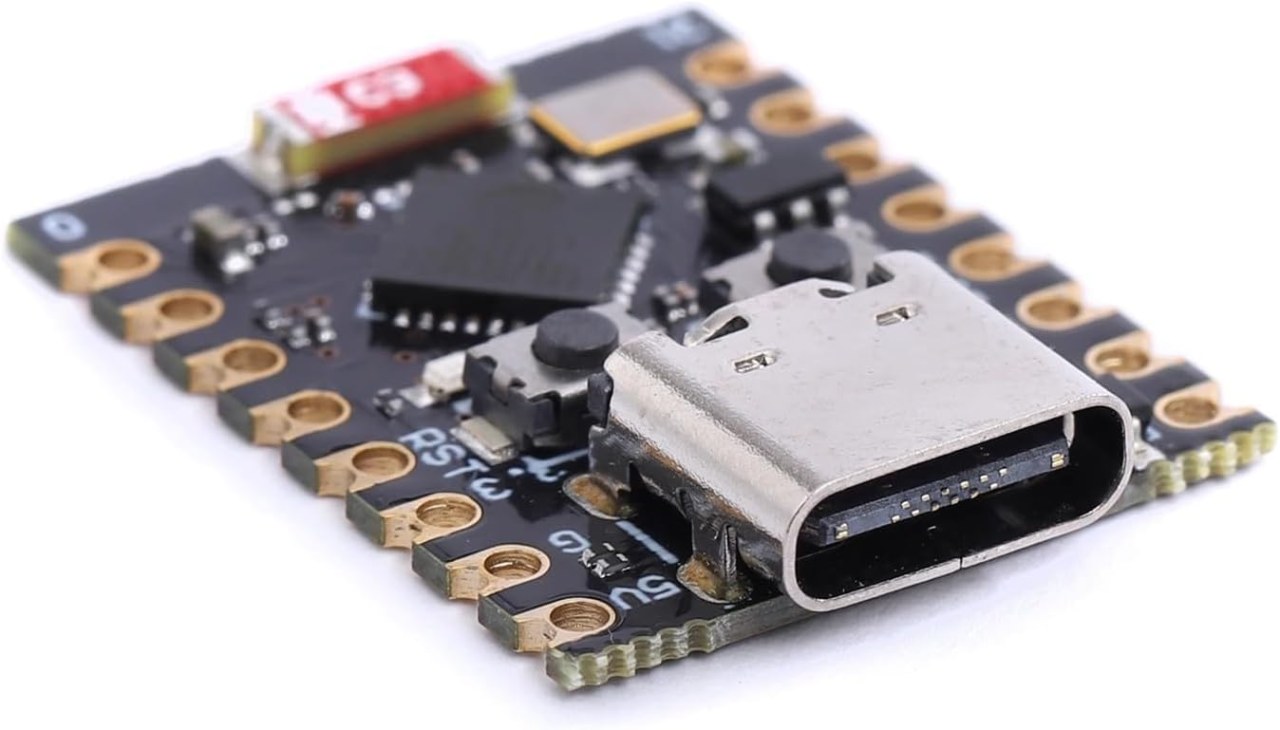
Haz clic para ampliar la imagen
The ESP32-C3 Super Mini is a tiny, powerful microcontroller board that brings RISC-V architecture and Bluetooth 5 (LE) to your projects for less than the cost of a coffee. Despite its thumbnail size, it packs Wi-Fi, 400KB of SRAM, and enough I/O to handle most robotics, IoT, and home automation tasks. Unlike its bigger brother (ESP32), the C3 focuses on low power and low cost while staying fully compatible with the Arduino IDE.
Programming it is as easy as using an Arduino Uno. Install the ESP32 board package in Arduino IDE, select "ESP32C3 Dev Module", and upload via USB-C. No extra programmer needed. The board appears as a COM port, and you can blink LEDs, read sensors, or control relays in minutes.
Example Applications
- Robotics: Control a small robot car using two DC motors via GPIO 5 & 6 (PWM). Add a Bluetooth gamepad for wireless control.
- IoT Sensor Node: Read a DHT22 temperature/humidity sensor on GPIO 4 and send data to MQTT server via Wi-Fi.
- Home Automation: Control a 5V relay on GPIO 8 from a smartphone using BLE or a web server.
- Wireless LED Strip: Drive WS2812B (NeoPixel) on GPIO 21 – perfect for smart lamps.
Pinout Reference
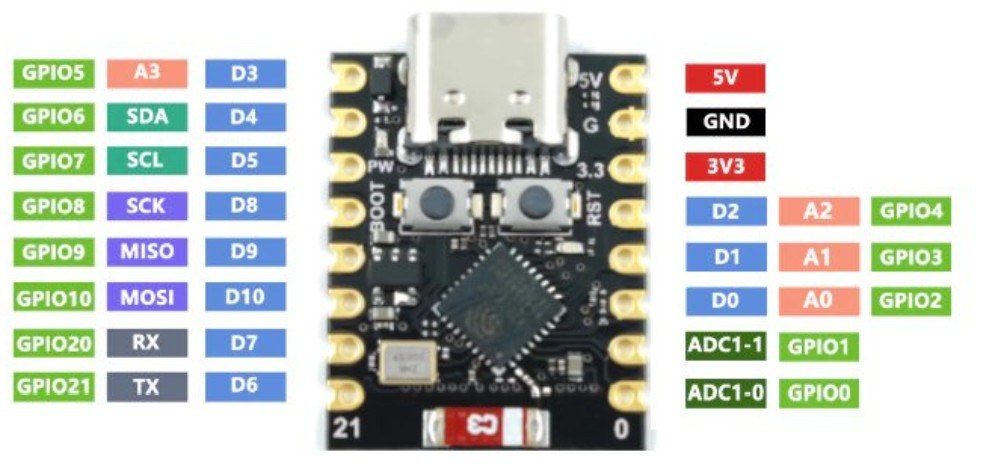
Front row (USB-C side)      Back row (opposite side)
[5V]  [GND] [GPIO4] [GPIO3] [GPIO2] [GPIO1] [GPIO0] ... → (rest on other side)
[GPIO5] [GPIO6] [GPIO7] [GPIO8] [GPIO9] [GPIO10] [GPIO20] [GPIO21]
Important: GPIO 8 controls the built-in blue LED (active high). GPIO 9 is the BOOT button. Both buttons (BOOT and RST) are present on the board edge.
Key Specifications (Bullet points)
- CPU: 32-bit RISC-V @ 160 MHz
- RAM: 400KB SRAM + 384KB ROM
- Flash: 4MB (onboard)
- Wireless: 2.4 GHz Wi-Fi (802.11 b/g/n) + Bluetooth 5 (LE only)
- Operating Voltage: 3.3V (5V tolerant only on specific pins – check datasheet)
- Input Power: 5V via USB-C or 5V pin (built-in regulator)
- Digital I/O: 13 pins (GPIO 0-10, 20, 21)
- Analog Inputs: 4 x 12-bit ADC channels (GPIO 0-3)
- PWM: All digital pins support PWM (up to 6 simultaneous channels)
- Size: 18mm x 30mm (0.7" x 1.2") – smaller than a postage stamp
Getting Started in Arduino IDE (3 steps)
- Add ESP32 board URL: File → Preferences → Additional Boards Manager URLs → paste:
https://raw.githubusercontent.com/espressif/arduino-esp32/gh-pages/package_esp32_index.json - Install ESP32 platform: Tools → Board → Boards Manager → search "ESP32" → install "esp32 by Espressif Systems"
- Select board: Tools → Board → ESP32 Arduino → ESP32C3 Dev Module
Now upload a blink sketch (change LED_BUILTIN to 8 for the blue LED). If you see connect/disconnect loops, hold BOOT → tap RST → release BOOT to enter download mode.
Where to Buy
You can find the ESP32-C3 Super Mini on AliExpress, Amazon, or specialized electronics stores. links are below this article.
Pro tip: The boards are often sold without firmware watch this video to fist the board if constantly rebooting https://youtube.com/shorts/kFEb5_krLyM?feature=share
Recursos y referencias
-
Externo
Archivos📁
Otros archivos
-
📕ESP32 C3 Datasheet English
esp32-c3_datasheet_en[1].pdf0.86 MB